-
-
Notifications
You must be signed in to change notification settings - Fork 2.1k
zh platform slack
进入 机器人 页,点击 + 创建机器人,找到 Slack 并点击进入 Slack 配置页。
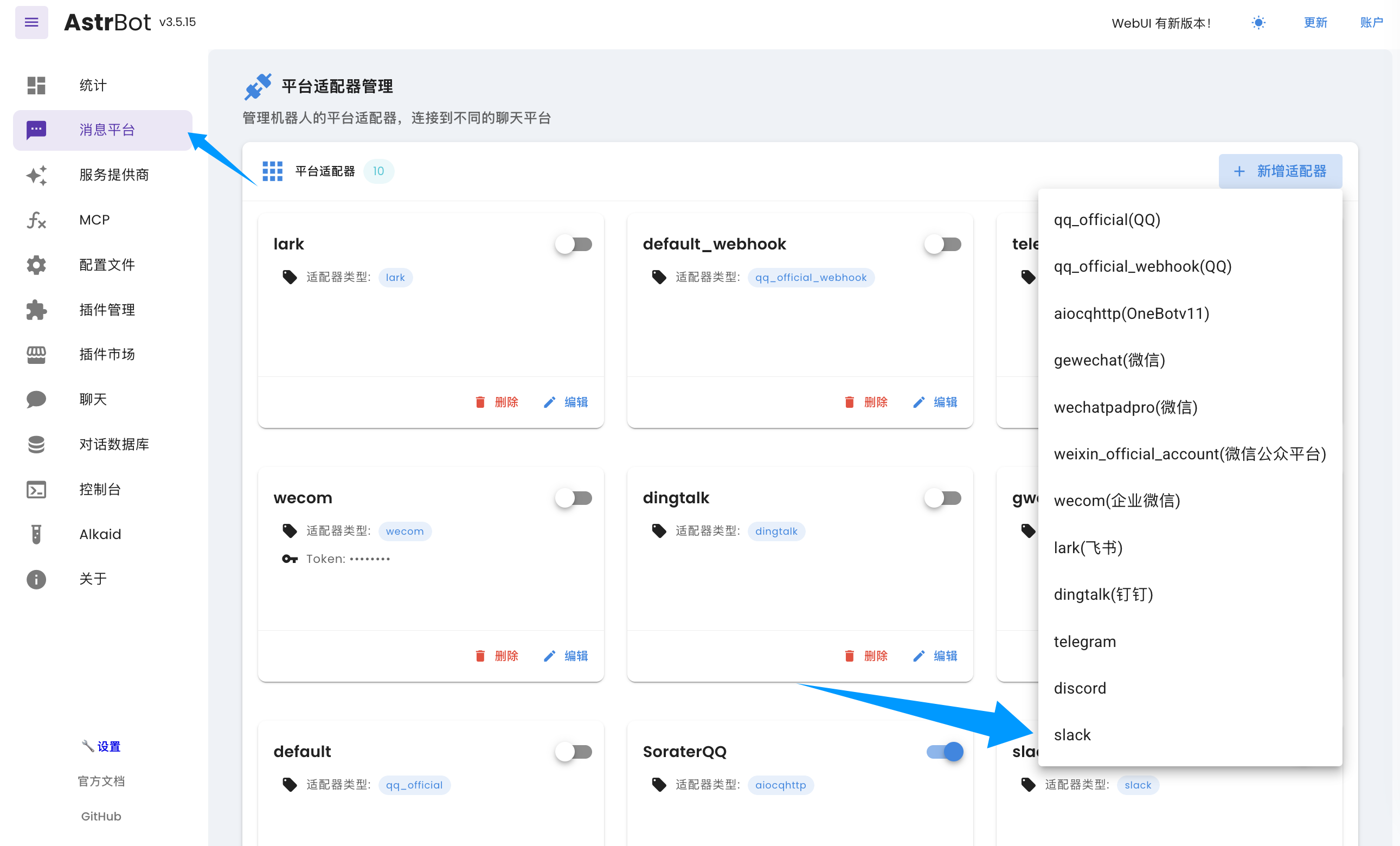
在弹出的配置对话框中点击 启用。
Slack 支持两种接入方式:Webhook 与 Socket。如果您没有公网服务器并且消息业务量的规模较小,我们建议您使用 socket 方式。如果您有公网服务器(或者有一定的技术背景,了解如何设置 Tunnel,如 Cloudflare Tunnel),可以选择 webhook 方式。socket 方式部署相对简单。
- 创建 Slack 账号和一个工作区(Workspace)。
- 前往 应用后台,点击「Create New App」->「From Scratch」,输入
应用名称和要添加到的工作区,然后点击「Create App」。 - (仅 Webhook 需要)获取
Signing Secret,在左边栏 Basic Information 页下,找到 App Credentials 的Signing Secret,点击 Show 并且复制到平台适配器配置的 signing_secret 处。
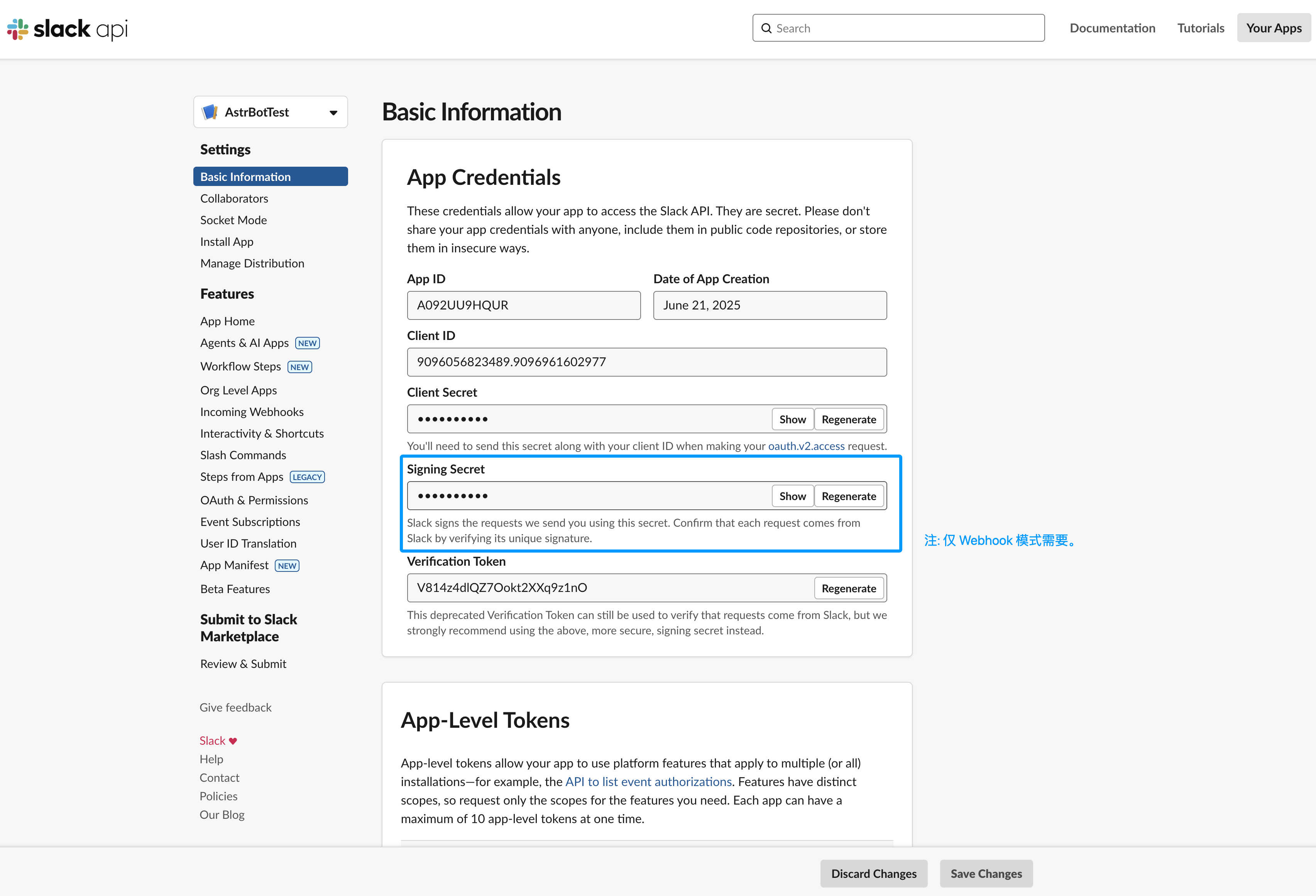
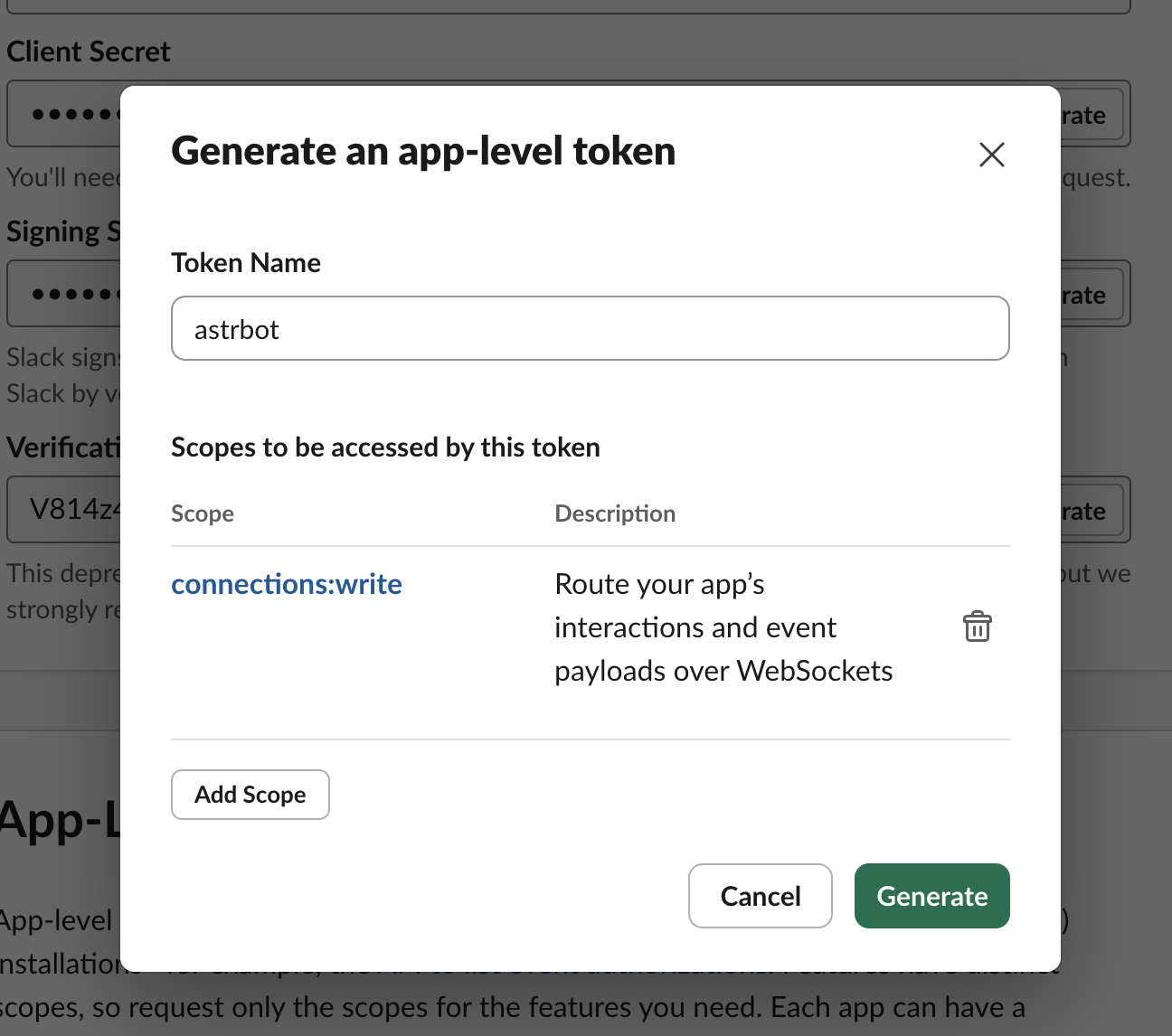
- 在左边栏 Basic Information 页下,找到 App-Level Tokens,点击 「Generate Token and Scopes」。Token Name 任意输入,点击 Add Scope,选择
connections:write,然后点击 「Generate」,点击 Copy 将结果复制到 AstrBot 配置页的 app_token 处。
-
在左边栏 OAuth & Permissions 页下,在 Bot Token Scopes 下方添加如下权限:
- channels:history
- channels:read
- channels:write.invites
- chat:write
- chat:write.customize
- chat:write.public
- files:read
- files:write
- groups:history
- groups:read
- groups:write
- im:history
- im:read
- im:write
- reactions:read
- reactions:write
- users:read
-
在左边栏 OAuth & Permissions 页下,在 Oauth Token 处点击
Install to xxx(xxx 是您工作区的名字)。然后复制生成的 Bot User OAuth Token 到平台适配器配置的 bot_token 处。 -
(仅 Socket 需要)在左边栏 Socket Mode 页下,开启 Enable Socket Mode。
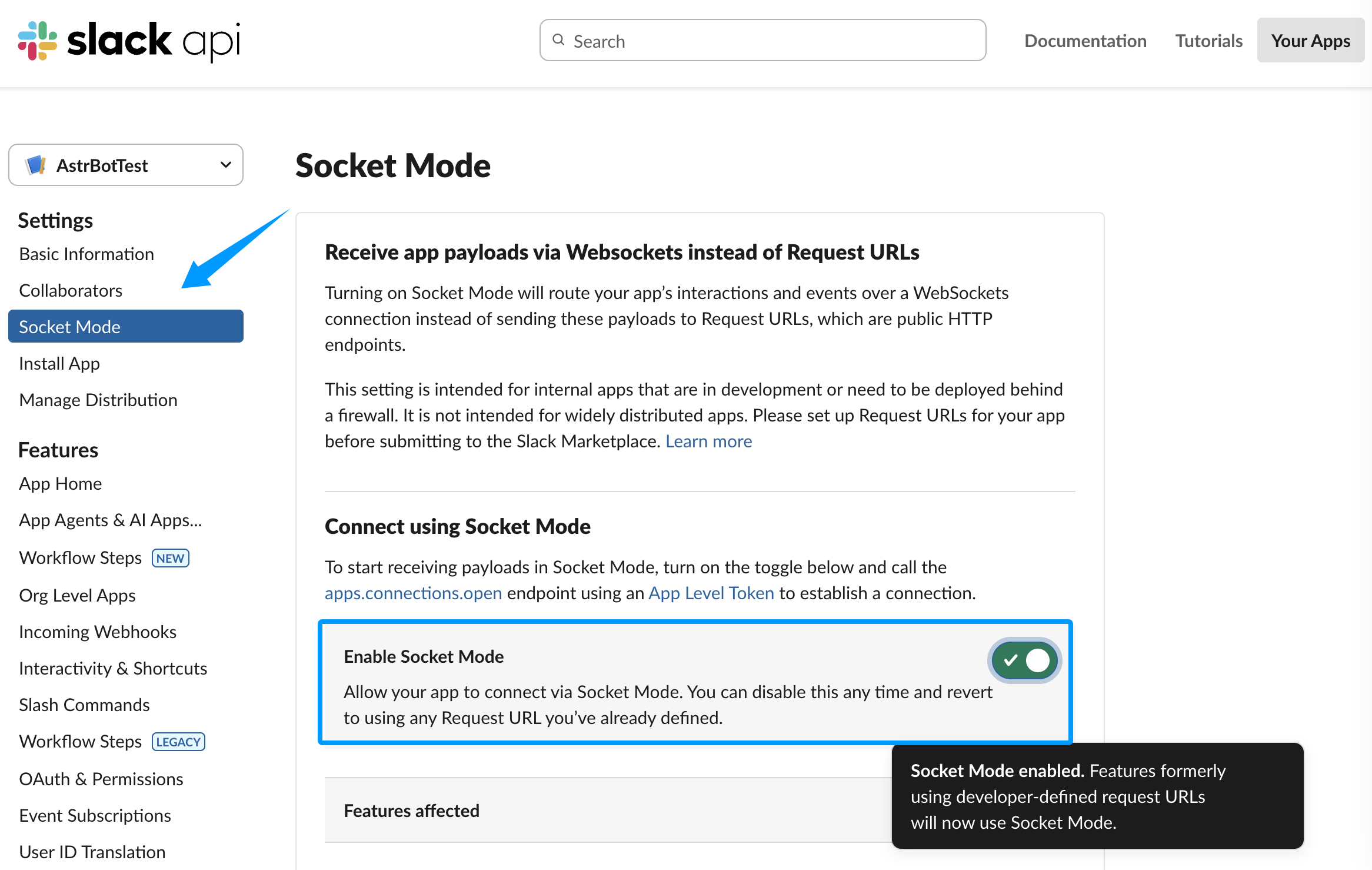
现在,配置已经完成。如果您使用的是 Socket 模式,那么直接点击配置的右下角的保存按钮即可。
如果您使用的是 Webhook 模式,请保持 统一 Webhook 模式 (unified_webhook_mode) 为开启状态。
Tip
v4.8.0 之前没有 统一 Webhook 模式,请填写以下配置项:
Slack Webhook Host、Slack Webhook Port 和 Slack Webhook Path
新建平台适配器成功后,返回到 Slack 设置,在左边栏 Event Subscriptions 页下,点击 Enable Events 启用事件接收。
如果您使用的是 Webhook 模式:
- 如果开启了
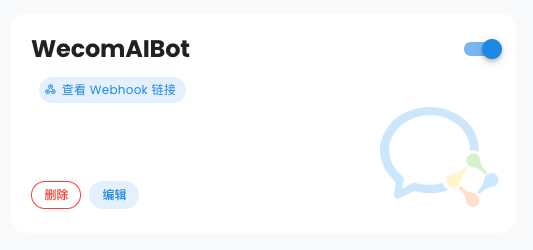
统一 Webhook 模式,点击保存之后,AstrBot 将会自动为你生成唯一的 Webhook 回调链接,你可以在日志中或者 WebUI 的机器人页的卡片上找到,将该链接填入Request URL输入框中。
- 如果没有开启
统一 Webhook 模式,请在Request URL输入框中输入https://您的域名/astrbot-slack-webhook/callback。
Tip
Webhook 模式下,您需要先在 DNS 服务商处设置好域名,然后使用反向代理软件将请求转发到 AstrBot 所在服务器的 6185 端口(如果开启了统一 Webhook 模式)或配置指定的端口(如果没有开启统一 Webhook 模式)。或者您可以使用 Cloudflare Tunnel。具体教程请参考网络资源,本教程不赘述。
启用后,在下方的 Subscribe to bot events 处,点击 Add Bot User Event,添加如下事件:
- channel_created
- channel_deleted
- channel_left
- member_joined_channel
- member_left_channel
- message.channels
- message.groups
- message.im
- reaction_added
- reaction_removed
- team_join
进入您刚刚添加的 Slack 工作区,进入需要用到 Bot 的频道,然后 @ 您刚刚创建的应用。然后点击 Slackbot 随后发送的消息中的 添加 按钮来添加到工作区中。然后,@ 应用,输入 /help,如果能够成功回复,说明测试成功。
如果有疑问,请提交 Issue。
- 首页
- 文档入口
- Top Level
- community events
- deploy
- dev
- others
- platform
- 接入 OneBot v11 协议实现
- 接入钉钉 DingTalk
- 接入 Discord
- 接入 Kook
- 接入飞书
- 接入 LINE
- 接入 Matrix
- 接入 Mattermost
- 接入 Misskey 平台
- 接入 QQ 官方机器人平台
- 通过 QQ官方机器人 接入 QQ (Webhook)
- 通过 QQ官方机器人 接入 QQ (Websockets)
- 接入 Satori 协议
- 接入 server-satori (基于 Koishi)
- 接入 Slack
- 接入消息平台
- 接入 Telegram
- 接入 VoceChat
- AstrBot 接入企业微信
- 接入企业微信智能机器人平台
- AstrBot 接入微信公众平台
- 接入个人微信
- providers
- use
- Home
- Docs Entry
- Top Level
- config
- deploy
- Deploy AstrBot on 1Panel
- Deploy AstrBot on BT Panel
- Deploy AstrBot on CasaOS
- Deploy AstrBot from Source Code
- Community-Provided Deployment Methods
- Deploy via Compshare
- Deploy AstrBot with Docker
- Deploy AstrBot with Kubernetes
- Deploy AstrBot with AstrBot Launcher
- Other Deployments
- Package Manager Deployment (uv)
- Installation via System Package Manager
- Preface
- dev
- ospp
- others
- platform
- Connect OneBot v11 Protocol Implementations
- Connect to DingTalk
- Connecting to Discord
- Connect to KOOK
- Connecting to Lark
- Connecting to LINE
- Connecting to Matrix
- Connecting to Mattermost
- Connecting to Misskey Platform
- Connect QQ Official Bot
- Connect QQ via QQ Official Bot (Webhook)
- Connect QQ via QQ Official Bot (Websockets)
- Connect to Satori Protocol
- Connect server-satori (Koishi)
- Connecting to Slack
- Messaging Platforms
- Connecting to Telegram
- Connect to VoceChat
- Connect AstrBot to WeCom
- Connect to WeCom AI Bot Platform
- Connect AstrBot to WeChat Official Account Platform
- Connect Personal WeChat
- providers
- 接入 302.AI
- Agent Runners
- Built-in Agent Runner
- Connect to Coze
- Connect to Alibaba Cloud Bailian Application
- Connect to DeerFlow
- Connect to Dify
- Connect AIHubMix
- coze
- dashscope
- dify
- 大语言模型提供商
- NewAPI
- 接入 PPIO 派欧云
- 接入 LM Studio 使用 DeepSeek-R1 等模型
- Integrating Ollama
- Connecting to SiliconFlow
- Connecting Model Services
- Connecting to TokenPony
- use
- Agent Runner
- Agent Sandbox Environment ⛵️
- astrbot sandbox
- Docker-based Code Interpreter
- Built-in Commands
- Computer Use
- Context Compression
- Custom Rules
- Function Calling
- AstrBot Knowledge Base
- MCP
- AstrBot Star
- Proactive Capabilities
- Anthropic Skills
- Agent Handoff and SubAgent
- Unified Webhook Mode
- Web Search
- Admin Panel


