-
-
Notifications
You must be signed in to change notification settings - Fork 2.1k
en providers agent runners dashscope
Since v3.4.30, AstrBot supports connecting to Alibaba Cloud Bailian Application.
On the Alibaba Cloud Bailian Application website, click to add a new application. Create an agent application, workflow application, or agent orchestration application according to your needs, and build the agent or workflow as required.
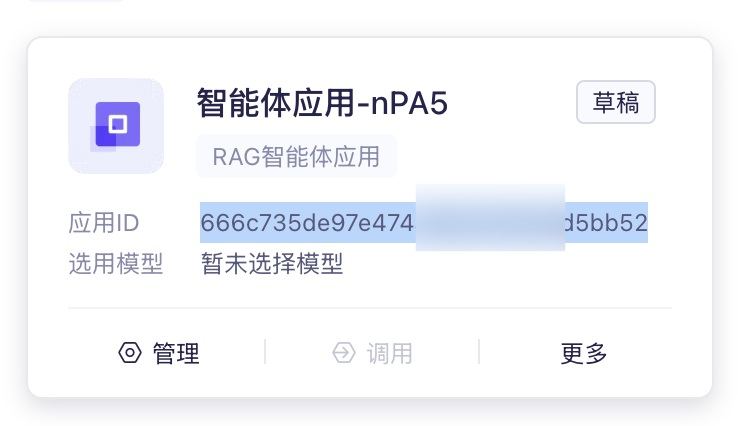
Record the Application ID:
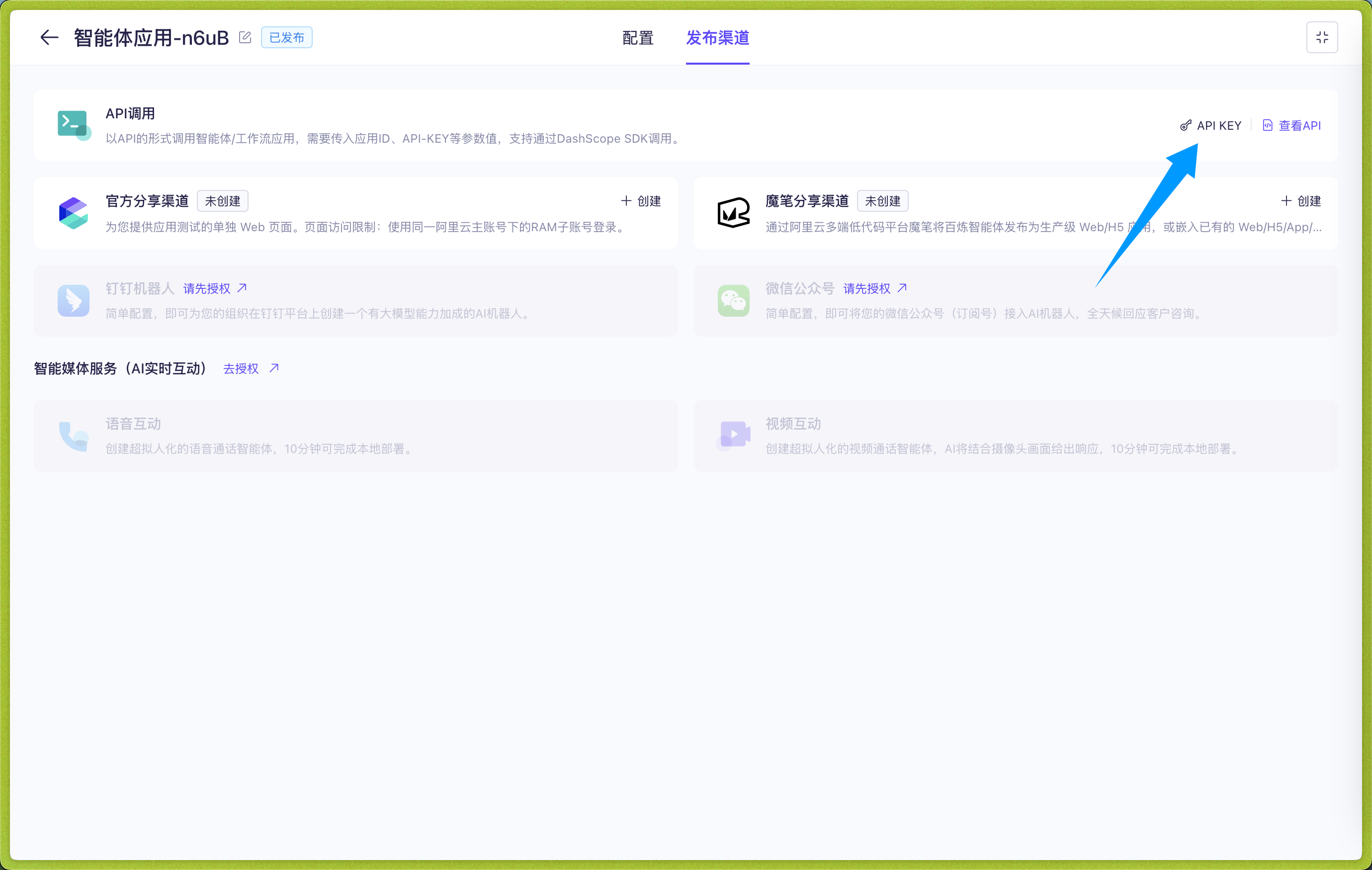
Click to enter the application, click Publishing Channel -> API Call -> API KEY, create and copy the API KEY:
In the WebUI, click "Model Provider" -> "Add Provider", select "Agent Runner", select "Alibaba Cloud Bailian Application", and enter the Alibaba Cloud Bailian Application configuration page.
According to Alibaba Cloud Bailian Application, there are four application types:
- Agent Application (agent)
- Task Workflow Application (task-workflow)
- Dialog Workflow Application (dialog-workflow)
- Agent Orchestration Application (agent-arrange)
Tip
Multi-turn conversations are only supported for agent applications and dialog workflow applications. AstrBot will automatically attach conversation history for these two types of applications to support multi-turn conversations.
Please ensure that the Application Type configured in AstrBot matches the application type created in Alibaba Cloud Bailian Application.
Then fill in the Application ID in dashscope_app_id and the API KEY in dashscope_api_key.
After filling in these three items, click Save.
Go to the Configuration page in the left sidebar, click "Agent Execution Method", select "Alibaba Cloud Bailian Application", then select the ID of the Alibaba Cloud Bailian Application Agent Runner you just created in the new configuration options that appear below, and click "Save" in the bottom right corner to complete the configuration.
For the two workflow applications, you can dynamically set input variables in the chat area.
Use the /set command to dynamically set input variables, as shown in the figure below:
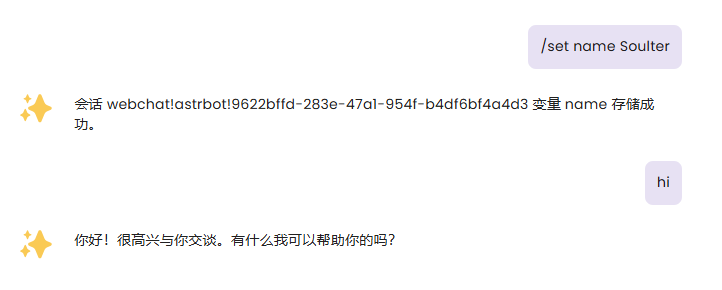
After setting variables, AstrBot will attach the variables you set in the next request to Alibaba Cloud Bailian Application, flexibly adapting to your Workflow.
Of course, you can use the /unset command to cancel the variables you set. For example, /unset name
Variables are permanently valid in the current session.
- 首页
- 文档入口
- Top Level
- community events
- deploy
- dev
- others
- platform
- 接入 OneBot v11 协议实现
- 接入钉钉 DingTalk
- 接入 Discord
- 接入 Kook
- 接入飞书
- 接入 LINE
- 接入 Matrix
- 接入 Mattermost
- 接入 Misskey 平台
- 接入 QQ 官方机器人平台
- 通过 QQ官方机器人 接入 QQ (Webhook)
- 通过 QQ官方机器人 接入 QQ (Websockets)
- 接入 Satori 协议
- 接入 server-satori (基于 Koishi)
- 接入 Slack
- 接入消息平台
- 接入 Telegram
- 接入 VoceChat
- AstrBot 接入企业微信
- 接入企业微信智能机器人平台
- AstrBot 接入微信公众平台
- 接入个人微信
- providers
- use
- Home
- Docs Entry
- Top Level
- config
- deploy
- Deploy AstrBot on 1Panel
- Deploy AstrBot on BT Panel
- Deploy AstrBot on CasaOS
- Deploy AstrBot from Source Code
- Community-Provided Deployment Methods
- Deploy via Compshare
- Deploy AstrBot with Docker
- Deploy AstrBot with Kubernetes
- Deploy AstrBot with AstrBot Launcher
- Other Deployments
- Package Manager Deployment (uv)
- Installation via System Package Manager
- Preface
- dev
- ospp
- others
- platform
- Connect OneBot v11 Protocol Implementations
- Connect to DingTalk
- Connecting to Discord
- Connect to KOOK
- Connecting to Lark
- Connecting to LINE
- Connecting to Matrix
- Connecting to Mattermost
- Connecting to Misskey Platform
- Connect QQ Official Bot
- Connect QQ via QQ Official Bot (Webhook)
- Connect QQ via QQ Official Bot (Websockets)
- Connect to Satori Protocol
- Connect server-satori (Koishi)
- Connecting to Slack
- Messaging Platforms
- Connecting to Telegram
- Connect to VoceChat
- Connect AstrBot to WeCom
- Connect to WeCom AI Bot Platform
- Connect AstrBot to WeChat Official Account Platform
- Connect Personal WeChat
- providers
- 接入 302.AI
- Agent Runners
- Built-in Agent Runner
- Connect to Coze
- Connect to Alibaba Cloud Bailian Application
- Connect to DeerFlow
- Connect to Dify
- Connect AIHubMix
- coze
- dashscope
- dify
- 大语言模型提供商
- NewAPI
- 接入 PPIO 派欧云
- 接入 LM Studio 使用 DeepSeek-R1 等模型
- Integrating Ollama
- Connecting to SiliconFlow
- Connecting Model Services
- Connecting to TokenPony
- use
- Agent Runner
- Agent Sandbox Environment ⛵️
- astrbot sandbox
- Docker-based Code Interpreter
- Built-in Commands
- Computer Use
- Context Compression
- Custom Rules
- Function Calling
- AstrBot Knowledge Base
- MCP
- AstrBot Star
- Proactive Capabilities
- Anthropic Skills
- Agent Handoff and SubAgent
- Unified Webhook Mode
- Web Search
- WebUI


