

A Home Assistant custom integration that provides weather forecasting using the classic Zambretti and Sager algorithms based on barometric pressure trends.

Click the button below to install directly via HACS:

Or open HACS → Integrations → Custom repositories → add https://github.com/ziffmafiya/zambretti_sager (category: Integration).
After installation, click here to start setup:


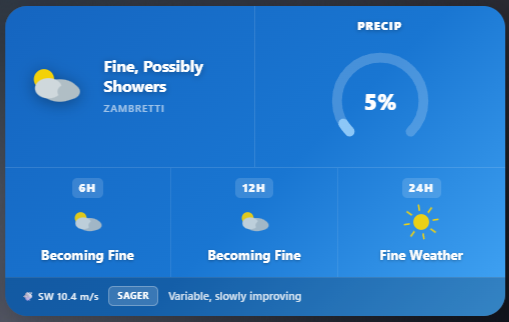
The integration includes a built-in Lovelace card that displays the current forecast with animated weather icons, night mode, wind info, pressure sparkline, and a 24-hour history chart. It is registered automatically — no manual resource setup needed.
- Zambretti Forecast — 32 different weather predictions based on pressure trends over 3 hours
- Sager Forecast — weather prediction based on current pressure and wind direction
- Extended Forecasts — predictions for 6, 12, and 24 hours ahead
- Precipitation Probability — percentage chance of rain based on pressure trends
- Sea Level Pressure Correction — automatic altitude-based pressure correction for accurate forecasts
- Interactive Map Selection — choose your location on a map for automatic altitude detection
- Temperature Compensation — uses temperature sensor for precise pressure correction
- Wind Speed & Direction — optional wind speed sensor with visualization in the card
- Night Mode — automatic moon/stars icon and dark theme when sun is down
- Pressure Sparkline — 24-hour pressure history chart inside the card
- Animated Weather Icons — drifting clouds, falling snow, waving wind lines
- Localization — 20 languages: English, German, Spanish, French, Italian, Dutch, Polish, Portuguese, Russian, Ukrainian, Chinese (Simplified & Traditional), Japanese, Korean, Czech, Swedish, Danish, Norwegian, Hungarian, Turkish
Then configure:
- Open HACS → Integrations
- Click the three dots → Custom repositories
- Add
https://github.com/ziffmafiya/zambretti_sagerwith category Integration - Click Install
- Restart Home Assistant
- Copy
custom_components/zambretti_sagerto your HAcustom_componentsdirectory - Restart Home Assistant
- Go to Settings → Devices & Services
- Click Add Integration
- Search for Zambretti and Sager
- Follow the setup wizard:
- Select your pressure sensor (absolute or sea level pressure)
- Select your wind direction sensor
- (Optional) Select your temperature sensor for accurate sea level correction
- Enable sea level pressure correction if using an absolute pressure sensor
- Click on the map to select your weather station location
- Click Submit
The integration creates six sensors grouped under a single device:
| Sensor | Description |
|---|---|
| Zambretti Forecast | Current detailed weather prediction (32 states) |
| Sager Forecast | Simplified weather prediction |
| Zambretti Forecast 6h | Prediction for 6 hours ahead |
| Zambretti Forecast 12h | Prediction for 12 hours ahead |
| Zambretti Forecast 24h | Prediction for 24 hours ahead |
| Precipitation Probability | Chance of rain, 0–100% |
Analyzes barometric pressure trends over the past 3 hours:
- Falling (≤ −1.6 hPa) — worsening weather
- Steady (−1.6 to +1.6 hPa) — stable conditions
- Rising (≥ +1.6 hPa) — improving weather
The result maps to one of 32 classical weather descriptions.
Uses current pressure and wind direction:
- > 1020 hPa — Fair, No Change
- < 1005 hPa — Unsettled, Rain
- 1005–1020 hPa — Variable
When enabled, the integration fetches your altitude from Open-Elevation API using the map location, then applies the barometric formula:
P_sea = P_abs / (1 − (0.0065 × h) / (T + 0.0065 × h + 273.15))^5.257
The setup UI and Lovelace card are available in 20 languages:
🇬🇧 English · 🇩🇪 Deutsch · 🇪🇸 Español · 🇫🇷 Français · 🇮🇹 Italiano · 🇳🇱 Nederlands · 🇵🇱 Polski · 🇵🇹 Português · 🇷🇺 Русский · 🇺🇦 Українська · 🇨🇳 简体中文 · 🇹🇼 繁體中文 · 🇯🇵 日本語 · 🇰🇷 한국어 · 🇨🇿 Čeština · 🇸🇪 Svenska · 🇩🇰 Dansk · 🇳🇴 Norsk · 🇭🇺 Magyar · 🇹🇷 Türkçe
To change the language, go to your HA profile → Language, or set the card language in the visual editor.
- Home Assistant 2024.1.0 or newer
- A barometric pressure sensor (hPa)
- A wind direction sensor (degrees, optional but recommended for Sager)
- A temperature sensor (optional, for sea level correction)
Forecast shows "Calculating..." or "Initializing..." Wait a few minutes — the integration needs pressure history to calculate trends. Make sure the pressure sensor is providing valid data.
Inaccurate forecasts Enable sea level correction if you're above sea level, verify the map location, and make sure the temperature sensor is working.
Altitude not detected The integration uses the Open-Elevation API. Check that your Home Assistant instance has internet access. Altitude is fetched once at startup.
- Zambretti Algorithm — developed by Negretti and Zambra in the early 1900s
- Sager Algorithm — developed by meteorologist Raymond Sager
- Integration Author — Maksym (@ziffmafiya)
MIT License — see LICENSE for details.
Found a bug or have a suggestion? Open an issue on GitHub.