


NestJS-native admin framework inspired by Django admin, packaged as an npm library.
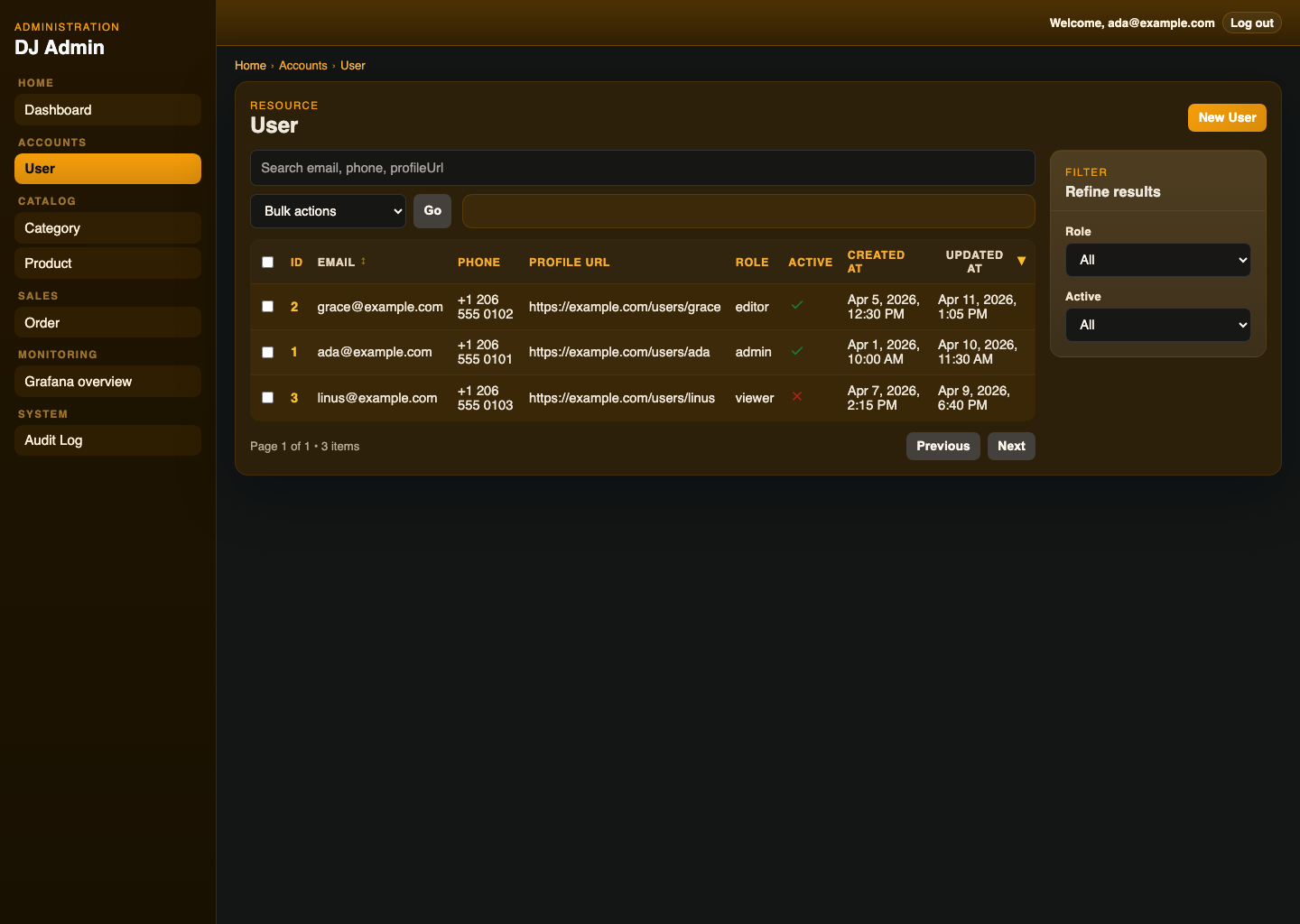
- server-side resource registration
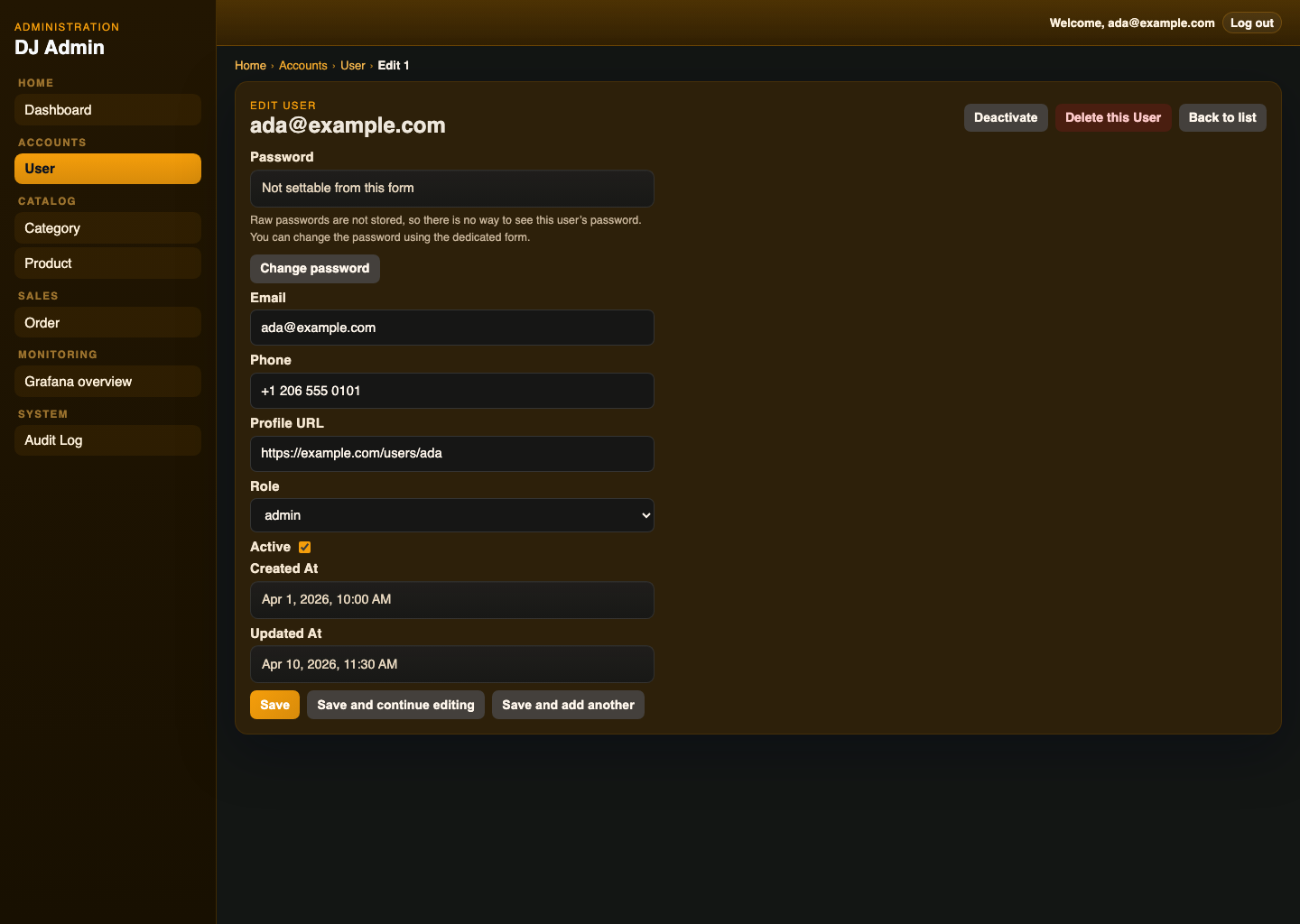
- DTO-driven form metadata
- built-in schema support for
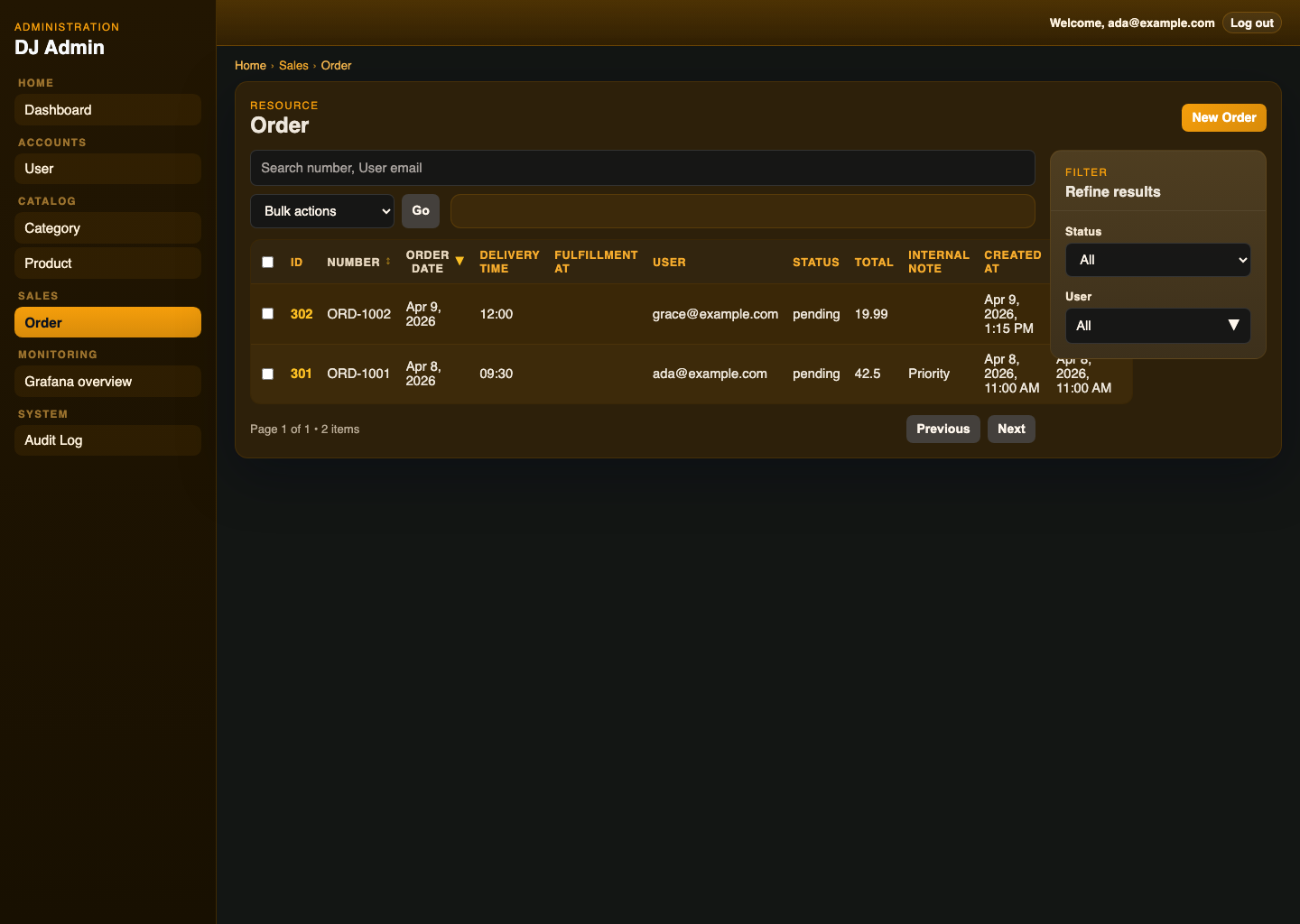
class-validatorandzod - configurable list fields, filters, search, and lookup behavior
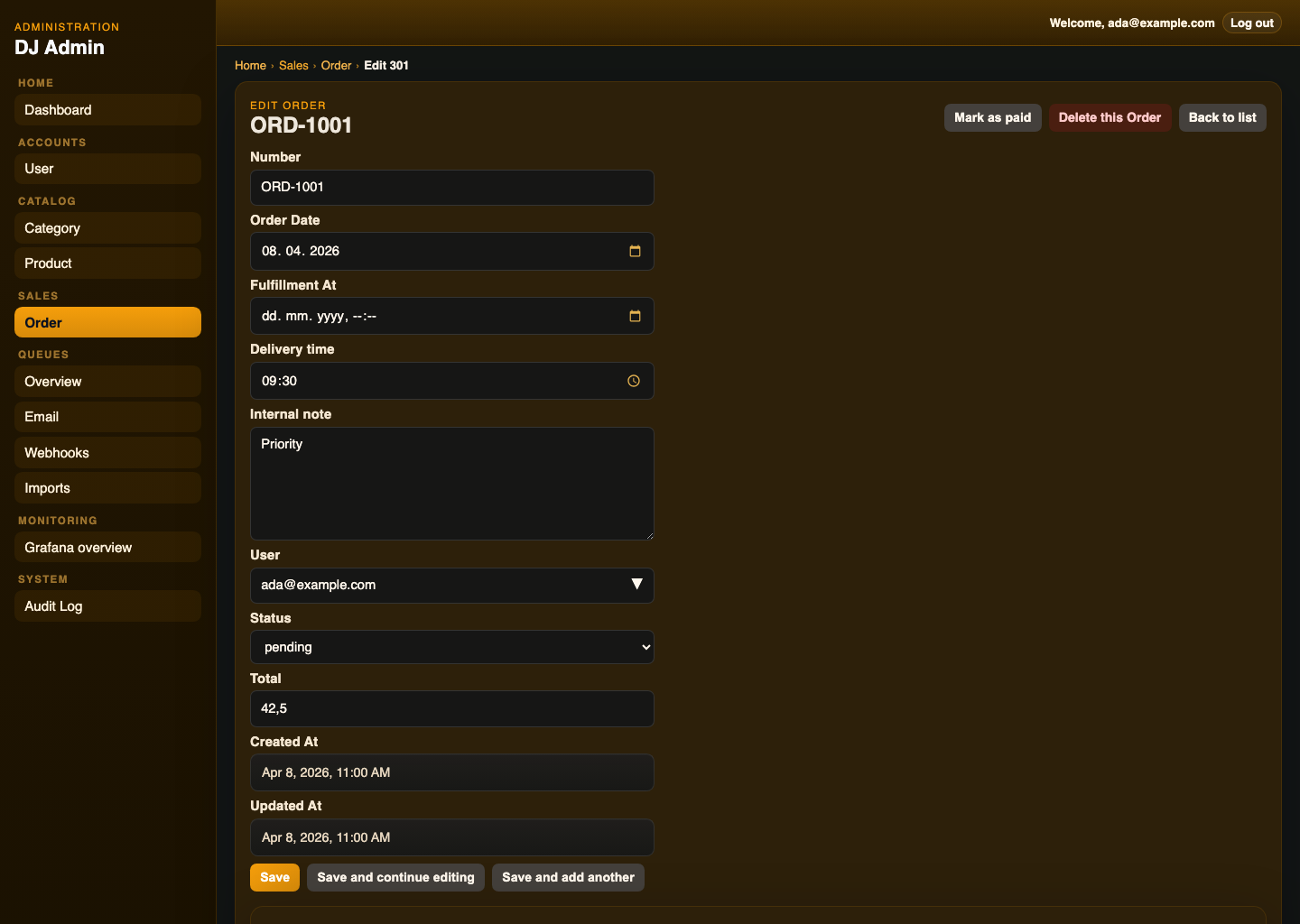
- create, edit, delete, and detail flows for registered resources
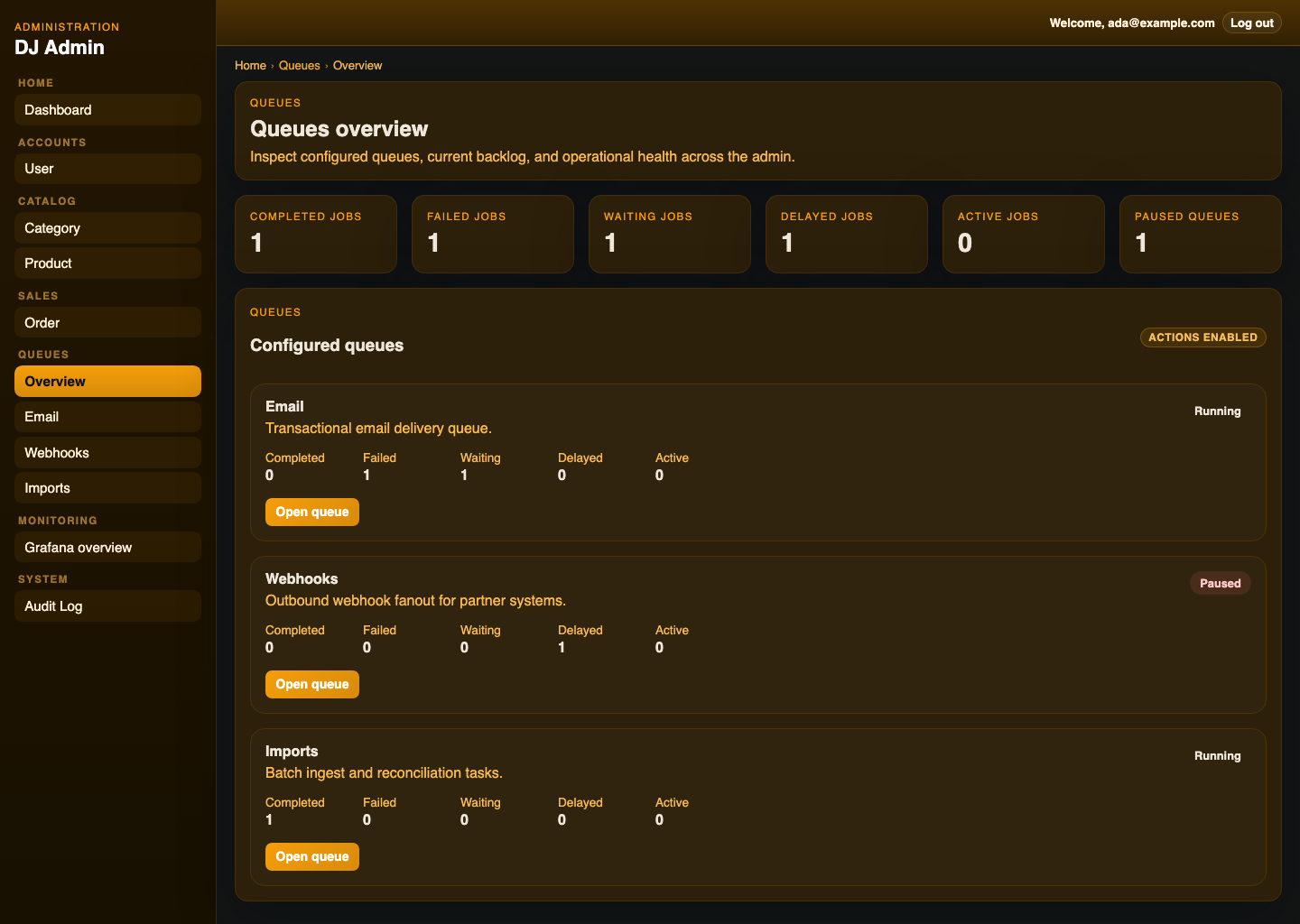
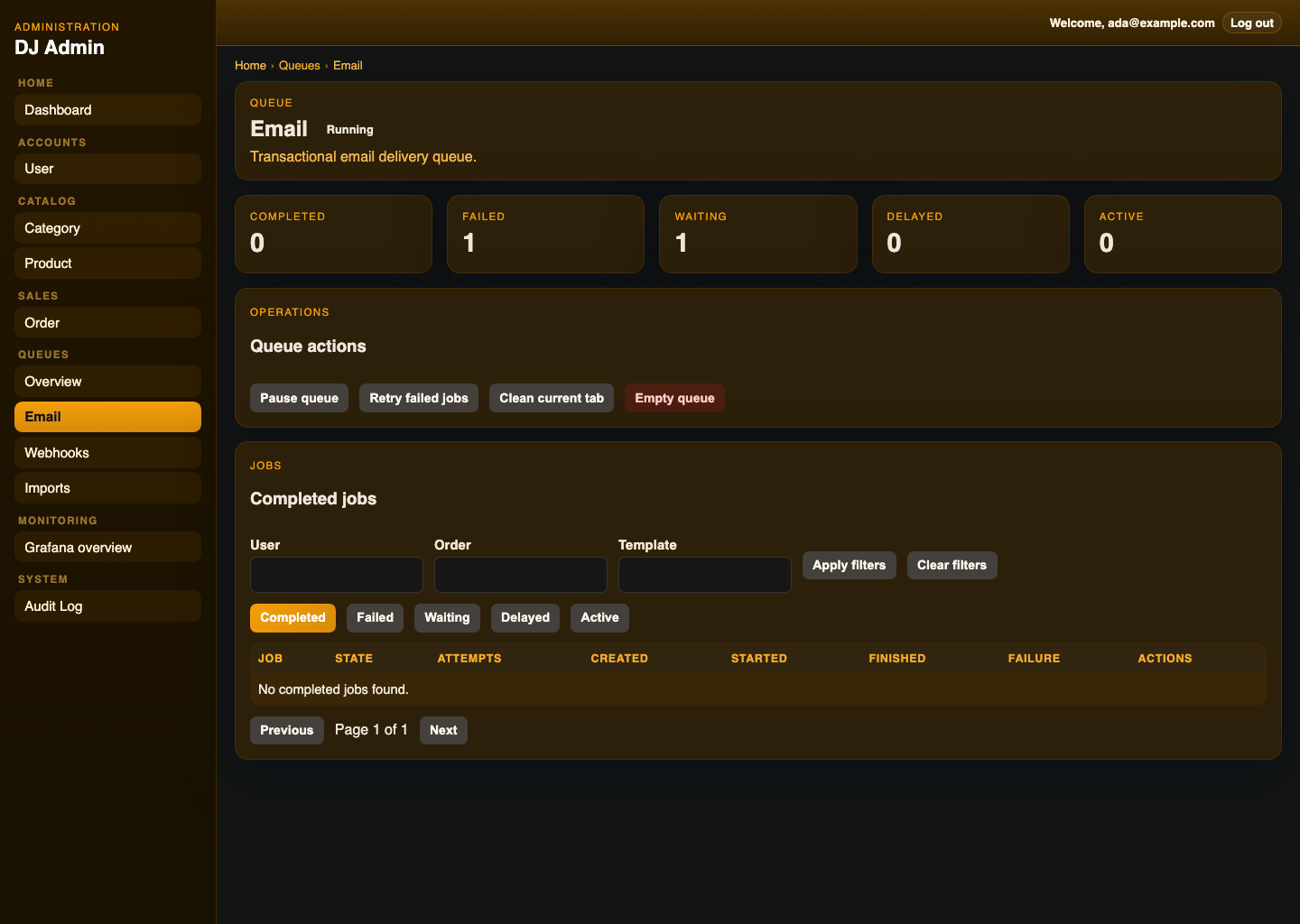
- built-in queue explorer for BullMQ, including queue overview, queue/job detail pages, and operational actions
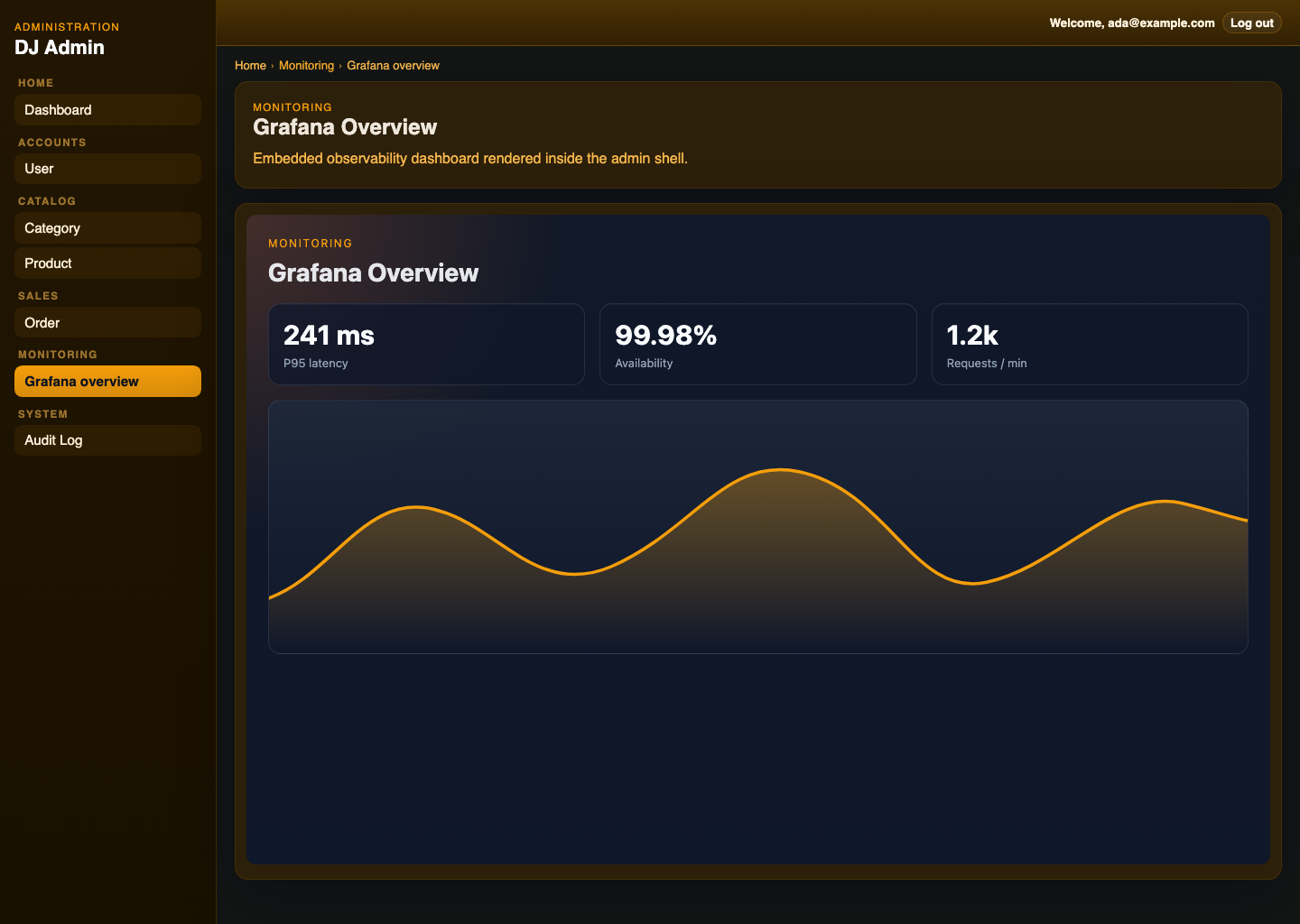
- extension-provided pages, nav items, widgets, and route-backed operational screens, including embedded dashboards and resource-linked queue panels
- optional soft delete support
- built-in admin login and session management
- built-in admin audit log support
- bundled admin UI assets
TypeORM,MikroORM,Prisma, andin-memoryadapter support- runnable demo apps for
TypeORM,MikroORM,Prisma,in-memory, and external-auth setups
Use nestjs-dj-admin when you need:
- an admin panel for NestJS
- a Django Admin alternative for Node.js / TypeScript
- a backoffice CRUD UI for internal tools
- an admin dashboard for TypeORM, MikroORM, or Prisma apps
- DTO-driven forms and validation in a NestJS-native package
nestjs-dj-admin is designed to feel more NestJS-native and more Django-Admin-like, with server-side resource registration, DTO/schema-driven metadata, and a tighter integration model for Nest applications.
This quickstart assumes:
TypeORMfor persistenceclass-validatorplusclass-transformerfor admin form/schema metadata
Install the package plus the framework dependencies and the schema library you want to use out of the box:
npm install nestjs-dj-admin @nestjs/common @nestjs/core @nestjs/platform-express class-validator class-transformer reflect-metadata rxjsnpm install nestjs-dj-admin @nestjs/common @nestjs/core @nestjs/platform-express zod reflect-metadata rxjsThen add your ORM package:
npm install typeormnpm install @mikro-orm/corenpm install @prisma/clientThen mount the admin module and provide the matching adapter.
TypeORM:
import { Module } from '@nestjs/common';
import { ADMIN_ADAPTER, AdminModule, TypeOrmAdminAdapter } from 'nestjs-dj-admin';
import { DataSource } from 'typeorm';

@Module({
  imports: [
    AdminModule.forRoot({
      path: '/admin',
    }),
  ],
  providers: [
    {
      provide: ADMIN_ADAPTER,
      useFactory: (dataSource: DataSource) => new TypeOrmAdminAdapter(dataSource),
      inject: [DataSource],
    },
  ],
})
export class AppModule {}
MikroORM:
import { Module } from '@nestjs/common';
import { EntityManager } from '@mikro-orm/core';
import { ADMIN_ADAPTER, AdminModule, MikroOrmAdminAdapter } from 'nestjs-dj-admin';

@Module({
  imports: [
    AdminModule.forRoot({
      path: '/admin',
    }),
  ],
  providers: [
    {
      provide: ADMIN_ADAPTER,
      useFactory: (em: EntityManager) => new MikroOrmAdminAdapter(em),
      inject: [EntityManager],
    },
  ],
})
export class AppModule {}
Prisma:
import { Module } from '@nestjs/common';
import { PrismaClient } from '@prisma/client';
import { ADMIN_ADAPTER, AdminModule, PrismaAdminAdapter } from 'nestjs-dj-admin';

@Module({
  imports: [
    AdminModule.forRoot({
      path: '/admin',
    }),
  ],
  providers: [
    PrismaClient,
    {
      provide: ADMIN_ADAPTER,
      useFactory: (prisma: PrismaClient) => new PrismaAdminAdapter(prisma),
      inject: [PrismaClient],
    },
  ],
})
export class AppModule {}
Define create and update DTOs for a resource:
import { IsBoolean, IsEmail, IsOptional, IsString } from 'class-validator';

export class UserAdminDto {
  @IsString()
  id!: string;

  @IsEmail()
  email!: string;

  @IsString()
  role!: string;

  @IsBoolean()
  active!: boolean;

  @IsString()
  @IsOptional()
  createdAt?: string;
}

export class CreateUserDto {
  @IsEmail()
  email!: string;

  @IsString()
  role!: string;

  @IsBoolean()
  active!: boolean;
}

export class UpdateUserDto {
  @IsEmail()
  @IsOptional()
  email?: string;

  @IsString()
  @IsOptional()
  role?: string;

  @IsBoolean()
  @IsOptional()
  active?: boolean;
}
Register the resource with a schema built from those DTOs:
import { Injectable } from '@nestjs/common';
import { AdminResource, adminSchemaFromClassValidator } from 'nestjs-dj-admin';
import { User } from './user.entity.js';

@Injectable()
@AdminResource({
  model: User,
  list: ['id', 'email', 'role', 'active', 'createdAt'],
  search: ['email'],
  filters: ['role', 'active'],
  readonly: ['createdAt'],
  schema: adminSchemaFromClassValidator({
    displayDto: UserAdminDto,
    createDto: CreateUserDto,
    updateDto: UpdateUserDto,
  }),
})
export class UserAdmin {}
Use displayDto as the canonical admin field schema for list/detail/filter/search metadata. createDto and updateDto define writable fields and validation. If you omit displayDto, the library falls back to the legacy create/update merge behavior.
The demo Category resource uses this pattern for a server-assigned createdById field: it is visible in admin list/filter/detail metadata through displayDto, but omitted from the create/update DTOs and defaulted on create from the authenticated user.
Build the library UI assets and start your app. The admin API and UI will be mounted at the path you configured, such as /admin.
nestjs-dj-admin supports four adapter modes:
TypeOrmAdminAdapterUse when your app already uses TypeORM repositories/entities.MikroOrmAdminAdapterUse when your app already uses MikroORM entities and an injectedEntityManager.PrismaAdminAdapterUse when your app already uses aPrismaClient.InMemoryAdminAdapterUse for tests, isolated demos, or non-persistent admin fixtures.
Current adapter coverage across the first-class ORMs includes:
- list pagination, sorting, filtering, and distinct values
- full-text search on local fields
- relation-aware search such as
userId.email - create, update, delete, and soft delete flows
- many-to-many relation editing
- lookup endpoints used by relation pickers
The repository keeps runnable demo apps for each supported ORM plus an external-auth integration example:
- examples/typeorm-demo-app/README.md
- examples/mikroorm-demo-app/README.md
- examples/prisma-demo-app/README.md
- examples/in-memory-demo-app/README.md
- examples/external-auth-demo-app/README.md
The example apps use a small Northwind-style back-office dataset. Shared example primitives live in examples/shared, while each demo app keeps its own ORM-specific models and thin *.admin.ts wrappers.
The repo ships runnable examples for the supported persistence layers plus a host-auth integration demo.
TypeORM example:
docker compose -f examples/typeorm-demo-app/docker-compose.yml up -d postgres grafana redis
npm run typeorm:setup:example
npm run dev:typeorm-example
MikroORM example:
docker compose -f examples/typeorm-demo-app/docker-compose.yml up -d postgres
npm run mikroorm:setup:example
npm run dev:mikroorm-example
Prisma example:
docker compose -f examples/typeorm-demo-app/docker-compose.yml up -d postgres
npm run prisma:setup:example
npm run dev:prisma-example
In-memory example:
npm run dev:inmemory-exampleExternal auth example:
npm run dev:external-auth-exampleThe PostgreSQL-backed demos use separate databases by default so they can run side by side:
- TypeORM:
nestjs_dj_admin_demo - MikroORM:
nestjs_dj_admin_mikroorm - Prisma:
nestjs_dj_admin_prisma
The root package exports the core module, decorator, constants, adapters, and the main public types:
import {
  ADMIN_ADAPTER,
  AdminField,
  AdminModule,
  AdminResource,
  InMemoryAdminAdapter,
  MikroOrmAdminAdapter,
  PrismaAdminAdapter,
  TypeOrmAdminAdapter,
} from 'nestjs-dj-admin';
The complete barrel lives in src/index.ts.
nestjs-dj-admin supports two auth modes:
- session auth managed by the admin module
- external auth managed by the host application
nestjs-dj-admin does not implement your real user model or password policy. You either provide an authenticate function for built-in session auth, or you reuse your host app’s auth stack and map the already-authenticated principal into the admin user shape.
In session mode, you provide authenticate(credentials, request) and the admin module manages the admin session cookie around it.
AdminModule.forRoot({
  path: '/admin',
  branding: {
    siteHeader: 'Back Office',
    siteTitle: 'Back Office',
    indexTitle: 'Site administration',
  },
  auth: {
    authenticate: async ({ email, password }, request) => {
      const user = await usersService.findByEmail(email);

      if (!user || !user.isAdmin) {
        return null;
      }

      const ok = await passwords.verify(password, user.passwordHash);
      if (!ok) {
        return null;
      }

      return {
        id: String(user.id),
        permissions: ['orders.read', 'orders.write', 'audit.read'],
        email: user.email,
        isSuperuser: user.role === 'admin',
      };
    },
  },
});
Session auth options:
- session mode:
cookieNamerememberMeMaxAgeMssessionTtlMssessionStorecookieauthenticate(credentials, request)
External auth mode is meant for apps that already have their own auth/session stack. In that mode the admin can reuse host guards and map the already-authenticated principal from request.user.
External auth options:
guardsresolveUser(request)loginUrlloginMessagelogout(request, response)
Example:
AdminModule.forRoot({
  path: '/admin',
  auth: {
    mode: 'external',
    guards: [AppSessionGuard],
    resolveUser: (request) => request.user ?? null,
    loginUrl: '/app/login?next=/admin',
    loginMessage: 'Sign in through the host application.',
  },
});
This is the right path when your app already has:
- cookie/session auth handled by the host app
- Nest guards that authenticate requests before they reach
/admin request.userpopulated by your existing auth layer
See:
Resource and extension visibility is permission-based.
The library user contract is:
type AdminAuthUser = {
  id: string;
  permissions: string[];
  email?: string;
  isSuperuser?: boolean;
};
If your app stores a single role, map it at the auth boundary into the permissions your admin needs, and set isSuperuser explicitly when appropriate.
The library does not derive isSuperuser for you. Your app decides that in authenticate(...) or resolveUser(...).
If you omit resource or extension permissions, the library falls back to superuser-only access:
AdminModule.forRoot({
  path: '/admin',
  auth: {
    authenticate: async ({ email, password }) => {
      // ...
      return {
        id: '1',
        email,
        permissions: [],
        isSuperuser: true,
      };
    },
  },
});
By default, a resource named orders implies:
orders.readorders.write
So you grant those keys to users, rather than configuring a permissions block on every resource.
Example:
return {
  id: String(user.id),
  email: user.email,
  permissions: ['orders.read', 'orders.write', 'audit.read'],
  isSuperuser: user.role === 'admin',
};
Behavior:
- users without the resource's implied read permission, such as
orders.read, do not see it in admin metadata or navigation - users with
readbut notwriteaccess can still open the resource, but the UI falls back to a read-only view - create, update, delete, password-change, and custom write actions are still enforced by the backend even if the UI is bypassed
Custom pages, nav items, and dashboard widgets use the same permission-key pattern through their own permissions.read fields.
If page/nav/widget permissions are omitted, they also default to “superuser only”.
Typical shapes:
orders.readorders.writeproducts.readproducts.writeusers.readusers.writeaudit.read
External auth integrations typically map the host app principal into the admin user shape in resolveUser(...):
AdminModule.forRoot({
  path: '/admin',
  auth: {
    mode: 'external',
    guards: [AppSessionGuard],
    resolveUser: (request) => {
      const user = request.user as { id: string; email?: string; role: string } | undefined;
      if (!user) {
        return null;
      }

      return {
        id: String(user.id),
        email: user.email,
        permissions: user.role === 'editor' ? ['orders.read', 'orders.write', 'audit.read'] : [],
        isSuperuser: user.role === 'admin',
      };
    },
  },
});Permissions control what an already-admitted admin user can see or change.
If you want to stop someone from entering the admin area at all, do that in auth:
- in
sessionauth mode, returnnullfromauthenticate(...)for users who should not get an admin session - in
externalauth mode, block them with your admin guard(s) before the request reaches the admin controller
Typical split:
- auth decides who may enter
/adminat all - permissions decide which resources, pages, widgets, and audit entries that admitted user may see
Example external-auth setup:
AdminModule.forRoot({
  path: '/admin',
  auth: {
    mode: 'external',
    guards: [AppSessionGuard, AdminAccessGuard],
    resolveUser: (request) => request.user ?? null,
  },
});
Audit log access is configured separately from resource access.
Example:
AdminModule.forRoot({
  path: '/admin',
  auditLog: {
    enabled: true,
    permissions: {
      read: ['audit.read'],
    },
  },
});
Behavior:
- if
auditLog.permissionsis omitted, audit log access defaults to['admin'] - users without audit-log read access do not see the
Audit Logsection - users with audit-log access only see entries for resources they can read
- non-resource auth/system events are scoped to the current user unless the reader has full admin visibility
The current 0.1.0 defaults are:
- admin path: the documented default remains
/admin - audit log: disabled by default
- audit retention:
500entries when audit logging is enabled without a custom store policy - session TTL:
12 hours - remember-me TTL:
30 days - auth cookie defaults:
httpOnly: truesameSite: 'lax'secure: 'auto'path: '/'
Equivalent configuration:
AdminModule.forRoot({
  path: '/admin',
  auth: {
    sessionTtlMs: 12 * 60 * 60 * 1000,
    rememberMeMaxAgeMs: 30 * 24 * 60 * 60 * 1000,
    cookie: {
      httpOnly: true,
      sameSite: 'lax',
      secure: 'auto',
      path: '/',
    },
    authenticate: async () => null,
  },
  auditLog: {
    enabled: false,
    maxEntries: 500,
  },
});The library supports a few basic branding tweaks without turning them into a full theming system.
AdminModule.forRoot(...) accepts:
branding.siteHeaderbranding.siteTitlebranding.indexTitlebranding.accentColorextensions
Example:
AdminModule.forRoot({
  path: '/admin',
  branding: {
    siteHeader: 'Northwind Admin',
    siteTitle: 'Northwind Admin',
    indexTitle: 'Northwind administration',
    accentColor: '#7aa37a',
  },
});
These control the sidebar header, browser title suffix, dashboard title, and the main accent color used across the admin chrome.
extensions lets you register non-CRUD admin capabilities through a public extension API. Built-in helpers can be composed, for example embedPageExtension(...) for the page itself, dashboardLinkWidgetExtension(...) for dashboard promotion, and bullmqQueueExtension(...) for first-class queue inspection and actions.
Example:
import { dashboardLinkWidgetExtension } from 'nestjs-dj-admin/dashboard-link-widget-extension';
import { embedPageExtension } from 'nestjs-dj-admin/embed-page-extension';

AdminModule.forRoot({
  path: '/admin',
  extensions: [
    embedPageExtension({
      id: 'grafana-page',
      page: {
        slug: 'grafana-overview',
        label: 'Grafana overview',
        category: 'Monitoring',
        title: 'Grafana Overview',
        description: 'Embedded dashboard page inside the admin shell.',
        url: 'http://127.0.0.1:3001/d-solo/dj-admin-overview/dj-admin-overview?orgId=1&panelId=1',
        height: 720,
      },
    }),
    dashboardLinkWidgetExtension({
      id: 'grafana-widget',
      title: 'Grafana overview',
      description: 'Open the embedded monitoring dashboard from the admin home screen.',
      pageSlug: 'grafana-overview',
    }),
  ],
});
Embedded pages still depend on the upstream app allowing framing. For Grafana, that means embedding must be enabled on the Grafana side or the browser will block the iframe.
The queue extension registers:
- queue overview and per-queue pages
- job detail pages
- sidebar entries
- queue and job actions under the extension API
Example:
import { Queue } from 'bullmq';
import { AdminField } from 'nestjs-dj-admin';
import { IsInt, IsOptional, IsString } from 'class-validator';
import { dashboardLinkWidgetExtension } from 'nestjs-dj-admin/dashboard-link-widget-extension';
import { adminSchemaFromClassValidator, bullmqQueueExtension, BullMqQueueAdapter } from 'nestjs-dj-admin';

const queues = {
  email: new Queue('email', {
    connection: {
      host: '127.0.0.1',
      port: 6379,
      maxRetriesPerRequest: null,
    },
  }),
  webhooks: new Queue('webhooks', {
    connection: {
      host: '127.0.0.1',
      port: 6379,
      maxRetriesPerRequest: null,
    },
  }),
};

class EmailQueuePayloadDto {
  @AdminField({ label: 'User' })
  @IsInt()
  userId!: number;

  @AdminField({ label: 'Order' })
  @IsInt()
  @IsOptional()
  orderId?: number;

  @AdminField({ label: 'Template' })
  @IsString()
  template!: string;
}

class WebhookQueuePayloadDto {
  @AdminField({ label: 'Order' })
  @IsInt()
  @IsOptional()
  orderId?: number;

  @AdminField({ label: 'Target' })
  @IsString()
  target!: string;
}

const emailQueuePayloadSchema = adminSchemaFromClassValidator({
  displayDto: EmailQueuePayloadDto,
});

const webhookQueuePayloadSchema = adminSchemaFromClassValidator({
  displayDto: WebhookQueuePayloadDto,
});

AdminModule.forRoot({
  path: '/admin',
  extensions: [
    dashboardLinkWidgetExtension({
      id: 'queues-widget',
      title: 'Queues',
      description: 'Inspect queue health, backlog, and recent jobs across configured queues.',
      ctaLabel: 'Open queue overview',
      pageSlug: 'queues-overview',
    }),
    bullmqQueueExtension({
      adapter: new BullMqQueueAdapter({
        queues,
      }),
      queues: [
        {
          key: 'email',
          label: 'Email',
          description: 'Transactional mail delivery.',
          payloadSchema: emailQueuePayloadSchema,
          filters: ['userId', 'orderId', 'template'],
          list: ['userId', 'template'],
        },
        {
          key: 'webhooks',
          label: 'Webhooks',
          description: 'Outbound partner webhook fanout.',
          payloadSchema: webhookQueuePayloadSchema,
          filters: ['orderId'],
          list: ['orderId'],
        },
      ],
      recordPanels: [
        {
          resource: 'orders',
          title: 'Related queue jobs',
          links: [
            { queueKey: 'email', filterKey: 'orderId', recordField: 'id', label: 'Email jobs' },
            { queueKey: 'webhooks', filterKey: 'orderId', recordField: 'id', label: 'Webhook jobs' },
          ],
        },
      ],
    }),
  ],
});
If you want queues promoted on the dashboard, add that separately with dashboardLinkWidgetExtension(...). The queue feature itself only registers queue pages, nav items, actions, and optional resource-detail panels.
payloadSchema is the canonical queue payload field schema. filters and list are string arrays resolved against that schema, so queue payload configuration now follows the same schema-derived model as admin resources.
Queue filter and list labels come from the payload schema field metadata:
- with
adminSchemaFromClassValidator(...), use@AdminField({ label: '...' })on the payload DTO field when you want a custom label - with
adminSchemaFromZod(...), use thefieldsmap, for examplefields: { userId: { label: 'User' } } - if you do not provide an explicit label, the admin falls back to a start-cased field name such as
orderNumber->Order Number
If your app already uses Zod, you can use adminSchemaFromZod({ display: ... }) for queue payload schemas instead.
That extension mounts route-backed queue screens inside the admin shell:
/queues/queues/:queueKey/queues/:queueKey/jobs/:jobId
The built-in BullMqQueueAdapter expects live BullMQ Queue instances from your app. It does not create Redis connections for you, and it assumes your workers and queue lifecycle are already managed by the host app.
The queue extension follows the same implicit permission naming pattern as resources:
queues.readqueues.write
queues[].filters define the payload fields that can be filtered on queue detail pages, and recordPanels lets the extension surface matching jobs directly on resource detail pages such as orders/:id.
For production deployments, the main auth hardening knobs are:
auth.sessionStoreProvide durable shared session storage instead of using the built-in in-memory store.auth.sessionTtlMsControl server-side expiry for non-remembered sessions.auth.cookieOverride cookie policy, includingsameSite,path,domain, andsecure.
Example:
AdminModule.forRoot({
  path: '/admin',
  auth: {
    authenticate: async ({ email, password }) => {
      const user = await usersService.findByEmail(email);
      if (!user) {
        return null;
      }

      return passwords.verify(password, user.passwordHash)
        ? {
            id: String(user.id),
            permissions: [],
            email: user.email,
            isSuperuser: user.role === 'admin',
          }
        : null;
    },
    sessionStore: redisAdminSessionStore,
    sessionTtlMs: 1000 * 60 * 60 * 12,
    cookie: {
      secure: 'auto',
      sameSite: 'lax',
      path: '/admin',
    },
  },
});
Store shape:
import type {
  AdminSessionRecord,
  AdminSessionStore,
} from 'nestjs-dj-admin';

export class RedisAdminSessionStore implements AdminSessionStore {
  constructor(private readonly redis: RedisClient) {}

  async get(sessionId: string): Promise<AdminSessionRecord | null> {
    const raw = await this.redis.get(`admin-session:${sessionId}`);
    return raw ? (JSON.parse(raw) as AdminSessionRecord) : null;
  }

  async set(sessionId: string, record: AdminSessionRecord): Promise<void> {
    const ttlSeconds = record.expiresAt
      ? Math.max(1, Math.ceil((record.expiresAt - Date.now()) / 1000))
      : undefined;

    if (ttlSeconds) {
      await this.redis.set(`admin-session:${sessionId}`, JSON.stringify(record), {
        EX: ttlSeconds,
      });
      return;
    }

    await this.redis.set(`admin-session:${sessionId}`, JSON.stringify(record));
  }

  async delete(sessionId: string): Promise<void> {
    await this.redis.del(`admin-session:${sessionId}`);
  }
}
The examples show the full pattern in:
- examples/typeorm-demo-app/src/app.module.ts
- examples/mikroorm-demo-app/src/app.module.ts
- examples/prisma-demo-app/src/app.module.ts
- examples/in-memory-demo-app/src/app.module.ts
The repo test split is intentional:
npm run test:adaptersContract tests for adapter behavior.npm run test:e2eFast generic backend E2E against the in-memory fixture app.npm run test:e2e:demosReal database-backed demo E2E for TypeORM, Prisma, and MikroORM.npm run test:frontend-smokeFrontend smoke coverage against the generic admin fixture.
CI runs all of these, including the ORM demo E2E matrix, so first-class ORM support is enforced at runtime rather than only by compile checks.
The auth layer is usable in production when paired with a real authenticate(...) implementation, a durable sessionStore, and an explicit cookie/security posture. It does not replace the host application's broader security architecture.
What the library currently does:
- accepts an
authenticate(credentials, request)hook - issues an opaque session cookie after successful login
- reads that cookie on later admin requests
- clears the cookie on logout
- supports pluggable server-side session storage
- supports configurable cookie policy with a safer
secure: 'auto'default - supports
cookieName,rememberMeMaxAgeMs, andsessionTtlMs
What the library does not try to do for you:
- session rotation or revocation across processes
- CSRF protection
- login rate limiting
- lockout or abuse detection
- MFA, SSO, or delegated identity flows
Today, the built-in admin auth service uses an in-memory session store by default and writes a cookie with:
httpOnly: truesameSite: 'lax'secure: 'auto'path: '/'
secure: 'auto' means the cookie is marked secure when the incoming request is secure, including the common X-Forwarded-Proto: https proxy case.
That is acceptable for local development and the example apps, but production deployments should still make the session and cookie policy explicit.
Production guidance:
- treat the default in-memory session store as a development fallback, not the production answer
- if you deploy the admin publicly or in a multi-instance environment, provide a durable shared
sessionStore - keep HTTPS in front of the admin and leave
cookie.secureat'auto'or set it explicitly totrue - review whether the default
path: '/'is appropriate or whether your deployment should scope the cookie to/admin - set
sessionTtlMsandrememberMeMaxAgeMsintentionally instead of relying on defaults
The admin currently relies on cookie-backed auth plus SameSite=Lax, but it does not add explicit CSRF tokens or origin enforcement.
That means:
- the package does not claim to provide complete CSRF protection
- host applications should decide their own CSRF posture based on deployment environment and threat model
If you need stronger protection, add it at the host-app boundary. Typical options include:
- CSRF tokens for state-changing admin requests
- strict origin / referer validation
- tighter cookie scoping and secure-cookie enforcement
- isolating the admin on a dedicated subdomain or internal network boundary
The library does not currently throttle login attempts or lock accounts after repeated failures.
If the admin is reachable outside a trusted internal environment, you should add:
- rate limiting on the login endpoint
- lockout or backoff rules for repeated failed logins
- logging and alerting around auth failures
- optional IP- or identity-based abuse controls at the reverse proxy or application boundary
Auth responsibility is intentionally split.
The library owns:
- the admin login/logout endpoints
- calling your
authenticatefunction - issuing and reading the admin session cookie
- attaching the authenticated admin user to request handling
The host application owns:
- user storage and password verification
- role modeling and admin eligibility rules
- session durability and cross-instance behavior
- cookie security posture in production
- CSRF protection decisions
- rate limits, lockouts, audit logging, and broader security controls
In short: nestjs-dj-admin provides a production-usable admin auth layer, not a full application security framework.
Resources are discovered from providers decorated with @AdminResource(...).
The resource options define:
- list columns
- search fields
- filters
- readonly fields
- optional soft delete behavior
- permissions
- object actions
- bulk actions
- DTOs for create and update
- optional write-time transforms
- either DTO-based form metadata or a schema provider
Search fields can be either:
- plain local fields like
'number' - explicit relation paths like
{ path: 'userId.email', label: 'User email' }
Relation-aware search is opt-in and resource-defined. The library does not guess joins or related fields automatically.
Example:
const orderSchema = adminSchemaFromClassValidator({
  displayDto: OrderAdminDto,
  createDto: CreateOrderDto,
  updateDto: UpdateOrderDto,
});

@Injectable()
@AdminResource({
  model: Order,
  category: 'Sales',
  objectLabel: 'number',
  list: ['id', 'number', 'orderDate', 'userId', 'status', 'total'],
  search: ['number', { path: 'userId.email', label: 'User email' }],
  filters: ['status', 'userId'],
  readonly: ['createdAt', 'updatedAt'],
  schema: orderSchema,
  actions: [
    {
      name: 'Mark as paid',
      handler: async (entity, context) => {
        return context.adapter.update(context.resource, String(entity.id), {
          status: 'paid',
        });
      },
    },
  ],
  bulkActions: [
    {
      name: 'Archive selected',
      handler: async (ids, context) => {
        await Promise.all(
          ids.map((id) =>
            context.adapter.update(context.resource, id, {
              archived: true,
            }),
          ),
        );
      },
    },
  ],
})
export class OrderAdmin {}Form fields come from your DTOs, not from inspecting the ORM model directly.
Validation stays server-side through class-validator, while the admin library derives UI metadata from DTO fields and optional @AdminField(...) annotations.
Example:
import { AdminField } from 'nestjs-dj-admin';
import { Type } from 'class-transformer';
import { IsDate, IsEnum, IsInt, IsOptional, IsString } from 'class-validator';

export class CreateOrderDto {
  @IsString()
  number!: string;

  @Type(() => Date)
  @IsDate()
  orderDate!: Date;

  @AdminField({
    label: 'Internal note',
    input: 'textarea',
  })
  @IsString()
  @IsOptional()
  internalNote?: string;

  @AdminField({
    label: 'User',
    relation: {
      kind: 'many-to-one',
      option: { resource: 'users', labelField: 'email', valueField: 'id' },
    },
  })
  @IsInt()
  userId!: number;

  @IsEnum(OrderStatus)
  status!: OrderStatus;
}Built-in schema providers:
- Primary:
adminSchemaFromClassValidator(...)forclass-validator-annotated class schemas - Alternate:
adminSchemaFromZod(...)for Zod object schemas
import { adminSchemaFromClassValidator, adminSchemaFromZod } from 'nestjs-dj-admin';Use adminSchemaFromClassValidator(...) by default:
@Injectable()
@AdminResource({
  model: User,
  list: ['id', 'email', 'role', 'active'],
  search: ['email'],
  filters: ['role', 'active'],
  schema: adminSchemaFromClassValidator({
    displayDto: UserAdminDto,
    createDto: CreateUserDto,
    updateDto: UpdateUserDto,
  }),
})
export class UserAdmin {}
Use adminSchemaFromZod(...) when your app already uses Zod schemas:
import { adminSchemaFromZod } from 'nestjs-dj-admin';
import { z } from 'zod';
Example:
const createUserSchema = z.object({
  email: z.email(),
  role: z.enum(['admin', 'editor', 'viewer']),
  active: z.boolean(),
  userId: z.coerce.number(),
});

const updateUserSchema = createUserSchema.partial();
const displayUserSchema = z.object({
  id: z.coerce.number(),
  email: z.email(),
  role: z.enum(['admin', 'editor', 'viewer']),
  active: z.boolean(),
  userId: z.coerce.number(),
});

@Injectable()
@AdminResource({
  model: User,
  list: ['id', 'email', 'role', 'active'],
  search: ['email'],
  filters: ['role', 'active'],
  schema: adminSchemaFromZod({
    display: displayUserSchema,
    create: createUserSchema,
    update: updateUserSchema,
    fields: {
      userId: {
        label: 'User',
        relation: {
          kind: 'many-to-one',
          option: { resource: 'users', labelField: 'email', valueField: 'id' },
        },
      },
    },
  }),
})
export class UserAdmin {}
For both schema providers, prefer a displayDto / display schema whenever your readable resource fields differ from your writable create/update payloads.
This gives you:
- admin field generation from Zod schemas
- server-side create/update validation through Zod
- parsed/coerced payloads passed into resource transforms and adapter writes
- field overrides for labels, relations, help text, and input hints where raw Zod schemas are not expressive enough for admin UI concerns
The in-memory demo shows both approaches in one app:
Categoryusesschema: adminSchemaFromZod(...)- the other demo resources use
schema: adminSchemaFromClassValidator(...)
Currently supported primitive inputs include:
textemailtelurlpasswordnumbercheckboxdatetimedatetime-localtextareaselectmultiselect
Field metadata also supports:
labelhelpTextmodes: ['create'],['update'], or both- relation metadata for selector fields
Create and update DTOs can differ. That is how the examples implement Django-style password handling:
- create DTO includes
passwordandpasswordConfirm - update DTO omits editable password fields
- existing-record password changes use a dedicated password form
Resource-level write transforms let you reshape validated DTO payloads before they reach the adapter.
That is the intended place for:
- hashing passwords into
passwordHash - dropping confirmation fields
- mapping UI field names to storage field names
- resource-specific write normalization
Example:
const userSchema = adminSchemaFromClassValidator({
  displayDto: UserAdminDto,
  createDto: CreateUserDto,
  updateDto: UpdateUserDto,
});

@AdminResource({
  model: User,
  schema: userSchema,
  password: {
    hash: hashPassword,
    helpText:
      'Raw passwords are not stored, so there is no way to see this user password.',
  },
  transformCreate: async (payload) => {
    const password = String(payload.password ?? '');
    const passwordConfirm = String(payload.passwordConfirm ?? '');

    if (!password.trim()) {
      throw new BadRequestException({
        message: 'Validation failed',
        errors: [{ field: 'password', constraints: { isDefined: 'Password is required' } }],
      });
    }

    if (password !== passwordConfirm) {
      throw new BadRequestException({
        message: 'Validation failed',
        errors: [{ field: 'passwordConfirm', constraints: { matches: 'Passwords do not match' } }],
      });
    }

    const next = { ...payload };
    delete next.password;
    delete next.passwordConfirm;

    return {
      ...next,
      passwordHash: await hashPassword(password),
    };
  },
})
export class UserAdmin {}
See the real example in:
- examples/typeorm-demo-app/src/modules/user/user.admin.ts
- examples/mikroorm-demo-app/src/modules/user/user.admin.ts
- examples/prisma-demo-app/src/modules/user/user.admin.ts
Single-record actions run against one object and appear on the list and edit pages. Bulk actions run against selected IDs from the changelist.
Use them for admin operations such as:
- mark as paid
- deactivate user
- archive selected records
Action handlers receive the adapter, resolved resource metadata, authenticated admin user, and either the current entity or selected IDs.
The shared examples define both action styles in:
The library includes a Django-admin-style activity log for admin-side events. This is an admin activity trail, not full domain object history.
Recorded events include:
- login and logout
- create and update
- delete and soft delete
- password changes
- single-record actions
- bulk actions
The bundled UI exposes this through the built-in Audit Log page in the System section.
Current behavior:
- the core library falls back to an in-memory store unless you provide
auditLog.store - the TypeORM and Prisma example apps wire the audit log into their database
- newest entries are shown first
- audit visibility is permissioned separately through
auditLog.permissions - the feature is disabled by default and can be enabled with:
AdminModule.forRoot({
  path: '/admin',
  auditLog: {
    enabled: true,
  },
});auditLog.maxEntriescontrols retentionauditLog.storelets the host app provide a durable sinkauditLog.permissions.readcontrols which permission keys can access the audit log UI and endpoint
Concrete production-style pattern:
import { AdminModule } from 'nestjs-dj-admin';
import { PrismaAdminAuditStore } from './modules/admin-audit/prisma-admin-audit.store.js';

AdminModule.forRoot({
  path: '/admin',
  auditLog: {
    enabled: true,
    store: new PrismaAdminAuditStore(prisma),
  },
});
Store shape:
import type {
  AdminAuditEntry,
  AdminAuditResult,
  AdminAuditStore,
} from 'nestjs-dj-admin';

class PrismaAdminAuditStore implements AdminAuditStore {
  constructor(private readonly prisma: PrismaClient) {}

  async append(entry: AdminAuditEntry, maxEntries: number): Promise<void> {
    await this.prisma.adminAuditLog.create({
      data: {
        id: entry.id,
        timestamp: new Date(entry.timestamp),
        action: entry.action,
        actorId: entry.actor.id,
        actorRole: entry.actor.permissions[0] ?? '',
        actorEmail: entry.actor.email ?? null,
        summary: entry.summary,
        resourceName: entry.resourceName ?? null,
        resourceLabel: entry.resourceLabel ?? null,
        objectId: entry.objectId ?? null,
        objectLabel: entry.objectLabel ?? null,
        actionLabel: entry.actionLabel ?? null,
        count: entry.count ?? null,
      },
    });

    const overflow = await this.prisma.adminAuditLog.findMany({
      select: { id: true },
      orderBy: [{ timestamp: 'desc' }, { id: 'desc' }],
      skip: maxEntries,
    });

    if (overflow.length > 0) {
      await this.prisma.adminAuditLog.deleteMany({
        where: { id: { in: overflow.map((item) => item.id) } },
      });
    }
  }

  async list(query: { page: number; pageSize: number }): Promise<AdminAuditResult> {
    const page = Math.max(1, query.page);
    const pageSize = Math.max(1, query.pageSize);
    const [items, total] = await Promise.all([
      this.prisma.adminAuditLog.findMany({
        orderBy: [{ timestamp: 'desc' }, { id: 'desc' }],
        skip: (page - 1) * pageSize,
        take: pageSize,
      }),
      this.prisma.adminAuditLog.count(),
    ]);

    return {
      items: items.map((row) => ({
        id: row.id,
        timestamp: row.timestamp.toISOString(),
        action: row.action,
        actor: {
          id: row.actorId,
          role: row.actorRole,
          email: row.actorEmail ?? undefined,
        },
        summary: row.summary,
        resourceName: row.resourceName ?? undefined,
        resourceLabel: row.resourceLabel ?? undefined,
        objectId: row.objectId ?? undefined,
        objectLabel: row.objectLabel ?? undefined,
        actionLabel: row.actionLabel ?? undefined,
        count: row.count ?? undefined,
      })),
      total,
    };
  }
}
See the real implementations in:
- examples/prisma-demo-app/src/modules/admin-audit/prisma-admin-audit.store.ts
- examples/mikroorm-demo-app/src/modules/admin-audit/mikroorm-admin-audit.store.ts
- examples/typeorm-demo-app/src/modules/admin-audit/typeorm-admin-audit.store.ts
This is intentionally closer to Django admin's LogEntry concept than to a compliance-grade immutable audit system.
Soft delete is optional and resource-specific. It is not enabled globally.
When a resource opts into:
softDelete: {
  fieldName: 'deletedAt',
}
the admin behaves like a typical Django-admin soft-delete customization:
- normal list views show active rows by default
- the changelist exposes a visibility filter for
active,deleted, andall - delete actions archive the row by setting the soft-delete field instead of hard-removing it
- direct detail/edit access still works for archived rows if you navigate to them explicitly
The shared product demo uses this pattern.
Relation selectors are configured from DTO metadata, not inferred automatically from the ORM.
For relation fields, declare:
kind: currentlymany-to-oneormany-to-manyresource: target admin resource namelabelField: target field used for displayvalueField: target field used as the submitted value, usuallyid
Example:
@AdminField({
  label: 'Product',
  relation: {
    kind: 'many-to-one',
    option: { resource: 'products', labelField: 'name', valueField: 'id' },
  },
})
productId!: number;
This drives:
- relation selectors on create and edit forms
- lookup endpoints
- relation labels in list pages
- delete summaries and object labeling
- explicit relation-aware search paths such as
userId.email
See:
All three example apps serve the admin backend on http://127.0.0.1:3000/admin.
Shared seeded demo logins:
email: ada@example.com
password: admin123

email: grace@example.com
password: editor123
Shared seeded baseline:
- 3 users
- 20+ orders
- categories
- products
- order details
The ada@example.com account is the seeded superuser. grace@example.com is the seeded editor user with scoped permissions. linus@example.com remains demo-only and is not admitted to admin.
Primary demo app. Uses PostgreSQL, startup migrations, and seeded baseline data.
Clean setup:
npm install
docker compose -f examples/typeorm-demo-app/docker-compose.yml up -d postgres grafana redis
npm run typeorm:setup:example
npm run dev:typeorm-example
Built run:
npm run typeorm:setup:example
npm run build:typeorm-example
npm run start:typeorm-example
Default database settings:
DB_TYPE=postgres
DB_HOST=127.0.0.1
DB_PORT=5432
DB_USER=postgres
DB_PASSWORD=postgres
DB_NAME=nestjs_dj_admin_demo
typeorm:setup:example creates the demo database if needed and runs the checked-in TypeORM migrations. The app still runs pending migrations on startup as a safety net.
More detail: examples/typeorm-demo-app/README.md
First-class runnable demo for MikroORM on PostgreSQL, using checked-in SQL migrations and seeded baseline data.
Clean setup:
npm install
docker compose -f examples/typeorm-demo-app/docker-compose.yml up -d postgres
npm run mikroorm:setup:example
npm run dev:mikroorm-example
Built run:
npm run mikroorm:setup:example
npm run build:mikroorm-example
npm run start:mikroorm-example
Default database settings:
DB_HOST=127.0.0.1
DB_PORT=5432
DB_USER=postgres
DB_PASSWORD=postgres
DB_NAME=nestjs_dj_admin_mikroorm
npm run mikroorm:setup:example creates the demo database if needed. The app itself applies the checked-in MikroORM migration on startup.
More detail: examples/mikroorm-demo-app/README.md
First-class runnable demo, not a secondary adapter stub. Uses the same PostgreSQL container as the TypeORM demo, but a separate PostgreSQL database so it can coexist cleanly with the TypeORM example.
Clean setup:
npm install
docker compose -f examples/typeorm-demo-app/docker-compose.yml up -d postgres
npm run prisma:setup:example
npm run dev:prisma-example
Built run:
npm run prisma:setup:example
npm run build:prisma-example
npm run start:prisma-example
Default Prisma database URL:
DATABASE_URL=postgresql://postgres:postgres@127.0.0.1:5432/nestjs_dj_admin_prisma?schema=publicnpm run prisma:setup:example creates the demo database if needed, applies the checked-in Prisma migrations, and generates the client.
More detail: examples/prisma-demo-app/README.md
Fastest demo app. Uses the bundled in-memory adapter and starts with seeded baseline data, with no external database.
This demo also shows mixed schema providers in one app: Category uses Zod, while the other resources use DTOs plus class-validator.
Clean setup:
npm install
npm run dev:inmemory-example
Built run:
npm run build:inmemory-example
npm run start:inmemory-example
More detail: examples/in-memory-demo-app/README.md
Build all examples:
npm run build:examplesDefault full-stack development flow:
docker compose -f examples/typeorm-demo-app/docker-compose.yml up -d postgres
npm run dev
Stop and remove the demo Postgres volume:
docker compose -f examples/typeorm-demo-app/docker-compose.yml down -vAdapter contract coverage is available across all four adapters:
- in-memory
- TypeORM
- MikroORM
- Prisma
Covered adapter behavior:
findManyfindOnecreateupdatedeletedistinct- pagination
- sorting
- filtering
- search
Run the contract suite:
npm run test:adaptersBackend end-to-end coverage exercises the admin HTTP flow for:
- login/logout
- protected
/adminAPI access - resource metadata endpoints
- CRUD routes
- custom action routes
- permission denial paths
- validation error shape
Run the backend E2E suite:
npm run test:e2eRun linting and type checks:
npm run lint
npm run checkCurrent intentional limits:
- this is an admin framework, not a complete auth framework
- relation metadata is explicit; ORM relations are not auto-derived into admin forms
- the bundled UI is opinionated and not yet a full theming system
- advanced workflows such as richer dashboards are not part of
0.1.x - the TypeORM demo is migration-backed, but it is still a demo app rather than production rollout guidance
Current operational constraints:
- you must provide your own authentication check and password verification logic
- you must decide your own production stance for sessions, CSRF, rate limits, and lockouts
- if you use Prisma or TypeORM, you still own your underlying model design and database lifecycle
- durable audit logging is app-owned; the bundled ORM demos show database-backed stores, while the core fallback stays in-memory
The package is developed and tested against:
| Component | Supported / tested range |
|---|---|
| NestJS | ^11.1.6 |
@nestjs/platform-express |
^11.1.6 |
class-validator |
^0.14.2 |
class-transformer |
^0.5.1 |
rxjs |
^7.8.2 |
| TypeORM | ^0.3.25 |
| MikroORM Core | ^7.0.11 |
| Prisma Client | `^6.15.0 |
| Express | 5.x |
Adapter dependencies are optional unless you use that adapter:
typeormis optional if you are not usingTypeOrmAdminAdapter@mikro-orm/coreis optional if you are not usingMikroOrmAdminAdapter@prisma/clientis optional if you are not usingPrismaAdminAdapter
Current release stance:
0.1.0is intended as the first real public release0.1.xaims for a coherent public package, but not long-term API immutability1.0.0should only happen after the admin API, UI extension points, and operational guidance are more stable
Versioning expectations before 1.0.0:
- minor releases may still include breaking changes when they materially improve the public package shape
- patch releases should stay focused on fixes and low-risk polish
- release notes in CHANGELOG.md should call out any intentional breakage or upgrade-sensitive changes
- Public API entrypoint: src/index.ts
- Library build output:
dist/ - Prebuilt admin UI assets:
dist/admin-ui/ - Example apps: