


A demonstration of zerv in action. Shows how to implement automated versioning for CI/CD pipelines, generating multiple formats (semver, PEP440, Docker tags) with flexible branching strategy framework.
What is zerv?
- A Rust-based versioning tool that generates semantic versions from git current state (latest tag and current commit)
- Generates versions in multiple formats: semver, pep440, and docker_tag
- Supports flexible branching strategies and version generation rules
- More details can be found at https://github.com/wislertt/zerv
Why use this setup?
- Automated versioning for multi-environment CI/CD pipelines
- Flexible deployment controls to match your team's speed vs quality needs
- Dynamic GitOps approach: main branch represents all environments by default, PR labels can temporarily shift environment representation to specific branches
- Compatible with popular branching strategies (Trunk-based, GitFlow, Release Trains)
Quick start
- Fork this repository
- Install zerv locally for testing
- Create a PR to test the workflow
- Add
deploy-d,deploy-n,deployandpre-releaselabels
- Main branch tagged with semantic version format (major.minor.patch) - recommend using semantic-release
- For multiple long-live branches (e.g., git flow with develop branch): Enable "Require branches to be up to date before merging" protection rule for main branch
- Deployment pipeline must follow function pattern and be idempotent. There are 2 common deployment patterns:
deploy_without_env(repo, versions): For immutable releases (e.g., Python packages)- Each new version does not override previous versions
- Example: Publishing to PyPI with incrementing version numbers
deploy_with_env(repo, env_name, versions): For environment-specific deployments (e.g., Cloud Run services)- New version overrides existing version in specified environment
- Environment codes: d (development), n (nonproduction), p (production) following GCP landing zone convention
- Note: These can be configured to any naming convention (e.g., dev/staging/prod)
- Version formats: This repository demonstrates 3 formats: - Semver: For git repository tags and releases - PEP440: For Python package versions - Docker Tag: For container registry tags
- Note: This demo repository only echoes these formats as examples, but in a real deployment pipeline they would be used for their respective purposes.
- Note: Configure zerv to generate formats based on your deployment requirements and constraints. See zerv documentation for all supported formats.
- Deployment triggers: Uses PR labels with configurable prefixes:
deploy-prefix for environment-specific deployments (e.g.,deploy-d,deploy-n)deployfor environment-less deployments (e.g., immutable releases)pre-releasefor creating release candidates with tagging- These label prefixes can be configured to match your deployment naming conventions
- Core concept: GitOps approach where branches represent environment states
- Main branch: Represents all environments by default, uses semantic version control
- All non-main branches: Versioned by zerv when creating PRs
- Environment representation via PR labels: Temporarily shifts environment representation from main branch to the PR branch
- PR with
deploy-dlabel = branch represents development environment - PR with
deploy-nlabel = branch represents nonproduction environment
- PR with
- Environment-less deployment trigger:
- PR with
deploylabel = deploy without environment using version from the branch (e.g., for immutable releases)
- PR with
- Locking mechanism: Prevents concurrent deployments to same environment
- First PR with deploy-X label acquires lock for environment X
- Subsequent PRs with same label fail until lock is released
- Lock releases when PR merges/closes or label is removed
- Deployment flow:
- PR with label deploys to specific environment immediately
- When PR merges to main, CD pipeline deploys to ALL environments
- Flexible deployment controls to match your team's needs
- Example for higher quality nonproduction: Only allow
deploy-nonrelease/*branches, with required PR reviews before merging to release branch - Example for fast POC development: Allow
deploy-pdirectly in PRs for rapid iteration (accepting potential failures in production environment) - Adapt the strategy to your context - balance speed vs quality based on your project requirements
The following scenarios demonstrate how the deployment flow works in practice:
-
Initial State: Only the main branch exists. All environments (development, nonproduction, production) and environment-less deployments reference version
v1.1.2from the main branch.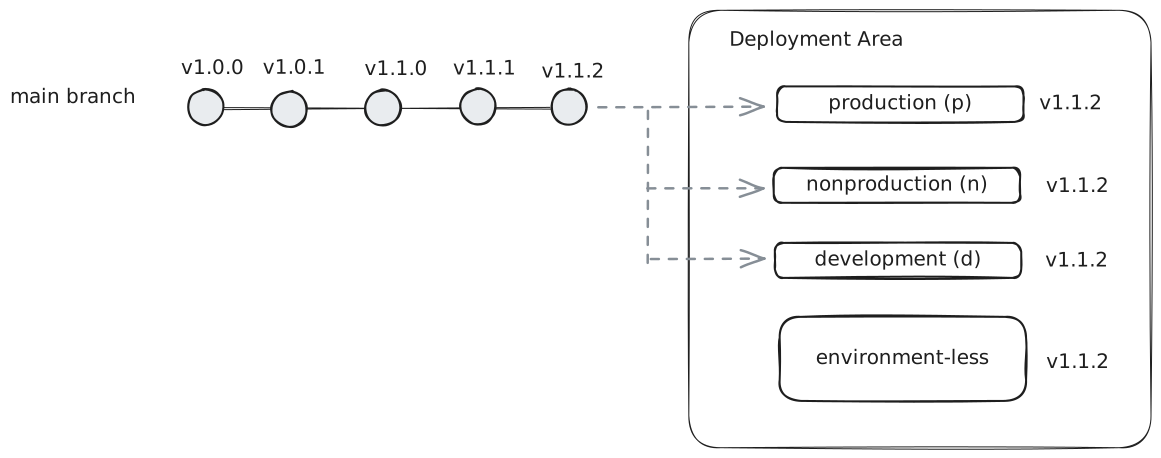
-
Feature Branch Deployment: A
feature/1branch is created with PR labelsdeploy-nanddeploy. The nonproduction environment deploys versionv1.1.3-alpha.1.post.2from the feature branch and becomes locked to it. Development and production remain on main branchv1.1.2. The environment-less deployment creates a new versionv1.1.3-alpha.1.post.2without overriding previous versions.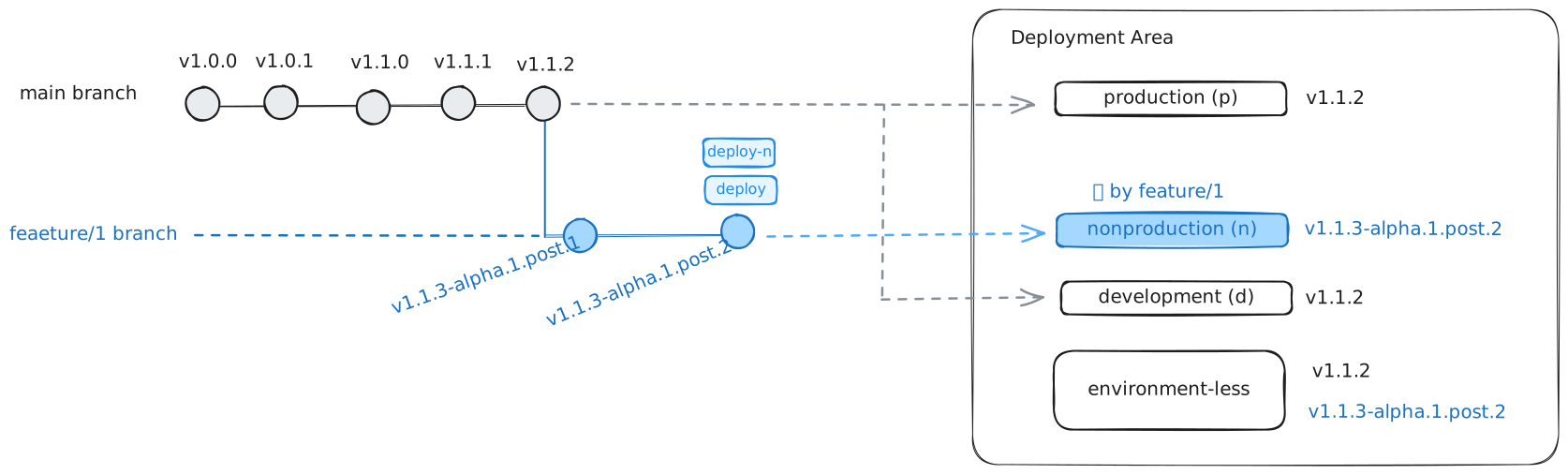
-
Concurrent Feature Deployment: While
feature/1PR is active, afeature/2branch is created with PR labelsdeploy-d,deploy-n, anddeploy. Nonproduction deployment fails due to being locked byfeature/1. Development deploys successfully with versionv1.1.3-alpha.2.post3fromfeature/2. Environment-less deployment creates another new versionv1.1.3-alpha.2.post.3alongside the existing version.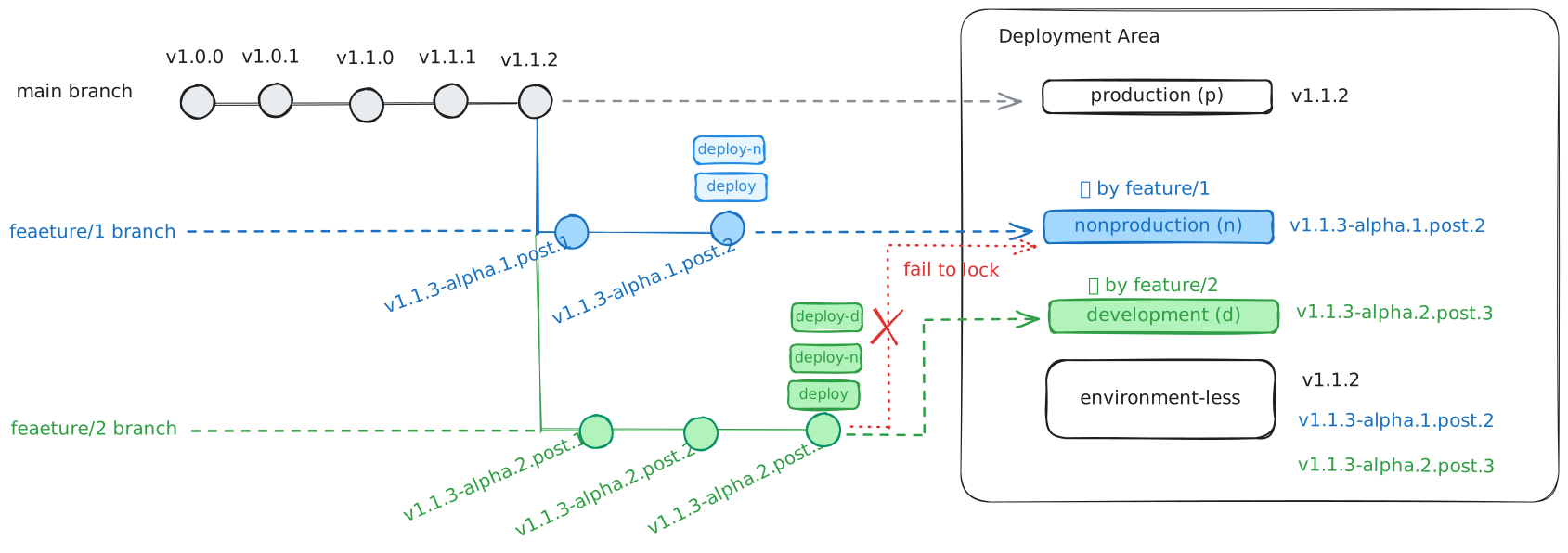
This repository uses the default branch rules from zerv flow command. For complete implementation details, see the shared workflow.
-
Feature branches (default): Generate alpha pre-releases with branch-based identification
- Numbered feature branches (
feature/1/xyz): Extracts number from branch name- Example:
1.0.1-alpha.1.post.1+feature.1.xyz.1.g4e9af24
- Example:
- Non-numbered feature branches (
feature/xyz): Uses 5-digit hash for identification- Example:
1.0.1-alpha.48993.post.1+feature.xyz.3.g4e9af24
- Example:
- Uses commit distance for post count
- Numbered feature branches (
-
"develop" branch: Generates beta pre-releases with stable numbering
- Example:
1.0.1-beta.1.post.1+develop.3.g4e9af24 - Uses commit distance for post count
- Example:
-
"release/*" branches: Generates release candidates with extracted or hash-based numbering
- Regular release branches:
1.0.1-rc.1.post.1.dev.1764382150+release.1.do.something.3.g4e9af24(full version) - With
pre-releaselabel:1.0.1-rc.1.post.1(short version, creates tag) - Numbered release branches (
release/1/xyz):1.0.1-rc.1.post.1 - Non-numbered release branches (
release/xyz):1.0.1-rc.48993.post.1(5-digit hash RC number) - Uses tag distance for post count
- Regular release branches:
-
Customization: All branch rules can be configured with
--branch-rulesargument
Zerv Flow is designed as a generalized branching framework that builds on top of version generation rules. Rather than being a rigid branching strategy itself, it provides a flexible foundation that's compatible with existing popular branching strategies.
-
Trunk-based / GitHub Flow:
- Structure: Main branch + short-lived feature branches
- Compatible out-of-the-box with default branch rules
-
GitFlow (Adaptive - not 100% traditional GitFlow):
- Structure: Main + develop long-lived branches + feature/release/hotfix branches
- Simplified release branches:
release/1/feature-nameorrelease/feature-name(no manual version bumping needed) - Requirements: Enable "Require branches to be up to date before merging" for main branch protection rule
- Configuration: Update branch rules if develop branch has different name
- Note: This adapts traditional GitFlow (designed 2010, pre-CI/CD) for modern workflows. Even the author now suggests adapting it to your context: nvie.com
-
Release Trains:
- Structure: Main + develop as accumulation branch, feature branches from develop, periodic releases
- Process: Create release branches from develop on schedule, merge to main for releases
- Requirements: Enable "Require branches to be up to date before merging" for main branch protection rule
-
GitLab Flow (Environment Branches):
- Note: Not designed to support this strategy by default
- Could work with custom configuration but considered out of scope for this framework
Contributions are welcome! Please feel free to submit a Pull Request. For major changes, please open an issue first to discuss what you would like to change.
This project is licensed under the Apache License 2.0 - see the LICENSE file for details.

![@renovate[bot]](https://avatars.githubusercontent.com/in/2740?s=64&v=4)