This policy explains how the public can responsibly report vulnerabilities, and how DBT developers must protect sensitive information and follow DBT’s required security controls when working in GitHub.
If you believe you have found a security vulnerability, please submit a report via our HackerOne form
Please include:
- Where the issue can be observed (URL, IP address or page)
- A brief description (e.g. “XSS vulnerability”)
- Safe, non‑destructive reproduction steps
Disclosure guidelines
- Do not share vulnerability details beyond DBT and the asset owner
- HackerOne accounts are optional but allow updates
- You must agree to HackerOne’s Terms, Privacy Policy, and Disclosure Guidelines
- NCC Group triages reports within five working days
- DBT Cyber assists with coordination, but the asset owner is responsible for remediation
These requirements apply to DBT developers.
Information on secrets and their management can be found here.
Instructions on what to do in the event of a leak can be found here.
In summary, developers must:
- Never commit secrets or sensitive data to GitHub
- Use secure storage for managing secrets
- Ensure no secrets appear in PRs, logs or config files
- Follow incident‑response steps immediately if a leak occurs
DBT uses several processes to strengthen the security posture of our GitHub repositories.
Use this checklist to ensure your repository implements these processes:
-
Create or update
SECURITY_CHECKLIST.md
See: SECURITY_CHECKLIST.md -
Review the CI/CD overview
See: CI/CD Overview -
Set up the pre‑commit hook framework
See: Pre‑Commit Hooks -
Set up custom GitHub properties
See: Custom GitHub Properties -
Apply the DBT GitHub security policy
See: GitHub Security Policy -
Ensure a
CODEOWNERSfile exists
See: CODEOWNERS -
Review GitHub Safety Tips
See: GitHub Safety Tips -
Review Repository Access and Governance
See: Repository Access & Governance -
Review the Pull Request template
See: Pull Request Template -
Review branch protection rules
See: Branch Protection Rules -
Review push protection
See: Push Protection
Create SECURITY_CHECKLIST.md in the root of your repository if not present. Copy the checklist and update it as checks are completed.
Review the GitHub CI/CD Overview which summarises the controls DBT has in place to strengthen the security posture of our GitHub repositories.
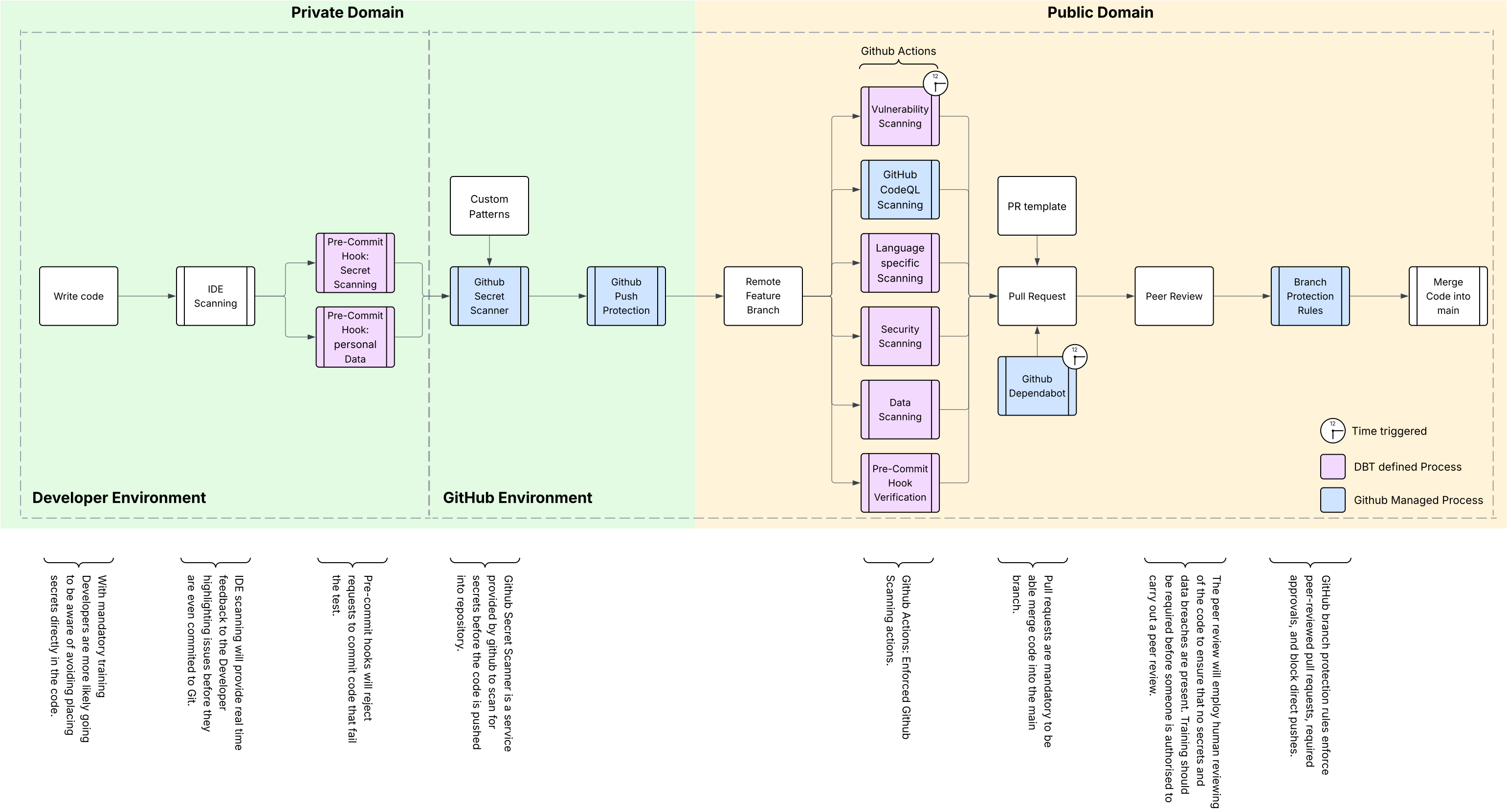
DBT requires all contributors to use the organisation‑approved pre‑commit hooks before committing. A GitHub Action blocks PRs where the hook has not run.
For more information and setup guidance please refer here.
DBT uses custom github properties to enforce branch protection rules and run organisation level github actions.
Manage custom properties:
https://github.com/uktrade/REPO_NAME/settings/access
Mandatory
reusable_workflow_opt_in-truescs_portfolio- The portfolio associated with your CSC. If your portfolio is missing, this can be added by raising an SRE ticket.
Optional
is_docker— for repos that build Docker imageslanguage— all languages used by this repository should be selected, and github workflows will run with dedicated checks on that language.
DBT has introduced a new organisation-wide GitHub security policy that applies the required security checks to every repository. New repositories get this policy by default, but existing ones must have it enabled before they can be made public. Over time, this policy will fully replace the old one across the uktrade account.
You must be an organisation administrator to apply this policy
To add the new security policy, follow these instructions:
- As an organisation administrator, navigate to the security config page.
- Scroll down to the Apply configurations sections, and enter the name of the repository to be made public in the filter input field
- Use the checkbox next to the results list to select all repositories being made public, then use the Apply configuration button to select the Default DBT security configuration
- A confirmation modal will appear displaying a summary of the action being made. Click the apply button
- In the repository that has had the new policy applied, navigate to the Advanced Security page in the repository settings. At the top of the page there should be a banner message Modifications to some settings have been blocked by organization administrators.
The default DBT GitHub Security policy does not currently support scanning PRs raised from a fork of a repository.
If PRs from forks must be supported, switch to Advanced CodeQL to generate a codeql.yml workflow:
- Open the GitHub settings page, and navigate to the Advanced Security section using the left hand menu
- Scroll down to the Code Scanning section, under the Tools sub-section there will be an item for CodeQL analysis
- Click the ... button next to Default setup text, then choose the Switch to advanced option from the menu
- On the popup, click the Disable CodeQL button. Although you are disabling CodeQL, there is still a branch protection rule in place that blocks a PR unless a CodeQL scan is detected. Disabling here will not allow PRs to be merged
- The GitHub online editor will open to create a new file called codeql.yml in your repo, and the contents of this file will be prefilled with the languages CodeQL has detected in your repo. You can modify the contents of this file if needed, however you must leave the workflow name as
CodeQL Advanced - Once happy with the workflow file contents, click the green Commit changes button to trigger a PR to merge this into the main branch
- Approve and merge the PR with this workflow file. Once merged, the CodeQL scan will perform an initial scan that can take a while but you can track the progress by viewing the Actions tab for your repository
Repositories must include a CODEOWNERS file:
https://docs.github.com/en/repositories/managing-your-repositorys-settings-and-features/customizing-your-repository/about-code-owners
Internal contributors should review the GitHub Safety Tips to understand how to protect themselves when coding in the open.
TBC
If your repository does not already contain a pull_request_template.md file, you will inherit the DBT template by default. If you are already using your own template, you should add this section to remind reviewers they should be ensuring no secret values are visible:
### Reviewer Checklist

- [ ] I have reviewed the PR and ensured no secret or sensitive data is present
An organisation ruleset has been created to apply a minimum set of branch protection rules:
- A PR is required for merges into the default branch (usually main)
- At least 1 approver is required before a PR can be merged
- Any conversations on the PR must be marked as resolved
Organisation admins and repository admins have been added to the bypass list for this branch protection ruleset.
Repository admins might decide to add additional rules to their own repositories. It is not possible for repository admins to add their own rules that reduce this level of protection. As an example, a repository admin could add a ruleset that drops the required number of approvers to 0 but that would have no effect as the organisation ruleset would take precedence. They could add a ruleset that sets the number of approvers to 3, and as this is not reducing the organisation ruleset protection this would take precedence.
Push protection is required for all repositories using the default DBT GitHub security policy.
DBT also defines custom secret‑scanning patterns.
You should confirm that push protection is enabled on your repository.
Please raise a ticket with SRE if you need additional patterns.