Mob-Tool is a command-line tool designed to facilitate mob programming sessions for remote teams. The tool provides several features to help teams manage their sessions, including controlling the timer, switching the driver role among team members, and simplifying the necessary Git commands to hand over the work to the next team member.
Mob programming is a software development approach where a team of developers works together on the same task at the same time.
- No changes are made in the
mainbranch: All changes are made in a new feature branch, and you can choose the name of the branch when you start the mob session. - All Git commands executed by the tool are logged in the output: This way, the team can easily see what changes are being made to their repository.
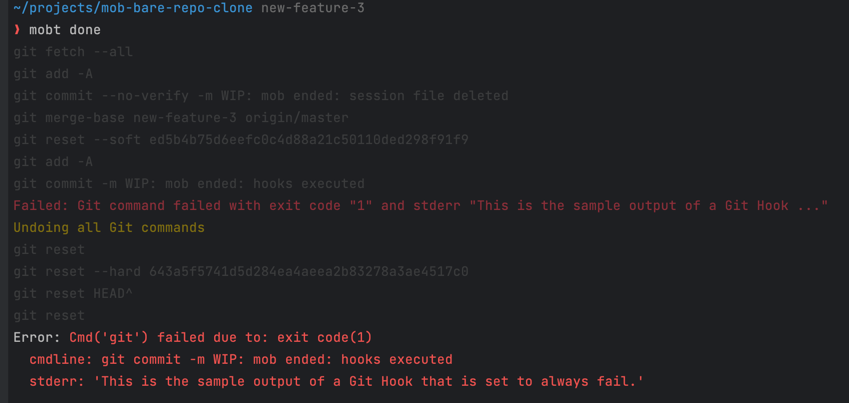
- All commands are rolled back if any error occurs: The commands to rollback are also logged in the output.
pip install mob-toolImportant!
Please note that some operating systems might be equipped with the
python3andpip3commands instead ofpythonandpip(but they should be equivalent). If you don’t havepiporpip3available in your system, please check out pip installation docs.
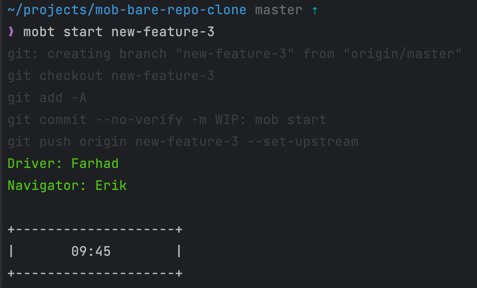
To start a new session, use the following command:
mobt start <branch-name>Here's an example of the output of the start command:
When your time is up, pass the driver role to the next team member with the following command:
mobt nextHere's an example of the output of the next command:
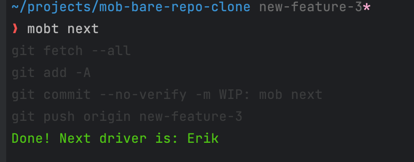
Note that you must call mob next even if you didn't make any changes in the code, so the Mob-Tool can manage whose
turn is next.
The next driver (in this example, Erik) can start working by running the same mobt start <branch-name> command.
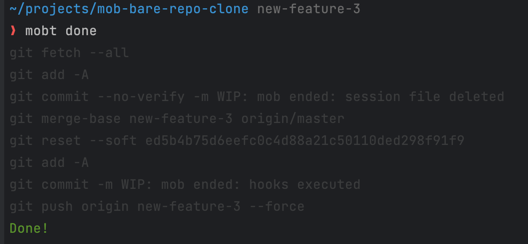
When your feature is ready, you can end the current mob session using the mobt done command. This command finalizes the work by squashing all commits into a single one, pushing the changes to the remote repository, and removing the mob session file to clean up the session.
mobt done [branch_name] [--message | -m <"commit message">] [--do-not-try-to-rebase]branch_name(optional): The name of the branch to process. If not provided, the command defaults to the current mob session branch.--message/-m <"commit message">(optional): Allows you to specify a custom message for the squashed commit. If omitted, a default commit message will be generated.--do-not-try-to-rebase(optional): Use this option to prevent the command from attempting to rebase changes onto the main branch before squashing.
All Git hooks are executed for this final commit, ensuring that your codebase integrity is maintained. Note that Git hooks are always ignored during the start and next commands.
Here's an example of the output of the done command:
The mobt squash command squashes all commits in the current mob session branch or a specified branch. This is useful when you want to combine all the work done during a mob session into a single, clean commit.
mobt squash [branch_name] [--push | -p] [--message | -m <"commit message">] [--do-not-try-to-rebase]branch_name(optional): The name of the branch to squash. If not provided, the current mob session branch will be used.--push/-p(optional): Force push the squashed commit to the remote repository.--message/-m <"commit message">(optional): Provides a custom message for the squashed commit. If not provided, a default message will be generated.--do-not-try-to-rebase(optional): Disables the default behavior of attempting to rebase changes on top of the main branch before squashing.
Git hooks are executed for the final squashed commit.
The mobt wip_commit command creates a "Work In Progress" (WIP) commit with all your current local changes and pushes it to the remote repository. This is particularly useful for saving your work without formally passing the driver role or when you need to share your changes with the team quickly.
mobt wip_commitThis command helps ensure that no work is lost and that all changes are versioned, even if they are not yet ready to be merged.
To set up the development environment, follow these steps:
- Clone the repository
- Create a virtual environment with
python -m venv venv. - Install the app from the local repository with
pip install -e .
e.g.:
rm -rfv venv
python -m venv venv
source ./venv/bin/activate
pip install -e .
If one of the Git commands fails, all changes made to the repository are rolled back. Here's an example of the output with a rollback in action: