Editor-configurable document workflows for Sanity Studio.
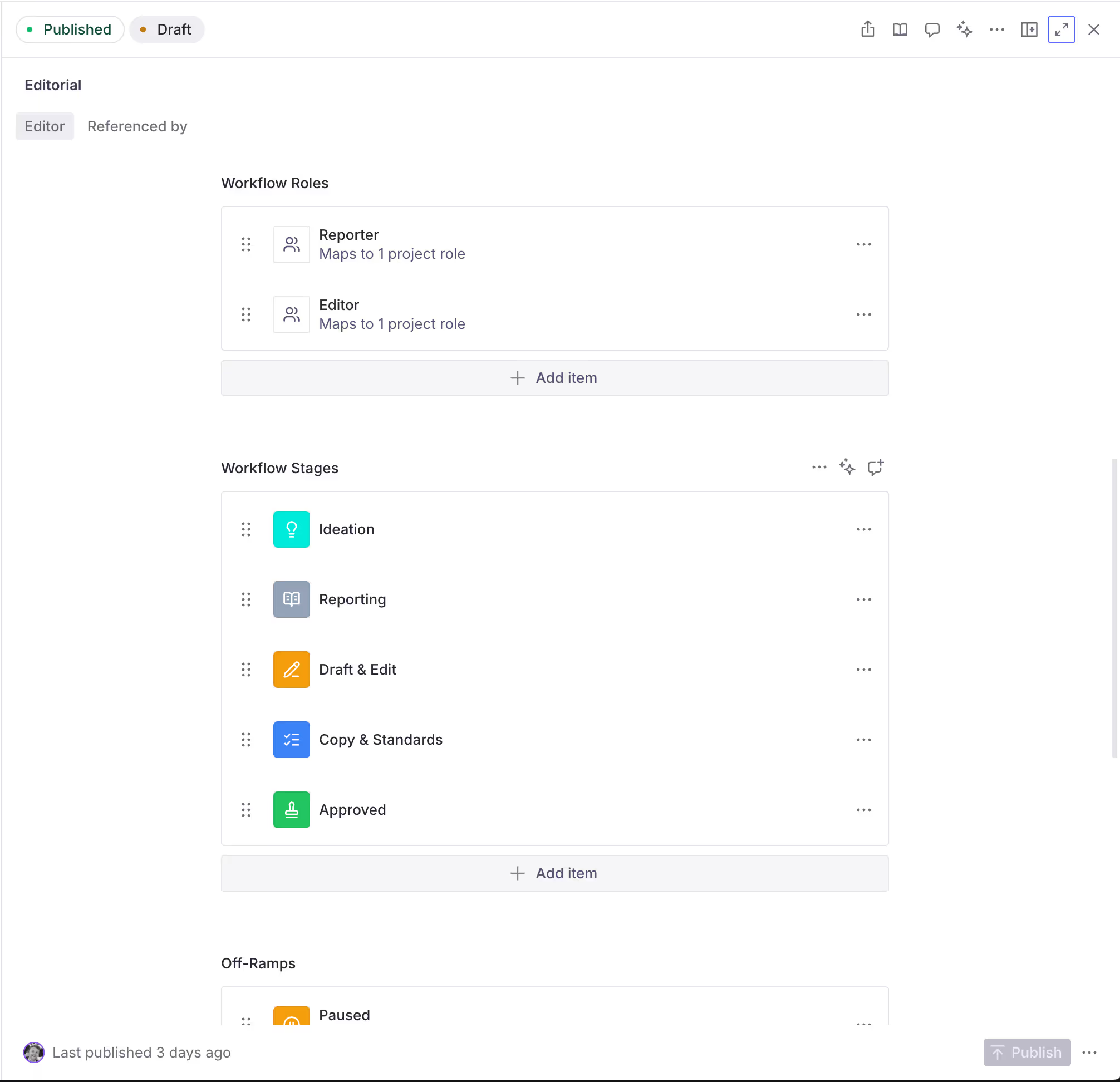
Content authors define the workflow — stages, off-ramps, roles, task templates, completion gating, publish gating — in a workflowDefinition document. The plugin then takes care of the Studio wiring: it injects a status field, an assignments array, and an audit trail onto every workflow-aware document, turns the Publish action into a Move to next stage action, and surfaces an Audit Trail inspector.
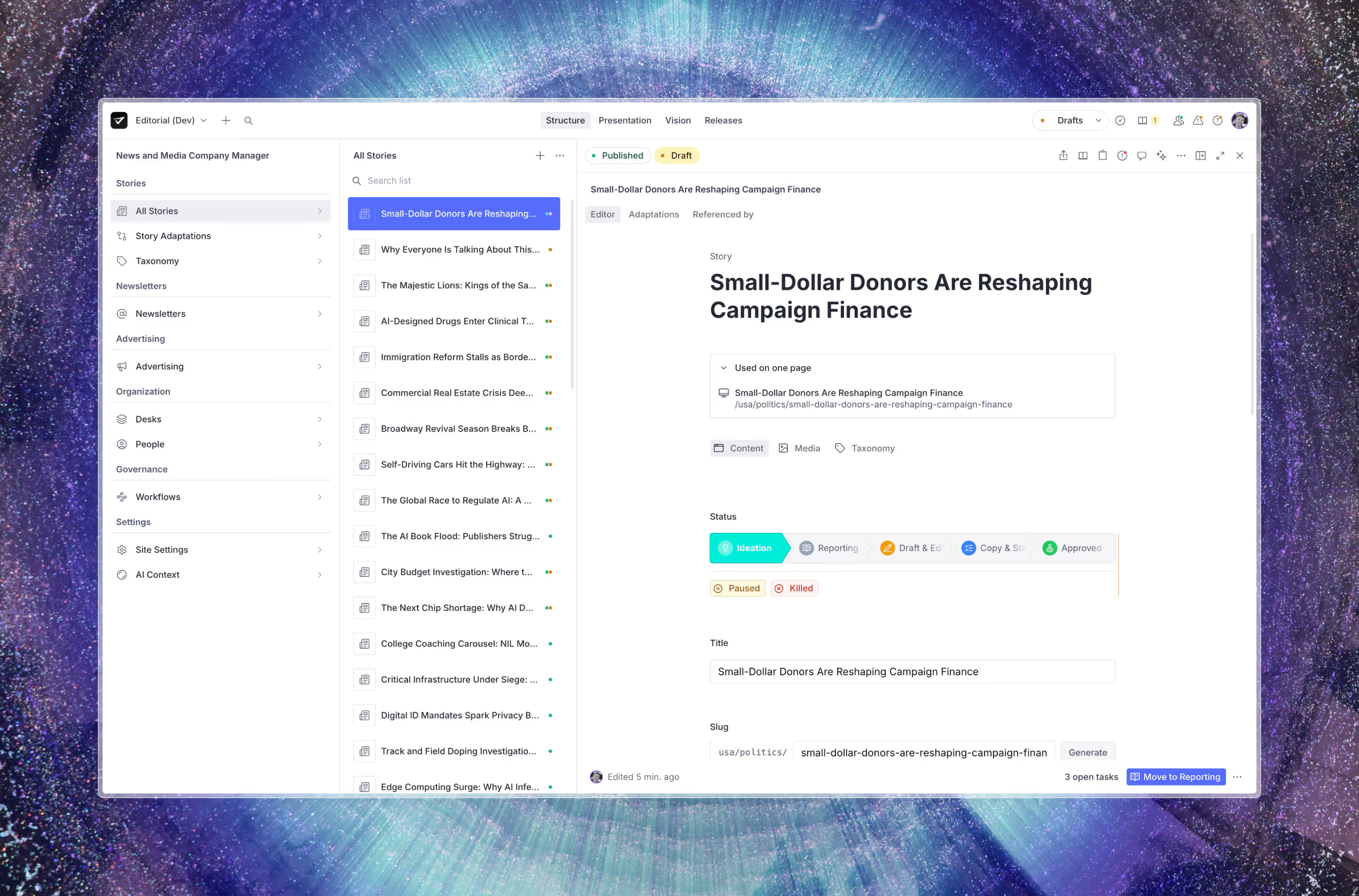
The simplest working setup is one line of config (plugins: [workflowsPlugin()]) plus one workflowDefinition document authored in Studio.
- Full API reference → docs/reference.md
- Engine + UI primitives the plugin is built on →
@sanity-labs/workflow-kit
The plugin works on every Sanity plan, but role-based workflow behavior depends on which project roles your plan supports. See How the plugin works across Sanity plans before you design approvals, gating overrides, or separation of duties.
| Term | What it is |
|---|---|
workflowDefinition |
A Studio document that describes one workflow. Targets a single documentType and owns that type's stages, off-ramps, and roles. |
| Stage | A step on the happy path (e.g. draft → in_review → approved). Each stage has a label, icon, color, and optional tasks and gating rules. |
| Off-ramp | A terminal/abandoned state that isn't part of the forward path (e.g. spiked, archived). Can unpublish the document on entry. |
| Role | A workflow role (e.g. Reporter, Section Editor) authored inside the workflowDefinition document. Each role maps to one or more Sanity project roles via workflowRole.projectRoles[]; the plugin uses that mapping to resolve which Sanity users count as which workflow role at runtime. |
| Task template | A task that's auto-created on stage entry, with an assignee role and due date. Tasks live in the -comments addon dataset. |
| Completion gating | If on, a stage can't be left until its required tasks are closed. Roles listed in gatingOverrideRoles can override. |
| Publish gating | Documents can only be published when the current stage has enablePublishing: true. Enforced by a custom validator. |
| Audit trail | Every transition appends a setStatus entry to the document's statuses array. Rendered in a per-document inspector. |
flowchart LR
  Editor["Editor authors<br/>workflowDefinition doc"] --> Plugin
  Config["sanity.config.ts:<br/>workflowsPlugin()"] --> Plugin
  Plugin["Plugin registers:<br/>- withWorkflow decorator<br/>- action resolver<br/>- audit inspector"] --> Doc
  Doc["Any workflow-aware<br/>document type"] -->|"status field"| Action["Move to next stage<br/>(publish action)"]
  Action -->|"patches status,<br/>appends audit entry,<br/>creates tasks"| DocUpdated["Document updated"]
  DocUpdated --> Inspector["Audit Trail inspector"]
About 5 minutes from pnpm install to your first transition.
pnpm add @sanity-labs/sanity-plugin-workflows @sanity-labs/workflow-kit
@sanity-labs/workflow-kitis a peer of this package — you need it in your project even if you never import from it directly.
// sanity.config.ts
import { defineConfig } from "sanity";
import { workflowsPlugin } from "@sanity-labs/sanity-plugin-workflows";

export default defineConfig({
  name: "default",
  title: "My Studio",
  projectId: "your-project-id",
  dataset: "production",
  plugins: [workflowsPlugin()],
  schema: {
    types: [
      // your existing types
    ],
  },
});
With zero options, the plugin:
- Registers the workflow schema types (
workflowDefinition, stages, off-ramps, roles, task templates, assignments). - Applies the
withWorkflow()decorator to all document types except the plugin's own config documents (workflowDefinitionandworkflowsConfig), injectingstatus, anassignmentsarray,statuses(audit trail), andpendingTransitionReasonfields plus a publish-gating validator. - Registers the audit-trail publish action wrapper and the Audit Trail inspector.
Start Studio (sanity dev), open the new Workflow Definition document type, and create one:
- Document Type — the
nameof an existing document type, e.g.article. - Roles — add at least one (e.g. Reporter, slug
reporter, mapped to the Sanity project roles that count as reporters). - Stages — add at least two. For the final "ready to publish" stage, toggle Allow Publishing on.
- Publish the definition.
Open any document of the target type. You should now see:
- A
Statusfield at the top (the injectedStatusPathInput). - The publish button has become Move to next stage, styled with the next stage's icon and color.
- Open the Audit Trail inspector from the document header — it streams updates as you move through stages.
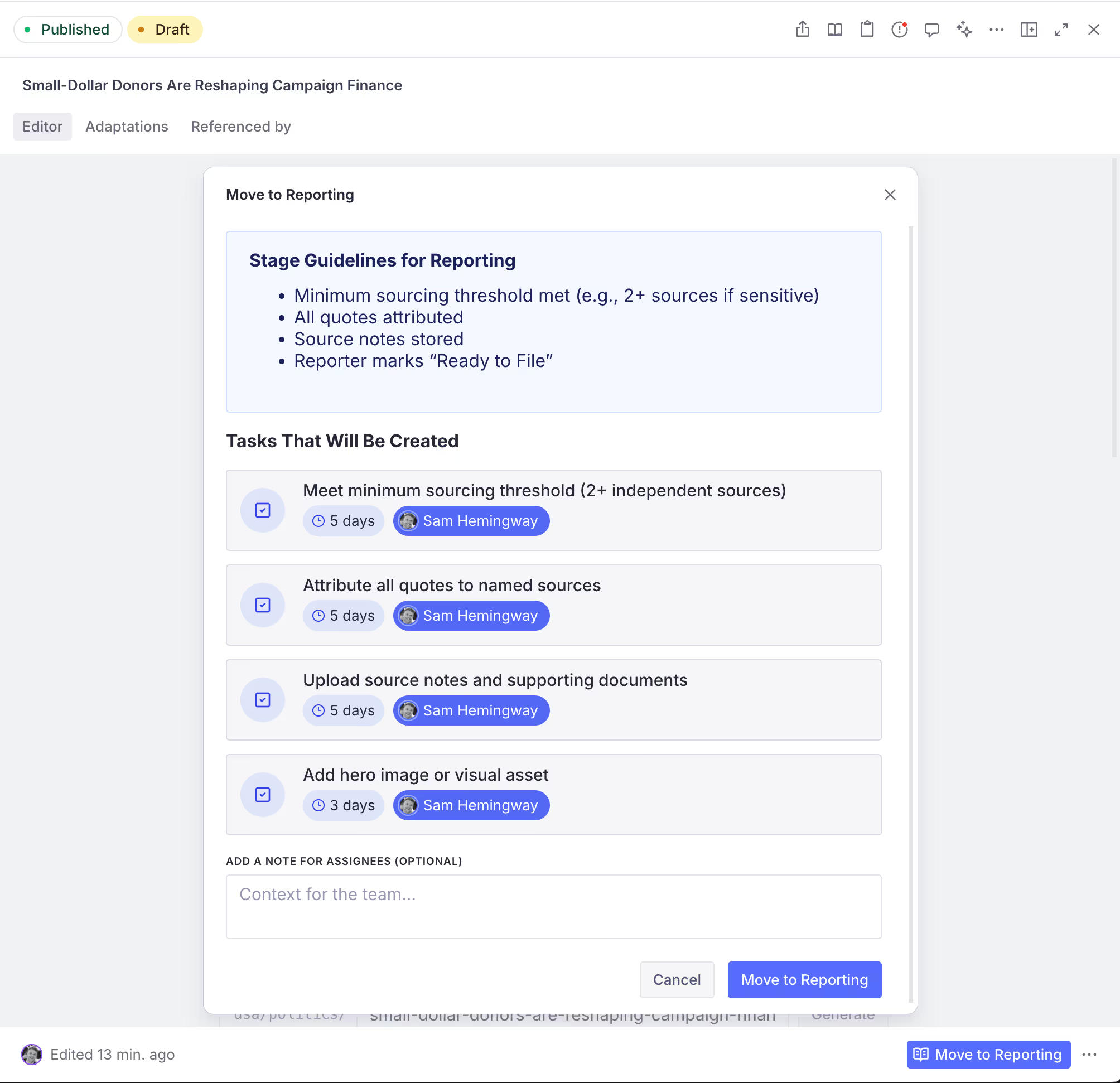
Click Move to next stage. If the stage has task templates or stage guidance, you'll see a confirmation dialog. Confirm, and the document's status is patched, tasks are created in the -comments addon dataset, and a new entry appears in the audit trail.
That's a complete workflow. Everything below is optional customization.
The core workflow works on every Sanity plan. Plan differences only show up when you map workflow roles to Sanity project roles. That mapping drives gating overrides, off-ramp access, and assignee eligibility.
| Plan | Available project roles | What that means for workflow roles | Main limitation or advantage |
|---|---|---|---|
| Free | administrator, viewer |
You can still map workflow roles, but anyone who needs to edit or move documents will usually map to administrator, because viewer is read-only. |
Best for basic admin-versus-viewer workflows; separation of duties is limited. |
| Growth | administrator, editor, viewer, developer, contributor |
More built-in roles give you more realistic editorial handoffs without changing how the plugin works. | Good for lightweight separation of duties, but you are still limited to Sanity's predefined roles. |
| Enterprise | Everything in Growth plus custom roles | You can map workflow roles to custom project roles that match your real team structure. | Most expressive option for strict approvals, off-ramp permissions, and assignee rules. |
Nothing about the plugin requires Enterprise. Enterprise simply gives role mapping more room to model real-world teams.
For the schema-level details behind this mapping, see workflowRole.projectRoles[] in the full API reference.
Every workflow-aware document gets an assignments array field injected automatically. No schema edit required. Each entry captures a workflow role (auto-populated from workflowDefinition.roles[]) and the Sanity user id assigned to it — so editors can record who's the reporter on this article, who's the section editor, and so on, with the picker always in sync with the current workflow definition.
Opt out entirely — suppress the injection with a plugin option:
workflowsPlugin({ injectAssignments: false });Or declare your own assignments field on the document type, and the decorator will leave it alone.
Customize — if you need additional fields on assignments (e.g. a channel or market categorization), define your own schema type with name: 'assignment' and register it via workflowsPlugin({schemaTypes: [yourAssignment]}). The plugin merges schema types by name, so yours replaces the default.
Copy the shape from the plugin's own assignmentObject export (exported from @sanity-labs/sanity-plugin-workflows/schema) as a starting point.
You might want to ensure that editors cannot add workflows to specific document types — singletons, config documents, embedded blocks surfaced as documents, etc. By default the plugin only excludes its own config documents: workflowDefinition and workflowsConfig.
To add your own, disable the plugin's built-in decorator and run withWorkflow yourself with your exclude list:
// sanity.config.ts
import { defineConfig, type SchemaTypeDefinition } from "sanity";
import { workflowsPlugin } from "@sanity-labs/sanity-plugin-workflows";
import {
  withWorkflow,
  type SchemaDecorator,
} from "@sanity-labs/sanity-plugin-workflows/schema";

const applySchemaDecorators = (
  types: SchemaTypeDefinition[],
  decorators: SchemaDecorator[],
) => decorators.reduce((acc, decorate) => decorate(acc), types);

export default defineConfig({
  // ...
  schema: {
    types: (prev) =>
      applySchemaDecorators(prev, [
        withWorkflow({ exclude: ["siteSettings", "homepage"] }),
      ]),
  },
  plugins: [workflowsPlugin({ schemaTypes: [] })],
});If a document type already owns a status field you want to keep (e.g. a domain-specific lifecycle), the decorator will detect that and skip injection entirely — leaving your field alone. To still get the audit-trail statuses array with its custom UI, add reusableStatusTrackerField manually:
// schemaTypes/documents/storyAdaptationType.ts
import { defineField, defineType } from "sanity";
import { reusableStatusTrackerField } from "@sanity-labs/sanity-plugin-workflows/schema";

export const storyAdaptationType = defineType({
  name: "storyAdaptation",
  type: "document",
  fields: [
    defineField({ name: "title", type: "string" }),
    defineField({
      name: "status",
      type: "string",
      options: { list: ["draft", "live"] },
    }),
    { ...reusableStatusTrackerField, group: "workflows" },
  ],
  groups: [{ name: "workflows", title: "Workflows" }],
});The plugin mounts a single action resolver that wraps publish, inserts off-ramp slot actions, and adds the transition dialog. When your Studio already has its own action resolvers to compose with, disable the plugin's defaults and mount the pieces yourself:
// sanity.config.ts
import { defineConfig } from "sanity";
import { workflowsPlugin } from "@sanity-labs/sanity-plugin-workflows";
import { workflowAuditTrailActionResolver } from "@sanity-labs/sanity-plugin-workflows/actions";
import { createWorkflowAuditInspector } from "@sanity-labs/sanity-plugin-workflows/audit";
import type { DocumentActionComponent } from "sanity";

type ActionResolver = typeof workflowAuditTrailActionResolver;

const composeActionResolvers = (
  ...resolvers: ActionResolver[]
): ActionResolver => {
  return (prev, context) =>
    resolvers.reduce(
      (acc: DocumentActionComponent[], resolve) => resolve(acc, context),
      prev,
    );
};

const combinedActions = composeActionResolvers(
  yourCustomActionResolver,
  workflowAuditTrailActionResolver,
  yourOtherActionResolver,
);

export default defineConfig({
  // ...
  plugins: [
    workflowsPlugin({
      actions: false,
      inspector: false,
      schemaTypes: workflowSchemaTypes,
    }),
  ],
  document: {
    actions: combinedActions,
    inspectors: (prev) => [createWorkflowAuditInspector(), ...prev],
  },
});
workflowAuditTrailActionResolver is the composite the plugin uses internally. It wraps publish, inserts off-ramp actions from workflowOffRampDocumentActionsResolver, and runs the transition wrapper from workflowTransitionActionResolver.
Every internal client call uses a single API version (default '2026-04-12', defined in src/internal/plugin/constants.ts). Pin a different version when you need to align with the rest of your Studio:
workflowsPlugin({ apiVersion: "2026-04-12" });The value is stored globally on the plugin's internal constants module — set it once at registration time.
Disable actions and mount the inspector on its own when you want history without the transition dialog:
workflowsPlugin({ actions: false, inspector: true });Or disable both and mount the inspector yourself with custom title/icon:
import { ClipboardListIcon } from "@sanity/icons";
import { createWorkflowAuditInspector } from "@sanity-labs/sanity-plugin-workflows/audit";

const auditInspector = createWorkflowAuditInspector({
  icon: ClipboardListIcon,
  title: "Status history",
});

export default defineConfig({
  // ...
  plugins: [workflowsPlugin({ actions: false, inspector: false })],
  document: {
    inspectors: (prev) => [auditInspector, ...prev],
  },
});
The inspector only renders when useHasWorkflow(documentType) returns true, i.e. a published workflowDefinition document exists for that type.
You can seed a workflow as an NDJSON import so a repo clone doesn't require authoring a workflow from scratch:
{
  "_id": "workflowDefinition.article",
  "_type": "workflowDefinition",
  "title": "Article workflow",
  "slug": { "_type": "slug", "current": "article" },
  "documentType": "article",
  "forwardOnly": false,
  "roles": [
    {
      "_type": "workflowRole",
      "_key": "role-reporter",
      "label": "Reporter",
      "slug": { "_type": "slug", "current": "reporter" },
      "projectRoles": ["editor", "administrator"]
    }
  ],
  "stages": [
    {
      "_type": "workflowStage",
      "_key": "stage-draft",
      "label": "Draft",
      "slug": { "_type": "slug", "current": "draft" },
      "color": "#9CA3AF",
      "enablePublishing": false
    },
    {
      "_type": "workflowStage",
      "_key": "stage-review",
      "label": "In Review",
      "slug": { "_type": "slug", "current": "in_review" },
      "color": "#3B82F6",
      "enablePublishing": false
    },
    {
      "_type": "workflowStage",
      "_key": "stage-approved",
      "label": "Approved",
      "slug": { "_type": "slug", "current": "approved" },
      "color": "#10B981",
      "enablePublishing": true
    }
  ]
}
Save as workflow.article.ndjson and import:
npx sanity dataset import workflow.article.ndjson productionThe plugin exposes four entrypoints. Each maps directly to a section in docs/reference.md.
| Entrypoint | What you get |
|---|---|
@sanity-labs/sanity-plugin-workflows |
workflowsPlugin, WorkflowsPluginOptions — the plugin function and its options type. |
@sanity-labs/sanity-plugin-workflows/schema |
withWorkflow, every default schema type, every generator function, reusableStatusTrackerField, generateStatusType, WorkflowListOption, SchemaDecorator. |
@sanity-labs/sanity-plugin-workflows/actions |
Action resolvers and direct factories: workflowAuditTrailActionResolver, workflowTransitionActionResolver, workflowOffRampDocumentActionsResolver, createWorkflowTransitionAction, createWorkflowOffRampSlotAction. |
@sanity-labs/sanity-plugin-workflows/audit |
createWorkflowAuditInspector, WorkflowAuditInspector, useHasWorkflow, WorkflowAuditInspectorConfig, WorkflowStatusEntry. |
This plugin is built on top of @sanity-labs/workflow-kit, which provides the engine (performWorkflowTransition, evaluateWorkflowStageGating, fetchWorkflowDefinition, role/ACL helpers) and the React/Studio primitives (StatusPathInput, WorkflowStatusPath, the confirm/gated/off-ramp dialogs).
Reach for workflow-kit directly when:
- You want to render the workflow path on a frontend (Next.js, etc.) — use
WorkflowStatusPathfrom@sanity-labs/workflow-kit/react. - You're building a custom document action or server-side script and only need
performWorkflowTransition— import it from@sanity-labs/workflow-kit/engine. - You want to embed the transition dialogs outside this plugin — the
Dialog+DialogContentcomponents are exported from@sanity-labs/workflow-kit/react. - You're writing a custom Studio input and want to use the raw
StatusPathInput— import it from@sanity-labs/workflow-kit/studio.
If you're adding workflows to a Studio for the first time, this plugin is the batteries-included entry point. Use workflow-kit when you outgrow it.
No "Move to next stage" action appears on a document.
- The document type is one of the plugin's default exclusions:
workflowDefinitionorworkflowsConfig. - No published
workflowDefinitionexists wheredocumentType == "<yourType>". The decorator checks for the definition at validate time; the action only renders whenfindNextWorkflowStagereturns a stage after the currentstatus. - The document's
statusis the last stage on the happy path. There's no next stage to move to — the originalPublishaction is shown instead. - Publish action itself was suppressed earlier in the action chain. The transition wrapper only wraps actions whose
action === 'publish'.
The status field doesn't get injected.
The withWorkflow decorator intentionally skips types that already declare a status or statuses field (see src/internal/schema/withWorkflow.tsx lines 55–60). This is the escape hatch used by storyAdaptationType in news_and_media. If you want the audit-trail statuses array on those types, add reusableStatusTrackerField manually.
The assignments field appears on a document type where I don't want it.
By default the plugin injects an assignments array on every workflow-aware document. Two ways to suppress it:
- Declare your own
assignmentsfield on that document type — the decorator sees an existing field with that name and leaves it alone. - Disable the injection globally with
workflowsPlugin({ injectAssignments: false }). You can still add{type: 'assignment'}to specific array fields yourself.
Publish is blocked with "Cannot publish - document must reach …".
The publish-gating validator only allows publish on stages/off-ramps where enablePublishing: true. Flip the toggle on the target stage in the workflowDefinition and republish the definition.
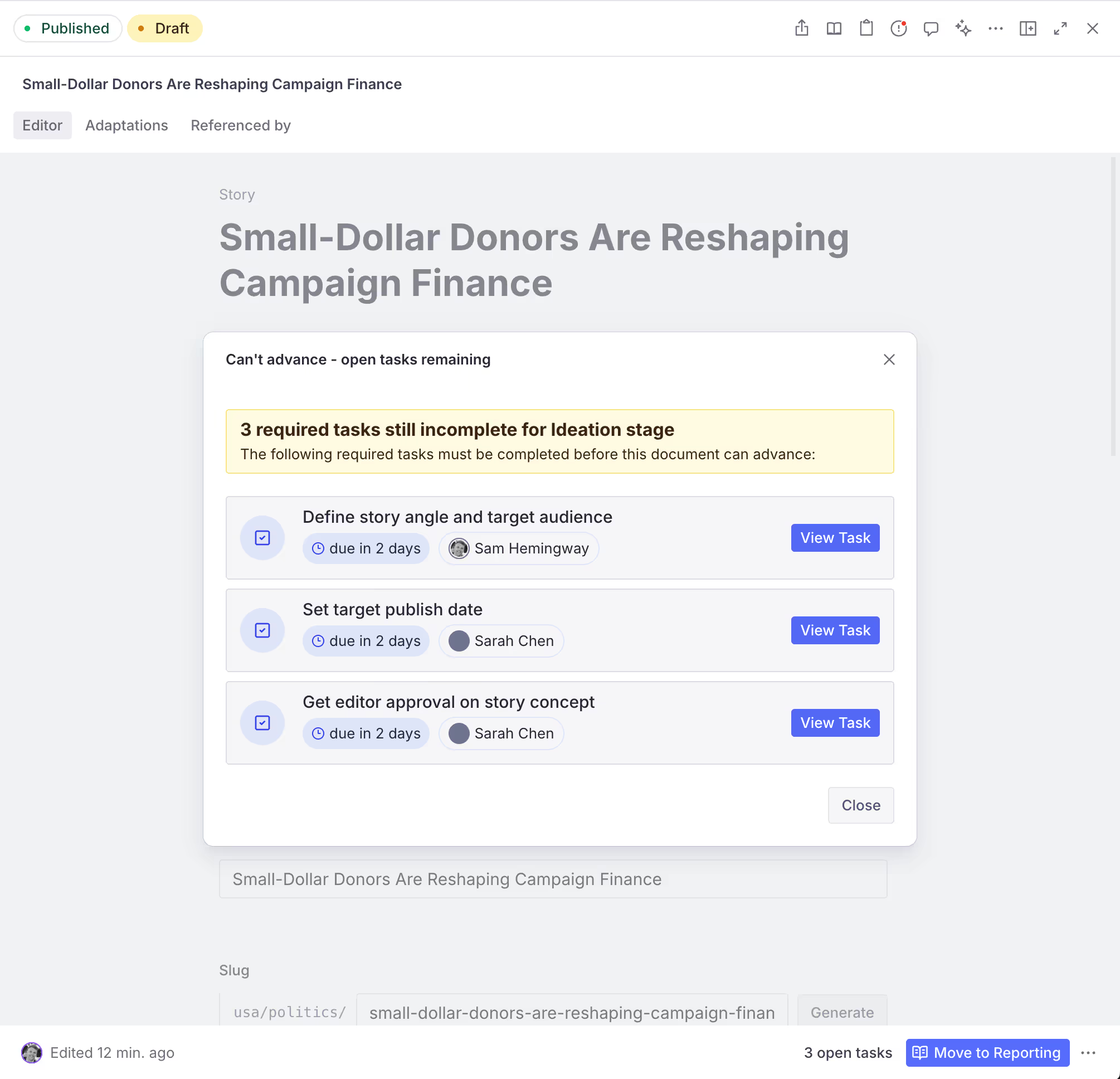
The transition dialog opens straight to the "open tasks remaining" view.
The current stage has enableCompletionGating: true and there are open required tasks in the -comments addon dataset. Close the tasks, or add a role to gatingOverrideRoles on the stage so gating-privileged users can override.
Types drift after editing a schema.
Re-run schema extraction and typegen in the consuming Studio:
npx sanity schema extract
npx sanity typegen generate
API version mismatch / "could not resolve workflow" errors.
If your Studio pins a Sanity API version elsewhere, pass the same version to the plugin:
workflowsPlugin({ apiVersion: "2026-04-12" });This plugin uses @sanity/plugin-kit and pkg-utils. See Testing a plugin in Sanity Studio for hot-reload setup.
Common scripts:
pnpm build        # pkg-utils build with strict checks
pnpm typecheck    # tsgo --noEmit
pnpm lint         # oxlint
pnpm test         # vitest run
pnpm link-watch # plugin-kit link-watch (develop against a local Studio)MIT © Sam Hemingway