




This image contains the GeyserMC Standalone Proxy, which allows you to connect to Java Edition Minecarft servers from Bedrock Edition clients. Please refer to the GeyserMC website for more information.
docker run -d \
  --name geyser-proxy \
  --restart unless-stopped \
  -e JAVA_ADDRESS=mc \
  -e JAVA_AUTH_TYPE=floodgate \
  -v geyser-data:/Geyser/data \
  -v /path/to/floodgate/key.pem:/Geyser/floodgate/key.pem \
portiz93/geysermc-proxy:latestvolumes:
geyser-data:
geyser-proxy:
image: portiz93/geysermc-proxy:latest
# Add your Minecraft server service to wait for it to be healthy
# depends_on:
# mc:
# condition: service_healthy
environment:
# The name of the Minecraft server service or the IP address of the server
JAVA_ADDRESS: mc
# The port of the Minecraft server. Default is 25565
# JAVA_PORT: 25565
# The type of authentication to use. Default is online
JAVA_AUTH_TYPE: floodgate
restart: unless-stopped
volumes:
- geyser-data:/Geyser/data
# Replace local path with the path to your Floodgate key.pem file
- /path/to/floodgate/key.pem:/Geyser/floodgate/key.pemIf you intend to use Floodgate, you will need to mount the Floodgate key.pem file directly to /Geyser/floodgate/key.pem in the container.
Take a look here for how to set up Geyser.
| Variable | Default | Description |
|---|---|---|
BEDROCK_ADDRESS |
0.0.0.0 |
The IP address that Geyser will bind on to listen for incoming Bedrock connections. Generally, you should only change this if you want to limit what IPs can connect to your server. |
BEDROCK_PORT |
19132 |
The port that will Geyser will listen on for incoming Bedrock connections. Since Minecraft: Bedrock Edition uses UDP, this port must allow UDP traffic. |
JAVA_ADDRESS |
127.0.0.1 |
The IP address of the Java Edition server. |
JAVA_PORT |
25565 |
The port of the Java Edition server. |
JAVA_AUTH_TYPE |
online |
What type of authentication Bedrock players will be checked against when logging into the Java server. Can be "floodgate" (see https://wiki.geysermc.org/floodgate/), "online", or "offline". |
JAVA_FORWARD_HOSTNAME |
true |
Whether to forward the hostname that the Bedrock client used to connect over to the Java server. This is designed to be used for forced hosts on proxies. |
MOTD_PRIMARY_MOTD |
Geyser |
The MOTD that will be broadcasted to Minecraft: Bedrock Edition clients. This is irrelevant if "passthrough-motd" is set to true. If either of these are empty, the respective string will default to "Geyser" |
MOTD_SECONDARY_MOTD |
Another Geyser server. |
|
MOTD_PASSTHROUGH_MOTD |
true |
Whether Geyser should relay the MOTD from the Java server to Bedrock players. |
MOTD_MAX_PLAYERS |
100 |
Maximum amount of players that can connect. This is only visual, and is only applied if passthrough-motd is disabled. |
MOTD_PASSTHROUGH_PLAYER_COUNTS |
true |
Whether to relay the player count and max players from the Java server to Bedrock players. |
MOTD_PING_PASSTHROUGH_INTERVAL |
3 |
How often to ping the Java server to refresh MOTD and player count, in seconds. |
GAMEPLAY_SERVER_NAME |
Geyser |
The server name that will be sent to Minecraft: Bedrock Edition clients. This is visible in both the pause menu and the settings menu. |
GAMEPLAY_COOLDOWN_TYPE |
crosshair |
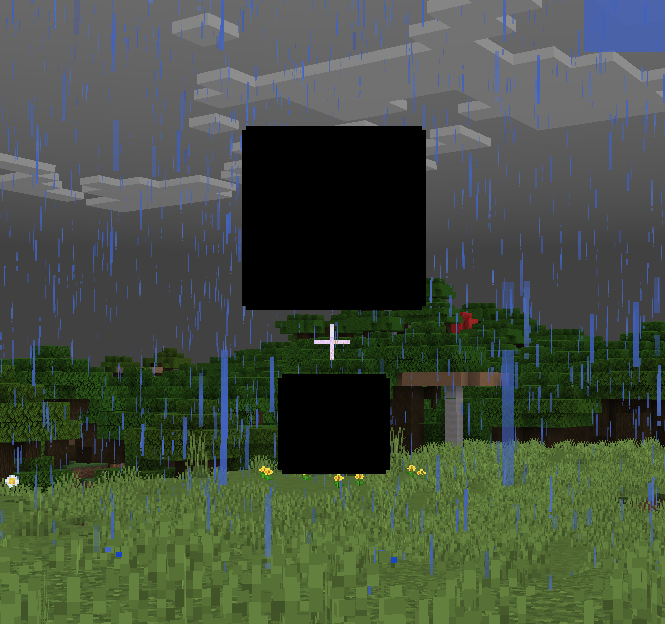
Allow a fake cooldown indicator to be sent. Bedrock players otherwise do not see a cooldown as they still use 1.8 combat. Please note: with the integrated pack disabled, some users may see a black box during the cooldown sequence, like below: https://geysermc.org/img/external/cooldown_indicator.png This can be resolved by enabling the integrated pack, or by going into Bedrock settings under the accessibility tab and setting "Text Background Opacity" to 0. This setting can be set to "crosshair", "hotbar", or "disabled" |
GAMEPLAY_COMMAND_SUGGESTIONS |
true |
Bedrock clients can freeze when opening up the command prompt for the first time if given a lot of commands. Disabling this will prevent command suggestions from being sent and solve freezing for Bedrock clients. |
GAMEPLAY_SHOW_COORDINATES |
true |
Controls if coordinates are shown to players. |
GAMEPLAY_DISABLE_BEDROCK_SCAFFOLDING |
false |
Whether Bedrock players are blocked from performing their scaffolding-style bridging. |
GAMEPLAY_NETHER_ROOF_WORKAROUND |
false |
Bedrock prevents building and displaying blocks above Y127 in the Nether. This config option works around that by changing the Nether dimension ID to the End ID. The main downside to this is that the entire Nether will have the same red fog rather than having different fog for each biome. |
GAMEPLAY_EMOTES_ENABLED |
true |
Whether to show Bedrock Edition emotes to other Bedrock Edition players. |
GAMEPLAY_BLOCK_LEGACY_CODES |
true |
Whether to remove legacy text formatting codes sent by Bedrock players. Unlike on Java Edition, typing section signs for legacy color codes is possible on Bedrock Edition. See https://minecraft.wiki/w/Formatting_codes for further information. |
GAMEPLAY_UNUSABLE_SPACE_BLOCK |
minecraft:barrier |
Which item to use to mark unavailable slots in a Bedrock player inventory. Examples of this are the 2x2 crafting grid while in creative, or custom inventory menus with sizes different from the usual 3x9. A barrier block is the default item. This config option can be set to any Bedrock item identifier. If you want to set this to a custom item, make sure that you specify the item in the following format: "geyser_custom:" |
GAMEPLAY_ENABLE_CUSTOM_CONTENT |
true |
Whether to add any items and blocks which normally does not exist in Bedrock Edition. This should only need to be disabled if using a proxy that does not use the "transfer packet" style of server switching. If this is disabled, furnace minecart items will be mapped to hopper minecart items. Geyser's block, item, and skull mappings systems will also be disabled. This option requires a restart of Geyser in order to change its setting. |
GAMEPLAY_FORCE_RESOURCE_PACKS |
true |
Force clients to load all resource packs if there are any. If set to false, it allows the user to connect to the server even if they don't want to download the resource packs. |
GAMEPLAY_ENABLE_INTEGRATED_PACK |
true |
Whether to automatically serve a resource pack that is required for some Geyser features to all connecting Bedrock players. If enabled, force-resource-packs will be enabled. |
GAMEPLAY_FORWARD_PLAYER_PING |
false |
Whether to forward player ping to the server. While enabling this will allow Bedrock players to have more accurate ping, it may also cause players to time out more easily. |
GAMEPLAY_XBOX_ACHIEVEMENTS_ENABLED |
false |
Allows Xbox achievements to be unlocked. If a player types in an unknown command, they will receive a message that states cheats are disabled. Otherwise, commands work as expected. |
GAMEPLAY_MAX_VISIBLE_CUSTOM_SKULLS |
128 |
The maximum number of custom skulls to be displayed per player. Increasing this may decrease performance on weaker devices. A value of 0 will disable all custom skulls. Setting this to -1 will cause all custom skulls to be displayed regardless of distance or number. |
GAMEPLAY_CUSTOM_SKULL_RENDER_DISTANCE |
32 |
The radius in blocks around the player in which custom skulls are displayed. |
DEFAULT_LOCALE |
system |
The default locale if we don't have the one the client requested. If set to "system", the system's language will be used. |
LOG_PLAYER_IP_ADDRESSES |
true |
Whether player IP addresses will be logged by the server. |
SAVED_USER_LOGINS |
For online mode authentication type only. Stores a list of Bedrock player usernames that should have their Java Edition account saved after login. This saves a token that can be reused to authenticate the player later. This does not save emails or passwords, but you should still be cautious when adding to this list and giving others access to this Geyser instance's files. Removing a name from this list will delete its cached login information on the next Geyser startup. The file that tokens will be saved in is in the same folder as this config, named "saved-refresh-tokens.json". | |
PENDING_AUTHENTICATION_TIMEOUT |
120 |
For online mode authentication type only. Specify how many seconds to wait while user authorizes Geyser to access their Microsoft account. User is allowed to disconnect from the server during this period. |
NOTIFY_ON_NEW_BEDROCK_UPDATE |
true |
Whether to alert the console and operators that a new Geyser version is available that supports a Bedrock version that this Geyser version does not support. It's recommended to keep this option enabled, as many Bedrock platforms auto-update. |
ADVANCED_CACHE_IMAGES |
0 |
Specify how many days player skin images will be cached to disk to save downloading them from the internet. A value of 0 is disabled. (Default: 0) |
ADVANCED_SCOREBOARD_PACKET_THRESHOLD |
20 |
Geyser updates the Scoreboard after every Scoreboard packet, but when Geyser tries to handle a lot of scoreboard packets per second, this can cause serious lag. This option allows you to specify after how many Scoreboard packets per seconds the Scoreboard updates will be limited to four updates per second. |
ADVANCED_ADD_TEAM_SUGGESTIONS |
true |
Whether Geyser should send team names in command suggestions. Disable this if you have a lot of teams used that you don't need as suggestions. |
ADVANCED_RESOURCE_PACK_URLS |
A list of remote resource pack urls to send to the Bedrock client for downloading. The Bedrock client is very picky about how these are delivered - please see our wiki page for further info: https://geysermc.org/wiki/geyser/packs/ | |
ADVANCED_JAVA_USE_HAPROXY_PROTOCOL |
false |
Whether to enable HAPROXY protocol when connecting to the Java server. This is useful only when: 1) Your Java server supports HAPROXY protocol (it probably doesn't) 2) You run Velocity or BungeeCord with the option enabled in the proxy's main config. IF YOU DON'T KNOW WHAT THIS IS, DON'T TOUCH IT! |
ADVANCED_BEDROCK_BROADCAST_PORT |
0 |
The port to broadcast to Bedrock clients with the MOTD that they should use to connect to the server. A value of 0 will broadcast the port specified above. DO NOT change this unless Geyser runs on a different port than the one that is used to connect. |
ADVANCED_BEDROCK_COMPRESSION_LEVEL |
6 |
How much to compress network traffic to the Bedrock client. The higher the number, the more CPU usage used, but the smaller the bandwidth used. Does not have any effect below -1 or above 9. Set to -1 to disable. |
ADVANCED_BEDROCK_USE_HAPROXY_PROTOCOL |
false |
Whether to expect HAPROXY protocol for connecting Bedrock clients. This is useful only when you are running a UDP reverse proxy in front of your Geyser instance. IF YOU DON'T KNOW WHAT THIS IS, DON'T TOUCH IT! |
ADVANCED_BEDROCK_HAPROXY_PROTOCOL_WHITELISTED_IPS |
A list of allowed HAPROXY protocol speaking proxy IP addresses/subnets. Only effective when "use-proxy-protocol" is enabled, and should really only be used when you are not able to use a proper firewall (usually true with shared hosting providers etc.). Keeping this list empty means there is no IP address whitelist. IP addresses, subnets, and links to plain text files are supported. | |
ADVANCED_BEDROCK_USE_WATERDOGPE_FORWARDING |
false |
Should be enabled if this Geyser instance is behind a WaterdogPE proxy. If enabled, Geyser will use the xuid / address sent from WaterdogPE and reject clients that do not send it. |
ADVANCED_BEDROCK_MTU |
1400 |
The internet supports a maximum MTU of 1492 but could cause issues with packet fragmentation. 1400 is the default. |
ADVANCED_BEDROCK_VALIDATE_BEDROCK_LOGIN |
true |
This option disables the auth step Geyser performs for connecting Bedrock players. It can be used to allow connections from ProxyPass and WaterdogPE. In these cases, make sure that users cannot directly connect to this Geyser instance. See https://www.spigotmc.org/wiki/firewall-guide/ for assistance - and use UDP instead of TCP. Disabling Bedrock authentication for other use-cases is NOT SUPPORTED, as it allows anyone to spoof usernames, and is therefore a security risk. All Floodgate functionality (including skin uploading and account linking) will also not work when this option is disabled. |
ENABLE_METRICS |
false |
bStats is a stat tracker that is entirely anonymous and tracks only basic information about Geyser, such as how many people are online, how many servers are using Geyser, what OS is being used, etc. You can learn more about bStats here: https://bstats.org/. https://bstats.org/plugin/server-implementation/GeyserMC |
METRICS_UUID |
a23ef3ad-50e1-49b7-bf95-b5c9cd91b863 |
The bstats metrics uuid. Do not touch! |
DEBUG_MODE |
false |
If debug messages should be sent through console |
All software and files not created or managed by GeyserMC are licensed under the MIT license.
See GeyserMC's license.
This project is not affiliated with GeyserMC or any of its developers. This is an unofficial image.