The all-in-one WordPress security plugin. Login protection, AI crawler blocker, CPU monitor, content lock, and a beautiful login page customizer with real-time live preview — all from a single modern dashboard.



🌐 View Details | 💰 View Pricing | 🎥 Watch Video Tutorial
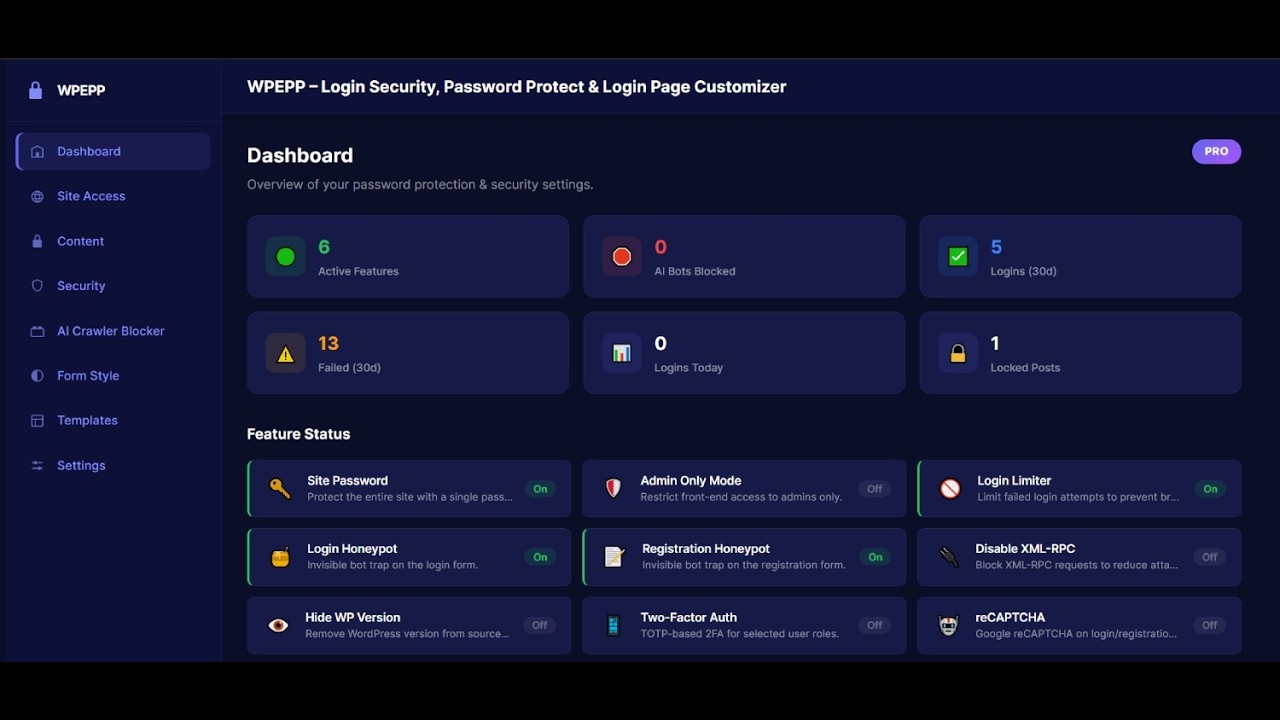
Stop installing 5 separate plugins. WPEPP replaces your:
| What you were using | → | WPEPP replaces it |
|---|---|---|
| Login Limiter plugin | → | ✅ Built-in Login Limiter |
| Login page customizer | → | ✅ Built-in Live Preview Customizer |
| Password form styler | → | ✅ 4 Styles + Templates |
| Content restriction plugin | → | ✅ Content Lock + Conditional Display |
| AI crawler blocker | → | ✅ One-click AI Blocker |
| Server monitoring plugin | → | ✅ Built-in CPU Monitor & Site Health |
Zero external scripts on the front end. No impact on page speed.
- Login Attempt Limiter — block IPs after repeated failed login attempts
- Configurable Lockout — set max attempts and lockout duration in minutes
- Login Honeypot — invisible bot trap catches brute force attacks instantly
- Registration Honeypot — hidden spam trap blocks fake signups
- Registration Rate Limiter — prevent mass registration spam per IP
- IP-based Tracking — every failed login tracked by IP for accurate blocking
- Custom Login URL — change
wp-login.phpto any URL you choose - Hide Default Login — original
wp-login.phpreturns 404 - After-Login Redirect — send users to a specific page after login
- Auto-Login Links — generate secure one-time login tokens
- Works with Google Authenticator, Authy, Microsoft Authenticator, and any TOTP app
- QR Code Setup — users scan a QR code to set up 2FA in seconds
- Recovery Codes — 8 one-time backup codes per user
- Role-Based Enforcement — enable 2FA for specific user roles
- RFC 6238 Compliant — industry-standard TOTP implementation
- reCAPTCHA on login and registration forms
- Stops bots before they even attempt a login
- Records every successful, failed, and locked-out login attempt
- IP address, user-agent, status, and timestamp per event
- One-Click AI Blocker — toggle GPTBot, CCBot, Google-Extended, and more
- robots.txt Rules — auto-injects bot-blocking rules
- User-Agent Blocking — returns 403 Forbidden at the server level
- Rule Preview — see generated rules before saving
- Admin-Only Mode — restrict the entire front end to logged-in users
- Site Password — single shared password for all visitors
- Configurable Cookie Duration — set how long access cookie lasts
- Login Popup Option — blurred overlay instead of redirect (Pro)
- Page Whitelist — keep selected pages publicly accessible
- Per-Post Toggle — lock from Gutenberg sidebar or Classic Editor meta box
- Multiple Lock Actions — login link, inline password form, popup blur, or redirect
- Role-Based Locking — restrict to specific user roles
- Auto-Expiry Unlock — automatically unlock at a scheduled date/time
- REST API Compatible — hidden content stripped from API responses
Show or hide any post or page based on smart conditions — no shortcodes.
| Condition | Free | Pro |
|---|---|---|
| User logged in / logged out | ✅ | ✅ |
| User role | ✅ | |
| Device type (desktop/tablet/mobile) | ✅ | |
| Time range | ✅ | |
| Date range | ✅ | |
| Day of week | ✅ | |
| Recurring schedule | ✅ | |
| Browser type | ✅ | |
| URL parameters | ✅ | |
| Referrer source | ✅ |
12 conditions total.
- Background — solid color, gradient, image, or video with overlay
- Custom Logo — image or text-based logo with custom font
- Form, Field, Button, Link & Error styling — full control
- Live Preview — every change visible in real time before saving
- Register & Lost Password Pages (Pro)
- 4 Unique Form Styles — 2 free, 2 Pro
- 10+ One-Click Templates — Minimal, Modern Dark, Corporate, Nature, Gradient Wave, and more
- Custom Text, Labels, Social Media Icons
- Disable XML-RPC
- Hide WordPress Version
- Disable REST API User Enumeration
- IP Blocklist & Allowlist (Pro)
- Disposable Email Blocker (Pro)
- Email Domain Whitelist/Blacklist (Pro)
- Admin Approval for Registrations (Pro)
- Assign "Member Only" page template to any page
- Logged-out visitors see a login form; authenticated users see the content
- Zero configuration — works out of the box
- Real-Time CPU Usage — CPU percentage, core count, and 1/5/15-minute load averages
- Memory Overview — PHP memory usage, peak usage, and configured limits
- System Health Score — green/yellow/red health badge based on CPU, memory, and cron status
- Slow Query Logger — log database queries exceeding a configurable time threshold
- SAVEQUERIES Toggle — enable/disable WordPress query logging from the dashboard
- Cron Jobs Manager — view, run, and delete scheduled cron events with overdue detection
- Plugin Performance — see plugin resource impact and deactivate sluggish plugins
- Options Bloat Analyzer — inspect database options size, autoloaded data, and top options
- Transient Cleanup — clean expired transients with one click
- Error Log Viewer — parse and display PHP/WordPress error log entries (Pro)
- WP Config Manager — toggle WP_DEBUG, WP_DEBUG_LOG, SAVEQUERIES without editing files
| Feature | Free | Pro |
|---|---|---|
| Login Limiter & IP Lockout | ✅ | ✅ |
| Login & Registration Honeypot | ✅ | ✅ |
| Disable XML-RPC | ✅ | ✅ |
| Hide WordPress Version | ✅ | ✅ |
| AI Crawler & Bot Blocker | ✅ | ✅ |
| Site-Wide Password & Admin-Only Mode | ✅ | ✅ |
| Login Page Styling (Basic) | ✅ | ✅ |
| Password Form Styles 1 & 2 | ✅ | ✅ |
| Conditional Display (login status) | ✅ | ✅ |
| Member-Only Page Template | ✅ | ✅ |
| Real-Time Live Preview | ✅ | ✅ |
| Hide Login Page / Custom Login URL | ✅ | |
| Two-Factor Authentication (2FA) | ✅ | |
| Google reCAPTCHA | ✅ | |
| Login Activity Log | ✅ | |
| IP Blocklist / Allowlist | ✅ | |
| Content Lock (Per-Post) | ✅ | |
| Conditional Display (12 conditions) | ✅ | |
| Register & Lost Password Page Styling | ✅ | |
| Password Form Styles 3 & 4 | ✅ | |
| Tablet & Mobile Responsive Preview | ✅ | |
| Login Popup (Blur Overlay) | ✅ | |
| Disposable Email Blocker | ✅ | |
| Admin Registration Approval | ✅ | |
| CPU Monitor & Site Health | ||
| CPU Usage & Memory Stats | ✅ | ✅ |
| Slow Query Logger | ✅ | ✅ |
| Cron Jobs Manager | ✅ | ✅ |
| Plugin Performance Monitor | ✅ | ✅ |
| Options Bloat Analyzer | ✅ | ✅ |
| Transient Cleanup | ✅ | ✅ |
| Error Log Viewer | ✅ | |
| WP Config Manager | ✅ | ✅ |
- Go to Plugins → Add New
- Search for WPEPP or limit login attempts customizer
- Click Install Now, then Activate
- Click WPEPP in the admin sidebar
- Download the plugin
.zipand extract it - Upload
wp-edit-password-protected/to/wp-content/plugins/ - Activate via Plugins in your WordPress dashboard
- Security — Enable login limiter, honeypots, and hardening
- Site Access — Configure site-wide restriction if needed
- Form Style — Customize your login page with live preview
- Content — Set up conditional display and member-only pages
How do I limit login attempts in WordPress?
Go to WPEPP → Security and enable Login Limiter. Set the maximum failed attempts and lockout duration. IPs that exceed the limit are automatically blocked.
How do I hide the WordPress login page?
With WPEPP Pro, go to WPEPP → Security → Custom Login URL. Enter your preferred slug. The default wp-login.php returns 404 to attackers.
How do I block AI crawlers like ChatGPT and Google AI?
Go to WPEPP → AI Crawler Blocker. Toggle GPTBot, CCBot, Google-Extended, and others. Rules are automatically added to your robots.txt.
Does WPEPP slow down my website?
No. WPEPP loads zero external scripts on the front end. Assets load only on pages that need them.
Is WPEPP compatible with WooCommerce?
Yes. You can use conditional display on product pages, restrict shop access, and style the WooCommerce login form.
Does WPEPP support multisite?
Yes. Each sub-site has independent settings. Network-wide activation is supported.
- Added CPU Monitor — real-time CPU usage, memory stats, load average, and system health overview
- Added Slow Query Logger with configurable threshold and SAVEQUERIES toggle
- Added Cron Jobs Manager — view, run, and delete cron events with overdue detection
- Added Plugin Performance Monitor — view resource impact and deactivate plugins
- Added Options Bloat Analyzer — inspect autoloaded options and clean expired transients
- Added Error Log Viewer (Pro) — parse PHP/WordPress error log entries
- Added WP Config Manager — toggle SAVEQUERIES, WP_DEBUG, WP_DEBUG_LOG from dashboard
- Fixed login page customizer styles not applying in some themes
- Fixed password-protected form styles not rendering on certain page builders
- Fixed conditional display meta box default values not saving properly
- Updated admin menu name to WPEPP Security
- Complete rebuild with React-powered admin dashboard
- Added real-time live preview for all form and login page styling
- Added login limiter, honeypot, registration honeypot, rate limiter
- Added custom login URL — hide
wp-login.php(Pro) - Added Two-Factor Authentication (2FA) with TOTP (Pro)
- Added Google reCAPTCHA for login and registration (Pro)
- Added login activity log (Pro)
- Added IP blocklist and allowlist (Pro)
- Added disposable email blocker (Pro)
- Added admin approval for user registrations (Pro)
- Added disable XML-RPC, hide WP version, disable REST user enumeration
- Added AI crawler blocker (GPTBot, CCBot, Google-Extended, etc.)
- Added content lock — per-post, role-based, auto-expiry (Pro)
- Added conditional content display with 12 condition types
- Added site access control — admin-only, login-required, site-wide password
- Added member-only page template
- Added templates gallery with 10+ designs
- Added after-login redirect and auto-login token generator
- Migrated from Customizer (Kirki) to REST API settings
- Full backward compatibility with v1.x settings
- Conditional meta now supported in REST API responses
- Replaced
wp_redirectwithwp_safe_redirectfor security
- Added login form display options
- Added 5 new styles for the password-protected form
- Initial release
Licensed under the GPLv2 or later.
Pull requests are welcome. For major changes, please open an issue first to discuss what you would like to change.
Built by WPThemeSpace