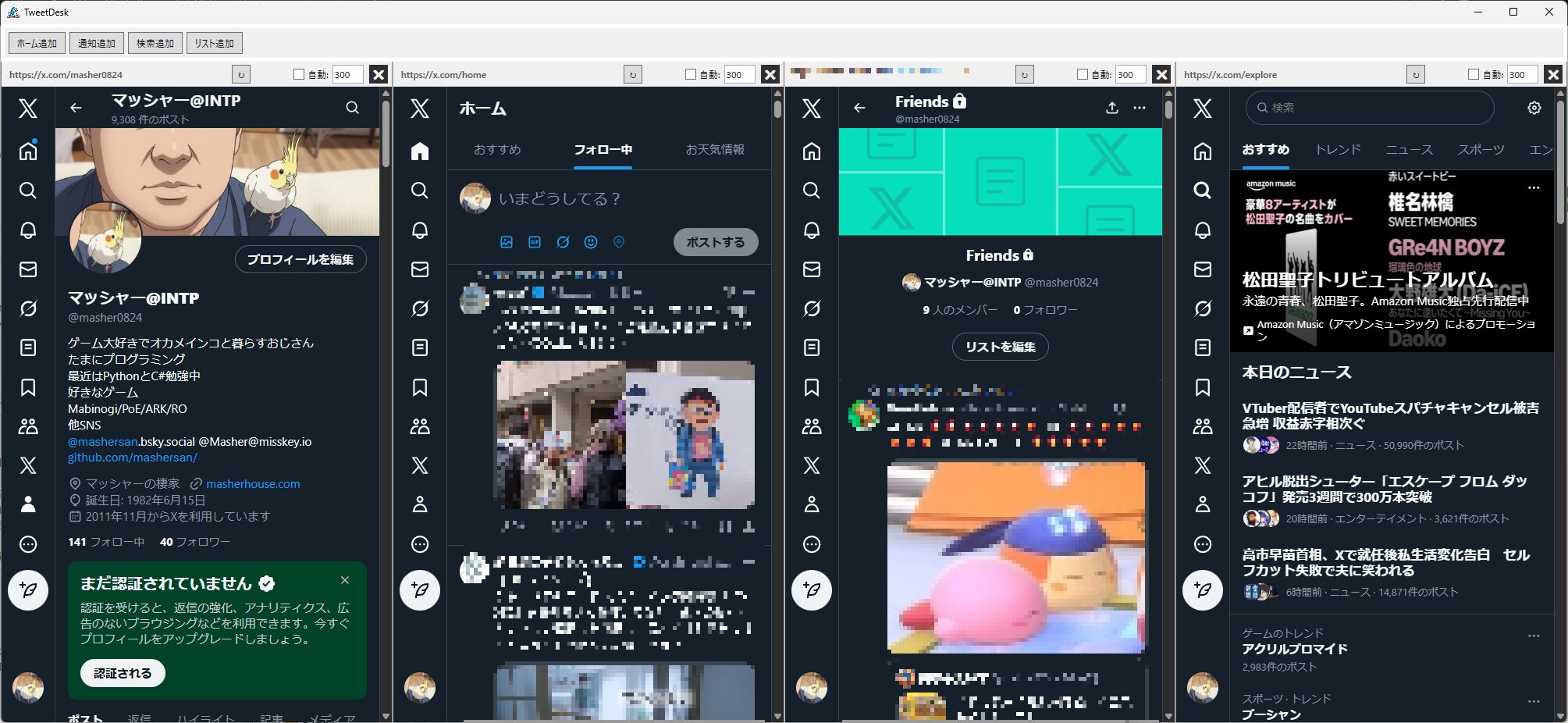
TweetDeck(旧)風のシンプルなマルチカラム型クライアントです。X (Twitter) のAPIを使用せず、WebView2 (Edgeレンダリングエンジン) を利用して複数のタイムラインを効率的に表示します。
- マルチカラム表示: ホーム、通知、検索、リスト、ユーザーなどをカラムとして自由に追加・並べ替え可能。
- プロファイル機能: 複数のアカウントや用途(趣味用、仕事用など)ごとに、Cookieや設定が完全に分離された環境を切り替えられます。
- 多言語対応: 日本語と英語の表示切り替えに対応しています。
- Chrome拡張機能のサポート: 広告ブロック(uBlock Origin等)やスタイル変更(Old Twitter Layout等)などの拡張機能をロードして使用できます。PC内のChromeから直接インポートすることも可能です。
- NGワード機能: 指定したキーワードを含むポストを非表示にできます。設定画面からの登録のほか、テキスト選択時の右クリックメニューからも追加可能です。
- フォーカスモード: ツイートや設定をクリックすると一時的に単一ビューに切り替わり、詳細確認や長文作成に集中できます。
- 柔軟なレイアウト:
- 等分割モード: ウィンドウ幅に合わせて全カラムを自動リサイズ。
- 固定幅モード: 横スクロールで多数のカラムを表示。幅の微調整も可能。
- カスタマイズ性:
- テーマ切り替え: ライト・ダーク・システム準拠の3パターンから外観を選択可能。
- カスタムCSS: 全カラムに適用されるCSSを記述し、フォントや配色の微調整が可能。
- 表示オプション: 左側メニューの非表示、リストヘッダーの簡略化、右サイドバー(トレンド等)の非表示など、画面を広く使う設定が充実。
- RT非表示: カラムごとにリポスト(RT)や「〇〇さんがいいねしました」等の表示を隠すことができます。
- オフタイマー (自動終了): アプリがバックグラウンド(非アクティブ)の状態が指定時間続くと、自動でアプリを終了させることができます。
- カラム設定の集約: カラムごとの設定(RT非表示、自動更新など)を歯車メニュー内に格納し、カラム幅を狭くしてもレイアウトが崩れない省スペース設計を採用しています。
- キーボードショートカット: 矢印キーでのカラム移動、Ctrl + 数字キーでのジャンプ、PageUp/Downでのスクロール操作に対応。
- アクティブ時タイマー停止: アプリを操作している間は自動更新タイマーを止め、TLが勝手に流れるのを防ぎます。
- アプリ内音量一括管理: カラム内の動画や音声のボリュームを、ツールバーのスライダーで一括調整できます。
- ウィンドウ・スナップ: ウィンドウを移動する際、他のXColumnウィンドウや画面端にピタッと吸着します。
- サーバー状態監視: Xのサーバーダウンや制限を検知し、ステータスアイコンで通知します。
- Windows 10 / 11
- .NET 8.0 デスクトップ ランタイム
- Microsoft Edge WebView2 ランタイム
- (通常、最新のWindowsにはプリインストールされています)
XColumn.exeを実行します。- プロファイル: 必要に応じて「新規」ボタンでプロファイルを作成します(デフォルトでも使用可能です)。
- カラム追加: メニューバーの 「ファイル」→「新規カラムを追加」 から必要なカラムを追加します。
- 並べ替え: カラム上部のハンドル(URLが表示されているバー)をドラッグ&ドロップして、カラムの順序を入れ替えます。
- 設定メニュー: 各カラムの歯車ボタン(⚙️)から、カラムごとの幅調整、自動更新間隔、ズーム倍率、RT/Rep非表示の設定を行えます。
- 言語設定: メニューの 「ツール」→「設定」 から言語(Language)を変更できます(再起動後に適用されます)。
ショートカットの「リンク先」の末尾に引数を追加したり、ターミナルから実行することで、動作を変更できます。
--profile "プロファイル名": 指定したプロファイルで起動します。- 例:
XColumn.exe --profile "趣味用"
- 例:
--enable-devtools: WebView2の開発者ツール (F12キー) を有効にします。--disable-gpu: GPUハードウェアアクセラレーションを無効にします(描画トラブル回避用)。
カラム内の表示(白・ダーク・漆黒など)は、X (Twitter) 公式の設定から変更することでアプリに反映されます。
- ホーム画面などの左メニューから 「設定とプライバシー」 を選択します。
- 「アクセシビリティ、表示、言語」 → 「表示」 を選択します。
- 「背景」 セクションからお好みのテーマを選択してください。
Chromeウェブストアの拡張機能をXColumnで使用するには、以下のいずれかの方法で追加します。
方法A:Chromeからインポート(推奨)
- 普段お使いのChromeブラウザで、目的の拡張機能をインストールしておきます。
- XColumnのメニュー 「ツール」→「拡張機能の管理...」 を開きます。
- 「Chromeからインポート...」 をクリックします。
- 検出された拡張機能一覧から使用したいものにチェックを入れ、「インポート」を押します。
- アプリを再起動すると有効になります。
方法B:フォルダから手動追加
- 拡張機能のフォルダ(
manifest.jsonが含まれるフォルダ)を用意します。 - 「ツール」→「拡張機能の管理...」 → 「フォルダから追加...」 で選択します。
- このリポジトリをクローンします。
- Visual Studio 2022 で
XColumn.slnを開きます。 - .NET 8.0 SDK がインストールされていることを確認します。
- NuGet パッケージ マネージャーからパッケージを復元します(WebView2, GongSolutions.WPF.DragDrop等)。
- ビルドして実行します。
- 🚀 機能追加: 拡張機能の管理ウィンドウに、インポートした拡張機能の保存先をエクスプローラーで表示する「フォルダを開く」ボタンを追加 🚀 Added feature: Added an "Open Folder" button to the extension management window to show the saved location of imported extensions in Explorer.
- 🚀 機能改善: 拡張機能の管理ウィンドウから拡張機能を削除する際、インポート時に作成されたフォルダとその配下のファイルも完全に削除するように動作を変更 🚀 Improved: Changed the behavior when removing an extension from the management window to completely delete the physical folder and its files created during import.
- 🐛 バグ修正: 拡張機能が新しいウィンドウで独自の設定画面などを開こうとした際、OSのアプリ選択ダイアログが表示されてしまうエラーを修正し、アプリ内の画面で安全に開くように改善 🐛 Bug fix: Fixed an issue where the OS app selection dialog was displayed when an extension tried to open its own settings page in a new window, and improved it to open safely within the app.
- 🐛 バグ修正: 設定が正常に保存されない問題を修正
- 🐛 Bug fix: Fixed an issue where settings were not being saved correctly.
- ⚙ 設定追加: PiPウィンドウを常に手前に表示する(最前面表示)オプションを追加 Added setting: Added an option to keep the PiP window always on top.
- 🚀 機能改善: 枠なしのPiPウィンドウの端をマウスで掴んでリサイズできるように操作性を改善し、デフォルトサイズを800x600に変更 Improved: Improved usability by allowing the borderless PiP window to be resized by dragging its edges, and changed the default size to 800x600.
- 🚀 機能改善: アプリ起動時およびプロファイル切り替え時、カラムを時間差で順次読み込むように変更し、多数のカラムが存在する場合のフリーズや読み込み失敗を防止 Improved: Changed column loading to sequential with a slight delay during app startup or profile switching, preventing freezes or load failures when many columns are present.
- 🐛 バグ修正: PiPウィンドウを変更したサイズや位置が保存されず、次回開いたときにリセットされてしまう問題を修正 Bug fix: Fixed an issue where the modified size and position of the PiP window were not saved and were reset the next time it was opened.
- 🐛 バグ修正: 「動画クリック時に自動でPiPで開く」および「カラムの上下2段表示」の設定が、アプリ再起動時にリセットされてしまう起動時の不具合を修正 Bug fix: Fixed a startup timing issue where the "Auto PiP for video" and "2-tier column layout" settings were reset when the app restarted.
- ✨ 機能追加: 動画やGIFをクリックした際、拡張機能に頼らずWPFネイティブの最前面PiP(ピクチャー・イン・ピクチャー)ウィンドウで再生する機能を追加 New feature: Added a native WPF top-most PiP (Picture-in-Picture) window for playing videos/GIFs without relying on browser extensions.
- ⚙ 設定追加: 設定画面のその他→試験的機能に、動画クリック時に自動でPiPで開くオプションを追加 Added setting: In the settings screen, under Other → Experimental Features, an option has been added to automatically open videos in Picture-in-Picture (PiP) when clicked.
- 🚀 機能改善: X (Twitter) の複雑なSPA遷移(クリックイベント)をC#側で高精度にインターセプトし、確実なPiP切り替えを実現 Improved: Achieved reliable PiP switching by accurately intercepting X (Twitter)'s complex SPA transitions (click events) on the C# side.
- 🚀 機能追加: リストを大量に使用するユーザー向けに、カラムの上下2段表示レイアウトを追加(等分割との併用や移動も可能) New feature: Added a 2-tier column layout for heavy list users (can be combined with uniform grid spacing and moved naturally).
- 🚀 機能改善: カラム移動後にフォーカスモードを起動すると元のカラムが手前に被る問題(Airspace問題)を修正し、安定性とパフォーマンスを向上 Improved: Fixed the "Airspace" issue where relocated columns appeared on top of Focus Mode, improving stability and performance.
- 🚀 機能改善: アプリ内のハードコードされた日本語文字列を見直し、英語モードでの多言語表示を強化 Improved: Reviewed hardcoded Japanese strings to enhance multi-language (English) display across the UI.
- 💖 その他: ヘルプメニューに「ご支援・寄付」項目(Buy Me a Coffee / GitHub Sponsors)を追加 Other: Added a "Support / Donate" item (Buy Me a Coffee / GitHub Sponsors) to the Help menu.
- 🚀 機能追加: 複数アカウント(マルチプロファイル)に対応。試験的機能として別プロファイルのタイムラインを追加する機能を追加 New feature: Added support for multiple accounts (multi-profile). Added a feature to add timelines from other profiles as an experimental feature.
- 🚀 機能改善: 試験的機能(別プロファイル追加)のON/OFF設定を追加し、メニュー表示を動的に切り替えるように改善 Improved: Added an ON/OFF setting for experimental features (adding other profiles) and improved the menu to toggle visibility dynamically.
- 🚀 機能改善: マルチプロファイル環境におけるセッション誤爆を防止するため、カラムの所属プロファイルに応じたフォーカスモードの制御を強化 Improved: Enhanced focus mode control based on the column's profile to prevent session contamination in multi-profile environments.
- 🐛 バグ修正: カラムヘッダーの自動更新アイコンがスクロール時に正しく変化しない問題を修正 Bug fix: Fixed an issue where the column header auto-refresh icon would not update correctly when scrolling.
- 🐛 バグ修正: スクロール検知や動画自動再生無効設定が、既存のカラムへ即時反映されない問題を修正 Bug fix: Fixed an issue where scroll detection and video autoplay disable settings were not immediately reflected in existing columns.
- 🐛 バグ修正: フォーカスモード設定が即時反映されない問題を修正 Bug fix: Fixed an issue where focus mode settings were not immediately applied.
- 🐛 バグ修正: カラムを追加したあとにフォーカスモードになると表示が崩れる事がある問題修正 Bug fix: Fixed an issue where the display would sometimes become corrupted when entering focus mode after adding a column.
- 🚀 機能改善: フォーカスモード遷移の動作を見直し、一部条件で画像が拡大表示されないことがある問題を修正 Improved: Revised the behavior of focus mode transitions and fixed an issue where images might not enlarge under certain conditions.
- ✨ 機能追加:メモリ消費を大幅に削減できる「休止(💤)」ボタンをカラム上部に追加しました。
クリックすると重いページを一時的に軽量な待機画面に置き換えてメモリを解放し、再度クリックで元のページに復帰します。
- New Feature: Added a "Suspend (💤)" button at the top of columns to drastically reduce memory consumption. Clicking it temporarily replaces heavy pages with a lightweight standby screen to free up memory, and clicking it again restores the original page.
- 🐛 バグ修正: メニューからプロファイルを切り替えて再起動した際、選択したプロファイルではなくデフォルトのプロファイルが開いてしまう問題を修正しました。
- Bug Fix: Fixed an issue where restarting the app after switching profiles from the menu would incorrectly open the default profile instead of the selected one.
- 🚀 機能改善: サーバー稼働状況(右上のステータスアイコン)の監視ロジックを見直し、バックグラウンドの軽微な通信エラーやキャンセルによって過敏に「接続不可」や「API制限中」と表示されてしまう問題を改善しました。
- Improvement: Revised the monitoring logic for the server status indicator (top right), resolving an issue where it would overly sensitively display "Disconnected" or "Rate Limited" due to minor background network errors or cancellations.
- 初期リリース (TweetDeskとして)
本アプリケーションは個人が開発した非公式クライアントです。X (Twitter) のAPIを使用せず、Webサイトをブラウザコンポーネントで表示・制御しています。
- 機能の保証について: Xの仕様変更により、予告なく機能しなくなる可能性があります。
- 責任の所在: 本ソフトウェアの使用によって生じたあらゆる損害(アカウントの制限・凍結、データの消失、PCの不具合など)について、開発者は一切の責任を負いません。
- 自己責任: 本アプリケーションのダウンロード、インストール、および使用は、全てユーザー自身の責任において行ってください。
このプロジェクトは MIT ライセンス の下で公開されています。
A simple multi-column client inspired by (old) TweetDeck.
- Multi-Column Display: Home, Notifications, Search, Lists, etc.
- Profiles: Isolated environments for multiple accounts.
- Chrome Extensions Support: Load Ad-blockers or style modifiers.
- Focus Mode: Detailed view for tweets and settings.
- Customizability: Themes, Custom CSS, and various display options.
- Windows 10 / 11
- .NET 8.0 Desktop Runtime
- Microsoft Edge WebView2 Runtime
- (Typically pre-installed on the latest versions of Windows)
- Run
XColumn.exe. - Profiles: Create a new profile if needed (Default is also available).
- Add Columns: Add columns via "File" -> "Add New Column" in the menu bar.
- Reorder: Drag and drop the handle (bar displaying the URL) at the top of a column to change its order.
- Column Settings: Use the gear icon (⚙️) on each column to adjust column width, auto-refresh intervals, zoom factor, and display filters.
- Language: You can change the language from "Tools" -> "Settings" (Requires restart).
You can use the following arguments to modify the startup behavior:
--profile "Profile Name": Launch with a specific profile.--enable-devtools: Enable WebView2 Developer Tools (F12).--disable-gpu: Disable GPU hardware acceleration.
The in-column display (Light, Dark, Lights out) follows X (Twitter) official settings.
- Open "Settings and privacy" from the left menu on Home.
- Select "Accessibility, display, and languages" -> "Display".
- Choose your preferred theme under the "Background" section.
To use Chrome Web Store extensions in XColumn:
Method A: Import from Chrome (Recommended)
- Install the desired extension in your regular Chrome browser.
- Open "Tools" -> "Manage Extensions..." in XColumn.
- Click "Import from Chrome...".
- Check the extensions you want to use and click "Import".
- Restart the app to apply.
Method B: Manual Addition from Folder
- Prepare the extension folder (containing
manifest.json). - Select "Tools" -> "Manage Extensions..." -> "Add from Folder...".
This application is an unofficial client developed by an individual. It does not use the X (Twitter) API but controls the website using browser components.
- No Warranty: Features may stop working without notice due to changes in X's specifications.
- Liability: The developer assumes no responsibility for any damages (account restrictions/freezing, data loss, PC malfunctions, etc.) arising from the use of this software.
- Use at Your Own Risk: Download, installation, and use of this application are entirely at the user's own risk.
This project is released under the MIT License.
- v1.34.0 (2026/01/23)
- New Feature: Added functionality to forcibly stop video autoplay. This prevents autoplay at the browser level regardless of X's web settings (Toggleable in Settings).
- New Feature: Added an option to set the "Default Profile" to be opened at startup in the Settings.
- Improvement: Improved behavior to only apply column width settings to all columns when the width value is actually changed in the Settings (preserving individual width adjustments).
- Bug Fix: Fixed an issue where column width changes in Settings were not being reflected on the screen.
- v1.33.0 (2026/01/22)
- Improvement: Updated the update notification dialog to offer three options: "Go to GitHub", "Skip", and "Later", allowing users to mute notifications for specific versions.
- New Feature: Added
--enable-devtoolsoption to enable Developer Tools. - New Feature: Added
--disable-gpuoption to disable GPU acceleration.
- v1.32.0 (2026/01/13)
- Improvement: Refreshed Focus Mode (detailed view) from a screen-switching method to a modal (overlay) display that covers the entire window.
- v1.31.0 (2026/01/05)
- New Feature: Added a "Zoom" setting to the column settings menu, allowing you to adjust the display scale.
- Improvement: Pressing Enter in the settings input boxes (Refresh Interval, Zoom) now immediately applies the changes.
- v1.30.1 (2026/01/02)
- UI Improvements: Added an "Other" tab to the Settings screen and moved some settings.
- v1.30.0 (2026/01/01)
- New Feature: Added the ability to set individual column widths from the column settings menu.
- New Feature: Added an option to toggle "Check for updates on startup" in the settings.
- Fix: Resolved an issue where the server check interval setting was not saved across restarts.
- v1.29.3 (2025/12/30)
- Bug Fix: Fixed an issue where toggling "Hide RT" or "Hide Rep" from the column settings menu would not immediately reflect the changes on the screen.
- v1.29.2 (2025/12/29)
- Feature Improvement: The column header layout has been revamped. Settings (hide RT, auto-update, etc.) have been consolidated into the gear menu, so the buttons are not hidden even when the column width is narrowed.
- Feature Improvement: The window title bar now displays the current version and the name of the profile being used.
- v1.29.1 (2025/12/29)
- Bug Fix: Fixed an issue where settings using the Off Timer were not saved correctly.
- v1.29.0 (2025/12/29)
- New Feature: Added an Off-Timer (Auto Shutdown) function.
- Improvement: Pressing Enter in the auto-refresh interval box now immediately applies the setting and resets the timer.
- Fix: Resolved an issue where arrow keys would trigger column navigation while typing in Focus Mode.
- Fix: Fixed an issue where auto-refresh would interrupt input when using legacy IME.
- v1.28.0 (2025/12/22)
- New Feature: Added "User..." to the Add Column menu.
- New Feature: Added links to X (Web) Display/Autoplay settings within the app settings.
- Improvement: Implemented a policy to prevent automatic video playback.
- Fix: Resolved an issue where some Chrome extensions (e.g., Tampermonkey) were not displaying their correct names.
- Fix: Fixed an issue where clicking settings links would unintentionally add a Home column.
- Fix: Resolved an issue where column settings would reset if the app was closed while viewing a settings page.
- v1.25.3 (2025/12/19)
- Fix: Resolved an issue where returning from an image view would occasionally scroll back to the position of a previously viewed image.
- Improvement: Improved the timing of scroll position preservation to more reliably save the state when returning to the top of the timeline.
- v1.25.2 (2025/12/18)
- Feature Added: Added a "List Auto-Transition Wait Time" setting to the Settings screen.
- Feature Improvement: Revised the logic for list auto-transitions to resolve issues with small window sizes and certain conditions where transitions would not occur correctly.
- UI Fix: Slightly tweaked (enlarged) the size of the "OK/Cancel" buttons on the Settings screen to improve usability.
- v1.25.1 (2025/12/18)
- Fix: Resolved an issue where the app became unresponsive when closing extension settings without saving.
- Improvement: Fixed the layout of the "Manage Extensions" window for better resizing behavior.
This is an unofficial client. Use at your own risk. The developer is not responsible for any account restrictions or data loss.
Released under the MIT License.