




A complete Guidance, Navigation, and Control (GNC) framework for a WAM‑V Catamaran Autonomous Surface Vessel (ASV) validated in the VRX (Virtual RobotX) high‑fidelity simulation environment.
This project integrates:
- 3‑DOF vessel dynamics modeling
- Adaptive Circular Line‑of‑Sight (LOS) guidance
- PD‑based heading control
- Surge velocity regulation
- Differential thrust mixing (twin thrusters)
- Real‑time ROS 2 communication
- Precision autonomous docking strategy
✅ Smooth path tracking and zero‑overshoot docking without RPM discontinuities.
This demonstration showcases:
- Adaptive Circular LOS path tracking
- Smooth differential thrust control
- Turn-then-go heading stabilization
- Precision zero-overshoot docking
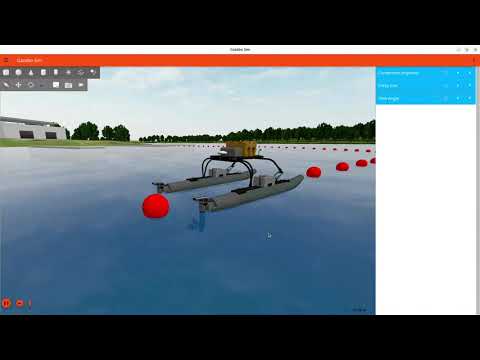
▶ Click the image above to watch the full VRX simulation on YouTube.
- Key Features
- System Architecture
- Performance Improvements
- System Requirements
- Repository Layout
- Installation & Setup
- Execution Order
- ROS Interface
- Notes
- Author
- License
-
Adaptive Circular LOS Guidance
Continuous path progression without waypoint switching spikes. -
Smooth Differential Thrust Profile
Eliminates saw‑tooth RPM oscillations caused by discrete waypoint jumps. -
Distance‑Based Docking Deceleration
Square‑root velocity shaping for precise, zero‑overshoot stopping. -
Turn‑Then‑Go Strategy
Reduces surge speed during large heading errors for safe maneuvering. -
Real‑Time Simulink ↔ ROS 2 Integration
Live GPS and IMU feedback from Gazebo with real‑time thrust publishing.
flowchart LR
  P["Path / Markers"] --> G["Adaptive Circular LOS"]
  G --> H["PD Heading Control"]
  H --> S["Surge Speed Controller"]
  S --> M["Differential Thrust Mixer"]
  M --> V["WAM-V Dynamics<br/>(VRX Gazebo / VRX)"]
  V --> F["GPS + IMU Feedback"]
  F --> G
- Continuous spline‑based path tracking
- Adaptive lookahead radius near docking zone
- Heading latch for final approach stability
- Differential thrust control for twin‑hull propulsion
- Ubuntu 24.04 LTS
- ROS 2 Jazzy
- Gazebo Harmonic
- VRX Simulator (
vrx_gz)
https://github.com/osrf/vrx
This project was developed and validated using:
- MATLAB R2025b Update 3
- Simulink (R2025b)
All toolboxes below are actively used within the Simulink model and required for full functionality:
- Aerospace Blockset
- Aerospace Toolbox
- Automated Driving Toolbox
- Computer Vision Toolbox
- Control System Toolbox
- Image Processing Toolbox
- ROS Toolbox (ROS 2 interface)
- Simulink Control Design
⚠️ Missing toolboxes may cause unresolved block errors or simulation failures.
Run inside MATLAB:
verEnsure all required toolboxes appear before running the model.
Your modified VRX world file is version‑controlled inside this repository at:
vrx_world/sydney_regatta.sdf
Recommended structure:
asv-autonomous-docking-and-path-tracking/
├── src/
│   ├── functions/
│   └── main/
├── scripts/
│   └── update_path_sydney_regatta.py
├── vrx_world/
│   └── sydney_regatta.sdf          ✅ (Modified VRX world file)
├── docs/
└── results/
Follow official instructions:
git clone https://github.com/kavindagehan/asv-autonomous-docking-and-path-tracking.git
cd asv-autonomous-docking-and-path-trackingsource /opt/ros/jazzy/setup.bashIf VRX was built in a workspace:
source ~/vrx_ws/install/setup.bashThis project depends on a modified sydney_regatta.sdf that contains the marker tags:
<!-- START-MARKERS -->
<!-- END-MARKERS -->
These tags are required for automatic path injection (triggered by the MATLAB live script).
Case A — VRX built from source (common):
VRX_WORLDS_DIR=~/vrx_ws/src/vrx/vrx_gz/worldsCase B — VRX available via package share directory:
VRX_WORLDS_DIR="$(ros2 pkg prefix vrx_gz)/share/vrx_gz/worlds"Verify the directory exists:
ls "$VRX_WORLDS_DIR"cd "$VRX_WORLDS_DIR"
mv sydney_regatta.sdf sydney_regatta_original.sdfRun this from the repo root:
cp vrx_world/sydney_regatta.sdf "$VRX_WORLDS_DIR/"grep -n "START-MARKERS\|END-MARKERS" "$VRX_WORLDS_DIR/sydney_regatta.sdf"✅ If both markers are printed, the world file is correctly installed.
Path injection is performed automatically when running:
ASV_SIM_ROS_MAIN_V2_1.mlx.
Start MATLAB first (recommended), then run the main live script:
- Run:
ASV_SIM_ROS_MAIN_V2_1.mlx- This automatically performs the required path injection into the VRX world file
- It also configures ROS 2 communication required by the Simulink model
cd ~/vrx_ws
colcon build --merge-install
If VRX is already built and unchanged, you can skip this build step.
ros2 launch vrx_gz competition.launch.py world:=sydney_regattaOpen and run:
- Simulink model:
Simulink_ROS_Boat_Path_Follow_V2_5.slx
(Ensure the model is in Run mode and publishing thrust commands.)
List topics:
ros2 topic listCheck thrust output:
ros2 topic echo /wamv/thrusters/left/thrust/wamv/sensors/gps/gps/fix/wamv/sensors/imu/imu/data
/wamv/thrusters/left/thrust/wamv/thrusters/right/thrust
- Environmental disturbances (wind, waves, current) can be enabled in VRX for robustness testing.
- Validation was performed under still‑water conditions for baseline benchmarking.
- The original world file is preserved as a backup (
sydney_regatta_original.sdf). - If the VRX world file does not contain the marker tags, the MATLAB live script’s automatic path injection will fail.
Gehan Kavinda Dasanayake
Research Project – Carinthia University of Applied Sciences
- GitHub: https://github.com/kavindagehan
- LinkedIn: https://www.linkedin.com/in/kavindagehan/
This project is licensed under the MIT License. See the LICENSE file for details.