A fake REST API, powered by AI, ready in 2 minutes.
Your backend isn't done. You need to build the UI anyway. Instead of hardcoding mockUser = { name: "John" } everywhere, do this:
- Paste the JSON shape your API will return.
- AI generates 50 realistic rows that match it.
- Call real HTTP endpoints (
GET /mock/users,GET /mock/users/42,POST /mock/users…) from your frontend.
That's it. No fixtures, no Faker setup, no Postman juggling. The data looks like production because an LLM wrote it — real names, plausible emails, dates that line up.
Built for frontend teams waiting on the backend.
The app has two parts: a backend that stores your projects, talks to the AI, and serves the mock API — and a frontend (admin UI) where you click around and design endpoints.
You don't have to build or customize the frontend. It's ready out of the box. The only thing you set is where the backend lives — one URL. After that, the UI connects, you log in, create projects, generate data, and you're done.
- Running everything on your laptop? The default URL already works.
- Deployed the backend to a server? Point the frontend at that server's URL — one env var — and reload.
- Moving the backend later? Change the URL again. The frontend doesn't care.
In short: set up the backend once, then just tell the frontend where to find it. Everything else — auth, forms, endpoint management, AI generation, the mock API itself — is already wired up.
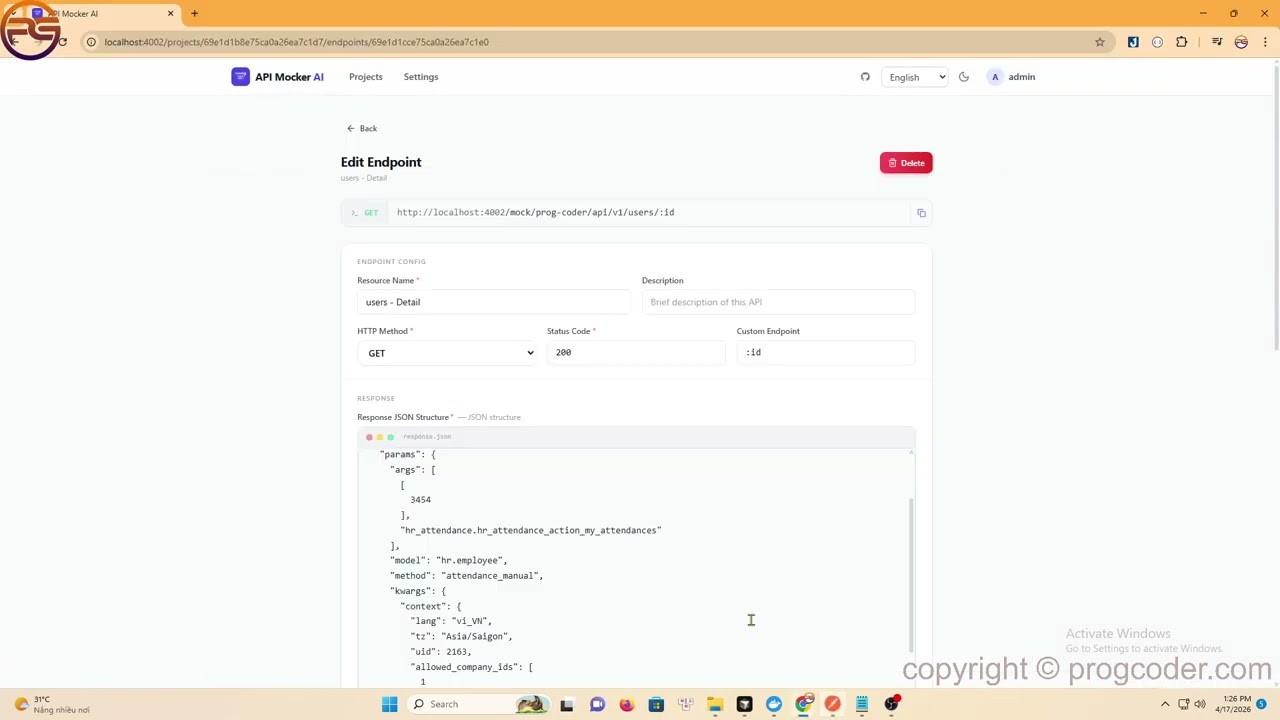
- Projects + auto CRUD — create one resource, get 5 endpoints for free: list, detail, create, update, delete
- AI-generated data — paste a JSON shape, pick an AI provider (OpenAI / Gemini / Grok), get realistic rows back
- Live HTTP mock API — real methods, real status codes, real pagination — not a static file
- Pagination out of the box — auto-detects shape (
items/total/page) and serves paged responses - Per-project API prefix — keep mocks for different products isolated (
project-a/api/...,project-b/api/...)
Pros
- Zero fixture writing. Describe shape once, AI fills 50 rows that actually read like production data (real names, plausible emails, dates that make sense).
- Works for the whole frontend team — one server, shared mocks, everyone hits the same URLs.
- Swappable AI provider — bring your own key, no vendor lock.
- Self-hosted. Data stays on your infra, not on someone else's SaaS.
- Realistic enough to demo with. No more
"foo","bar","test123"screenshots.
Cons
- Needs an AI API key (OpenAI / Gemini / Grok) — not free at scale.
- Mock data is static after generation — regenerate to refresh.
- No request matching / stub rules yet (no "return 500 when body has X"). Just endpoints that return data.
- No built-in latency / failure injection.
- Requires MongoDB — not a zero-dep CLI.
| Tool | Data generation | Hosted? | Fake data quality | Best for |
|---|---|---|---|---|
| API Mocker AI | AI from your JSON shape | Self-host | Realistic (LLM) | Demo-quality mocks, fast iteration |
| JSON Server | You write fixtures | Self-host | Only what you type | Quick local prototypes |
| Mockoon | Templating (Faker.js) | Self-host / desktop | Generic fake data | Offline, stub rules, latency |
| Postman Mock | You write examples | Postman cloud | Only what you type | Teams already in Postman |
| Beeceptor / MockAPI.io | Templates / faker | SaaS | Generic fake data | Zero-setup public mocks |
| WireMock | Request matching / stubs | Self-host | Only what you stub | Contract testing, edge cases |
Short version: JSON Server / Postman make you write the data. Mockoon / WireMock shine at matching rules but give you Lorem Ipsum. API Mocker AI is the opposite trade — weak on matching rules, strong on the data actually looking real.
Needs Node 18+ and MongoDB 7+ (or Docker).
# one-shot with Docker (Mongo + backend + frontend)
docker-compose up -d
Or run pieces separately — backend first, then point the frontend at it:
# 1. Mongo
docker-compose up mongodb -d

# 2. Backend (port 4000)
cd backend && npm install && cp .env.example .env && npm run dev

# 3. Frontend — just set the backend URL and go
cd frontend && npm install
echo "VITE_BACKEND_URL=http://localhost:4000" > .env   # <-- only FE change you need
npm run dev
Open http://localhost:4002:
- First visit →
/setupto create the admin account /settings→ paste your AI provider API key- Create a project, add a resource, paste JSON shape, hit Generate
- Call
http://localhost:4000/mock/{your-prefix}/{endpoint}from your app
Deploying the backend somewhere else? Same frontend, just change VITE_BACKEND_URL to the new host and rebuild.
| Variable | Default | Purpose |
|---|---|---|
PORT |
4000 |
Backend port |
MONGODB_URI |
mongodb://localhost:27017/apimocker-ai |
Mongo connection string |
CORS_ORIGINS |
http://localhost:4002 |
Comma-separated allowed origins |
NODE_ENV |
development |
Env mode |
ENCRYPTION_KEY |
auto | 64-char hex, encrypts AI keys |
JWT_ACCESS_SECRET |
auto | Access token secret |
JWT_REFRESH_SECRET |
auto | Refresh token secret |
JWT_ACCESS_TTL |
60m |
Access token lifetime |
JWT_REFRESH_TTL |
7d |
Refresh token lifetime |
VITE_BACKEND_URL |
http://localhost:4000 |
Frontend → backend URL. The one knob you flip when the backend moves. |
autovalues regenerate on each restart. Set them in production or every restart wipes sessions and breaks stored API keys.
- Backend — Node, Express, TypeScript, Mongoose, Zod, JWT, bcryptjs, Helmet
- Frontend — React 19, Vite, TailwindCSS, Monaco Editor, react-i18next
- DB — MongoDB 7
- AI — OpenAI, Google Gemini, Grok
- Infra — Docker, Docker Compose
PRs welcome. See CONTRIBUTING.md for the dev loop, code style, and commit conventions. Open an issue first for bigger changes.
MIT © huynxtb