




Undetected Playwright automation on a stealth-patched Firefox.
Python, MIT, and it passes every bot detection test.
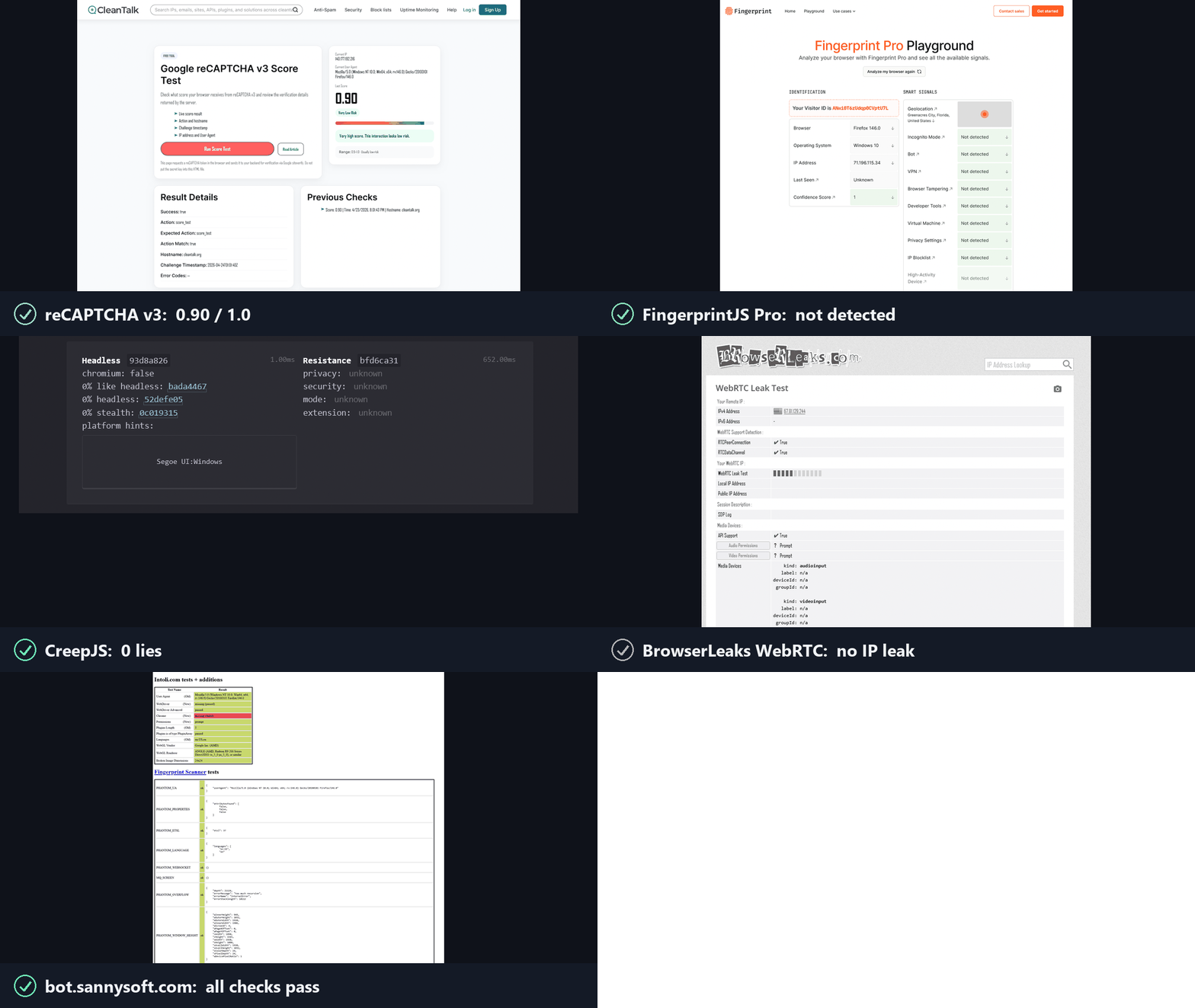
Anti-bots ask two questions. invisible_playwright answers yes to both.
1. Is this a real browser? Yes. It is Firefox, patched at the C++ source level.
- Fingerprint set inside the engine, not injected into the page: Navigator, screen, GPU/WebGL, Canvas, fonts, audio, WebRTC, timezone, network.
- No JS shim, no override, no seam to read.
2. Is a real person using it? Yes. The actions are humanized in the driver.
- Every click, hover and drag follows a natural mouse path with human timing, no teleporting cursor.
- Each input is byte-identical to a real mouse: real input source, pressure, trusted events.
Driven by the standard Playwright API. Full breakdown: feder-cr/firefox_antidetect_patch.
Once the browser is handled it stops being the variable. If you are still getting challenged, the tell is no longer the browser, it is the IP you come from. Around 90% of proxies are public: anyone can rent the same address, so it is already known and sits on the blocked-IP lists sites check. A perfect browser on a known IP still loses.
The fix is the clean 10%, residential IPs that aren't already known. For those we recommend sx.org, who filter for and serve only IPs that aren't already on those lists.
pip install invisible-playwright
python -m invisible_playwright fetch      # one-time ~238 MB download (~544 MB unpacked), sha256-verified
Supported platforms: Windows x86_64, Linux x86_64 / arm64, macOS arm64 / x86_64. On macOS the app is ad-hoc signed (not notarized): if Gatekeeper complains, clear the quarantine flag once with xattr -dr com.apple.quarantine on the cached Firefox.app.
100% Playwright-compatible - sync and async, all methods, zero API changes. If you already use Playwright, switching is two lines:
- from playwright.sync_api import sync_playwright
- with sync_playwright() as p:
-     browser = p.firefox.launch()
+ from invisible_playwright import InvisiblePlaywright
+ with InvisiblePlaywright() as browser:
Every session gets a distinct fingerprint (GPU, audio, fonts, screen, ~200 fields) and Bezier-curve mouse motion.
Sync
from invisible_playwright import InvisiblePlaywright

with InvisiblePlaywright(proxy={"server": "socks5://...", "username": "u", "password": "p"}) as browser:
    page = browser.new_page()
    page.goto("https://example.com")
    page.click("#submit")   # mouse arcs to the button on a Bezier curve
Async
from invisible_playwright.async_api import InvisiblePlaywright

async with InvisiblePlaywright(proxy={"server": "socks5://...", "username": "u", "password": "p"}) as browser:
    page = await browser.new_page()
    await page.goto("https://example.com")
    await page.click("#submit")
The browser object is a playwright.sync_api.Browser / playwright.async_api.Browser - every Playwright method works as-is.
Log the seed to replay a run:
sf = InvisiblePlaywright()
with sf as browser:
    print("seed =", sf.seed)
# ...with InvisiblePlaywright(seed=42) as browser:
... # same GPU, same canvas hash, same audio context, every runproxy = {
"server": "socks5://gate.example.com:1080",
"username": "user",
"password": "pass",
}
with InvisiblePlaywright(proxy=proxy) as browser:
...Schemes supported: socks5, socks4, http, https. DNS is routed through the proxy by default, no local leak.
Around 90% of proxies are public, so their IPs are already known and blocked. For the clean 10%, residential IPs that aren't already known, we recommend sx.org, who filter for and serve only IPs that aren't already on those lists.
The browser timezone follows timezone=:
# default: timezone is auto-derived from the egress IP (proxy egress if a
# proxy is set, otherwise the host's own public IP)
with InvisiblePlaywright(proxy=proxy) as browser:
    ...

# explicit IANA zone always wins, the only way to force a specific zone
with InvisiblePlaywright(proxy=proxy, timezone="America/New_York") as browser:
...By default everything comes from seed. To force specific values while the rest stays seed-derived:
with InvisiblePlaywright(
    seed=42,
    pin={
        "gpu.renderer": "ANGLE (NVIDIA, NVIDIA GeForce RTX 4090 Direct3D11)",
        "gpu.vendor":   "Google Inc. (NVIDIA)",
        "screen.width":  2560,
        "screen.height": 1440,
        "hardware.concurrency": 16,
    },
) as browser:
    ...
Full list of pinnable keys, how pinning interacts with the Bayesian sampler, and common patterns are in docs/pinning.md.
The installed command is invisible-playwright, with a hyphen. python -m invisible_playwright works identically and needs nothing on PATH.
invisible-playwright fetch          # download the engine if missing
invisible-playwright fetch --force  # re-download even if cached
invisible-playwright path           # absolute path to the cached engine (downloads it if absent)
invisible-playwright version        # wrapper, core and engine versions
invisible-playwright clear-cache    # remove cached engine trees
invisible-playwright doctor # check every cached engine against the sealAll of it reads better, and is searchable, at feder-cr.github.io/invisible_playwright, organised into four sections instead of one flat list:
- Documentation - installation, the two-line switch from plain Playwright, proxy/timezone configuration, pinning specific fields, the CLI.
- Guides - how detection actually works, in seven groups: browser identity, canvas/WebGL/fonts/ audio, network and WebRTC, the automation layer, AI agents, the detectors themselves explained from source, and testing.
- Comparisons - against Camoufox, Patchright, nodriver and playwright-stealth, and the case for Firefox over Chromium generally.
- Integrations - Scrapy, Crawlee, Robot Framework, CodeceptJS, test runners, Playwright MCP, and the frameworks it does not fit, by name.
If you don't know where to start: Three ways to make Playwright undetected is the map most other pages link back to, Playwright detected as a bot on one site is the troubleshooting order, and navigator.webdriver is not the tell you think it is explains the most famous property in this space and why patching it alone buys you almost nothing.
- crawl4ai stealth and custom browser engines - browser_type accepts firefox but there is no executable_path; where the adapter seam is
- Why headless browsers render different fonts - the three causes, the per-platform font sets, and why the fix is not installing more fonts
- How to make Linux and macOS report real Windows fonts - one manifest, three font backends convinced not to ask the host, and the four seams still open
- measureText and TextMetrics as a fingerprinting surface - ten-plus numbers from one call needing no permission prompt, and the two mistakes we made fixing it
- What privacy.resistFingerprinting really does - and why this project sets it to false on purpose
- The ChromeDriver cdc_ variable - why renaming it is not removing it, and what that generalises to
- What bot.sannysoft.com actually checks - row by row, and the canvas-in-iframe test nobody reads
- How CreepJS decides you are lying - four detection techniques, and why blocking the probe is itself recorded
- Firefox preferences that silently do nothing - five reasons, starting with the one that cost us a real bug
- What BotD actually detects - twenty detectors, and why most are not about bots at all
- Why a FingerprintJS visitor ID changes - it is a hash of 41 components, so one moving moves all of it
The open-source neighbours, and what each one is for.
On the Firefox side
- Camoufox - an anti-detect Firefox that also patches at the C++ level. It covers a wider surface and ships its own fingerprint database; this project derives a fingerprint from a seed with a Bayesian sampler, so one number reproduces one machine. Full comparison.
- LibreWolf - a Firefox fork with privacy defaults. It ships a configured binary for people to browse with; this ships source patches plus an automation wrapper.
- arkenfox/user.js - Firefox hardening through preferences. Where a preference is enough, use it; this project patches C++ where one is not.
On the Chromium side
- Patchright - a patched Playwright fork, so the stealth work lands in the driver rather than in the browser binary. Full comparison.
- nodriver - the successor to
undetected-chromedriver, driving Chrome over CDP directly and removing the WebDriver-flavoured tells. Full comparison. - playwright-stealth - an init-script patch applied before the page loads. Its own maintainer calls it a proof-of-concept; full comparison.
- puppeteer-extra-plugin-stealth - the original of this init-script lineage, still widely recommended. Its repository's last substantive commit is from mid-2024; what that means in practice.
- selenium-stealth - the same approach on Selenium/CDP. Its repository's last commit is from December 2021; what that means in practice.
- pyppeteer - the unofficial Python port of Puppeteer. Its own README says it's unmaintained and points to
playwright-pythoninstead; what that recommendation is actually about. - rebrowser-patches - fixes the
Runtime.enableCDP leak on Chromium, independently converging on close to the same fix Patchright uses. Full comparison. - fingerprint-suite - generates a coherent fingerprint with a Bayesian network, close to this project's own generation approach, then injects it into a Playwright or Puppeteer page on either Chromium or Firefox. Full comparison.
- playwright-with-fingerprints - injects fingerprint values sourced from a remote paid service, Windows-only, pinned to a specific Chromium build. Full comparison.
Which of these fits depends on the layer your problem is at, and on whether you need Firefox or Chromium. Three ways to make Playwright undetected works through what each layer can and cannot reach, including what this one costs.
If you are picking between engines rather than tools, note that a large share of AI agent frameworks drive Chromium over CDP, which decides the question for you: AI browser agents and stealth.
MIT - see LICENSE. The patched Firefox binary is distributed under the MPL-2.0 (Firefox upstream license). The C++ patches against mozilla-central that produce that binary are at feder-cr/firefox_antidetect_patch.
This project is for educational purposes only. It is provided as-is, with no warranties. I take no responsibility for how it is used. Use it at your own risk and in compliance with the laws of your jurisdiction.
Built by Federico Elia
