

For more information about this project and GSoC Progress please refer to GSoC Wiki
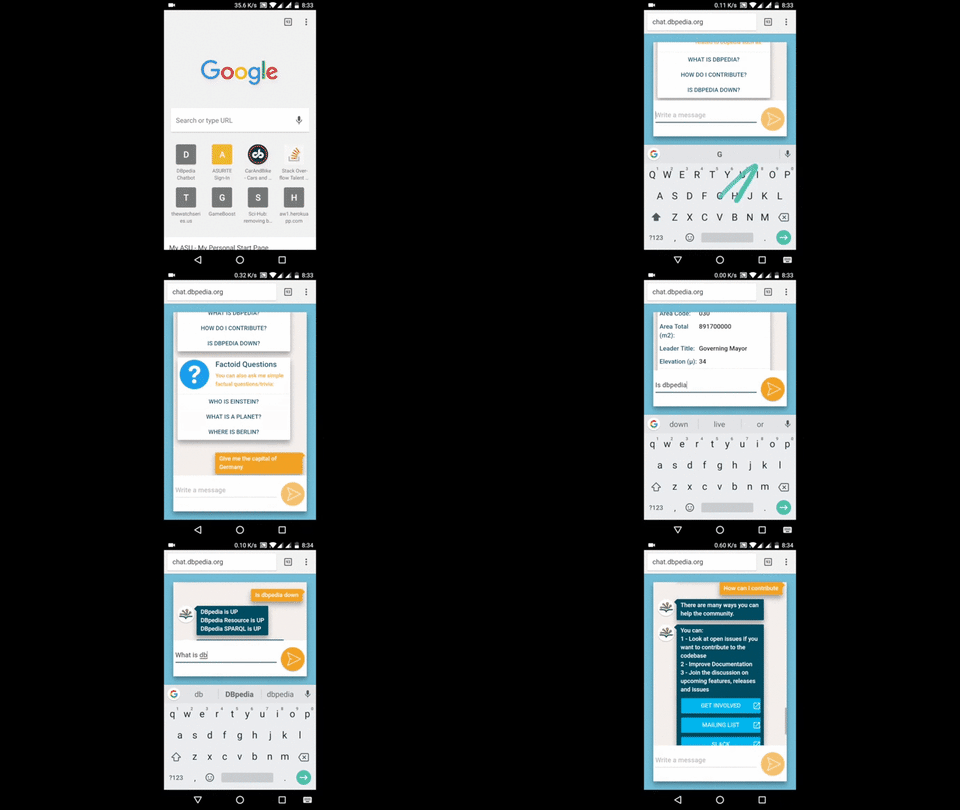
When running locally or in development include the following configuration as a properties file in the src/main/resources folder.
In case you do not have a proper CouchDB instance or API keys please use the following dummy configuration file.
Please note that using the dummy configuration file can result in some features being unavailable since they may require the requisite API services.
admin.username = <admin-username>
admin.password = <admin-password>

chatbot.baseUrl = <https-url-to-access-the-bot>
chatbot.gaID = <google-analytics-id>

chatbot.fb.appSecret = <secret>
chatbot.fb.verifyToken = <token>
chatbot.fb.pageAccessToken = <access-token>
chatbot.slack.botToken = <bot-token>

cloudant.url = <couchdb-url>
cloudant.username = <couchdb-username>
cloudant.password = <couchdb-password>
cloudant.chatDB = <couchdb-chatdb-name>
cloudant.feedbackDB = <couchdb-feedbackdb-name>
cloudant.explorerDB = <couchdb-explorerdb-name>

tmdb.apiKey = <tmdb-api-key>

wolfram.apiKey = <wolfram-alpha-api-key>spring.thymeleaf.cache = false
spring.devtools.livereload.enabled = true
logging.level.com.github.messenger4j = DEBUG
logging.level.com.github.messenger4j = <log-level>$ mvn clean install
# $PORT is the port number you want the server to run in for example 8080
$ java $JAVA_OPTS -Dserver.port=$PORT -jar target/*.jar$ mvn spring-boot:run
$ node/node node_modules/.bin/webpack --env.NODE_ENV=dev --watchAdd the following snippet to the <head> section of the webpage where you want to embed the ChatBot.
<script type="text/javascript">
  (function() {
    var URL = "https://chat.dbpedia.org"
    window.onload = function() {
      var iframe = document.createElement("iframe");
      iframe.setAttribute("src", URL + "/embed");
      iframe.setAttribute("frameBorder", 0);
      iframe.style.zIndex = 10000000;
      iframe.style.height = "100%";
      iframe.style.width = "40%";
      iframe.style.position = "fixed";
      iframe.style.bottom = "20px";
      iframe.style.left = "20px";
      iframe.style.display = "none";

      document.body.appendChild(iframe);
      window.addEventListener("message", receiveMessage, false);
      function receiveMessage(event) {
        if(event.origin == URL && event.data == "dbpedia-chatbot-embed-loaded") {
          iframe.style.display = "block";
        }
      }
    }
  })();
</script>The chatbot exposes a REST API that allows developers to integrate chatbot functionality into their applications.
POST /webhook
Content-Type: application/json
Note: This is a public webhook endpoint that does not require authentication. Currently, no application-level rate limiting is configured. For production deployments, consider implementing rate limiting via an API gateway or reverse proxy (e.g., nginx, AWS API Gateway) to prevent abuse.
{
  "userId": "unique-user-id",
  "messageType": "text",
  "messageData": [
    {
      "text": "Your question here"
    }
  ]
}| Field | Type | Description |
|---|---|---|
| userId | string | Unique identifier for the user/session |
| messageType | string | text for queries, parameter for button responses |
| messageData | array | Array containing message objects with text field |
The API returns an array of response objects:
[
  {
    "messageType": "text",
    "messageData": [
      {
        "title": "Entity Title",
        "text": "Response content",
        "image": "https://example.com/image.jpg",
        "buttons": []
      }
    ]
  }
]| Field | Type | Description |
|---|---|---|
| messageType | string | Type of response (typically text) |
| messageData | array | Array of response objects |
| title | string | Title/subject of the response |
| text | string | Main response content |
| image | string | URL to related image (optional, may be empty) |
| buttons | array | Interactive buttons for follow-up actions (optional) |
Request:
curl -X POST https://chat.dbpedia.org/webhook \
  -H "Content-Type: application/json" \
  -d '{
    "userId": "test-user-123",
    "messageType": "text",
    "messageData": [{"text": "Who is Albert Einstein?"}]
  }'
Response:
[
  {
    "messageType": "text",
    "messageData": [
      {
        "title": "Albert Einstein",
        "text": "Albert Einstein was a German-born theoretical physicist...",
        "image": "https://commons.wikimedia.org/wiki/Special:FilePath/Einstein_1921.jpg",
        "buttons": []
      }
    ]
  }
]- "Who is Albert Einstein?"
- "What is the capital of France?"
- "Tell me about DBpedia"
- "Where is Paris?"
- Supported messageType values: Only
textandparameterare currently supported - Query length: For optimal results, keep queries concise (under 200 characters recommended)
- Character encoding: UTF-8 is fully supported, including special characters (², €, etc.)
- Error responses: Invalid messageType or malformed requests may return HTTP 500 errors
If running the chatbot locally:
curl -X POST http://localhost:8080/webhook \
  -H "Content-Type: application/json" \
  -d '{
    "userId": "test-user",
    "messageType": "text",
    "messageData": [{"text": "Hello"}]
}'@inproceedings{ramngongausbeck2018,
address = {Republic and Canton of Geneva, Switzerland},
author = {Athreya, Ram G and Ngonga, Axel and Usbeck, Ricardo},
booktitle = {WWW '18 Companion: The 2018 Web Conference Companion, April 23--27, 2018, Lyon, France},
doi = {10.1145/3184558.3186964},
location = {Lyon, France},
numpages = {4},
publisher = {International World Wide Web Conferences Steering Committee},
title = {{Enhancing Community Interactions with Data-Driven Chatbots - The DBpedia Chatbot}},
url = {https://svn.aksw.org/papers/2018/WWW_dbpedia_chatbot/public.pdf},
year = 2018
}