


A style-guide–aware title case engine for JavaScript that implements AP, APA, Chicago, NYT, Wikipedia, and British styles with contextual acronym disambiguation, dictionary-backed entity detection, runtime validation, and curated domain terminology.
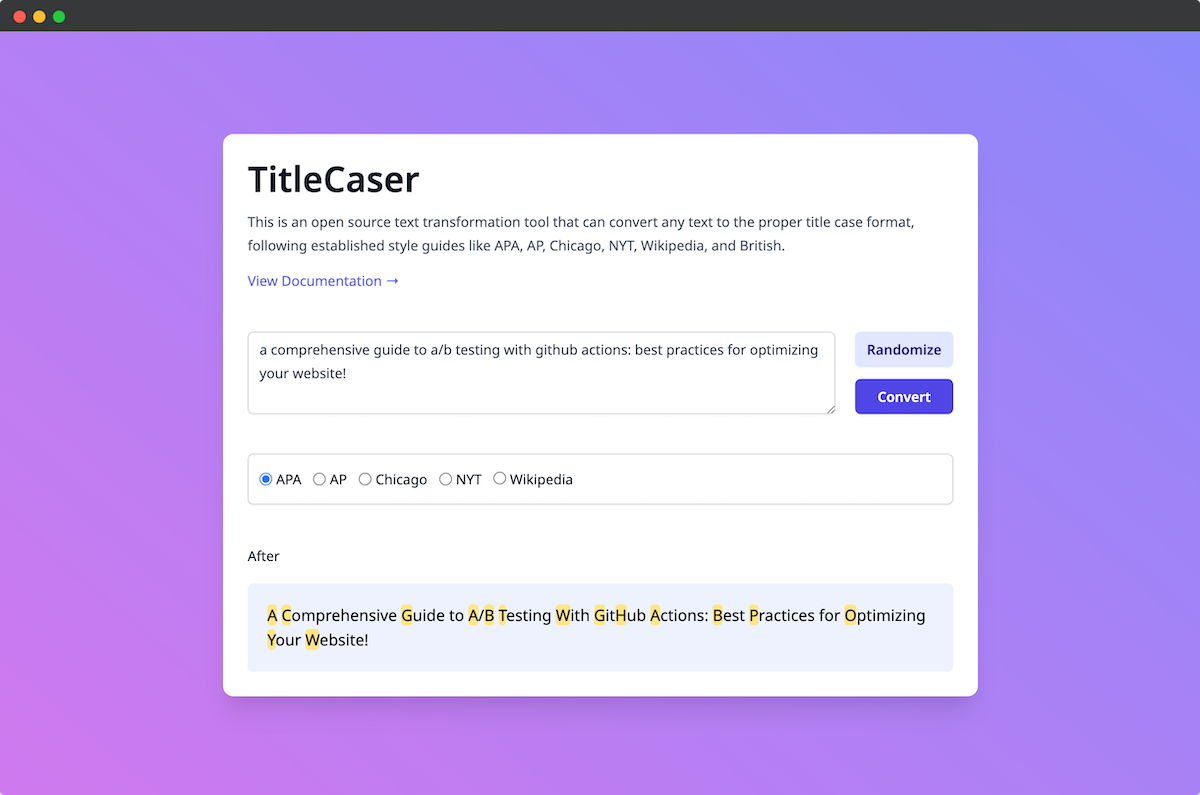
TitleCaser is a deterministic, style-guide–aware title casing engine built for production publishing systems. It implements major editorial standards with rule-driven capitalization logic, including contextual acronym disambiguation, compound handling, possessive normalization, punctuation-aware processing, dictionary-assisted entity detection, and curated domain vocabulary enforcement across marketing, academia, business, finance, geography, legal, defense, media, names, and technology.
Its multi-pass processing architecture ensures deterministic output while supporting custom overrides, exact phrase preservation, controlled vocabulary enforcement, and a defensive validation layer for runtime inputs. Designed for Node.js and browser environments, TitleCaser integrates cleanly into CMS pipelines, build systems, and automated editorial workflows where precision and repeatability are required.
Built-in rule systems for AP, APA, Chicago, NYT, Wikipedia (sentence case), and British styles. Each style applies its own logic for minor words, hyphenated compounds, possessives, colon capitalization, and acronym handling, producing consistent, repeatable output.
Distinguishes regional acronyms from identical lowercase words using positional and surrounding-word heuristics.
For example:
"It’s up to us in the US military to decide."
→ "It’s Up to Us in the US Military To Decide."

"us-uk-led coalition"
→ "US-UK-Led Coalition"- Supports US, UK, EU, USA (dotted and undotted forms)
- Handles hyphenated compounds (US-Backed, US-UK-Led)
- Works in parenthetical and comma-separated contexts
- Detects end-of-sentence acronyms
- Avoids false positives inside longer words
Includes curated normalization rules across brands, technology, geography, business, marketing, defense, academia, finance, legal, media, names, and entertainment domains.
- Brand and product casing (
GOOgle,nodejs,iphone→Google,Node.js,iPhone) - Media, entertainment, and platform names (
fox news,cnn international,apple music→Fox News,CNN International,Apple Music) - Technology and developer terms (
aws,github,devops,ddos→AWS,GitHub,DevOps,DDoS) - Names, possessives, and compounds (
donald duck,o'connor,louis-iv→Donald Duck,O’Connor,Louis-IV) - Unicode and international brand casing (
skoda→Škoda) - Runtime custom term overrides
- Exact phrase replacements
Wikipedia mode uses dictionary-backed part-of-speech data, given-name and family-name lists, curated proper phrases, and contextual scoring to avoid overcorrecting user intent.
- Preserves likely names (
Donald Duck,John Smith,Maeve O’Connor) - Preserves known media and brand phrases (
BBC News,Sky News,The Lincoln Project) - Lowercases ordinary article-led phrases (
The Public Event → the public event) - Avoids treating every capitalized word as a proper noun
- Provides profile-specific imports for
liteandfulldictionary builds
Intelligent processing of hyphenated compounds with style-specific rules:
- Multi-hyphen compounds (
US-UK-Led Coalition) - Style-specific compound rules (AP vs Chicago)
- En dash and em dash normalization
- Acronym-first compound logic
- Roman numerals inside compounds
- Brand casing preservation inside compounds
Layered multi-pass processing for stable handling of complex inputs:
- Input normalization (spacing and
<br>handling) - Token-based whitespace-preserving transformation pipeline
- Style-aware casing pass
- Acronym resolution pass
- Short-word correction pass
- Final contextual correction pass
- Optional smart quote conversion
- Exact phrase override pass
Designed for integration into publishing workflows, CMS pipelines, and automated editorial systems.
- Preserves
<br>tags - Normalizes spacing around colon +
<br> - Retains ampersands and symbols
- Handles excessive whitespace safely
- Optional whitespace preservation for editor-safe real-time usage
- Defensive validation for script tags, unsafe controls, bidi controls, emoji, special characters, and allowed HTML tags
TitleCaser is not an HTML sanitizer. Its validation layer is designed to reject or allow configured input patterns before casing, while still supporting editor workflows that intentionally pass safe tags such as <br>.
The AMD/browser build extends String.prototype.toTitleCase() for direct string usage in client environments.
- Node.js (ES modules)
- Browser (prototype extension via AMD build)
- AMD distribution build
- CLI build and test scripts
- Structured utilities under
src/utils/* - Structured data under
src/data/* - Dedicated
TitleCaserConfigAPI for reusable runtime configuration
npm install @danielhaim/titlecaserimport { TitleCaser } from '@danielhaim/titlecaser';
const titleCaser = new TitleCaser({ style: 'ap' });
titleCaser.toTitleCase('inside the race to secure ai systems before the next cyberattack'); // → "Inside the Race To Secure AI Systems Before the Next Cyberattack"
titleCaser.toTitleCase('how hospitals prepare for ddos attacks on aws'); // → "How Hospitals Prepare for DDoS Attacks on AWS"
titleCaser.toTitleCase('what the us military learned from nato drills'); // → "What the US Military Learned From NATO Drills"Handles brand normalization, acronyms, hyphenation, possessives, and colon rules:
import { TitleCaser } from '@danielhaim/titlecaser';

const titleCaser = new TitleCaser({ style: 'ap' });

titleCaser.toTitleCase(
  "inside a high-profile, long-term plan for e-commerce growth"
); // → "Inside a High-Profile, Long-Term Plan for E-Commerce Growth"titleCaser.addReplaceTerm('cms', 'CMS');
titleCaser.toTitleCase('cms audit after hospital breach'); // → "CMS Audit After Hospital Breach"titleCaser.addExactPhraseReplacements([
{ 'public records request': 'Public Records Request' }
]);
titleCaser.toTitleCase('inside the public records request that changed city hall'); // → "Inside the Public Records Request That Changed City Hall"const tc = new TitleCaser({
style: 'ap',
smartQuotes: true
});
tc.toTitleCase('"we are not ready," says former nato commander'); // → “We Are Not Ready,” Says Former NATO CommanderWhitespace normalization is enabled by default.
By default, TitleCaser collapses consecutive whitespace and trims leading and trailing spaces:
const tc = new TitleCaser({ style: "ap" });

tc.toTitleCase("   the   quick   brown   fox   "); // → "The Quick Brown Fox"
For real-time editors or environments where spacing must be preserved, disable normalization:
const tc = new TitleCaser({
  style: "ap",
  normalizeWhitespace: false
});

tc.toTitleCase("   the   quick   brown   fox   "); // → "   The   Quick   Brown   Fox   "
When normalizeWhitespace is false:
- Internal spacing is preserved
- Leading/trailing whitespace is preserved
- Newlines and tabs are preserved
- Only letter casing is transformed
This behavior allows safe integration into real-time editors without unexpected trimming or cursor instability when normalization is disabled (see Issue #17 for discussion).
Use TitleCaserConfig when you want to validate and reuse a full configuration object before passing it into TitleCaser.
import { TitleCaser, TitleCaserConfig } from '@danielhaim/titlecaser';

const config = new TitleCaserConfig({
  style: 'wikipedia',
  minTitleChars: 1,
  maxTitleChars: 400,
  dictionaryProfile: 'full',
  allowEmojis: true,
  allowSpecialCharacters: true,
  normalizeQuotes: true,
  normalizeWhitespace: true,
  ignoreList: ['internal-code-name'],
  phraseReplacementList: {
    'open source initiative': 'Open Source Initiative'
  },
  security: {
    allowHtml: true,
    allowedHtmlTags: ['br'],
    rejectScriptTags: true,
    rejectEventHandlers: true,
    rejectControlCharacters: true,
    rejectBidiControls: true
  }
});

const titleCaser = new TitleCaser(config.toTitleCaserOptions());

titleCaser.toTitleCase('the report cited fox news after the public event');
// → "The report cited Fox News after the public event"
minTitleLength and maxTitleLength are supported aliases for minTitleChars and maxTitleChars.
Dictionary profiles control which dictionary data is used for dictionary-backed decisions. The default package import points to the full build for compatibility. To reduce compiled bundle size, import the lite entry point instead of relying only on the runtime dictionaryProfile option.
import { TitleCaser as LiteTitleCaser } from '@danielhaim/titlecaser/lite';
import { TitleCaser as FullTitleCaser } from '@danielhaim/titlecaser/full';| Profile | Description |
|---|---|
lite |
Smaller build with curated proper phrases, names, brands, media entities, acronyms, and domain terms. It does not include the WordNet-derived part-of-speech dictionary, so Wikipedia sentence-case detection is less aggressive. |
full |
Full dictionary-assisted build with the complete WordNet-derived noun, verb, adjective, and adverb data; default. |
The dictionary is bundled with the package and does not perform API calls. Runtime dictionaryProfile is still accepted for the default build, but runtime selection cannot remove data that has already been compiled into a bundle.
<script src="./path/to/dist/full/titlecaser.amd.js"></script>
<!-- or -->
<script src="./path/to/dist/lite/titlecaser.amd.js"></script>
const output = "inside the race to secure ai systems before the next cyberattack"
.toTitleCase({ style: 'apa' });
console.log(output); // → "Inside the Race to Secure AI Systems Before the Next Cyberattack"Automatically normalize editorial headings in a publishing workflow:
<h2>how nato logistics depend on rail lines, ports, and fuel depots</h2>
<h2>inside the race to secure ai systems before the next cyberattack</h2>
<h2>why local newspapers are turning to nonprofit ownership</h2>
function applyTitleCaseToH2Elements(options = { style: "apa" }) {
const h2Elements = document.querySelectorAll("h2");
h2Elements.forEach((h2) => {
h2.innerHTML = h2.innerHTML.toTitleCase(options);
});
}
applyTitleCaseToH2Elements();new TitleCaser(options)| Option | Type | Default | Description |
|---|---|---|---|
style |
string | 'ap' |
Editorial style: 'ap' | 'apa' | 'chicago' | 'nyt' | 'wikipedia' | 'british' |
dictionaryProfile |
string | 'full' |
Dictionary profile: 'lite' | 'full' |
smartQuotes |
boolean | false |
Converts straight quotes (' ") to typographic curly quotes |
normalizeQuotes |
boolean | false |
Normalizes left/right quote characters before processing |
normalizeWhitespace |
boolean | true |
Collapses consecutive whitespace and trims leading/trailing whitespace. Set to false to preserve original spacing (editor-safe mode). |
minTitleChars |
number | 1 |
Minimum accepted input length in characters |
maxTitleChars |
number | 400 |
Maximum accepted input length in characters |
allowEmojis |
boolean | true |
Allows emoji characters in input |
allowSpecialCharacters |
boolean | true |
Allows configured special characters in input |
neverCapitalize |
string[] | [] |
Additional words that should remain lowercase (merged with style defaults) |
wordReplacementsList |
object[] | internal defaults | Array of { 'term': 'replacement' } objects used for term normalization |
phraseReplacementList |
object | {} |
String-to-string phrase replacement map |
replaceTerms |
array | [] |
Tuple-style replacement list used by TitleCaserConfig |
security |
object | default security policy | Controls HTML, script tag, event-handler, control-character, bidi, and zero-width character validation |
debug |
boolean | false |
Enables internal warning logs during processing |
| Option | Type | Default | Description |
|---|---|---|---|
allowHtml |
boolean | false |
Allows HTML-looking input only when enabled |
allowedHtmlTags |
string[] | ['br'] |
Tags allowed when HTML is enabled |
rejectScriptTags |
boolean | true |
Rejects <script> tags |
rejectEventHandlers |
boolean | true |
Rejects inline handlers such as onclick= |
rejectControlCharacters |
boolean | true |
Rejects unsafe control characters |
rejectBidiControls |
boolean | true |
Rejects bidi override/control characters |
rejectZeroWidthCharacters |
boolean | false |
Optionally rejects zero-width characters |
titleCaser.toTitleCase('inside the heat wave response'); // → "Inside the Heat Wave Response"titleCaser.addReplaceTerm('cms', 'CMS');titleCaser.removeReplaceTerm('cms');titleCaser.setReplaceTerms([
{ 'cms': 'CMS' },
{ 'aws': 'AWS' }
]);titleCaser.addExactPhraseReplacements([
{ 'public records request': 'Public Records Request' },
{ 'city hall': 'City Hall' }
]);titleCaser.setStyle('chicago');import { createTitleCaserConfig } from '@danielhaim/titlecaser';
const config = createTitleCaserConfig({
style: 'ap',
maxTitleChars: 300
});
const titleCaser = new TitleCaser(config.toTitleCaserOptions());npm run test- Extensive unit test coverage
- Split style validation for AP, APA, Chicago, NYT, and Wikipedia
- Utility-level tests for individual helpers
- Hygiene and runtime validation tests
- TypeScript definition tests
- Acronym disambiguation edge cases
- Hyphenation edge cases
- Brand normalization
- Wikipedia dictionary/entity contradiction tests
- Cross-style name heuristic and rare noun trap coverage
Focused test commands:
npm run test-ap
npm run test-apa
npm run test-chicago
npm run test-nyt
npm run test-wikipedia
npm run test-utils
npm run test-hygieneUseful materials for improving your knowledge of writing and language style guides. These resources include various books and manuals, such as the Publication Manual of the American Psychological Association, the Chicago Manual of Style, and the AP Stylebook, which are widely recognized as authoritative sources on grammar, punctuation, and capitalization rules.
- AP Stylebook, 56th Edition
- Publication Manual of the American Psychological Association, Seventh Edition (2020)
- Chicago Manual of Style: Capitalization
- The Bluebook: A Uniform System of Citation. 21st ed. Cambridge: Harvard Law Review Association, 2020
- The Chicago Manual of Style, 17th Edition
- The New York Times Manual of Style and Usage
- Wikipedia: Letter case
- Wikipedia:Manual of Style/Titles of works
If you encounter any bugs or issues while using the library or the demo page, please report them by opening a new issue in the repository's issue tracker.
When reporting a bug, please provide as much detail as possible, including the steps to reproduce the issue and any error messages that you see. I appreciate any contribution to improving this library.
We welcome contributions! Please see our Contributing Guidelines for details.
This project is licensed under the Apache License 2.0 - see the LICENSE file for details.
See CHANGELOG.md for a list of changes and version history.