




A community-maintained Git reference site with command explanations, examples, troubleshooting notes, and a printable quick reference.
This repository powers a VitePress documentation site for learning and using Git more effectively.
It is designed to be:
- Easy to scan for common commands
- Practical with examples and real-world workflows
- Helpful when things go wrong with troubleshooting guidance
- Friendly to contributors with clear writing and open-source workflows
- Basics –
init,clone,add,commit,status,log,diff - Branching –
checkout,switch,merge - Merging and history rewriting –
rebase,cherry-pick,revert - Remote workflows –
push,pull,fetch,remote,submodule - Advanced topics –
stash,reflog,bisect,worktree,hooks - Troubleshooting – common Git problems and fixes
- Guides – workflows,
.gitignore, and FAQ - Glossary – short definitions for Git terms
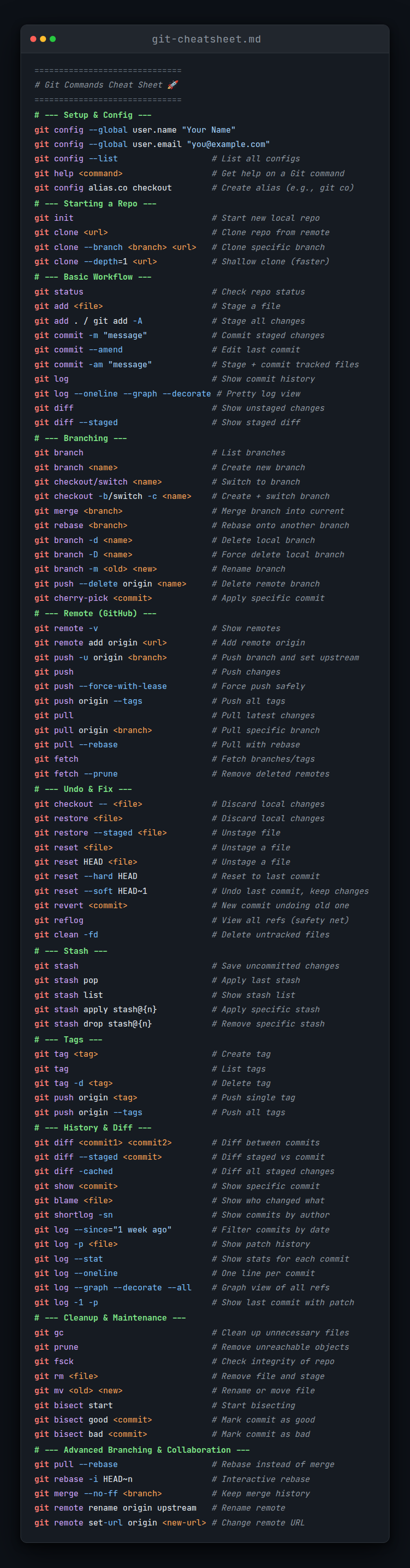
- Quick Reference – a compact page and printable PDF
docs/
├── 01_basics/
├── 02_branching/
├── 03_merging/
├── 04_remote/
├── 05_advanced/
├── 06_troubleshooting/
├── guides/
├── glossary.md
├── index.md
└── quick-reference.md
Each folder contains focused pages so readers can jump directly to the topic they need.
Open the live site here: z0zerox.github.io/Git-Commands-CheatSheet
Quick links:
git clone https://github.com/Z0ZeroX/Git-Commands-CheatSheet.git
cd Git-Commands-CheatSheet
npm install
npm run docs:dev
Then open the local site shown in the terminal, usually http://localhost:5173.
npm run docs:buildUse the printable quick reference here: Git Commands Quick Reference PDF
- Node.js 18+
- npm
- Git installed locally
If you are only reading the docs, you do not need any local dependencies.
Contributions are welcome.
You can help by:
- improving command explanations
- fixing typos or broken links
- adding examples or edge cases
- improving troubleshooting content
- translating the site into more languages
Before submitting a pull request:
- Read CONTRIBUTING.md
- Create a feature branch
- Make your changes
- Preview the docs locally
- Run a production build to catch broken links or formatting issues
- License: MIT — see LICENSE
- Issues: use GitHub Issues for bugs, ideas, and content fixes
- Discussions: use GitHub Discussions for broader questions and suggestions
- Code of conduct: contributor expectations are documented in CONTRIBUTING.md
If this project helps you, a star on GitHub is always appreciated.
Thanks to everyone who contributes documentation, feedback, fixes, and ideas.