A modern desktop application built with JavaFX 21 for efficiently managing, sorting, analyzing, and visualizing student grade data. Features include data persistence, Excel import/export, multiple sorting algorithms, and statistical/distribution views.
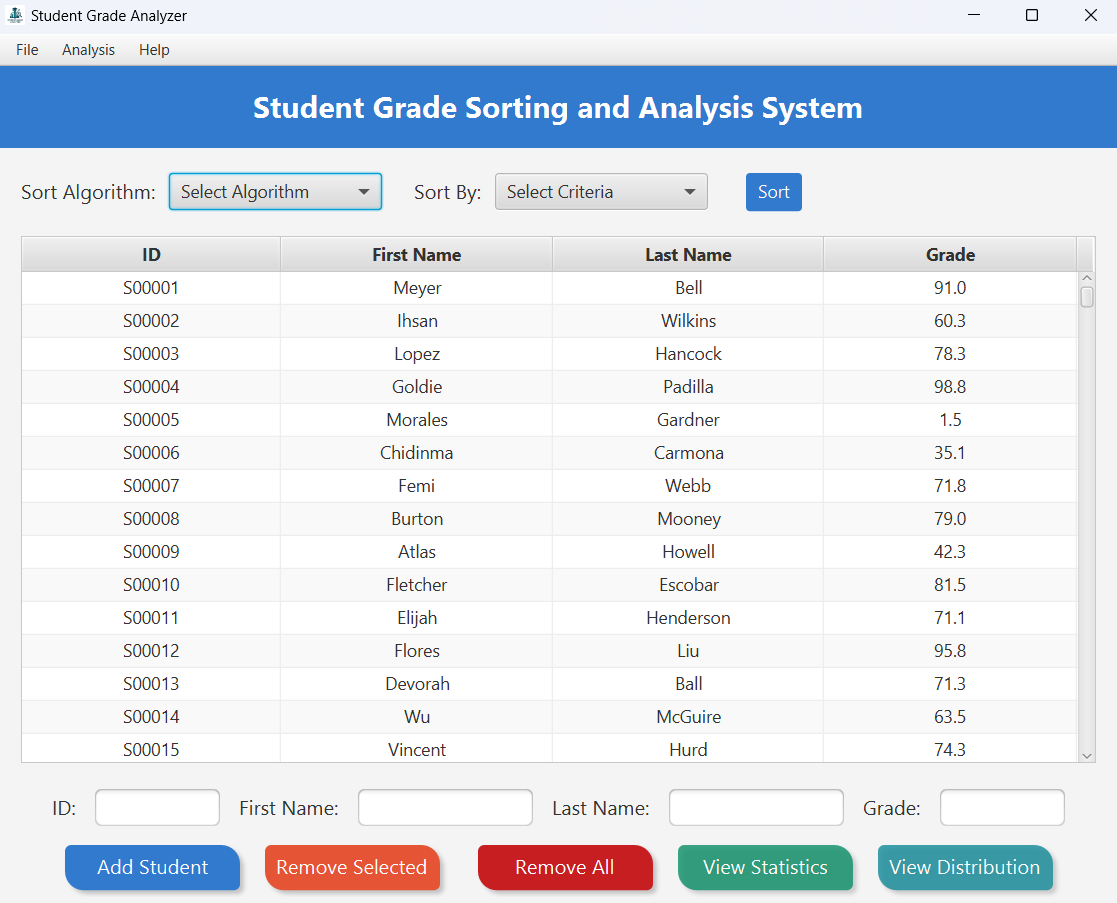
Main View - Manage & Sort Data
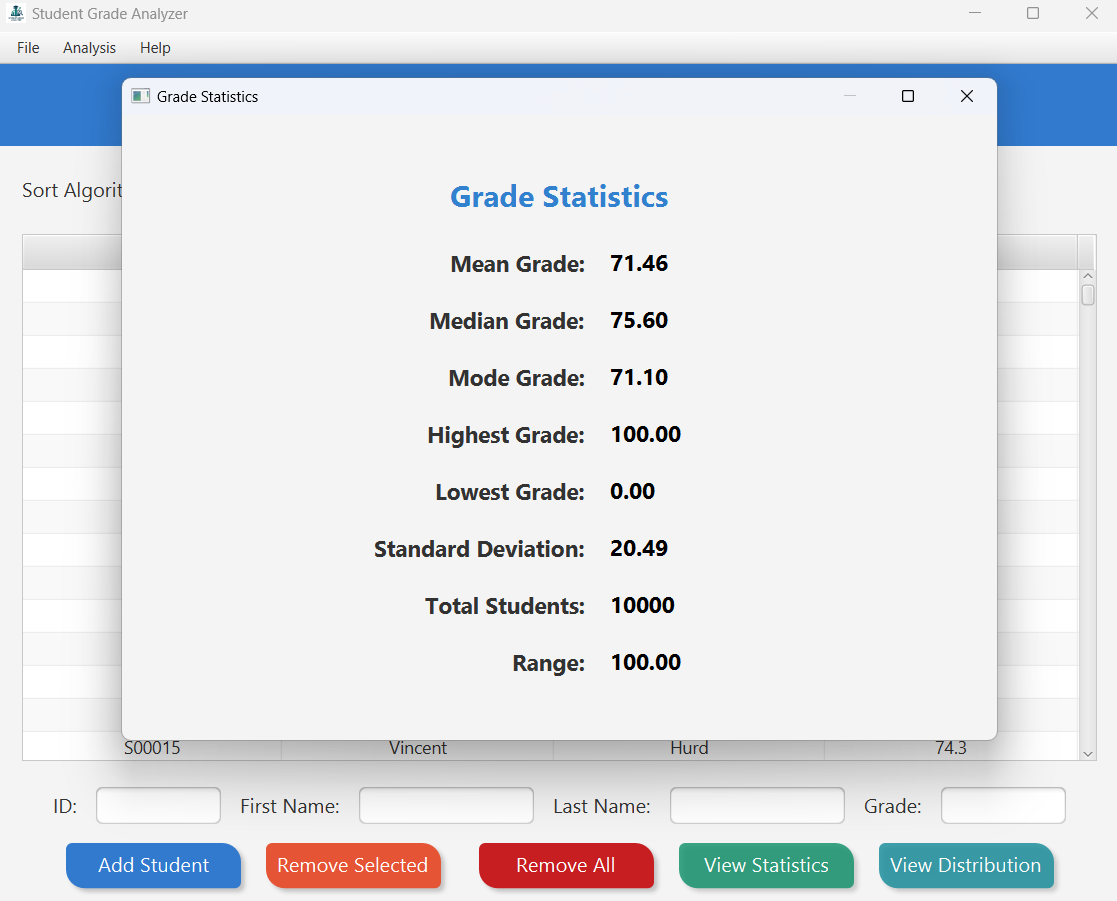
Statistics View - Key Metrics
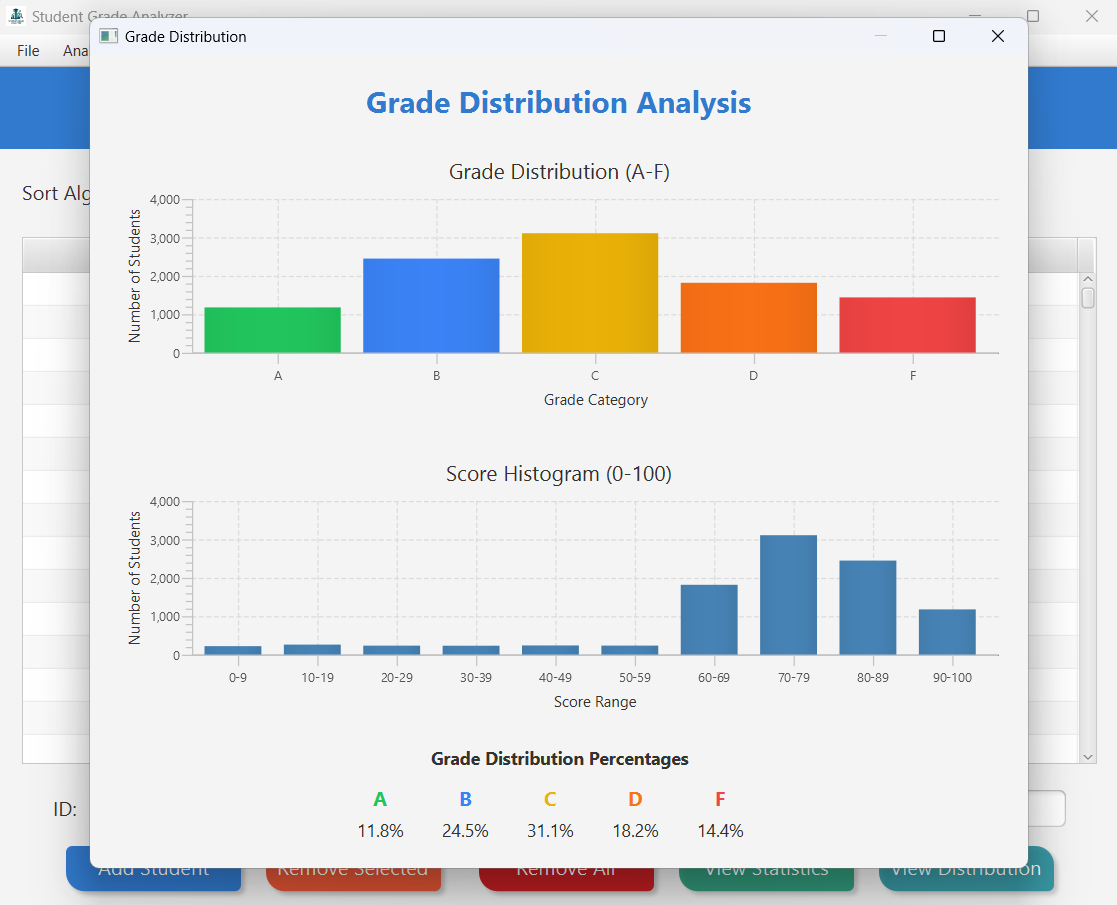
Distribution View - Charts & Percentages
This application provides a user-friendly interface to:
- Enter and store student information (ID, First Name, Last Name, Grade).
- View student data in a clear, sortable table.
- Sort student records based on various criteria (ID, Name, Grade) using different efficient sorting algorithms (QuickSort, MergeSort, RadixSort).
- Import student data from Excel (
.xlsx) files. - Export the current student data to Excel (
.xlsx) files. - Calculate and display key statistical metrics for the grades.
- Visualize the grade distribution using bar charts.
- Persist data between sessions using a local JSON file.
-
✍️ Data Entry & Management:
- Easily add new students with unique IDs, names, and grades (validated 0-100).
- Quickly remove selected students via the table.
- Built-in input validation ensures data integrity.
-
📊 Data Display:
- Presents student data in a clean, readable TableView.
- Columns include ID, First Name, Last Name, and Grade.
-
🚀 Efficient Sorting:
- Sort data instantly by ID, Name, or Grade.
- Compare algorithm performance by choosing between:
QuickSortMergeSortRadixSort(Optimized for numeric ID & Grade)
- See the sort execution time displayed after each operation.
-
🔄 Import/Export (Excel):
- Import student lists directly from
.xlsxfiles (ID, FirstName, LastName, Grade expected). - Choose to replace existing data or append new records (duplicate IDs are skipped on append).
- Export the current student table to a new
.xlsxfile with a single click.
- Import student lists directly from
-
📈 Analysis & Visualization:
- Statistics View: Get immediate insights with calculated metrics:
- Mean, Median, Mode
- Highest & Lowest Grades
- Standard Deviation & Range
- Total Student Count
- Distribution View: Visualize class performance:
- Bar chart showing counts for grade categories (A, B, C, D, F).
- Clearly displayed percentages for each grade category.
- Detailed score histogram chart (0-9, 10-19, ..., 90-100).
- Statistics View: Get immediate insights with calculated metrics:
-
💾 Data Persistence:
- Your data is automatically saved to
students.jsonwhen you close the app. - Data is automatically loaded when you start the app again – no manual saving needed!
- Your data is automatically saved to
- Language: Java (Requires JDK 21 or later to build)
- Framework: JavaFX 21 (via OpenJFX) for the graphical user interface.
- Build Tool: Apache Maven
- IDE Used:
(Recommended)
- Libraries:
- Jackson Databind: For saving/loading student data to/from JSON.
- Apache POI (poi-ooxml): For reading from and writing to Excel
.xlsxfiles. - Apache Commons (Collections4, Compress, IO): Dependencies for Apache POI.
- XMLBeans: Dependency for Apache POI.
- Packaging:
. (for
.exewrapper)


Follow these instructions to get the application running or to build it from the source code.
- To Run the Application (
Student Grade Analyzer.exe):- Windows Operating System.
- Java Runtime Environment (JRE) 8 installed. Download it from here
.
- Java Development Kit (JDK) 21 (64-bit) installed. Download it from here
.
- To Build from Source:
- JDK 21 (64-bit) or later. Make sure JDK
binis on your system PATH. - Apache Maven: Required to compile and package the project. Make sure
mvnis executable from your command line (Mavenbindirectory added to PATH). - Launch4j: (Optional, if you want to rebuild the
.exewrapper) Download from
- JDK 21 (64-bit) or later. Make sure JDK


- Install Prerequisites: Before running the application, ensure you have both JRE 8 AND JDK 21 (x64) installed on your Windows machine, and that JDK 21 is correctly configured in your system
PATH. - Download: Get the
Student Grade Analyzer.exefile from the - Run: Double-click the
Student Grade Analyzer.exefile. It should use the installed JRE/JDK to launch the JavaFX application.

Use these steps to run the project directly within IntelliJ IDEA.
- Clone the Repository:
git clone https://github.com/OmarAfifi-CSE/StudentGradeAnalyzer.git cd StudentGradeAnalyzer - Open Project in IntelliJ:
File->Open...-> Select the cloned project'spom.xmlfile ->Open as Project.- Trust the project if prompted.
- Configure Project SDK:
File->Project Structure...(Ctrl+Alt+Shift+S).Project Settings->Project: Set SDK to your installed JDK 21. SetLanguage levelto SDK default.Apply->OK.
- Sync Maven Dependencies:
- Open the Maven tool window (
View->Tool Windows->Maven). - Click the "Reload All Maven Projects" button (circling arrows). Wait for completion.
- Open the Maven tool window (
- Run/Debug:
- Select the configured
StudentGradeApprun configuration and click Run (▶️ ) or Debug (🐞).
- Select the configured
This method uses IntelliJ's artifact system, ideal for running within the IDE.
- Prerequisites: JDK 21 (configured in IntelliJ), JavaFX SDK 21 (know the
libpath), Maven dependencies synced (Maven->Reload Project). - Configure Artifact (if needed):
File->Project Structure->Artifacts->+->JAR->From modules with dependencies....- Module:
StudentGradeAnalyzer(or similar). - Main Class:
main.StudentGradeAppPublish. - Select:
Copy to the output directory and link via manifest. OK->Apply->OK.
- Build Artifact:
Build->Build Artifacts...-> Select your artifact ->Build. (Output typically inout/artifacts/...).
Note: This builds an output folder (out/artifacts/...) with your JAR and dependencies. It doesn't create a single executable or bundle Java. Running it outside IntelliJ requires manually setting up the java command with the correct VM options and classpath. For distribution, consider using jpackage or Launch4j.
- Launch: Run the
.exeor execute the JAR (requires manual JavaFX module configuration if run directly). - View Data: Existing student data (loaded from
students.json) is displayed in the table. - Sort: Select a sorting algorithm (QuickSort, MergeSort, RadixSort) and a criteria (ID, Name, Grade) from the dropdowns and click "Sort". Note that RadixSort may only be suitable for ID/Grade depending on implementation.
- Add Student: Enter ID, First Name, Last Name, and Grade in the fields at the bottom and click "Add Student".
- Remove Student: Select a row in the table and click "Remove Selected".
- Analyze: Click "View Statistics" or "View Distribution" to open separate windows with calculated metrics and charts.
- Import/Export: Use the "File" menu to import from or export to
.xlsxfiles. - Exit: Use the "File" -> "Exit" menu item or the window's close button. Data is saved automatically on exit.
- Persistent student data is stored in a JSON file located at:
C:\Users\[YourUsername]\.StudentGradeAnalyzer\students.json(on Windows)~/.StudentGradeAnalyzer/students.json(on macOS/Linux)
- Deleting this file will cause the application to load sample data on the next startup.


