Registering Items
Sacados uses an Item Register system, this is used so that we can keep track of the Items through the network (with their IDs) without sending all the Items "immutable" data.
The Items are in fact Scriptable Objects, this is useful because you can edit your Items directly in the Editor. Besides you can also create Items at runtime by just instantiating a new one.
It's recommended to register your Items at the very beginning of your game.
Then, you have two choices:
- Populate your Items in an array through the inspector and register them
- Get the Items using Resources.LoadAll("Path") and register them
// Populate this array through the inspector
// Or use Resources.LoadAll<Item>("MyItemsFolder");
public Item[] ItemsToRegister;

// This method should be called at the startup of the game
private void Start() {

  // If you don't want to populate the array through the inspector:
  ItemsToRegister = Resources.LoadAll<Item>("MyItemsFolder");
  // Note: The path is relative to the Assets/Resources path

  // Loop through the Items
  foreach(Item item in ItemsToRegister) {

      // Register the Item
      Item.Register(item);

  }

}Just do a right click in a project folder in the editor, then go in Create > Sacados and finally click on Item. Change it's name and then edit it in the inspector.
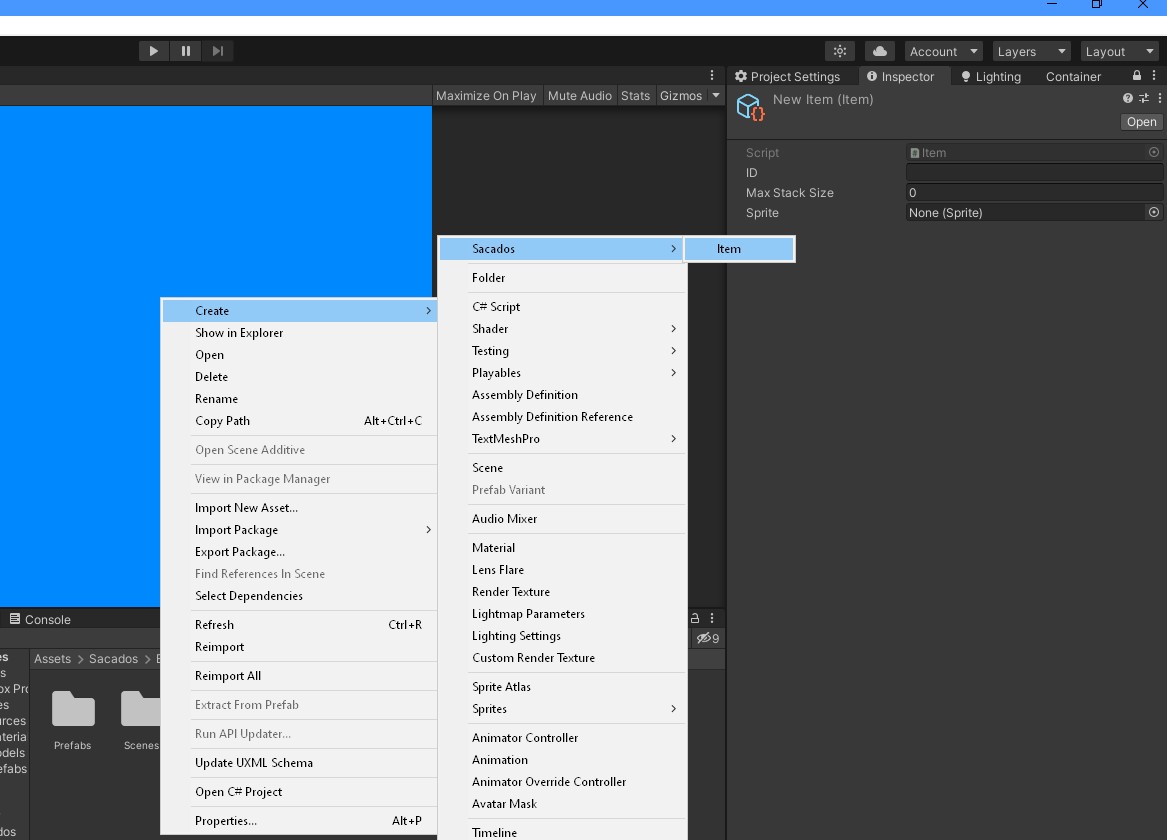
You can also create and register Items at runtime. This may be useful if you want to add a modding support for your game.
// This method should be called at the startup of the game
private void Start() {

  // Initialize a new Item
  Item myItem = new Item() {

    // Set the Item ID
    ID = "MyNewItemID",
    // Set the Item MaxStackSize
    MaxStackSize = 64

  };

  // Register the Item
  Item.Register(myItem);

}