- On the first run, the application will create a
Settings/Fansly.jsonfile. - Retrieve your Token, using your browser.
- Go to the Fansly website.
- Open the devtools (
F12orright-click>inspect element). - Open the
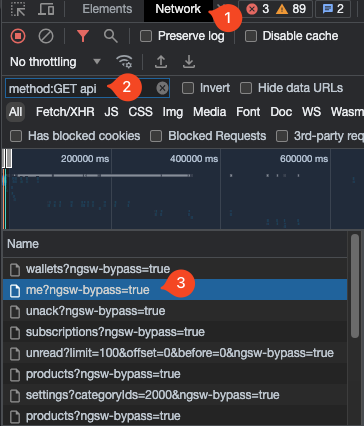
Networktab in the devtools. - Search for
method:GET api, refresh the page and click on one of the requests ending inngsw-bypass=true. - Look at the
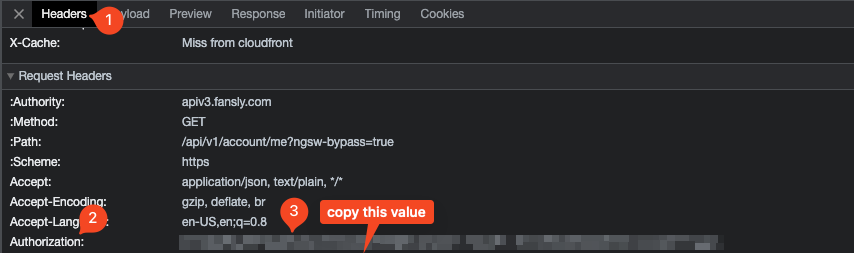
Request Headersand find theAuthorization:line, copy the value behind it.
- Add the
Authorization:value in your browser to theSettings/Fansly.jsonfile'sTokensetting. - Add your username to the
Settings/Fansly.jsonfile'sUsernamesetting. - On the second run, the application will automatically connect to Fansly' real-time API and start receiving events.
{
  "Fansly": {
    "Token": "your-fansly-token",
    "Username": "your-username"
  }
}