- Java Basics
- byte/8
- char/16
- short/16
- int/32
- float/32
- long/64
- double/64
- boolean/~
boolean has only two values: true and false. It can be stored in 1 bit, but its exact size is not clearly specified. During compilation, the JVM converts boolean data to int, using 1 for true and 0 for false. The JVM supports boolean arrays, but implements them by reading and writing byte arrays.
Every primitive type has a corresponding wrapper type. Assignments between primitive types and their wrapper types are completed through autoboxing and unboxing.
Integer x = 2;     // boxing, calls Integer.valueOf(2)
int y = x; // unboxing, calls X.intValue()The difference between new Integer(123) and Integer.valueOf(123) is:
- new Integer(123) creates a new object every time;
- Integer.valueOf(123) uses an object from the cache pool, so repeated calls get a reference to the same object.
Integer x = new Integer(123);
Integer y = new Integer(123);
System.out.println(x == y);    // false
Integer z = Integer.valueOf(123);
Integer k = Integer.valueOf(123);
System.out.println(z == k);   // true
The implementation of valueOf() is simple: it first checks whether the value is in the cache pool. If it is, it directly returns the cached object.
public static Integer valueOf(int i) {
    if (i >= IntegerCache.low && i <= IntegerCache.high)
        return IntegerCache.cache[i + (-IntegerCache.low)];
    return new Integer(i);
}
In Java 8, the default range of the Integer cache pool is -128~127.
static final int low = -128;
static final int high;
static final Integer cache[];

static {
    // high value may be configured by property
    int h = 127;
    String integerCacheHighPropValue =
        sun.misc.VM.getSavedProperty("java.lang.Integer.IntegerCache.high");
    if (integerCacheHighPropValue != null) {
        try {
            int i = parseInt(integerCacheHighPropValue);
            i = Math.max(i, 127);
            // Maximum array size is Integer.MAX_VALUE
            h = Math.min(i, Integer.MAX_VALUE - (-low) -1);
        } catch( NumberFormatException nfe) {
            // If the property cannot be parsed into an int, ignore it.
        }
    }
    high = h;

    cache = new Integer[(high - low) + 1];
    int j = low;
    for(int k = 0; k < cache.length; k++)
        cache[k] = new Integer(j++);

    // range [-128, 127] must be interned (JLS7 5.1.7)
    assert IntegerCache.high >= 127;
}
The compiler calls valueOf() during autoboxing. Therefore, if multiple Integer instances with the same value within the cache range are created through autoboxing, they reference the same object.
Integer m = 123;
Integer n = 123;
System.out.println(m == n); // true
The cache pools for primitive wrapper types are:
- boolean values true and false
- all byte values
- short values between -128 and 127
- int values between -128 and 127
- char in the range \u0000 to \u007F
When using wrapper types corresponding to these primitive types, if the value is within the cache range, the cached object can be used directly.
Among all numeric wrapper caches in JDK 1.8, IntegerCache is special. Its lower bound is -128 and its default upper bound is 127, but the upper bound is configurable. When starting the JVM, use -XX:AutoBoxCacheMax=<size> to specify the cache size. During JVM initialization, this option sets a system property named java.lang.IntegerCache.high, and IntegerCache reads this property during initialization to determine the upper bound.
StackOverflow : Differences between new Integer(123), Integer.valueOf(123) and just 123
String is declared final, so it cannot be inherited. Wrapper classes such as Integer also cannot be inherited.
In Java 8, String internally uses a char array to store data.
public final class String
    implements java.io.Serializable, Comparable<String>, CharSequence {
    /** The value is used for character storage. */
    private final char value[];
}
After Java 9, the String implementation changed to store strings in a byte array and uses coder to indicate which encoding is used.
public final class String
    implements java.io.Serializable, Comparable<String>, CharSequence {
    /** The value is used for character storage. */
    private final byte[] value;

    /** The identifier of the encoding used to encode the bytes in {@code value}. */
    private final byte coder;
}
The value array is declared final, meaning it cannot reference another array after initialization. In addition, String has no internal method that changes the value array, so String immutability can be guaranteed.
1. hash values can be cached
Because String hash values are used frequently, such as when String is used as a HashMap key. Immutability makes the hash value immutable as well, so it only needs to be computed once.
2. String Pool requirement
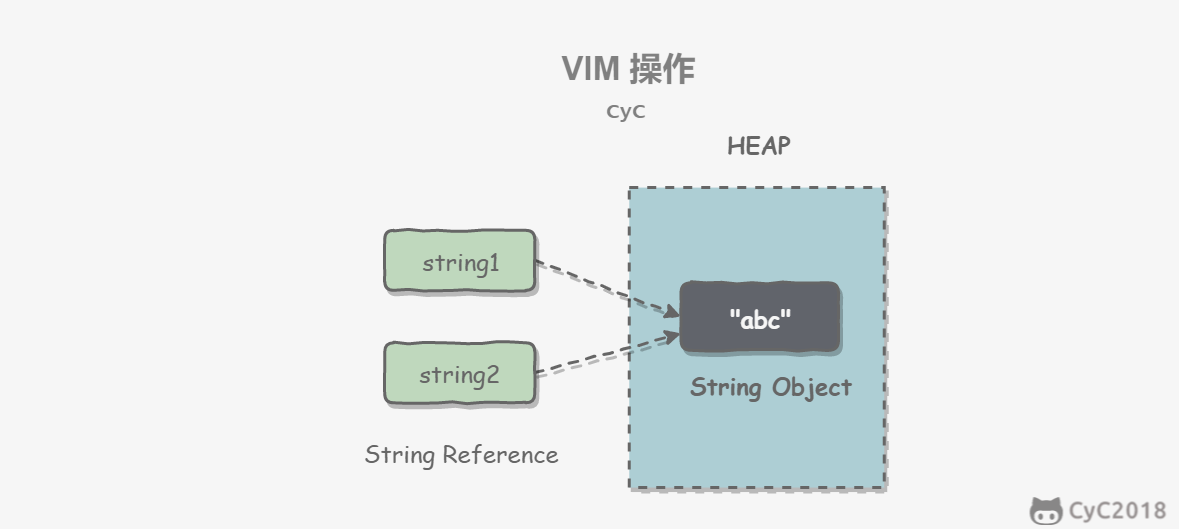
If a String object has already been created, its reference can be obtained from the String Pool. String Pool is possible only because String is immutable.
3. Security
String is often used as a parameter, and String immutability guarantees that parameters do not change. For example, if String were mutable when used as a network connection parameter, it could be changed during the connection process. The party that changed it might think it is now connecting to another host, while the actual situation may not match.
4. Thread safety
String immutability is inherently thread-safe, so String can be safely used across multiple threads.
Program Creek : Why String is immutable in Java?
1. Mutability
- String is immutable
- StringBuffer and StringBuilder are mutable
2. Thread safety
- String is immutable, so it is thread-safe
- StringBuilder is not thread-safe
- StringBuffer is thread-safe and uses synchronized internally for synchronization
StackOverflow : String, StringBuffer, and StringBuilder
The string constant pool (String Pool) stores all string literals, which are determined at compile time. In addition, String's intern() method can add strings to the String Pool at runtime.
When a string calls intern(), if a string with the same value already exists in the String Pool (determined using equals()), the reference to the string in the String Pool is returned. Otherwise, a new string is added to the String Pool and a reference to the new string is returned.
In the example below, s1 and s2 create two different strings using new String(), while s3 and s4 obtain the same string reference through s1.intern() and s2.intern(). intern() first puts "aaa" into the String Pool and then returns the string reference, so s3 and s4 reference the same string.
String s1 = new String("aaa");
String s2 = new String("aaa");
System.out.println(s1 == s2);           // false
String s3 = s1.intern();
String s4 = s2.intern();
System.out.println(s3 == s4);           // true
If a string is created as a literal such as "bbb", it is automatically placed into the String Pool.
String s5 = "bbb";
String s6 = "bbb";
System.out.println(s5 == s6);  // true
Before Java 7, the String Pool was stored in the runtime constant pool, which belonged to the permanent generation. In Java 7, the String Pool was moved to the heap because permanent generation space is limited and can cause OutOfMemoryError when many strings are used.
Using this approach creates two string objects in total, assuming the String Pool does not yet contain the "abc" string object.
- "abc" is a string literal, so a string object pointing to this "abc" literal is created in the String Pool at compile time;
- Using new creates a string object on the heap.
Create a test class whose main method uses this approach to create a string object.
public class NewStringTest {
    public static void main(String[] args) {
        String s = new String("abc");
    }
}
Use javap -verbose to decompile and obtain the following content:
// ...
Constant pool:
// ...
   #2 = Class              #18            // java/lang/String
   #3 = String             #19            // abc
// ...
  #18 = Utf8               java/lang/String
  #19 = Utf8               abc
// ...

  public static void main(java.lang.String[]);
    descriptor: ([Ljava/lang/String;)V
    flags: ACC_PUBLIC, ACC_STATIC
    Code:
      stack=3, locals=2, args_size=1
         0: new           #2                  // class java/lang/String
         3: dup
         4: ldc           #3                  // String abc
         6: invokespecial #4                  // Method java/lang/String."<init>":(Ljava/lang/String;)V
         9: astore_1
// ...
In the Constant Pool, #19 stores the string literal "abc", and #3 is the String Pool string object that points to this string literal #19. In the main method, line 0 uses new #2 to create a string object on the heap, and ldc #3 uses the string object in the String Pool as the parameter to the String constructor.
The following is the source code of the String constructor. When one string object is passed as the constructor parameter of another string object, the value array contents are not fully copied; both objects point to the same value array.
public String(String original) {
    this.value = original.value;
    this.hash = original.hash;
}Java passes parameters to methods by value, not by reference.
In the following code, dog in Dog dog is a pointer that stores the object's address. When passing a parameter into a method, the object's address is essentially passed by value to the formal parameter.
public class Dog {

    String name;

    Dog(String name) {
        this.name = name;
    }

    String getName() {
        return this.name;
    }

    void setName(String name) {
        this.name = name;
    }

    String getObjectAddress() {
        return super.toString();
    }
}
Changing an object's field value inside a method changes the original object's field value because both references point to the same object.
class PassByValueExample {
    public static void main(String[] args) {
        Dog dog = new Dog("A");
        func(dog);
        System.out.println(dog.getName());          // B
    }

    private static void func(Dog dog) {
        dog.setName("B");
    }
}
However, if the pointer is made to reference another object inside the method, then the pointers inside and outside the method point to different objects. Changing the object pointed to by one pointer does not affect the object pointed to by the other pointer.
public class PassByValueExample {
    public static void main(String[] args) {
        Dog dog = new Dog("A");
        System.out.println(dog.getObjectAddress()); // Dog@4554617c
        func(dog);
        System.out.println(dog.getObjectAddress()); // Dog@4554617c
        System.out.println(dog.getName());          // A
    }

    private static void func(Dog dog) {
        System.out.println(dog.getObjectAddress()); // Dog@4554617c
        dog = new Dog("B");
        System.out.println(dog.getObjectAddress()); // Dog@74a14482
        System.out.println(dog.getName());          // B
    }
}
StackOverflow: Is Java “pass-by-reference” or “pass-by-value”?
Java cannot implicitly perform downcasting because it can reduce precision.
The literal 1.1 is of type double and cannot be assigned directly to a float variable because this is downcasting.
// float f = 1.1;The literal 1.1f is of type float.
float f = 1.1f;Because the literal 1 is of type int, which has higher precision than short, int cannot be implicitly downcast to short.
short s1 = 1;
// s1 = s1 + 1;
However, the += or ++ operators perform implicit type conversion.
s1 += 1;
s1++;
The statement above is equivalent to downcasting the result of s1 + 1:
s1 = (short) (s1 + 1);StackOverflow : Why don't Java's +=, -=, *=, /= compound assignment operators require casting?
Starting from Java 7, String objects can be used in switch condition statements.
String s = "a";
switch (s) {
    case "a":
        System.out.println("aaa");
        break;
    case "b":
        System.out.println("bbb");
        break;
}
switch does not support long, float, or double because it was originally designed for equality checks on types with only a small number of values. If the values are too complex, if is more appropriate.
// long x = 111;
// switch (x) { // Incompatible types. Found: 'long', required: 'char, byte, short, int, Character, Byte, Short, Integer, String, or an enum'
//     case 111:
//         System.out.println(111);
//         break;
//     case 222:
//         System.out.println(222);
//         break;
// }
StackOverflow : Why can't your switch statement data type be long, Java?
1. Data
Declares data as a constant. It can be a compile-time constant or a constant that cannot be changed after being initialized at runtime.
- For primitive types, final makes the value unchanged;
- For reference types, final makes the reference unchanged, so it cannot reference another object, but the referenced object itself can still be modified.
final int x = 1;
// x = 2;  // cannot assign value to final variable 'x'
final A y = new A();
y.a = 1;
2. Methods
Declares that a method cannot be overridden by subclasses.
private methods are implicitly final. If a method defined in a subclass has the same signature as a private method in the base class, the subclass method does not override the base-class method; it defines a new method in the subclass.
3. Classes
Declares that a class cannot be inherited.
1. Static variables
- Static variable: also called a class variable. It belongs to the class, and all instances of the class share the static variable. It can be accessed directly through the class name. Only one copy of a static variable exists in memory.
- Instance variable: each created instance has its own instance variable, which is created and destroyed with that instance.
public class A {

    private int x;         // instance variable
    private static int y;  // static variable

    public static void main(String[] args) {
        // int x = A.x;  // Non-static field 'x' cannot be referenced from a static context
        A a = new A();
        int x = a.x;
        int y = A.y;
    }
}
2. Static methods
Static methods exist when the class is loaded and do not depend on any instance. Therefore, static methods must have implementations, meaning they cannot be abstract methods.
public abstract class A {
    public static void func1(){
    }
    // public abstract static void func2();  // Illegal combination of modifiers: 'abstract' and 'static'
}
They can access only static fields and static methods of their class. They cannot use this or super because those keywords are associated with concrete objects.
public class A {

    private static int x;
    private int y;

    public static void func1(){
        int a = x;
        // int b = y;  // Non-static field 'y' cannot be referenced from a static context
        // int b = this.y;     // 'A.this' cannot be referenced from a static context
    }
}
3. Static blocks
Static blocks run once when the class is initialized.
public class A {
    static {
        System.out.println("123");
    }

    public static void main(String[] args) {
        A a1 = new A();
        A a2 = new A();
    }
}1234. Static inner classes
Non-static inner classes depend on an instance of the outer class. In other words, an outer-class instance must be created first, and then that instance is used to create the non-static inner class. Static inner classes do not require this.
public class OuterClass {

    class InnerClass {
    }

    static class StaticInnerClass {
    }

    public static void main(String[] args) {
        // InnerClass innerClass = new InnerClass(); // 'OuterClass.this' cannot be referenced from a static context
        OuterClass outerClass = new OuterClass();
        InnerClass innerClass = outerClass.new InnerClass();
        StaticInnerClass staticInnerClass = new StaticInnerClass();
    }
}
Static inner classes cannot access non-static variables or methods of the outer class.
5. Static imports
When using static variables and methods, ClassName no longer needs to be specified. This simplifies code but greatly reduces readability.
import static com.xxx.ClassName.*6. Initialization order
Static variables and static blocks take precedence over instance variables and ordinary blocks. The initialization order of static variables and static blocks depends on their order in the code.
public static String staticField = "static variable";static {
System.out.println("static block");
}public String field = "instance variable";{
System.out.println("ordinary block");
}Constructor initialization happens last.
public InitialOrderTest() {
    System.out.println("constructor");
}
When inheritance is involved, the initialization order is:
- Parent class (static variables, static blocks)
- Child class (static variables, static blocks)
- Parent class (instance variables, ordinary blocks)
- Parent class (constructor)
- Child class (instance variables, ordinary blocks)
- Child class (constructor)
public native int hashCode()

public boolean equals(Object obj)

protected native Object clone() throws CloneNotSupportedException

public String toString()

public final native Class<?> getClass()

protected void finalize() throws Throwable {}

public final native void notify()

public final native void notifyAll()

public final native void wait(long timeout) throws InterruptedException

public final void wait(long timeout, int nanos) throws InterruptedException

public final void wait() throws InterruptedException1. Equivalence relation
Two objects have an equivalence relation if the following five conditions are satisfied:
I. Reflexivity
x.equals(x); // trueII. Symmetry
x.equals(y) == y.equals(x); // trueIII. Transitivity
if (x.equals(y) && y.equals(z))
    x.equals(z); // true;
IV. Consistency
Multiple calls to equals() return the same result.
x.equals(y) == x.equals(y); // trueV. Comparison with null
For any object x that is not null, x.equals(null) returns false.
x.equals(null); // false;2. Equivalence and equality
- For primitive types, == checks whether two values are equal. Primitive types do not have equals().
- For reference types, == checks whether two variables reference the same object, while equals() checks whether the referenced objects are equivalent.
Integer x = new Integer(1);
Integer y = new Integer(1);
System.out.println(x.equals(y)); // true
System.out.println(x == y);      // false
3. Implementation
- Check whether it is a reference to the same object. If so, return true directly;
- Check whether it is the same type. If not, return false directly;
- Cast the Object;
- Check whether each significant field is equal.
public class EqualExample {

    private int x;
    private int y;
    private int z;

    public EqualExample(int x, int y, int z) {
        this.x = x;
        this.y = y;
        this.z = z;
    }

    @Override
    public boolean equals(Object o) {
        if (this == o) return true;
        if (o == null || getClass() != o.getClass()) return false;

        EqualExample that = (EqualExample) o;

        if (x != that.x) return false;
        if (y != that.y) return false;
        return z == that.z;
    }
}
hashCode() returns a hash value, while equals() determines whether two objects are equivalent. Two equivalent objects must have the same hash value, but two objects with the same hash value are not necessarily equivalent, because hash computation has randomness and two different objects may compute the same hash value.
When overriding equals(), always override hashCode() as well to ensure that equivalent objects also have equal hash values.
Collection classes such as HashSet and HashMap use hashCode() to compute where an object should be stored. Therefore, to add objects to these collections, the corresponding class needs to implement hashCode().
In the code below, two equivalent objects are created and added to a HashSet. We want these two objects to be treated as the same, so only one object should be added to the set. However, EqualExample does not implement hashCode(), so the two objects have different hash values, causing the set to contain two equivalent objects.
EqualExample e1 = new EqualExample(1, 1, 1);
EqualExample e2 = new EqualExample(1, 1, 1);
System.out.println(e1.equals(e2)); // true
HashSet<EqualExample> set = new HashSet<>();
set.add(e1);
set.add(e2);
System.out.println(set.size());   // 2
An ideal hash function should be uniform: unequal objects should be evenly distributed across all possible hash values. This requires the hash function to consider the values of all fields. Each field can be treated as one digit in base R, forming a base-R integer.
R is usually 31 because it is an odd prime. If it were even, information would be lost during multiplication overflow because multiplying by 2 is equivalent to shifting left by one bit, losing the leftmost bit. Also, multiplying by 31 can be converted into shifting and subtraction: 31*x == (x<<5)-x, and the compiler automatically performs this optimization.
@Override
public int hashCode() {
    int result = 17;
    result = 31 * result + x;
    result = 31 * result + y;
    result = 31 * result + z;
    return result;
}By default, it returns a form such as ToStringExample@4554617c, where the value after @ is the unsigned hexadecimal representation of the hash code.
public class ToStringExample {

    private int number;

    public ToStringExample(int number) {
        this.number = number;
    }
}
ToStringExample example = new ToStringExample(123);
System.out.println(example.toString());ToStringExample@4554617c1. Cloneable
clone() is a protected method of Object, not public. If a class does not explicitly override clone(), other classes cannot directly call clone() on instances of that class.
public class CloneExample {
    private int a;
    private int b;
}
CloneExample e1 = new CloneExample();
// CloneExample e2 = e1.clone(); // 'clone()' has protected access in 'java.lang.Object'Override clone() with the following implementation:
public class CloneExample {
    private int a;
    private int b;

    @Override
    public CloneExample clone() throws CloneNotSupportedException {
        return (CloneExample)super.clone();
    }
}
CloneExample e1 = new CloneExample();
try {
CloneExample e2 = e1.clone();
} catch (CloneNotSupportedException e) {
e.printStackTrace();
}java.lang.CloneNotSupportedException: CloneExampleThe code above throws CloneNotSupportedException because CloneExample does not implement the Cloneable interface.
Note that clone() is not a method of the Cloneable interface; it is a protected method of Object. The Cloneable interface only specifies that if a class does not implement Cloneable and clone() is called, CloneNotSupportedException is thrown.
public class CloneExample implements Cloneable {
    private int a;
    private int b;

    @Override
    public Object clone() throws CloneNotSupportedException {
        return super.clone();
    }
}
2. Shallow copy
The copied object and the original object reference the same object for reference-type fields.
public class ShallowCloneExample implements Cloneable {

    private int[] arr;

    public ShallowCloneExample() {
        arr = new int[10];
        for (int i = 0; i < arr.length; i++) {
            arr[i] = i;
        }
    }

    public void set(int index, int value) {
        arr[index] = value;
    }

    public int get(int index) {
        return arr[index];
    }

    @Override
    protected ShallowCloneExample clone() throws CloneNotSupportedException {
        return (ShallowCloneExample) super.clone();
    }
}
ShallowCloneExample e1 = new ShallowCloneExample();
ShallowCloneExample e2 = null;
try {
e2 = e1.clone();
} catch (CloneNotSupportedException e) {
e.printStackTrace();
}
e1.set(2, 222);
System.out.println(e2.get(2)); // 2223. Deep copy
The copied object and the original object reference different objects for reference-type fields.
public class DeepCloneExample implements Cloneable {

    private int[] arr;

    public DeepCloneExample() {
        arr = new int[10];
        for (int i = 0; i < arr.length; i++) {
            arr[i] = i;
        }
    }

    public void set(int index, int value) {
        arr[index] = value;
    }

    public int get(int index) {
        return arr[index];
    }

    @Override
    protected DeepCloneExample clone() throws CloneNotSupportedException {
        DeepCloneExample result = (DeepCloneExample) super.clone();
        result.arr = new int[arr.length];
        for (int i = 0; i < arr.length; i++) {
            result.arr[i] = arr[i];
        }
        return result;
    }
}
DeepCloneExample e1 = new DeepCloneExample();
DeepCloneExample e2 = null;
try {
e2 = e1.clone();
} catch (CloneNotSupportedException e) {
e.printStackTrace();
}
e1.set(2, 222);
System.out.println(e2.get(2)); // 24. Alternatives to clone()
Using clone() to copy an object is both complex and risky. It throws exceptions and requires type conversion. Effective Java recommends avoiding clone() and using copy constructors or copy factories to copy objects.
public class CloneConstructorExample {

    private int[] arr;

    public CloneConstructorExample() {
        arr = new int[10];
        for (int i = 0; i < arr.length; i++) {
            arr[i] = i;
        }
    }

    public CloneConstructorExample(CloneConstructorExample original) {
        arr = new int[original.arr.length];
        for (int i = 0; i < original.arr.length; i++) {
            arr[i] = original.arr[i];
        }
    }

    public void set(int index, int value) {
        arr[index] = value;
    }

    public int get(int index) {
        return arr[index];
    }
}
CloneConstructorExample e1 = new CloneConstructorExample();
CloneConstructorExample e2 = new CloneConstructorExample(e1);
e1.set(2, 222);
System.out.println(e2.get(2)); // 2Java has three access modifiers: private, protected, and public. If no access modifier is added, the member has package-level visibility.
Access modifiers can be added to classes or members of a class, such as fields and methods.
- Class visibility means other classes can use this class to create instances.
- Member visibility means other classes can access that member through an instance of this class.
protected is used to modify members, meaning the member is visible to subclasses in the inheritance hierarchy. This modifier is meaningless for classes.
A well-designed module hides all implementation details and clearly separates its API from its implementation. Modules communicate only through their APIs, and one module does not need to know the internal workings of another. This concept is called information hiding or encapsulation. Therefore, access permissions should prevent each class or member from being accessed externally whenever possible.
If a subclass method overrides a parent-class method, the access level of the subclass method cannot be lower than that of the parent-class method. This ensures that wherever a parent-class instance can be used, a subclass instance can be used instead, satisfying the Liskov Substitution Principle.
Fields should never be public because doing so loses control over modifications to the field, and clients can modify it arbitrarily. For example, in the following example, AccessExample has a public id field. If at some point we want to store the id field as an int, all client code must be modified.
public class AccessExample {
    public String id;
}
Public getter and setter methods can replace public fields, allowing control over field modification behavior.
public class AccessExample {

    private int id;

    public String getId() {
        return id + "";
    }

    public void setId(String id) {
        this.id = Integer.valueOf(id);
    }
}
There are exceptions. If it is a package-private class or a private nested class, directly exposing members usually does not have much impact.
public class AccessWithInnerClassExample {

    private class InnerClass {
        int x;
    }

    private InnerClass innerClass;

    public AccessWithInnerClassExample() {
        innerClass = new InnerClass();
    }

    public int getValue() {
        return innerClass.x;  // direct access
    }
}1. Abstract classes
Abstract classes and abstract methods are declared using the abstract keyword. If a class contains abstract methods, the class must be declared as abstract.
The biggest difference between abstract classes and ordinary classes is that abstract classes cannot be instantiated and can only be inherited.
public abstract class AbstractClassExample {

    protected int x;
    private int y;

    public abstract void func1();

    public void func2() {
        System.out.println("func2");
    }
}
public class AbstractExtendClassExample extends AbstractClassExample {
@Override
public void func1() {
System.out.println("func1");
}
}// AbstractClassExample ac1 = new AbstractClassExample(); // 'AbstractClassExample' is abstract; cannot be instantiated
AbstractClassExample ac2 = new AbstractExtendClassExample();
ac2.func1();2. Interfaces
An interface is an extension of an abstract class. Before Java 8, it could be viewed as a completely abstract class, meaning it could not contain any method implementation.
Starting from Java 8, interfaces can also have default method implementations because maintaining interfaces without default methods is too costly. Before Java 8, if an interface wanted to add a new method, every class implementing that interface had to be modified to implement the new method.
Interface members, including fields and methods, are public by default and cannot be defined as private or protected. Starting from Java 9, methods can be defined as private, allowing reusable code to be defined without exposing the method.
Interface fields are static and final by default.
public interface InterfaceExample {

    void func1();

    default void func2(){
        System.out.println("func2");
    }

    int x = 123;
    // int y;               // Variable 'y' might not have been initialized
    public int z = 0;       // Modifier 'public' is redundant for interface fields
    // private int k = 0;   // Modifier 'private' not allowed here
    // protected int l = 0; // Modifier 'protected' not allowed here
    // private void fun3(); // Modifier 'private' not allowed here
}
public class InterfaceImplementExample implements InterfaceExample {
@Override
public void func1() {
System.out.println("func1");
}
}// InterfaceExample ie1 = new InterfaceExample(); // 'InterfaceExample' is abstract; cannot be instantiated
InterfaceExample ie2 = new InterfaceImplementExample();
ie2.func1();
System.out.println(InterfaceExample.x);3. Comparison
- From a design perspective, an abstract class provides an IS-A relationship and must satisfy the Liskov Substitution Principle, meaning subclass objects must be able to replace all parent-class objects. An interface is more like a LIKE-A relationship. It only provides a method implementation contract and does not require an IS-A relationship between the interface and the implementing class.
- From a usage perspective, a class can implement multiple interfaces but cannot inherit multiple abstract classes.
- Interface fields can only be static and final, while abstract-class fields have no such restriction.
- Interface members can only be public, while abstract-class members can have multiple access levels.
4. Choosing which to use
Use interfaces when:
- Unrelated classes need to implement a method, such as unrelated classes implementing compareTo() from the Comparable interface;
- Multiple inheritance is needed.
Use abstract classes when:
- Code needs to be shared among several related classes.
- The access permissions of inherited members need to be controlled instead of all being public.
- Non-static and non-constant fields need to be inherited.
In many cases, interfaces are preferred over abstract classes. Interfaces do not impose the strict class hierarchy requirements of abstract classes and can flexibly add behavior to a class. Starting from Java 8, interfaces can also have default method implementations, making the cost of modifying interfaces much lower.
- Abstract Methods and Classes
- Deep understanding of abstract class and interface
- When to Use Abstract Class and Interface
- Java 9 Private Methods in Interfaces
- Access parent-class constructors: use super() to access a parent-class constructor and delegate some initialization work to the parent class. Note that a subclass always calls a parent-class constructor to complete initialization, usually the default constructor. If the subclass needs to call another parent-class constructor, it can use super().
- Access parent-class members: if a subclass overrides a parent-class method, use the super keyword to reference the parent-class method implementation.
public class SuperExample {

    protected int x;
    protected int y;

    public SuperExample(int x, int y) {
        this.x = x;
        this.y = y;
    }

    public void func() {
        System.out.println("SuperExample.func()");
    }
}
public class SuperExtendExample extends SuperExample {
private int z;
public SuperExtendExample(int x, int y, int z) {
super(x, y);
this.z = z;
}
@Override
public void func() {
super.func();
System.out.println("SuperExtendExample.func()");
}
}SuperExample e = new SuperExtendExample(1, 2, 3);
e.func();SuperExample.func()
SuperExtendExample.func()1. Override
Exists in an inheritance hierarchy and means a subclass implements a method with exactly the same method declaration as the parent class.
To satisfy the Liskov Substitution Principle, overriding has the following three restrictions:
- The access permission of the subclass method must be greater than or equal to that of the parent-class method;
- The return type of the subclass method must be the parent-class method's return type or a subtype of it.
- The exception type thrown by the subclass method must be the exception type thrown by the parent class or a subtype of it.
Using the @Override annotation lets the compiler check whether the three restrictions above are satisfied.
In the example below, SubClass is a subclass of SuperClass, and SubClass overrides SuperClass's func() method. In this example:
- The subclass method access level is public, greater than the parent class's protected.
- The subclass return type is ArrayList<Integer>, a subtype of the parent return type List<Integer>.
- The subclass throws Exception, a subtype of the parent class's Throwable.
- The subclass override uses the @Override annotation, so the compiler automatically checks whether the restrictions are satisfied.
class SuperClass {
    protected List<Integer> func() throws Throwable {
        return new ArrayList<>();
    }
}

class SubClass extends SuperClass {
    @Override
    public ArrayList<Integer> func() throws Exception {
        return new ArrayList<>();
    }
}
When calling a method, first look in the current class for a matching method. If none exists, look in the parent class to see whether one was inherited. Otherwise, cast the parameter to a parent type and check whether a corresponding method exists. Overall, method-call priority is:
- this.func(this)
- super.func(this)
- this.func(super)
- super.func(super)
/*
    A
    |
    B
    |
    C
    |
    D
 */


class A {

    public void show(A obj) {
        System.out.println("A.show(A)");
    }

    public void show(C obj) {
        System.out.println("A.show(C)");
    }
}

class B extends A {

    @Override
    public void show(A obj) {
        System.out.println("B.show(A)");
    }
}

class C extends B {
}

class D extends C {
}
public static void main(String[] args) {
A a = new A();
B b = new B();
C c = new C();
D d = new D();
// A has show(A obj), so call it directly
a.show(a); // A.show(A)
// A does not have show(B obj), so cast B to its parent class A
a.show(b); // A.show(A)
// B has show(C obj) inherited from A, so call it directly
b.show(c); // A.show(C)
// B does not have show(D obj), but has show(C obj) inherited from A, so cast D to its parent class C
b.show(d); // A.show(C)
// The referenced object is still B, so ba and b have the same call result
A ba = new B();
ba.show(c); // A.show(C)
ba.show(d); // A.show(C)
}2. Overload
Exists within the same class and means a method has the same name as an existing method, but at least one of the parameter type, count, or order differs.
Note that if only the return value differs and everything else is the same, it is not overloading.
class OverloadingExample {
    public void show(int x) {
        System.out.println(x);
    }

    public void show(int x, String y) {
        System.out.println(x + " " + y);
    }
}
public static void main(String[] args) {
OverloadingExample example = new OverloadingExample();
example.show(1);
example.show(1, "2");
}Every class has a Class object that contains information about the class. When a new class is compiled, a .class file with the same name is produced, and its contents store the Class object.
Class loading is equivalent to loading the Class object. A class is dynamically loaded into the JVM only when it is first used. You can also control class loading with Class.forName("com.mysql.jdbc.Driver"), which returns a Class object.
Reflection can provide runtime class information, and the class can be loaded only at runtime. It can even be loaded when the class's .class file did not exist at compile time.
Class and java.lang.reflect together provide reflection support. The java.lang.reflect library mainly contains the following three classes:
- Field : use get() and set() to read and modify the field associated with a Field object;
- Method : use invoke() to call the method associated with a Method object;
- Constructor : use Constructor's newInstance() to create new objects.
Advantages of reflection:
- Extensibility : applications can use fully qualified names to create instances of extensible objects and use externally supplied user-defined classes.
- Class browsers and visual development environments : a class browser needs to enumerate class members. Visual development environments, such as IDEs, can benefit from type information available through reflection to help programmers write correct code.
- Debuggers and testing tools : debuggers need to inspect private members in a class. Testing tools can use reflection to automatically call discoverable API definitions in a class, ensuring higher code coverage in a test suite.
Disadvantages of reflection:
Although reflection is powerful, it should not be abused. If a feature can be implemented without reflection, it is better not to use it. Keep the following points in mind when using reflection.
-
Performance overhead : reflection involves dynamic type resolution, so the JVM cannot optimize this code. Therefore, reflection operations are much less efficient than non-reflection operations. Avoid reflection in frequently executed code or programs with high performance requirements.
-
Security restrictions : using reflection requires the program to run in an environment without security restrictions. If a program must run in an environment with security restrictions, such as an Applet, this becomes a problem.
-
Internal exposure : because reflection allows code to perform operations that are normally not allowed, such as accessing private fields and methods, using reflection may cause unexpected side effects. This can make code malfunction and harm portability. Reflection code breaks abstraction, so when the platform changes, code behavior may also change.
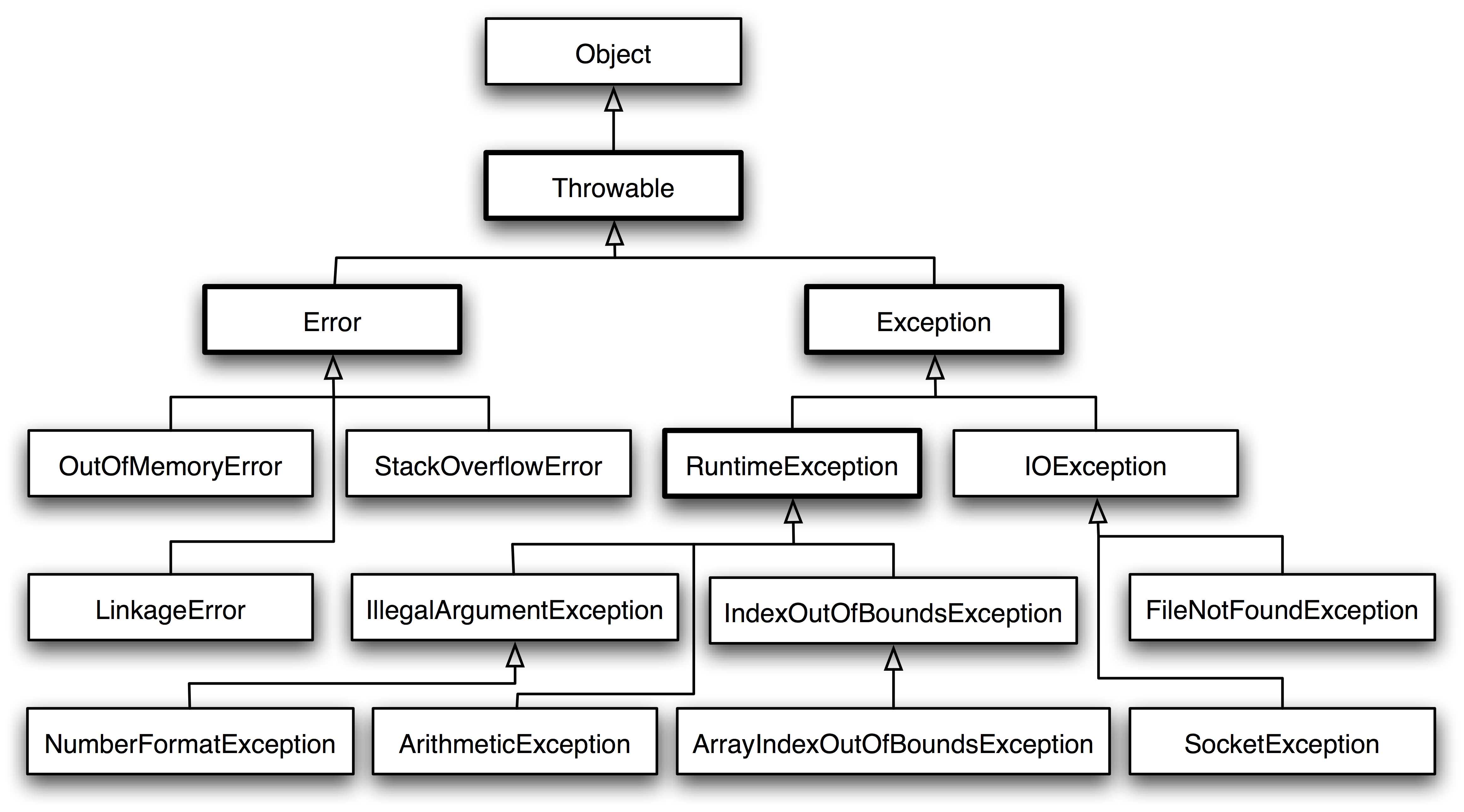
Throwable can represent any class that can be thrown as an exception. It is divided into two types: Error and Exception. Error represents errors that the JVM cannot handle, while Exception is divided into two types:
- Checked exceptions : must be caught and handled with try...catch..., and recovery from the exception is possible;
- Unchecked exceptions : runtime errors, such as division by 0 causing an ArithmeticException. The program crashes and cannot recover.
public class Box<T> {
    // T stands for "Type"
    private T t;
    public void set(T t) { this.t = t; }
    public T get() { return t; }
}Java annotations are metadata attached to code. Tools can parse and use them during compilation and runtime, providing description and configuration functions. Annotations do not and cannot affect the actual logic of the code; they only provide auxiliary information.
Annotation implementation principles and custom annotation examples
New highlights in Java SE 8
- Lambda Expressions
- Pipelines and Streams
- Date and Time API
- Default Methods
- Type Annotations
- Nashhorn JavaScript Engine
- Concurrent Accumulators
- Parallel operations
- PermGen Error Removed
New highlights in Java SE 7
- Strings in Switch Statement
- Type Inference for Generic Instance Creation
- Multiple Exception Handling
- Support for Dynamic Languages
- Try with Resources
- Java nio Package
- Binary Literals, Underscore in literals
- Diamond Syntax
- Java is a purely object-oriented language. All objects inherit from java.lang.Object. To stay compatible with C, C++ supports both object-oriented and procedural programming.
- Java achieves cross-platform behavior through the virtual machine, while C++ depends on specific platforms.
- Java has no pointers. Its references can be understood as safe pointers, while C++ has pointers like C.
- Java supports automatic garbage collection, while C++ requires manual memory management.
- Java does not support multiple inheritance and can only achieve similar behavior by implementing multiple interfaces, while C++ supports multiple inheritance.
- Java does not support operator overloading. Although addition can be performed on two String objects, this is built-in language support and is not operator overloading, while C++ supports operator overloading.
- Java's goto is a reserved word but cannot be used; C++ can use goto.
What are the main differences between Java and C++?
- JRE: Java Runtime Environment. It provides the environment required to run Java. It is a JVM program that mainly includes the standard JVM implementation and some basic Java class libraries.
- JDK: Java Development Kit. It provides the development and runtime environment for Java. The JDK is the core of Java development and integrates the JRE plus other tools, such as the javac compiler for compiling Java source code.
- Eckel B. Thinking in Java[M]. China Machine Press, 2002.
- Bloch J. Effective java[M]. Addison-Wesley Professional, 2017.