- Automatically updating a tour file as the associated code changes
- Automatically set the "pattern" record mode when you create a new tour, and select
Nonefor the git ref - Added support for opening a
*.tourfile in the VS Code notebook editor (Insiders only)
- A tour step can now run multiple commands
- Tours are now written to the
CodeTour: Custom Tour Directorydirectory, when that property is set - Fixed a performance issue with large codebases
- The "Tours available!" prompt is now suppressed when opening a CodeSwing workspace
- Added a new
CodeTour: Custom Tour Directorysetting, that allows a project to specify a custom directory for their tours to be stored in - Added support for storing tours in the
.github/toursfolder, in addition to the existing.vscode/toursand.toursdirectories - You can now create a tour called
main.tourat the root of your workspace, which will be considered a primary tour - Fixed a bug with running CodeTour in Safari (which doesn't support lookbehinds in regex)
- URI handler now allows specifying the step via 1-based numbers, as opposed to 0-based
- The URI handler now allows specifying just a step number, in order to index into a repo within only a single tour
- Added a URI handler, with support for launching a specific tour and step
- Exposed a new
onDidStartTourevent andstartTourByUrimethod to the extension API - Added experimental support for the CodeStatus extension
- Updated the play/stop icons
- Fixed an issue with tour steps that were attached to the first line of a file
- Added support for referencing workspace images in a tour step
- Added support for referencing workspace files in a tour step
- Fixed a bug with code fences, that allow multi-line snippets
- Fixed a bug with tours that span multi-root workspaces
- Fixed a bug with code fences, that allows the use of backticks in the code snippet
- Added support for conditional tours via the new
whenproperty to tour files - Added keybindings for starting and ending tours
- Fixed an issue with using quotes in a shell command
- Fixed a bug with code fences that used a multi-word language (e.g.
codefusion html)
- Introduced the new
CodeTour: Record Modesetting, that allows you to create tours that are associated with code via regex patterns, in addition to line numbers.
- Added the new
Add Tour Stepcommand to tour step nodes in theCodeTourtree - When you add a new tour step, you're now transitioned into preview mode.
- Fixed a bug with the rendering of shell commands, immediately after saving a step.
- The
CodeTour: Edit Tourcommand is now hidden from the command palette
- Fixed an issue with gutter decorators being duplicated when copying/pasting code on lines associated with a tour step
- When you save a tour step, you're now automatically transitioned into "preview mode", in order to make it simpler to view the rendering of your step
- Added the
codetour.promptForWorkspaceTourssetting to allow users to supress the notification when opening workspaces with tours - Fixed a bug with replaying directory and content steps
- Fixed a bug where there was a "flash" after adding the first step to a new tour
- Tour steps can now be associated with a regular expression or "comment marker" (e.g.
// CT1.1) in addition to a line number. - The
Insert codegesture will now replace the selection when the current step has one.
- Added a hover preview for tour steps in the
CodeTourtree view, so you can see the step's content at-a-glance - If a tour has a previous tour, then its first step will now display a
Previous Tourlink to navigate "back" to it - Tour references are now automatically updated when you the change the title of a tour through the
CodeTourview
- The
CodeTourview now indicates the progress for tours/steps you've already taken - The
CodeTourview now displays an icon next to the active tour step - The
CodeTour: Hide MarkersandCodeTour: Show Markerscommands are now hidden from the command palette
- Tours with titles that start with
#1 -or1 -are now automatically considered the primary tour, if there isn't already a tour that's explicitly marked as being the primary. - Added support for numbering/linking tours, and the
nextTourproperty in*.tourfiles
- Updated the previous/next navigation links, so that they don't show file names when a step doesn't have a title
- Introduced support for inserting code snippets
- Added arrow icons to the previous/next navigation links
- The
$schemaproperty is now explicitly added to*.tourfiles
- Added
Previous,NextandFinishcommands to the bottom of the comment UI, in order to make it easier to navigate a tour. - Fixed a parsing issue with step reference links
- Removed the
Reply...box from the tour step visualization.
- Added new extensibility APIs to record and playback tours for external workspaces (e.g. GistPad repo editing).
- Updated the
CodeTourtree to always show when you're taking a tour, even if you don't have a workspace open.
- Updated the tour recorder, to allow you to edit the line associated with a step
- Updated the tour recorder, to allow you to add a tour step from an editor selection
- Added the ability to record a new tour that is saved to an arbitrary location on disk, as opposed to the
.toursdirectory of the opened workspace.
- Fixed an issue where CodeTour overrode the JSON language type
- Added a list of well-known views to the step
viewproperty (e.g.scm,extensions:disabled) to simpify the authoring process for view steps.
- Exposed the
Add Tour Stepas a context menu to tour nodes in theCodeTourtree. - Update the
CodeTourtree, so that it doesn't "steal" focus while navigating a tour, if the end-user doesn't have it visible already - Experimental Added the concept of a "view step", which allows you to add a step that automatically focuses a VS Code view and describes it
- Experimental Added step commands, which allows a step to include one or more commands that should be executed when the step is navigated to
- Changed the
CodeTourtree to be always visible by default, as long as you have one or more workspaces opened.
- Fixed an issue with URI handling on Windows
- Introduced support for the step/tour reference syntax.
- Added the following commands to the command link completion list:
Run build task,Run taskandRun test task. - Fixed a bug where command links didn't work, if the command included multiple "components" to the name (e.g.
workbench.action.tasks.build). - Fixed a bug where tours weren't being discovered for virtual file systems that include a query string in their workspace path.
- Fixed a bug where tours that included content-only steps couldn't be exported.
- Fixed the open/export tour commands to correctly look for
*.tourfiles. - Fixed a bug where the
CodeTour: Record Tourcommand was being displayed without having any workspaces open.
- Added support for "command links" in your steps, including a completion provider for using well-known commands.
- Improved extension activation perf by building it with Webpack
- Fixed an issue with playing tours for virtual file systems (e.g.
gist://).
- Added support for a codebase to have a "primary" tour, which provides a little more prescription to folks that are onboarding
- Added the
Change Titlecommand to step nodes in theCodeTourtree. This allows you to easily give steps a title without needing to add a markdown header to their description - Added support for multi-select deletes in the
CodeTourtree, for both tour and step nodes - Added a
Preview Tourcommand that allows putting the active tour into preview mode - Updated the tour recorder to automatically place steps into edit mode when you start recording
- The
Save Stepbutton is now only enabled when recording a step, whose description isn't empty - Removed the
Start CodeTourstatus bar item, which just added noise to the user's statur bar
- Introduced the
Add CodeTour Stepcontext menu to directories in theExplorertree, which allows you to add steps that point at directories, in addition to files. - Added the
CodeTour: Add Tour Stepcommand, which allows you to create a content-only step, that isn't associated with a file or directory. - Fixed a bug where new steps weren't properly focused in the
CodeTourtree when recording a new tour.
- Explicitly marking the
CodeTourextension as a "workspace extension", since it needs access to the workspace files and Git extension. - Temporarily removed the
View Notebookcommand, since this isn't officially supported in VS Code.
- Added the
View Notebookcommand to tour nodes in theCodeTourtree, which allows you to view a tour as a notebook
- New tours are now written to the workspace's
.toursfolder, instead of the.vscode/toursfolder. Both folders are still valid locations for tours, but the former sets up CodeTour to be more editor-agnostic (e.g. adding a Visual Studio client) - New tours are now written using a
.tourextension (instead of.json). Both formats are still supported, but.tourwill be the new default.
- Added the
CodeTour: Open Tour URL...command, that allows opening a tour file by URL, in addition to the existingCodeTour: Open Tour File...command.
- Introduced support for embedding shell commands in a tour step (e.g.
>> npm run compile), which allows you to add more interactivity to a tour. - Added support for including VS Code
command:links within your tour step comments (e.g.[Start Tour](command:codetour.startTour)), in order to automate arbitrary workbench actions. - Tours can now be organized within sub-directories of the
.vscode/toursdirectory, and can now also be places withtin a root-level.toursfolder. - Added the
exportTourto the API that is exposed by this extension
- Added support for recording and playing tours within a multi-root workspace
- Added support for recording steps that reference files outside of the currently opened workspace. Note: This should only be done if the file is outside of the workspace, but still within the same git repo. Otherwise, the tour wouldn't be "stable" for people who clone the repo and try to replay it.
- The
CodeTourtree now auto-refreshes when you add/remove folders to the current workspace. - Fixed an issue with "tour markers" being duplicated
- Fixed an issue with replaying tours that were associated with a Git tag ref
- Updated the VS Code version dependency to
1.40.0(instead of1.42.0). - Removed the dependency on the built-in Git extension, to ensure that recording/playback is more reliable.
- Introduced "tour markers", which display a gutter icon next to lines of code which are associated with a step in a code tour.
- Updated the
CodeTourtree to display the currently active tour, regardless how it was started (e.g. you open a tour file).
- Updated the
CodeTourtree to only display if the currently open workspace has any tours, or if the user is currently taking a tour. That way, it isn't obtrusive to users that aren't currently using it. - Updated the
CodeTour: Refresh Tourscommand to only show up when the currently opened workspace has any tours.
- Added the
Export Tourcommand to theCodeTourtree, which allows exporting a recorded tour that embeds the file contents needed to play it back - Added the ability to open a code tour file, either via the
CodeTour: Open Tour File...command or by clicking theOpen Tour File...button in the title bar of theCodeTourview - Added support for tour steps to omit a line number, which results in the step description being displayed at the bottom of the associated file
- Exposed an experimental API for other extensions to record/playback tours. For an example, see the GistPad extension, which now allows you to create tours associated with interactive web playgrounds
- Added a new
Edit Stepcommand to theCodeTourtree, which allows you to start editing a tour at a specific step - Updated the
CodeTourtree to only show the move step up/down commands while you're actively recording that step
- Updated the
CodeTourtree to auto-select tree node that is associated with the currently viewing tour step - Text highlights can now be edited when editing a tour code
- Added support for collapsing all nodes in the
CodeTourtree - Added a prompt when trying to record a tour, using a title that is already in use by an existing tour
- Introduced support for step titles, which allow defining friendly names for a tour's steps in the
CodeTourtree - Exposed an extension API, so that other VS Code extensions (e.g. GistPad) can start and end tours that they manage
- Added the
CodeTour: Edit Tourcommand, that allows you to edit the tour you're currently playing.
-
Added the ability to record a text selection as part of a step
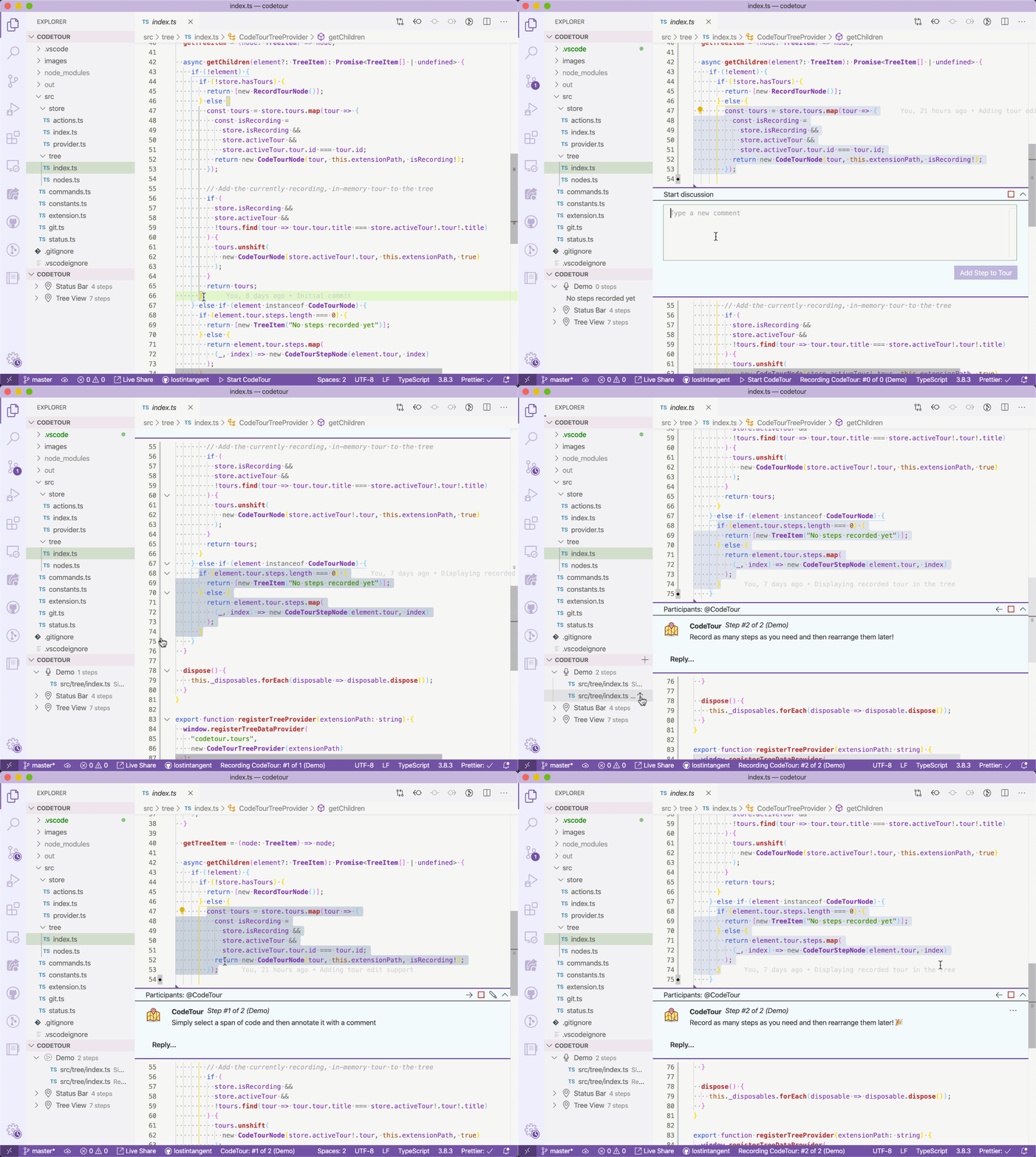
- Added the ability to associate a tour with a specific Git tag and/or commit, in order to enable it to be resilient to code changes
- Updated the tour recorder so that tours are automatically saved upon creation, and on each step/change
- Added the
Edit Tourcommand to tour nodes in theCodeTourtree, in order to allow editing existing tours - Added the
Move UpandMove Downcommands to tour step nodes in theCodeTourtree, in order to allow re-arranging steps in a tour - Added the
Delete Stepcommand to tour step nodes in theCodeTourtree - Added the ability to insert a step after the current step, as opposed to always at the end of the tour
- Updated the workspace tour notification to display when any tours are available, not just a "main tour"
- Added the
'Resume Tour,End Tour,Change Title,Change DescriptionandDelete Tourcommands to theCode Tourstree view to enable easily managing existing tours - Added the
Code Tour: End Tourcommand to the command palette
- Added an icon to the
Code Tourstree view which indicates the currently active tour - Added support for creating/replaying tours when connected to a remote environment (thanks @alefragnani!)
- Added the save/end tour commands to the
Code Tourstree view - The tour file name is now auto-generated based on the specified title
- Fixed a bug where recorded tours didn't always save properly on Windows
- Added keyboard shortcuts for navigating an active code tour
- Changed the
Code Toursview to always display, even if the current workspace doesn't have any tours. That way, there's a simple entry point for recording new tours
- Initial release 🎉