The DownloadProjectDependencies action now downloads app files from URLs specified in the installApps and installTestApps settings upfront, rather than validating URLs at build time. This change provides:
- Earlier detection of inaccessible or misconfigured URLs
- Clearer error messages when secrets are missing or URLs are invalid
- Warnings for potential issues like duplicate filenames
- Attempt to start docker service in case it is not running
- NextMajor (v28) fails when downloading dependencies from NuGet-feed
- Issue 2107 Publish a specific build mode to an environment
- Issue 1915 CICD fails on releases/26.x branch - '26.x' cannot be recognized as a semantic version string
AL-Go for GitHub is transitioning from the pull_request_target trigger to the more secure pull_request trigger. This is a step we are taking to make AL-Go for GitHub more secure by default. If you are used to working from branches within the repository you may not notice any difference. If you get pull requests from forks, those pull requests will no longer be able to access secrets. If that is blocking for your repository, you will need to update your settings to use the pull_request_target trigger.
How do I revert back to pull_request_target?
Add the following setting to one of your settings files and run the Update AL-Go System Files workflow:
"pullRequestTrigger": "pull_request_target"- Issue 2095 DeliverToAppSource.ProductId needs to be specified (Library app)
- Issue 2082 Sign action no longer fails when repository is empty or no artifacts are generated
- Issue 2078 Workflows run since January 14th '26 have space before CI/CD removed
- Issue 2070 Support public GitHub Packages feeds without requiring a Personal Access Token (PAT)
- Issue 2004 PublishToAppSource workflow publishes multi-app repos in alphabetical order instead of dependency order
- Issue 2045 DateTime parsing fails on non-US locale runners in WorkflowPostProcess.ps1
- Issue 2055 When using versioningStrategy 3+16, you get an error when building
- Issue 2094 PR into release branch gets wrong previous release
- AL-Go repositories with large amounts of projects may run into issues with too large environment variables
- Discussion 1855 Add trigger 'workflow_call' to workflow 'Update AL-Go System Files' for reusability
- Issue 2050 Publish To Environment creates mistyped environment
Previously, when running the "Publish To Environment" workflow with an environment name that doesn't exist in GitHub or AL-Go settings, the workflow would automatically create a new GitHub environment. This could lead to problems when environment names were mistyped, as the bogus environment would then cause subsequent CI/CD workflows to fail.
Now, the workflow will fail with a clear error message if the specified environment doesn't exist. If you intentionally want to deploy to a new environment that hasn't been configured yet, you can check the Create environment if it does not exist checkbox when running the workflow.
The workflowDefaultInputs setting now also applies to workflow_call inputs when an input with the same name exists for workflow_dispatch.
This ensures consistent default values across both manual workflow runs and reusable workflow calls.
Read more at workflowDefaultInputs.
AL-Go now supports GitHub's merge queue feature out of the box! The merge_group trigger has been added to the Pull Request Build workflow, enabling seamless integration with merge queues. When you have the merge queue feature enabled in your repo, multiple PRs will automatically be validated together. Read more about merge queues here.
Warning
If you rely on a custom workflow for merge queue validation, you may need to adjust your setup to avoid duplicate builds.
AL-Go telemetry now includes test results so you can more easily see how many AL tests, Page Scripting tests and BCPT tests ran in your workflows across all your repositories. Documentation for this can be found on this article on enabling telemetry.
AL-Go for GitHub now supports updating files from your custom templates via the new customALGoFiles setting. Read more at customALGoFiles.
A new setting workflowDefaultInputs allows you to configure default values for workflow_dispatch inputs. This makes it easier to run workflows manually with consistent settings across your team.
When you add this setting to your AL-Go settings file and run the "Update AL-Go System Files" workflow, the default values will be automatically applied to the workflow YAML files in your repository. The default values must match the input types (boolean, number, string, or choice) defined in the workflow YAML files.
Example configuration:
{
  "workflowDefaultInputs": [
    { "name": "directCommit", "value": true },
    { "name": "useGhTokenWorkflow", "value": true }
  ]
}
This setting can be used on its own in repository settings to apply defaults to all workflows with matching input names. Alternatively, you can use it within conditional settings to apply defaults only to specific workflows, branches, or other conditions.
Example using conditional settings to target specific workflows:
{
  "conditionalSettings": [
    {
      "workflows": ["Create Release"],
      "settings": {
        "workflowDefaultInputs": [
          { "name": "directCommit", "value": true },
          { "name": "releaseType", "value": "Prerelease" }
        ]
      }
    }
  ]
}
Important: When multiple conditional settings blocks match and both define workflowDefaultInputs, the arrays are merged following AL-Go's standard behavior for complex setting types (all entries are kept). If the same input name appears in multiple entries, the last matching entry takes precedence.
Read more at workflowDefaultInputs.
- Issue 2039 Error when deploy to environment: NewTemporaryFolder is not recognized
- Issue 1961 KeyVault access in PR pipeline
- Discussion 1911 Add support for reportSuppressedDiagnostics
- Discussion 1968 Parameter for settings passed to CreateDevEnv
- Issue 1945 Deploy Reference Documentation fails for CI/CD
- Use Runner_Temp instead of GetTempFolder whenever possible
- Issue 2016 Running Update AL-Go system files with branches wildcard
*tries to update origin - Issue 1960 Deploy Reference Documentation fails
- Discussion 1952 Set default values on workflow_dispatch input
unusedALGoSystemFileswill be removed after October 1st 2026. Please usecustomALGoFiles.filesToExcludeinstead.
By default, AL-Go merges settings from various places (see settings levels). Basic setting types such as string and integer are overwritten, but settings with complex types such as array and object are merged.
However, sometimes it is useful to avoid merging complex types. This can be achieved by specifying overwriteSettings property on a settings object. The purpose of the property is to list settings, for which the value will be overwritten, instead of merged. Read more at overwriteSettings property
AL-Go already supports AL code analysis, but up until now this was not tracked in GitHub. It is now possible to track code analysis issues automatically in the GitHub security tab, as well as having any new issues posted as a comment in Pull Requests.
Enable this feature by using the new setting trackALAlertsInGithub. This setting must be enabled at the repo level, but can optionally be disabled per project.
Please note that some automated features are premium and require the use of GitHub Code Security
- Discussion 1885 Conditional settings for CI/CD are not applied
- Discussion 1899 Remove optional properties from "required" list in settings.schema.json
- Issue 1905 AL-Go system files update fails (Get Workflow Multi-Run Branches action fails when there are tags with same value but different casing)
- Issue 1926 Deployment fails when using build modes
- Issue 1898 GetDependencies in localDevEnv does not fallback to github token
- Issue 1947 Project settings are ignored when loading bccontainerhelper
- Issue 1937 trackALAlertsInGitHub is failing in preview
- DeployTo settings from environment-specific AL-Go settings are not applied when deploying
ReadSettingsaction outputs too much information that is mainly used for debugging
A new setting pullRequestMergeMethod has been added to the commitOptions structure, allowing you to configure which merge method to use when pullRequestAutoMerge is enabled. Valid values are "merge" or "squash". The default value is "squash" to maintain backward compatibility.
Example
{
  "commitOptions": {
    "pullRequestAutoMerge": true,
    "pullRequestMergeMethod": "merge"
  }
}
AL-Go now offers a dataexplorer dashboard to get started with AL-Go telemetry. Additionally, we've updated the documentation to include a couple of kusto queries if you would rather build your own reports.
AL-Go settings can now be defined in GitHub environment variables. To use this feature, create a new variable under your GitHub environment called ALGoEnvironmentSettings. Please note that this variable should not include your environment name.
Settings loaded this way, will only be available during the Deploy step of the CI/CD or Publish to Environment actions, but not the Build step, making it most suitable for the DeployTo setting. Settings defined in this variable will take priority over any setting defined in AL-Go repo, org or settings files.
The contents of the variable should be a JSON block, similar to any other settings file or variable. When defining the DeployTo\<EnvName> setting in this variable, it should still include the environment name. Eg:
{
  DeployToProduction {
    "Branches": [
        "*"
    ],
    "includeTestAppsInSandboxEnvironment": false,
    "excludeAppIds": [ 1234 ]
  }
}
Please note, that due to certain security limitations, the properties runs-on, shell and ContinousDeployment of the DeployTo setting will NOT be respected if defined in a GitHub environment variable. To use these properties, please keep them defined elsewhere, such as your AL-Go settings file or Org/Repo settings variables.
- Issue 1770 Wrong type of projects setting in settings schema
- Issue 1787 Publish to Environment from PR fails in private repos
- Issue 1722 Check if apps are already installed on a higher version before deploying
- Issue 1774 Increment Version Number with +0.1 can increment some version numbers twice
- Issue 1837 Deployment from PR builds fail if PR branch name includes forward slashes (e.g.,
feature/branch-name). - Issue 1852 Page Scripting Tests are not added to build summary
- Issue 1829 Added custom jobs cannot be removed
- Idea 1856 Include workflow name as input for action ReadSetting
We have improved how logging is handled in AL-Go, and now make better use of GitHub built-in extended debug logging functionality. Extended debug logging can be enabled when re-running actions by clicking the 'Enable debug logging' checkbox in the pop-up window. This can be done both for jobs that failed and jobs that succeeded, but did not produce the correct result.
It is now possible to add custom jobs to AL-Go workflows. The Custom Job needs to be named CustomJob<something> and should be placed after all other jobs in the .yaml file. The order of which jobs are executed is determined by the Needs statements. Your custom job will be executed after all jobs specified in the Needs clause in your job and if you need the job to be executed before other jobs, you should add the job name in the Needs clause of that job. See https://aka.ms/algosettings#customjobs for details.
Note that custom jobs might break by future changes to AL-Go for GitHub workflows. If you have customizations to AL-Go for GitHub workflows, you should always doublecheck the pull request generated by Update AL-Go System Files.
Create an AL-Go for GitHub repository based on https://aka.ms/algopte or https://aka.ms/algoappsource, add custom workflows, custom jobs and/or settings to this repository and then use that repository as the template repository for other repositories. Using custom template repositories allows you to create and use highly customized template repositories and control the uptake of this in all repositories. See https://aka.ms/algosettings#customtemplate for details.
Note
Customized repositories might break by future changes to AL-Go for GitHub. If you are customizing AL-Go for GitHub, you should always double-check the pull request when updating AL-Go system files in your custom template repositories.
As stated in AL-Go Deprecations, setting cleanModePreprocessorSymbols is no longer supported and will be ignored by AL-Go for GitHub.
- Add top-level permissions for Increment Version Number workflow
- Issue 1697 Error in CheckForUpdates: "Internet Explorer engine is not available" when using self-hosted runners
- Issue 1685 HttpError: Resource not accessible by integration
- Issue 1757 Error when signing apps with key vault signing
Some workflow inputs are now validated early in order to avoid workflows to make modifications like creating a release, when we already should know that an error will occur later.
AL-Go for GitHub settings now has a schema. The following line is added at the beginning to any AL-Go settings files to utilize the schema:
"$schema": "https://raw.githubusercontent.com/microsoft/AL-Go-Actions/<version>/Actions/settings.schema.json"
By setting failOn to 'newWarning', pull requests will fail if new warnings are introduced. This feature compares the warnings in the pull request build against those in the latest successful CI/CD build and fails if new warnings are detected.
Now AL-Go telemetry also logs ActionDuration which makes it possible to track the duration of the different steps in the AL-Go workflows (e.g. RunPipeline or Sign)
- Issue 1678 Test summary is showing too many status icons
- Issue 1640 AL1040 error due to app folder within the artifacts cache being incorrectly recognized as an app folder
- Issue 1630 Error when downloading a release, when the destination folder already exists.
- Issue 1540 and 1649 Apps with dependencies to Microsft__EXCLUDE_ apps fails deployment
- Issue 1547 Dependencies will be installed even if DependencyInstallMode is ignore, but dependencies will never be installed on production environments
- Issue 1654 GithubPackageContext does not work together with private trustedNuGetFeeds
- Issue 1627 AL-Go should throw an error or a warning if you create a release, which is older than the latest release
- Issue 1657 When no files modified on Git, deployment fails
- Issue 1530 Dependency Field Service Integration does not get published in container while Installing apps
- Issue 1644 Support for AppAuth when using a private Template repository from another organization
- Issue 1669 GitHub App authentication to download dependencies from private repositories
- Issue 1478 Rate Limit Exceeded when running Update AL-Go System files
- Issue 1519 Submitting to AppSource WARNING: AuthContext.Scopes is .. should be
- Issue 1521 Dependencies not installed for multi project incremental PR build
- Issue 1522 Strange warnings in Deploy job post update to AL-Go 6.4
- BcContainerHelper settings were only read from .github/AL-Go-Settings.json, not allowing global settings in ALGoOrgSettings for TrustedNuGetFeeds, MemoryLimit and other things that should be possible to define globally
- Issue 1526 When updating AL-Go system files, the update process (creating a PR or directly pushing to the branch) fails when there is a file or directory in the repo with the same name as the branch that is to be updated
- Legacy code signing stopped working
Page scripting tests have been available for AL-Go for GitHub for a while but required manual inspection of the Page scripting artifact to see the results. It is now possible to get a quick overview in the job summary section of a CICD build, similar to how regular and bcpt test results are displayed.
No new settings are required. Test results will automatically be displayed if tests are enabled via the existing setting pageScriptingTests.
AL-Go for GitHub now supports deploying from a PR. When using the 'Publish To Environment' workflow, it is now possible to input 'PR_X' as the App version, where 'X' is the PR Id. This will deploy the artifacts from the latest PR build to the chosen environment, if that build is completed and successful.
All apps, which were not built by the PR build will be deployed from the last known good build. You can find a notification on the PR build explaining which build is used as the last known good build.
Note
When deploying a PR build to a sandbox environment, the app will get a special version number, which is: major.minor.maxint.run-number. This means that the sandbox environment likely needs to be deleted after the testing has ended.
alwaysBuildAllProjectswill be removed after October 1st 2025. Please set theonPull_Requestproperty of theincrementalBuildssetting to false to force full builds in Pull Requests.<workflow>Schedulewill be removed after October 1st 2025. The old setting, where the setting key was a combination of the workflow name andSchedule(dynamic setting key name) is deprecated. Instead you need to use a setting called workflowSchedule and either use Conditional Settings or place the setting in a workflow specific settings file.
- Issue 1433 Publish to Environment - DependencyInstallMode not found
- Issue 1440 Create Release fails due to recent changes to the AL-Go
- Issue 1330 CompilerFolder doesn't transfer installed Apps to NuGet resolution
- Issue 1268 Do not throw an un-understandable error during nuGet download
- Performance test sample code in 25.4 contains objects with ID 149201 and 149202, which are not renumbered
- Issue 798 Publish To Environment breaks CI/CD pipelines
- Issue 1182 Runs-on setting type is ambiguous - string or array
- Issue 1502 NuGet dependency version is always LatestMatching
workflowSchedule- can be structure with a property namedcron, which must be a valid crontab, defining the CRON schedule for when the specified workflow should run. Default is no scheduled runs, only manual triggers. Build your crontab string here: https://crontab.guru. You need to run the Update AL-Go System Files workflow for the schedule to take effect.
Note: If you configure a WorkflowSchedule for the CI/CD workflow, AL-Go will stop triggering CICDs on push unless you have also added CICDPushBranches to your settings.
Note also: If you define a schedule for Update AL-Go System Files, it uses direct Commit instead of creating a PR.workflowConcurrency- is used to control concurrency of workflows. Like with theworkflowSchedulesetting, this setting should be applied in workflow specific settings files or conditional settings. By default, all workflows allows for concurrency, except for the Create Release workflow. If you are using incremental builds in CI/CD it is also recommented to set WorkflowConcurrency to:[ "group: ${{ github.workflow }}-${{ github.ref }}", "cancel-in-progress: true" ]
in order to cancel prior incremental builds on the same branch.
Read more about workflow concurrency here.
nuGetFeedSelectModedetermines the select mode when finding Business Central app packages from NuGet feeds, based on the dependency version specified in app.json. Options are:Earliestfor earliest version of the package,EarliestMatchingfor earliest version of the package also compatible with the Business Central version used,Exactfor the exact version of the package,Latestfor the latest version of the package,LatestMatchingfor the latest version of the package also compatible with the Business Central version used.deployTo<environment>now has two additional properties:includeTestAppsInSandboxEnvironment, which deploys test apps and their dependencies to the specified sandbox environment if set totrue. Deployment will fail if used on a Prod environment or if the test app has a dependency on Tests-TestLibraries. Default value isfalse.excludeAppIds, which is an array of app ids which will be excluded from deployment. Default value is[]
incrementalBuilds- is a structure defining how you want AL-Go to handle incremental builds. When using incremental builds for a build, AL-Go will look for the latest successful build, newer than the definedretentionDaysand only rebuild projects or apps (based onmode) which needs to be rebuilt. Properties in the structure includes:onPush- set this property to true in order to enable incremental builds in CI/CD triggered by a merge/push event. Default is false.onPull_Request- set this property to false in order to disable incremental builds in Pull Request workflows. Default is true.onSchedule- set this property to true in order to enable incremental builds in CI/CD when running on a schedule. Default is false.retentionDays- number of days a successful build is good (and can be used for incremental builds). Default is 30.mode- defines the mode for incremental builds. Currently, two values are supported. Use modifiedProjects when you want to rebuild all apps in modified projects and depending projects or modifiedApps if you only want to rebuild modified apps and depending apps.
Note
The projects mentioned here are AL-Go projects in a multi-project repository. A repository can contain multiple projects and a project can contain multiple apps.
Update AL-Go System Files has a new input to specify a list of branches to be updated in a single workflow run.
When running the workflow on a schedule, you can now also specify includeBranches in workflowSchedule setting, which allows you to update the specified branches. Read more at https://aka.ms/algosettings#workflowSchedule.
Note
When running "Update AL-Go System Files" on multiple branches, the template repository URL will be determined based on the branch the workflow runs on and it will be used for all of the specified branches.
AL-Go for GitHub now supports incremental builds, which means that unchanged projects or apps will be reused from the previous good build. Read this to learn more.
Note
When using incremental builds it is recommended to also set workflowConcurrency as defined here.
AL-Go for GitHub now supports using a GitHub App specification as the GhTokenWorkflow secret for a more secure way of allowing repositories to run Update AL-Go System Files and other workflows which are creating commits and pull requests. See this description to learn how to use GitHub App authentication.
If your installApps or installTestApps are secure URL, containing a secret token, you can now use a GitHub secret specification as part of or as the full URL of apps to install. An example could be:
"installApps": [ "https://www.dropbox.com/${{SECRETNAME}}&dl=1" ]
Which would hide the secret part of your URL instead of exposing it in clear text.
cleanModePreprocessorSymbolswill be removed after April 1st 2025. Use Conditional Settings instead, specifying buildModes and thepreprocessorSymbolssetting. Read this for more information.
- It is now possible to skip the modification of dependency version numbers when running the Increment Version number workflow or the Create Release workflow
shortLivedArtifactsRetentionDaysdetermines the number of days to keep short lived build artifacts (f.ex build artifacts from pull request builds, next minor or next major builds). 1 is default. 0 means use GitHub default.preProcessorSymbolsis a list of preprocessor symbols to use when building the apps. This setting can be specified in workflow specific settings files or in conditional settings.
Setting versioning strategy to 3 will allow 3 segments of the version number to be defined in app.json and repoVersion. Only the 4th segment (Revision) will be defined by the GitHub run_number for the CI/CD workflow. Increment version number and Create Release now also supports the ability to set a third segment to the RepoVersion and appversion in app.json.
When using useProjectDependencies in a multi-project repository, AL-Go for GitHub used to generate short lived build artifacts called thisBuild-<projectnaame>-<type>-.... This is no longer the case. Instead, normal build artifacts will be published and used by depending projects. The retention period for the short lived artifacts generated are controlled by a settings called shortLivedArtifactsRetentionDays.
It is now possible to define preprocessor symbols, which will be used when building your apps using the preProcessorSymbols setting. This setting can be specified in workflow specific settings file or it can be used in conditional settings.
- Issue 1296 Make property "appFolders" optional
- Issue 1344 Experimental feature "git submodules" seems to be a breaking change
- Issue 1305 Extra telemetry Property RepositoryOwner and RepositoryName¨
- Add RunnerEnvironment to Telemetry
- Output a notice, not a warning, when there are no available updates for AL-Go for GitHub
useGitSubmodulescan be eithertrueorrecursiveif you want to enable Git Submodules in your repository. If your Git submodules resides in a private repository, you need to create a secret calledgitSubmodulesTokencontaining a PAT with access to the submodule repositories. Like with all other secrets, you can also create a setting calledgitSubmodulesTokenSecretNameand specify the name of another secret, with these permissions (f.ex. ghTokenWorkflow).commitOptions- is a structure defining how you want AL-Go to handle automated commits or pull requests coming from AL-Go (e.g. for Update AL-Go System Files). The structure contains the following propertiesmessageSuffix: A string you want to append to the end of commits/pull requests created by AL-Go. This can be useful if you are using the Azure Boards integration (or similar integration) to link commits to workitems.pullRequestAutoMerge: A boolean defining whether you want AL-Go pull requests to be set to auto-complete. This will auto-complete the pull requests once all checks are green and all required reviewers have approved.pullRequestLabels: A list of labels to add to the pull request. The labels need to be created in the repository before they can be applied.
In v6.1 we added experimental support for Git submodules - this did however only work if the submodules was in a public repository. In this version, you can use the useGitSubmodules setting to control whether you want to use Git Submodules and the gitSubmodulesToken secret to allow permission to read these repositories.
- Issue 1241 Increment Version Number might produce wrong app.json
- When auto discovering appFolders, testFolders and bcptTestFolders - if a BCPT Test app has a dependency to a test framework app, it is added to testFolders as well as bcptTestFolders and will cause a failure.
pageScriptingTestsshould be an array of page scripting test file specifications, relative to the AL-Go project. Examples of file specifications:recordings/my*.yml(for all yaml files in the recordings subfolder matching my*.yml),recordings(for all *.yml files in the recordings subfolder) orrecordings/test.yml(for a single yml file)doNotRunPageScriptingTestscan force the pipeline to NOT run the page scripting tests specified in pageScriptingTests. Note this setting can be set in a workflow specific settings file to only apply to that workflowrestoreDatabasesshould be an array of events, indicating when you want to start with clean databases in the container. Possible events are:BeforeBcpTests,BeforePageScriptingTests,BeforeEachTestApp,BeforeEachBcptTestApp,BeforeEachPageScriptingTest
trustedSigningis a structure definingAccount,EndPointandCertificateProfileif you want to use trusted signing. Note that your Azure_Credentials secret (Microsoft Entra ID App or Managed identity) still needs to provide access to your azure subscription and be assigned theTrusted Signing Certificate Profile Signerrole in the Trusted Signing Account.deployTo<environment>now has an additional property called DependencyInstallMode, which determines how dependencies are deployed if GenerateDependencyArtifact is true. Default value isinstallto install dependencies if not already installed. Other values areignorefor ignoring dependencies,upgradefor upgrading dependencies if possible andforceUpgradefor force upgrading dependencies.
Read https://learn.microsoft.com/en-us/azure/trusted-signing/ for more information about Trusted Signing and how to set it up. After setting up your trusted signing account and certificate profile, you need to create a setting called trustedSigning for AL-Go to sign your apps using Azure Trusted Signing.
Page Scripting tests are now supported as part of CI/CD. By specifying pageScriptingTests in your project settings file, AL-Go for GitHub will automatically run these page scripting tests as part of your CI/CD workflow, generating the following build artifacts:
PageScriptingTestResultsis a JUnit test results file with all results combined.PageScriptingTestResultDetailsare the detailed test results (including videos) when any of the page scripting tests have failures. If the page scripting tests succeed - the details are not published.
Git submodule is now supported as part of CI/CD on your project.
- Issue 1184 Publish to Environment fails on 'Permission Denied'
- AL Language extension in 25.0 doesn't contain the linux executable, use dotnet to invoke the dll instead.
deliverTo<deliverytarget>now has an additional property calledContinuousDelivery, indicating whether or not to run continuous delivery to this deliveryTarget. Default is true.trustMicrosoftNuGetFeedsUnless this setting is set to false, AL-Go for GitHub will trust the NuGet feeds provided by Microsoft. The feeds provided by Microsoft contains all Microsoft apps, all Microsoft symbols and symbols for all AppSource apps.trustedNuGetFeeds- can be an array of NuGet feed specifications, which AL-Go for GitHub will use for dependency resolution. Every feed specification must include a URL property and can optionally include a few other properties:- url - The URL of the feed (examples: https://pkgs.dev.azure.com/myorg/apps/\_packaging/myrepo/nuget/v3/index.json or https://nuget.pkg.github.com/mygithuborg/index.json").
- patterns - AL-Go for GitHub will only trust packages, where the ID matches this pattern. Default is all packages (*).
- fingerprints - If specified, AL-Go for GitHub will only trust packages signed with a certificate with a fingerprint matching one of the fingerprints in this array.
- authTokenSecret - If the NuGet feed specified by URL is private, the authTokenSecret must be the name of a secret containing the authentication token with permissions to search and read packages from the NuGet feed.
With this release the implementation for delivering to NuGet packages (by adding the NuGetContext secret), is similar to the functionality behind delivering to GitHub packages and the implementation is no longer in preview.
Previously, AL-Go required the GitHubRunner and GitHubRunnerShell settings to be set on repository level. This has now been changed such that they can be set on project level.
- Issue 1105 Increment Version Number - repoVersion in .github/AL-Go-Settings.json is not updated
- Issue 1073 Publish to AppSource - Automated validation: failure
- Issue 980 Allow Scope to be PTE in continuousDeployment for PTE extensions in Sandbox (enhancement request)
- Issue 1079 AppSource App deployment failes with PerTenantExtensionCop Error PTE0001 and PTE0002
- Issue 866 Accessing GitHub Environment Variables in DeployToCustom Scenarios for PowerShell Scripts
- Issue 1083 SyncMode for custom deployments?
- Issue 1109 Why filter deployment settings?
- Fix issue with github ref when running reusable workflows
- Issue 1098 Support for specifying the name of the AZURE_CREDENTIALS secret by adding a AZURE_CREDENTIALSSecretName setting
- Fix placeholder syntax for git ref in PullRequestHandler.yaml
- Issue 1164 Getting secrets from Azure key vault fails in Preview
AL-Go for GitHub relies on specific PowerShell modules, and the minimum versions required for these modules are tracked in Packages.json file. Should the installed modules on the GitHub runner not meet these minimum requirements, the necessary modules will be installed as needed.
All authentication context secrets now supports managed identities and federated credentials. See more here. Furthermore, you can now use https://aka.ms/algosecrets#authcontext to learn more about the formatting of that secret.
In the summary after a Test Run, you now also have the result of performance tests.
Previously, the workflows "Update AL-Go System Files" and "TroubleShooting" were hardcoded to always run on windows-latest to prevent deadlocks and security issues.
From now on, ubuntu-latest will also be allowed for these mission critical workflows, when changing the runs-on setting. Additionally, only the value pwsh for shell setting is allowed when using ubuntu-latest runners.
AL-Go for GitHub now includes a new telemetry module. For detailed information on how to enable or disable telemetry and to see what data AL-Go logs, check out this article.
-
deployTo<environmentName>: is not really new, but has a new property:- Scope = specifies the scope of the deployment: Dev, PTE. If not specified, AL-Go for GitHub will always use the Dev Scope for AppSource Apps, but also for PTEs when deploying to sandbox environments when impersonation (refreshtoken) is used for authentication.
- BuildMode = specifies which buildMode to use for the deployment. Default is to use the Default buildMode.
- <custom> = custom properties are now supported and will be transferred to a custom deployment script in the hashtable.
-
bcptThresholdsis a JSON object with properties for the default thresholds for the Business Central Performance Toolkit- DurationWarning - a warning is issued if the duration of a bcpt test degrades more than this percentage (default 10)
- DurationError - an error is issued if the duration of a bcpt test degrades more than this percentage (default 25)
- NumberOfSqlStmtsWarning - a warning is issued if the number of SQL statements from a bcpt test increases more than this percentage (default 5)
- NumberOfSqlStmtsError - an error is issued if the number of SQL statements from a bcpt test increases more than this percentage (default 10)
Note
Duration thresholds are subject to varying results depending on the performance of the agent running the tests. Number of SQL statements executed by a test is often the most reliable indicator of performance degredation.
- Issue 1084 Automatic updates for AL-Go are failing when main branch requires Pull Request
PowerPlatformSolutionFolder: Contains the name of the folder containing a PowerPlatform Solution (only one)DeployTo<environment>now has two additional propertiescompanyIdis the Company Id from Business Central (for PowerPlatform connection) andppEnvironmentUrlis the Url of the PowerPlatform environment to deploy to.
BuildPowerPlatform: to build a PowerPlatform SolutionDeployPowerPlatform: to deploy a PowerPlatform SolutionPullPowerPlatformChanges: to pull changes made in PowerPlatform studio into the repositoryReadPowerPlatformSettings: to read settings and secrets for PowerPlatform deploymentGetArtifactsForDeployment: originally code from deploy.ps1 to retrieve artifacts for releases or builds - now as an action to read apps into a folder.
- Pull PowerPlatform Changes for pulling changes from your PowerPlatform development environment into your AL-Go for GitHub repository
- Push PowerPlatform Changes for pushing changes from your AL-Go for GitHub repository to your PowerPlatform development environment
Note
PowerPlatform workflows are only available in the PTE template and will be removed if no PowerPlatformSolutionFolder is defined in settings.
- Connect your GitHub repository to Power Platform
- How to set up Service Principal for Power Platform
- Try one of the Business Central and Power Platform samples
- Publish To AppSource
Note
PowerPlatform functionality are only available in the PTE template.
- Issue 1019 CI/CD Workflow still being scheduled after it was disabled
- Issue 1021 Error during Create Online Development Environment action
- Issue 1022 Error querying artifacts: No such host is known. (bcartifacts-exdbf9fwegejdqak.blob.core.windows.net:443)
- Issue 922 Deploy Reference Documentation (ALDoc) failed with custom
- ContainerName used during build was invalid if project names contained special characters
- Issue 1009 by adding a includeDependencies property in DeliverToAppSource
- Issue 997 'Deliver to AppSource' action fails for projects containing a space
- Issue 987 Resource not accessible by integration when creating release from specific version
- Issue 979 Publish to AppSource Documentation
- Issue 1018 Artifact setting - possibility to read version from app.json
- Issue 1008 Allow PullRequestHandler to use ubuntu or self hosted runners for all jobs except for pregateCheck
- Issue 962 Finer control of "shell"-property
- Issue 1041 Harden the version comparison when incrementing version number
- Issue 1042 Downloading artifacts from GitHub doesn't work with branch names which include forward slashes
The artifact setting in your project settings file can now contain a * instead of the version number. This means that AL-Go for GitHub will determine the application dependency for your projects together with the applicationDependency setting and determine which Business Central version is needed for the project.
"artifact": "//*//latest"will give you the latest Business Central version, higher than your application dependency and with the same major.minor as your application dependency."artifact": "//*//first"will give you the first Business Central version, higher than your application dependency and with the same major.minor as your application dependency.
deliverToAppSource: a JSON object containing the following properties- productId must be the product Id from partner Center.
- mainAppFolder specifies the appFolder of the main app if you have multiple apps in the same project.
- continuousDelivery can be set to true to enable continuous delivery of every successful build to AppSource Validation. Note that the app will only be in preview in AppSource and you will need to manually press GO LIVE in order for the app to be promoted to production.
- includeDependencies can be set to an array of file names (incl. wildcards) which are the names of the dependencies to include in the AppSource submission. Note that you need to set
generateDependencyArtifactin the project settings file to true in order to include dependencies.
- Add
shellas a property underDeployTostructure
appSourceContinuousDeliveryis moved to thedeliverToAppSourcestructureappSourceMainAppFolderis moved to thedeliverToAppSourcestructureappSourceProductIdis moved to thedeliverToAppSourcestructure
Adding -clean when running localdevenv or clouddevenv will create a clean development environment without compiling and publishing your apps.
- Issue 940 Publish to Environment is broken when specifying projects to publish
- Issue 994 CI/CD ignores Deploy to GitHub Pages in private repositories
UpdateALGoSystemFilesEnvironment: The name of the environment that is referenced in jobUpdateALGoSystemFilesin the Update AL-Go System Files workflow. See jobs.<job_id>.environment for more information. Currently, only setting the environment name is supported.
- Support release branches that start with releases/
- Issue 870 Improve Error Handling when CLI is missing
- Issue 889 CreateRelease and IncrementVersionNumber workflow did not handle wild characters in
appFolders,testFoldersorbcptTestFolderssettings. - Issue 973 Prerelease is not used for deployment
AL-Go ships with Default, Translated and Clean mode out of the box. Now you can also define custom build modes in addition to the ones shipped with AL-Go. This allows you to define your own build modes, which can be used to build your apps in different ways. By default, a custom build mode will build the apps similarly to the Default mode but this behavior can be overridden in e.g. script overrides in your repository.
templateSha: The SHA of the version of AL-Go currently used
DumpWorkflowInfo: Dump information about running workflowTroubleshooting: Run troubleshooting for repository
Add another parameter when running Update AL-Go System Files, called downloadLatest, used to indicate whether to download latest version from template repository. Default value is true. If false, the templateSha repository setting is used to download specific AL-Go System Files when calculating new files.
- Issue 782 Exclude '.altestrunner/' from template .gitignore
- Issue 823 Dependencies from prior build jobs are not included when using useProjectDependencies
- App artifacts for version 'latest' are now fetched from the latest CICD run that completed and successfully built all the projects for the corresponding branch.
- Issue 824 Utilize
useCompilerFoldersetting when creating an development environment for an AL-Go project. - Issue 828 and 825 display warnings for secrets, which might cause AL-Go for GitHub to malfunction
alDoc: JSON object with properties for the ALDoc reference document generation- continuousDeployment = Determines if reference documentation will be deployed continuously as part of CI/CD. You can run the Deploy Reference Documentation workflow to deploy manually or on a schedule. (Default false)
- deployToGitHubPages = Determines whether or not the reference documentation site should be deployed to GitHub Pages for the repository. In order to deploy to GitHub Pages, GitHub Pages must be enabled and set to GitHub Actions. (Default true)
- maxReleases = Maximum number of releases to include in the reference documentation. (Default 3)
- groupByProject = Determines whether projects in multi-project repositories are used as folders in reference documentation
- includeProjects = An array of projects to include in the reference documentation. (Default all)
- excludeProjects = An array of projects to exclude in the reference documentation. (Default none)-
- header = Header for the documentation site. (Default: Documentation for...)
- footer = Footer for the documentation site. (Default: Made with...)
- defaultIndexMD = Markdown for the landing page of the documentation site. (Default: Reference documentation...)
- defaultReleaseMD = Markdown for the landing page of the release sites. (Default: Release reference documentation...)
- Note that in header, footer, defaultIndexMD and defaultReleaseMD you can use the following placeholders: {REPOSITORY}, {VERSION}, {INDEXTEMPLATERELATIVEPATH}, {RELEASENOTES}
- Deploy Reference Documentation is a workflow, which you can invoke manually or on a schedule to generate and deploy reference documentation using the aldoc tool, using the ALDoc setting properties described above.
- Troubleshooting is a workflow, which you can invoke manually to run troubleshooting on the repository and check for settings or secrets, containing illegal values. When creating issues on https://github.com/microsoft/AL-Go/issues, we might ask you to run the troubleshooter to help identify common problems.
ALDoc reference documentation tool is now supported for generating and deploying reference documentation for your projects either continuously or manually/scheduled.
As of October 1st 2023, Business Central insider builds are now publicly available. When creating local containers with the insider builds, you will have to accept the insider EULA (https://go.microsoft.com/fwlink/?linkid=2245051) in order to continue.
AL-Go for GitHub allows you to build and test using insider builds without any explicit approval, but please note that the insider artifacts contains the insider Eula and you automatically accept this when using the builds.
- Issue 730 Support for external rulesets.
- Issue 739 Workflow specific KeyVault settings doesn't work for localDevEnv
- Using self-hosted runners while using Azure KeyVault for secrets or signing might fail with C:\Modules doesn't exist
- PullRequestHandler wasn't triggered if only .md files where changes. This lead to PRs which couldn't be merged if a PR status check was mandatory.
- Artifacts names for PR Builds were using the merge branch instead of the head branch.
enableExternalRulesets: set this setting to true if you want to allow AL-Go to automatically download external references in rulesets.deliverTo<deliveryTarget>: is not really new, but has new properties and wasn't documented. The complete list of properties is here (note that some properties are deliveryTarget specific):- Branches = an array of branch patterns, which are allowed to deliver to this deliveryTarget. (Default [ "main" ])
- CreateContainerIfNotExist = [Only for DeliverToStorage] Create Blob Storage Container if it doesn't already exist. (Default false)
Environment URL is now displayed underneath the environment being deployed to in the build summary. For Custom Deployment, the script can set the GitHub Output variable environmentUrl in order to show a custom URL.
- Issue 227 Feature request: Allow deployments with "Schema Sync Mode" = Force
- Issue 519 Deploying to onprem environment
- Issue 520 Automatic deployment to environment with annotation
- Issue 592 Internal Server Error when publishing
- Issue 557 Deployment step fails when retried
- After configuring deployment branches for an environment in GitHub and setting Deployment Branch Policy to Protected Branches, AL-Go for GitHub would fail during initialization (trying to get environments for deployment)
- The DetermineDeploymentEnvironments doesn't work in private repositories (needs the GITHUB_TOKEN)
- Issue 683 Settings from GitHub variables ALGoRepoSettings and ALGoOrgSettings are not applied during build pipeline
- Issue 708 Inconsistent AuthTokenSecret Behavior in Multiple Projects: 'Secrets are not available'
Earlier, you could specify a mapping to an environment name in an environment secret called <environmentname>_EnvironmentName, <environmentname>-EnvironmentName or just EnvironmentName. You could also specify the projects you want to deploy to an environment as an environment secret called Projects.
This mechanism is no longer supported and you will get an error if your repository has these secrets. Instead you should use the DeployTo<environmentName> setting described below.
Earlier, you could also specify the projects you want to deploy to an environment in a setting called <environmentName>_Projects or <environmentName>-Projects. This is also no longer supported. Instead use the DeployTo<environmentName> and remove the old settings.
DetermineDeliveryTargets: Determine which delivery targets should be used for delivering artifacts from the build job.DetermineDeploymentEnvironments: Determine which deployment environments should be used for the workflow.
projectName: project setting used as friendly name for an AL-Go project, to be used in the UI for various workflows, e.g. CICD, Pull Request Build.fullBuildPatterns: used byDetermineProjectsToBuildaction to specify changes in which files and folders would trigger a full build (building all AL-Go projects).excludeEnvironments: used byDetermineDeploymentEnvironmentsaction to exclude environments from the list of environments considered for deployment.deployTo<environmentName>: is not really new, but has new properties. The complete list of properties is here:- EnvironmentType = specifies the type of environment. The environment type can be used to invoke a custom deployment. (Default SaaS)
- EnvironmentName = specifies the "real" name of the environment if it differs from the GitHub environment
- Branches = an array of branch patterns, which are allowed to deploy to this environment. (Default [ "main" ])
- Projects = In multi-project repositories, this property can be a comma separated list of project patterns to deploy to this environment. (Default *)
- SyncMode = ForceSync if deployment to this environment should happen with ForceSync, else Add. If deploying to the development endpoint you can also specify Development or Clean. (Default Add)
- ContinuousDeployment = true if this environment should be used for continuous deployment, else false. (Default: AL-Go will continuously deploy to sandbox environments or environments, which doesn't end in (PROD) or (FAT)
- runs-on = specifies which GitHub runner to use when deploying to this environment. (Default is settings.runs-on)
By specifying a custom EnvironmentType in the DeployTo structure for an environment, you can now add a script in the .github folder called DeployTo<environmentType>.ps1. This script will be executed instead of the standard deployment mechanism with the following parameters in a HashTable:
| Parameter | Description | Example |
|---|---|---|
$parameters.type |
Type of delivery (CD or Release) | CD |
$parameters.apps |
Apps to deploy | /home/runner/.../GHP-Common-main-Apps-2.0.33.0.zip |
$parameters.EnvironmentType |
Environment type | SaaS |
$parameters.EnvironmentName |
Environment name | Production |
$parameters.Branches |
Branches which should deploy to this environment (from settings) | main,dev |
$parameters.AuthContext |
AuthContext in a compressed Json structure | {"refreshToken":"mytoken"} |
$parameters.BranchesFromPolicy |
Branches which should deploy to this environment (from GitHub environments) | main |
$parameters.Projects |
Projects to deploy to this environment | |
$parameters.ContinuousDeployment |
Is this environment setup for continuous deployment | false |
$parameters."runs-on" |
GitHub runner to be used to run the deployment script | windows-latest |
AL-Go for GitHub now adds status checks to Pull Requests Builds. In your GitHub branch protection rules, you can set up "Pull Request Status Check" to be a required status check to ensure Pull Request Builds succeed before merging.
In v3.2 of AL-Go for GitHub, all secrets requested by AL-Go for GitHub were available to all steps in a job one compressed JSON structure in env:Secrets. With this update, only the steps that actually requires secrets will have the secrets available.
Issue 542 Deploy Workflow fails Issue 558 CI/CD attempts to deploy from feature branch Issue 559 Changelog includes wrong commits Publish to AppSource fails if publisher name or app name contains national or special characters Issue 598 Cleanup during flush if build pipeline doesn't cleanup properly Issue 608 When creating a release, throw error if no new artifacts have been added Issue 528 Give better error messages when uploading to storage accounts Create Online Development environment workflow failed in AppSource template unless AppSourceCopMandatoryAffixes is defined in repository settings file Create Online Development environment workflow didn't have a project parameter and only worked for single project repositories Create Online Development environment workflow didn't work if runs-on was set to Linux Special characters are not supported in RepoName, Project names or other settings - Use UTF8 encoding to handle special characters in GITHUB_OUTPUT and GITHUB_ENV
AL-Go contains several workflows, which create a Pull Request or pushes code directly. All (except Update AL-Go System Files) earlier used the GITHUB_TOKEN to create the PR or commit. The problem using GITHUB_TOKEN is that is doesn't trigger a pull request build or a commit build. This is by design: https://docs.github.com/en/actions/using-workflows/triggering-a-workflow#triggering-a-workflow-from-a-workflow Now, you can set the checkbox called Use GhTokenWorkflow to allowing you to use the GhTokenWorkflow instead of the GITHUB_TOKEN - making sure that workflows are triggered
keyVaultCodesignCertificateName: With this setting you can delegate the codesigning to an Azure Key Vault. This can be useful if your certificate has to be stored in a Hardware Security ModulePullRequestTrigger: With this setting you can set which trigger to use for Pull Request Builds. By default AL-Go will use pull_request_target.
DownloadProjectDependencies: Downloads the dependency apps for a given project and build mode.
In earlier versions of AL-Go for GitHub, all settings were available as individual environment variables to scripts and overrides, this is no longer the case.
Settings were also available as one compressed JSON structure in env:Settings, this is still the case.
Settings can no longer contain line breaks. It might have been possible to use line breaks earlier, but it would likely have unwanted consequences.
Use $settings = $ENV:Settings | ConvertFrom-Json to get all settings in PowerShell.
In earlier versions of AL-Go for GitHub, all secrets requested by AL-Go for GitHub were available as individual environment variables to scripts and overrides, this is no longer the case.
As described in bug 647, all secrets available to the workflow were also available in env:_Secrets, this is no longer the case.
All requested secrets were also available (base64 encoded) as one compressed JSON structure in env:Secrets, this is still the case.
Use $secrets = $ENV:Secrets | ConvertFrom-Json to get all requested secrets in PowerShell.
You cannot get to any secrets that weren't requested by AL-Go for GitHub.
Issue #446 Wrong NewLine character in Release Notes Issue #453 DeliverToStorage - override fails reading secrets Issue #434 Use gh auth token to get authentication token instead of gh auth status Issue #501 The Create New App action will now use 22.0.0.0 as default application reference and include NoImplicitwith feature.
The following workflows:
- Create New App
- Create New Test App
- Create New Performance Test App
- Increment Version Number
- Add Existing App
- Create Online Development Environment
All these actions now uses the selected branch in the Run workflow dialog as the target for the Pull Request or Direct COMMIT.
UseCompilerFolder: Setting useCompilerFolder to true causes your pipelines to use containerless compiling. Unless you also setdoNotPublishAppsto true, setting useCompilerFolder to true won't give you any performance advantage, since AL-Go for GitHub will still need to create a container in order to publish and test the apps. In the future, publishing and testing will be split from building and there will be other options for getting an instance of Business Central for publishing and testing.vsixFile: vsixFile should be a direct download URL to the version of the AL Language extension you want to use for building the project or repo. By default, AL-Go will use the AL Language extension that comes with the Business Central Artifacts.
- _BuildALGoProject is a reusable workflow that unites the steps for building an AL-Go projects. It has been reused in the following workflows: CI/CD, Pull Request Build, NextMinor, NextMajor and Current. The workflow appears under the Actions tab in GitHub, but it is not actionable in any way.
- DetermineArtifactUrl is used to determine which artifacts to use for building a project in CI/CD, PullRequestHandler, Current, NextMinor and NextMajor workflows.
With the changes to the CRONUS license in Business Central version 22, that license can in most cases be used as a developer license for AppSource Apps and it is no longer mandatory to specify a license file in AppSource App repositories. Obviously, if you build and test your app for Business Central versions prior to 21, it will fail if you don't specify a licenseFileUrl secret.
When upgrading to this version form earlier versions of AL-Go for GitHub, you will need to run the Update AL-Go System Files workflow twice if you have the useProjectDependencies setting set to true.
You can now run the Publish To Environment workflow without creating the environment in GitHub or settings up-front, just by specifying the name of a single environment in the Environment Name when running the workflow. Subsequently, if an AuthContext secret hasn't been created for this environment, the Device Code flow authentication will be initiated from the Publish To Environment workflow and you can publish to the new environment without ever creating a secret. Open Workflow details to get the device Code for authentication in the job summary for the initialize job.
When running the Create Online Dev. Environment workflow without having the adminCenterApiCredentials secret created, the workflow will intiate the deviceCode flow and allow you to authenticate to the Business Central Admin Center. Open Workflow details to get the device Code for authentication in the job summary for the initialize job.
- Issue #391 Create release action - CreateReleaseBranch error
- Issue 434 Building local DevEnv, downloading dependencies: Authentication fails when using "gh auth status"
In v2.4 and earlier, the PullRequestHandler would trigger the CI/CD workflow to run the PR build. Now, the PullRequestHandler will perform the build and the CI/CD workflow is only run on push (or manual dispatch) and will perform a complete build.
Build modes can now be specified per project
- DetermineProjectsToBuild is used to determine which projects to build in PullRequestHandler, CI/CD, Current, NextMinor and NextMajor workflows.
- CalculateArtifactNames is used to calculate artifact names in PullRequestHandler, CI/CD, Current, NextMinor and NextMajor workflows.
- VerifyPRChanges is used to verify whether a PR contains changes, which are not allowed from a fork.
- Issue #171 create a workspace file when creating a project
- Issue #356 Publish to AppSource fails in multi project repo
- Issue #358 Publish To Environment Action stopped working in v2.3
- Issue #362 Support for EnableTaskScheduler
- Issue #360 Creating a release and deploying from a release branch
- Issue #371 'No previous release found' for builds on release branches
- Issue #376 CICD jobs that are triggered by the pull request trigger run directly to an error if title contains quotes
NOTE: Release Branches are now only named after major.minor if the patch value is 0 in the release tag (which must be semver compatible)
This version contains a number of bug fixes to release branches, to ensure that the recommended branching strategy is fully supported. Bugs fixed includes:
- Release branches was named after the full tag (1.0.0), even though subsequent hotfixes released from this branch would be 1.0.x
- Release branches named 1.0 wasn't picked up as a release branch
- Release notes contained the wrong changelog
- The previous release was always set to be the first release from a release branch
- SemVerStr could not have 5 segments after the dash
- Release was created on the right SHA, but the release branch was created on the wrong SHA
Recommended branching strategy:
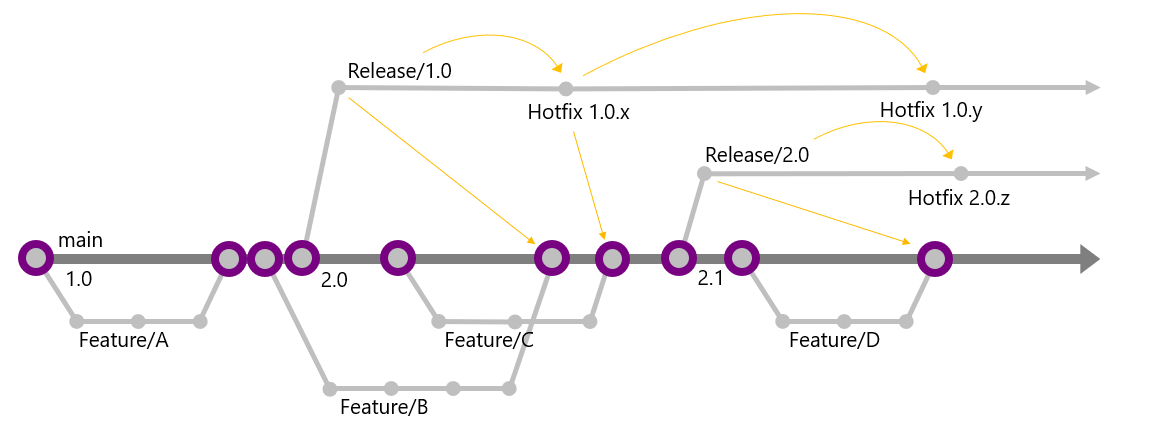
New Project setting: EnableTaskScheduler in container executing tests and when setting up local development environment
Recently, GitHub added support for variables, which you can define on your organization or your repository. AL-Go now supports that you can define a GitHub variable called ALGoOrgSettings, which will work for all repositories (with access to the variable) Org Settings will be applied before Repo settings and local repository settings files will override values in the org settings You can also define a variable called ALGoRepoSettings on the repository, which will be applied after reading the Repo Settings file in the repo Example for usage could be setup of branching strategies, versioning or an appDependencyProbingPaths to repositories which all repositories share. appDependencyProbingPaths from settings variables are merged together with appDependencyProbingPaths defined in repositories
ReadSettings has been refactored to allow organization wide settings to be added as well. CI Tests have been added to cover ReadSettings.
- Issue #312 Branching enhancements
- Issue #229 Create Release action tags wrong commit
- Issue #283 Create Release workflow uses deprecated actions
- Issue #319 Support for AssignPremiumPlan
- Issue #328 Allow multiple projects in AppSource App repo
- Issue #344 Deliver To AppSource on finding app.json for the app
- Issue #345 LocalDevEnv.ps1 can't Dowload the file license file
New Project setting: AssignPremiumPlan on user in container executing tests and when setting up local development environment New Repo setting: unusedALGoSystemFiles is an array of AL-Go System Files, which won't be updated during Update AL-Go System Files. They will instead be removed. Use with care, as this can break the AL-Go for GitHub functionality and potentially leave your repo no longer functional.
AL-Go projects can now be built in different modes, by specifying the buildModes setting in AL-Go-Settings.json. Read more about build modes in the Basic Repository settings.
With the support for PowerShell 7 in BcContainerHelper, the scripts LocalDevEnv and CloudDevEnv (placed in the .AL-Go folder) for creating development environments have been modified to run inside VS Code instead of spawning a new powershell 5.1 session.
Continuous Delivery can now run from other branches than main. By specifying a property called branches, containing an array of branches in the deliveryContext json construct, the artifacts generated from this branch are also delivered. The branch specification can include wildcards (like release/*). Default is main, i.e. no changes to functionality.
Continuous Deployment can now run from other branches than main. By creating a repo setting (.github/AL-Go-Settings.json) called <environmentname>-Branches, which is an array of branches, which will deploy the generated artifacts to this environment. The branch specification can include wildcards (like release/*), although this probably won't be used a lot in continuous deployment. Default is main, i.e. no changes to functionality.
When locating artifacts for the various projects, the SHA used to build the artifact is used for the release tag If all projects are not available with the same SHA, this error is thrown: The build selected for release doesn't contain all projects. Please rebuild all projects by manually running the CI/CD workflow and recreate the release. There is no longer a hard dependency on the main branch name from Create Release.
Some unit tests have been added and AL-Go unit tests can now be run directly from VS Code. Another set of end to end tests have also been added and in the documentation on contributing to AL-Go, you can see how to run these in a local fork or from VS Code.
GitHub natively uses LF as line seperator in source files. In earlier versions of AL-Go for GitHub, many scripts and actions would use CRLF and convert back and forth. Some files were written with UTF8 BOM (Byte Order Mark), other files without and JSON formatting was done using PowerShell 5.1 (which is different from PowerShell 7). In the latest version, we always use LF as line seperator, UTF8 without BOM and JSON files are written using PowerShell 7. If you have self-hosted runners, you need to ensure that PS7 is installed to make this work.
Setting the repo setting "shell" to "pwsh", followed by running Update AL-Go System Files, will cause all PowerShell code to be run using PowerShell 7 instead of PowerShell 5. This functionality is experimental. Please report any issues at https://github.com/microsoft/AL-Go/issues Setting the repo setting "runs-on" to "Ubuntu-latest", followed by running Update AL-Go System Files, will cause all non-build jobs to run using Linux. This functionality is experimental. Please report any issues at https://github.com/microsoft/AL-Go/issues
- Container Event log is added as a build artifact if builds or tests are failing
- Issue #280 Overflow error when test result summary was too big
- Issue #282, 292 AL-Go for GitHub causes GitHub to issue warnings
- Issue #273 Potential security issue in Pull Request Handler in Open Source repositories
- Issue #303 PullRequestHandler fails on added files
- Issue #299 Multi-project repositories build all projects on Pull Requests
- Issue #291 Issues with new Pull Request Handler
- Issue #287 AL-Go pipeline fails in ReadSettings step
- VersioningStrategy 1 is no longer supported. GITHUB_ID has changed behavior (Issue #277)
- Issue #233 AL-Go for GitHub causes GitHub to issue warnings
- Issue #244 Give error if AZURE_CREDENTIALS contains line breaks
- New workflow: PullRequestHandler to handle all Pull Requests and pass control safely to CI/CD
- Changes to yaml files, PowerShell scripts and codeowners files are not permitted from fork Pull Requests
- Test Results summary (and failed tests) are now displayed directly in the CI/CD workflow and in the Pull Request Check
- Proof Of Concept Delivery to GitHub Packages and Nuget
- Issue #143 Commit Message for Increment Version Number workflow
- Issue #160 Create local DevEnv with appDependencyProbingPaths
- Issue #156 Versioningstrategy 2 doesn't use 24h format
- Issue #155 Initial Add existing app fails with "Cannot find path"
- Issue #152 Error when loading dependencies from releases
- Issue #168 Regression in preview fixed
- Issue #189 Warnings: Resource not accessible by integration
- Issue #190 PublishToEnvironment is not working with AL-Go-PTE@preview
- Issue #186 AL-GO build fails for multi-project repository when there's nothing to build
- When you have GitHub pages enabled, AL-Go for GitHub would try to publish to github_pages environment
- Special characters wasn't supported in parameters to GitHub actions (Create New App etc.)
- Added new GitHub Action "Deliver" to deliver build output to Storage or AppSource
- Refactor CI/CD and Release workflows to use new deliver action
- Custom delivery supported by creating scripts with the naming convention DeliverTo*.ps1 in the .github folder
- New workflow: Publish to AppSource
- Continuous Delivery to AppSource validation supported
- New Repo setting: CICDPushBranches can be specified as an array of branches, which triggers a CI/CD workflow on commit. Default is main', release/*, feature/*
- New Repo setting: CICDPullRequestBranches can be specified as an array of branches, which triggers a CI/CD workflow on pull request. Default is main
- New Repo setting: CICDSchedule can specify a CRONTab on when you want to run CI/CD on a schedule. Note that this will disable Push and Pull Request triggers unless specified specifically using CICDPushBranches or CICDPullRequestBranches
- New Repo setting: UpdateGitHubGoSystemFilesSchedule can specify a CRONTab on when you want to Update AL-Go System Files. Note that when running on a schedule, update AL-Go system files will perfom a direct commit and not create a pull request.
- New project Setting: AppSourceContext should be a compressed json structure containing authContext for submitting to AppSource. The BcContainerHelperFunction New-ALGoAppSourceContext will help you create this structure.
- New project Setting: AppSourceContinuousDelivery. Set this to true in enable continuous delivery for this project to AppSource. This requires AppSourceContext and AppSourceProductId to be set as well
- New project Setting: AppSourceProductId should be set to the product Id of this project in AppSource
- New project Setting: AppSourceMainAppFolder. If you have multiple appFolders, this is the folder name of the main app to submit to AppSource.
- Support 2 folder levels projects (apps\w1, apps\dk etc.)
- Better error messages for if an error occurs within an action
- Special characters are now supported in secrets
- Initial support for agents running inside containers on a host
- Optimized workflows to have fewer jobs
- workflow now displays the currently used template URL when selecting the Run Workflow action
- Better detection of changed projects
- appDependencyProbingPaths did not support multiple projects in the same repository for latestBuild dependencies
- appDependencyProbingPaths with release=latestBuild only considered the last 30 artifacts
- Use mutex around ReadSecrets to ensure that multiple agents on the same host doesn't clash
- Add lfs when checking out files for CI/CD to support checking in dependencies
- Continue on error with Deploy and Deliver
- Base functionality for selecting a specific GitHub runner for an environment
- Include dependencies artifacts when deploying (if generateDependencyArtifact is true)
- Display clear error message if something goes wrong
- Issue #100 - Add more resilience to localDevEnv.ps1 and cloudDevEnv.ps1
- Issue #131 - Special characters are not allowed in secrets
- During initialize, all AL-Go settings files are now checked for validity and reported correctly
- During initialize, the version number of AL-Go for GitHub is printed in large letters (incl. preview or dev.)
- Create BCPT Test app and add to bcptTestFolders to run bcpt Tests in workflows (set doNotRunBcptTests in workflow settings for workflows where you do NOT want this)
- Include release notes of new version in the description of the PR (and in the workflow output)
- Apps are not signed when the workflow is running as a Pull Request validation
- if a secret called applicationInsightsConnectionString exists, then the value of that will be used as ApplicationInsightsConnectionString for the app
- Bugfix: increment all apps using f.ex. +0.1 would fail.
- Add suport for EnvironmentName redirection by adding an Environment Secret under the environment or a repo secret called <environmentName>_EnvironmentName with the actual environment name.
- No default environment name on Publish To Environment
- For multi-project repositories, you can specify an environment secret called Projects or a repo setting called <environment>_Projects, containing the projects you want to deploy to this environment.
- New setting: runs-on to allow modifying runs-on for all jobs (requires Update AL-Go System files after changing the setting)
- New setting: DoNotSignApps - setting this to true causes signing of the app to be skipped
- New setting: DoNotPublishApps - setting this to true causes the workflow to skip publishing, upgrading and testing the app to improve performance.
- New setting: ConditionalSettings to allow to use different settings for specific branches. Example:
    "ConditionalSettings": [
        {
            "branches": [
                "feature/*"
            ],
            "settings": {
                "doNotPublishApps":  true,
                "doNotSignApps":  true
            }
        }
    ]
- Default BcContainerHelperVersion is now based on AL-Go version. Preview AL-Go selects preview bcContainerHelper, normal selects latest.
- New Setting: bcptTestFolders contains folders with BCPT tests, which will run in all build workflows
- New Setting: set doNotRunBcptTest to true (in workflow specific settings file?) to avoid running BCPT tests
- New Setting: set obsoleteTagMinAllowedMajorMinor to enable appsource cop to validate your app against future changes (AS0105). This setting will become auto-calculated in Test Current, Test Next Minor and Test Next Major later.
- Add requested permissions to avoid dependency on user/org defaults being too permissive
- Default host to https://github.com/ (you can enter myaccount/AL-Go-PTE@main to change template)
- Support for "just" changing branch (ex. @Preview) to shift to the preview version
- Support for feature branches (naming feature/*) - CI/CD workflow will run, but not generate artifacts nor deploy to QA
- Support for release branches
- Force Semver format on release tags
- Add support for creating release branches on release (naming release/*)
- Add support for incrementing main branch after release
- Add support for incremental (and absolute) version number change
- Support environmentName redirection in CI/CD and Publish To Environments workflows
- If the name in Environments or environments settings doesn't match the actual environment name,
- You can add a secret called EnvironmentName under the environment (or <environmentname>_ENVIRONMENTNAME globally)
- Issue #90 - Environments did not work. Secrets for environments specified in settings can now be <environmentname>_AUTHCONTEXT
- Give warning instead of error If no artifacts are found in appDependencyProbingPaths
- Issue #90 - Environments did not work. Environments (even if only defined in the settings file) did not work for private repositories if you didn't have a premium subscription.
- LocalDevEnv.ps1 and *CloudDevEnv.ps1 will now spawn a new PowerShell window as admin instead of running inside VS Code. Normally people doesn't run VS Code as administrator, and they shouldn't have to. Furthermore, I have seen a some people having problems when running these scripts inside VS Code.
- New Repo Setting: GenerateDependencyArtifact (default false). When true, CI/CD pipeline generates an artifact with the external dependencies used for building the apps in this repo.
- New Repo Setting: UpdateDependencies (default false). When true, the default artifact for building the apps in this repo is not the latest available artifacts for this country, but instead the first compatible version (after calculating application dependencies). It is recommended to run Test Current, Test NextMinor and Test NextMajor in order to test your app against current and future builds.
- New Artifact: BuildOutput.txt. All compiler warnings and errors are emitted to this file to make it easier to investigate compiler errors and build a better UI for build errors and test results going forward.
- TestResults artifact name to include repo version number and workflow name (for Current, NextMinor and NextMajor)
- Default dependency version in appDependencyProbingPaths setting used is now latest Release instead of LatestBuild