Try the new Commit Graph Feature Preview! #2158

Replies: 53 comments 97 replies

|
Hi team, thanks for finally bringing the git graph to GitLens, was really missing it from GitKraken which I could not use on our huge repo due to serious performance issues. Are you planning to add the ability to checkout a branch by double-clicking on it on the graph like in GitKraken? |

It takes around 2 sec or less. |

|
@KostaMadorsky would you mind trying the latest GitLens Insiders edition? It should have significant performance improvements to the Graph |
|
@eamodio much more usable now! Thanks. Takes only 3 seconds to load first 500 commits and approximately the same to load more (200 increments). Now it's even faster than the Git Graph extension that takes around 6 seconds to load. |
|
Sweet! So the almost "constant" time is because we are using If you are using more recent versions of Git you can enable the commit-graph feature by running I'm also trying to figure out if there is a way to pre-detect that a repository will likely take a long time to sort (though so far I haven't been able to find anything that doesn't also take a long time) so that we could ask for a larger number of commits -- to minimize the sorting cost. I may just have to do some after-the-fact timings (and maybe cache them for each respository) to optimize that. |
|
Changed the default settings to load 2000 commits first and then 1000 when paginating. Works great, pretty much the same 3 seconds or so. |
|
Would also be great to get the context menu on commits/branches on right mouse click. I can see that most of the options are available from the ... menu in the Commit details section on the left pane when you select a commit on the graph. |

I agree with you and hope the team will develop this in the future. |

|
This is really lovely... thank you GITHUB |

|
The graph is the only reason I've paid for the GitLens+ and was waiting for it too long. But now I'm not using it as it's hard to use without the context menu. So eager to see it. |
|
I will use it in beta if you have the context menu available. |
|
Check out the latest GitLens Insiders edition for many updates -- much better perf, rich commit search support, and context menus! Let us know what you think -- and we are still actively working on all of it. You can install the GitLens insiders edition from here. FYI, you will also need the latest VS Code Insiders edition until VS Code 1.72 ships -- since that is required for our context menu support. Please be sure to disable or uninstall the stable version of GitLens first. |

|
how to disable the icon, I do not need this, thanks |


|
@Josverl I found this from my settings.json after using the gitlens setting (notice the graph key): |

|
To hide the Icon you can just right-click on the bar and press GitLens Commit graph, (works on mac) |

|
I have already switched |

|
Hi, add this to your settings.json:
|

|
Well, great work! |

|
Looking good! I was wondering why it looks exactly like the GitKraken commit graph? Is this some shared (open source) code or is it rewritten from scratch? |

|
Honestley speaking the exeperience you provide with you graph is poor. I learned that you are going to add features. But going out to public with less that free vs code extension like Git Graph offers for may years now is not a big thing https://marketplace.visualstudio.com/items?itemName=mhutchie.git-graph |
|
Why would you expect it to look anything other than Gitkraken? Gitlens was acquired by Gitkraken, you can even buy bundle Gitkraken + gitlens+. |

|
Not to dissuade this effort, however I'm going to need compelling reasons to pay for this when the excellent Git Graph extension is free... |
|
Git Graph has better performance with the huge repo I mentioned before. The only thing that it does not have that gitlens one provides is integration with the left pane, so when you click something on in the graph, it will also scroll and open stuff on the left. |

|
I appreciate the effort as well. Even if this feature were free, I still prefer Git Graph because it is less visually distracting for my poor, distractible brain. It's easier to scan and parse quickly, and is more compact. Something to consider as you develop the UX for this feature. |
|
@wwarriner Thanks for the feedback -- would love to hear more about what bits you find the most distracting. |

|
Hi, the graph view won't load for me, it just shows a blank page. GitLens version: 12.2.0 |

|
Same here! But it seems fixed on insiders using prerelease extension, so I'm not too concerned yet |

|
Its fixed, just update your vscode to latest stable release 1.71 |

|
This issue should be resolved with |

|
Works perfectly, thanks |

|
Hello, thanks for this feature! I signed up to have a 3 days free trial to GitLens+ but the commit graph is only working on a public repo. I cannot have it to work in my private repo from work. What should I do ? Have a nice day 😊 |

I'd like to have a bit more vivid colors for a branches on the graph window. |

|
The colors on the graph are themeable -- and which can also be controlled via the And the graph colors are: |

|
Nice feature, thanks for bringing it to the Gitlens. |

|
I do rebases with The commits boxed in red are meant to be on the main branch (leftmost) and the diverge near the top came off of the main branch, not the blue one. Pretty sure it worked correctly in the old version. |


|
I am using Git Graph and it would be great if GitLens had the option to filter branches, including remote ones. |
|
You can right-click on any branch or tag and hide it from the Graph. And on remote branches there is an additional "Hide Remote" to hide all remote branches on that specific remote. We will also be adding additional filtering options in the next couple of releases. |

|
Definitely looking for the exact opposite of that, unfortunately — hiding individually isn't feasible with how many branches I check out and review; need an opt-in selection like the older Git Graph extension provides. Excited to see where you take this, though! |
|
Yeah, we are planning to add an opt-in to what is shown on the Graph in addition to the current opt-out. Both opt-in and out will also be more configurable as well. We will also be bringing the "solo" mode from the GitKraken Client as well to quickly show only a specific branch. We'd definitely love to hear more about what you'd want to show/hide and how you'd like to configure it, etc. |

How do I make them visible again? |
|
See here: #2158 (reply in thread) |

|
Firstly I'm liking the graph, thanks for adding it to gitlens suggestions
|
|
Can you provide more details on what you would like to see on your first point? Maybe open a separate feature request. As for tags, they should already be showing up, are you not seeing them or did you have something else in mind? |

|
for 1, we have branches that look like
|

|
Very good functionality. |


|
Same thing, never saw a banner. |
|
I'll take a look into that. Are repos you're viewing private? |
|
yes |

|
It's a private repository. Being me and another author partner. It looks normal to him.
|
|
Thanks for the feedback! I have a fix in for this and should be included with our next release of GitLens Insiders edition. |

|
Loving the graph view, been helping me a lot in combining loads of Dependabot branches into a smaller batch PR. On that note, is it possible to get a link to PRs where the given branch is the source? So, right between these two columns, if I'm looking at the head of a branch and that branch is the source for a PR (I'm interested mainly in open PRs, but there might be utility in showing closed ones, as well), it would be helpful to see another column that shows links to those PRs. |

|
I don't think PR are going to make it into this next release, but we will definitely be adding them right after that -- I definitely want that feature. |
|
Would be great if you could filter out multiple branches manually instead of just current/all. |

|
Agree - I just bought the GitExtension Pro to see if I can centralize my workflow into VSCode; however, I need to be able to see the commit graph for multiple "specific" branches at the same time; so it looks like I'm staying with GitExtensions in a separate window for a while. |
|
It also seems like the "Commit Graph" is a singleton in the UI, so if I have multiple |
|
Right now you can hide specific branches (or specific remotes) by right-clicking on the branch in the Graph, but we don't have the opposite only seen a few specific branches at this point. Also today you can open 2 independent Graph's at the same time, but one needs to be in the bottom panel and one as an editor. We are thinking about allowing the opening of multiple Graph tabs at the same time, but have a couple more technical hurdles to make that happen. |

|
|
How does the change search exactly work? |

|
Why are all my repos being considered private by gitlens+?
|


|
Yes it was working before 😥 |
|
@ryan-zayne Can you open a new issue for this and provide logs? Please enable debug logging by running the GitLens: Enable Debug Logging command from the Command Palette (F1 or ctrl/cmd+shift+p). This will enable logging to the GitLens & GitLens (Git) channels in the Output pane. Once enabled, please reproduce the issue, and attach the logs from the GitLens channel, and if its Git related please also attach the logs from the GitLens (Git) channel. Thank you! |
|
Comment options
Thank you @eamodio cuz you just helped me solve the issue with your suggestion!😁 Following which to test the solution, I then when back to vscode, searched for "proxy" on vscode settings, and turned off anything that popped up in that search and restarted vscode. |
|
Glad it's fixed. Are you using a proxy? Or did you have one setup in vscode? |
|
@eamodio to be sincere I actually don't even grasp the concept of "proxy" so I don't even know how the heck on works😅 |

|
Would it be possible to view all the changes that happen across multiple commits. Right now you can view all the changes from a single commit. For example, on GitHub you can see all the changes that happened in a PR in a single commit. Maybe being able to shift-select multiple commits? |
|
Unfortunately, not currently -- it is something we've talked about but hasn't made the roadmap yet. Great suggestion! |

|
|


|


|
UI/UX question: can we have a third option for the detailed view inside the "Commit graph"-tab? I don't like the right sidebar, even less when I am not working with the git history. It adds extra space. And the left is just too small. The way "Git graph" does it is perfect, it adds the information directly where I had clicked and therefore no need to move my eyes left↔right when I search something. |

|
The Gitlens
Fetch button: Source control sync button (typically @ bottom-left corner of VSCode): Also, the |


|
I've hidden a number of branches by right clicking the branch name in the graph and selecting Hide, but how do I now show those branches again? |

|
@stuarthallows you can show them by selecting the eye icon at the top of the commit graph.
|


|
@d13 One of the best extensions for vscode by far. Thanks for the amazing work ❤️ |

|
Is there a way to select multiple commits from graph to perform a collective action on all of them? |
|
Not yet but it is something we are planning on adding. Just don't have an ETA just yet. |

|
Thanks for the update! |

|
I hope to add the function of push tag. |
|
We will be adding that soon. |

|
Thanks for the update! |

|
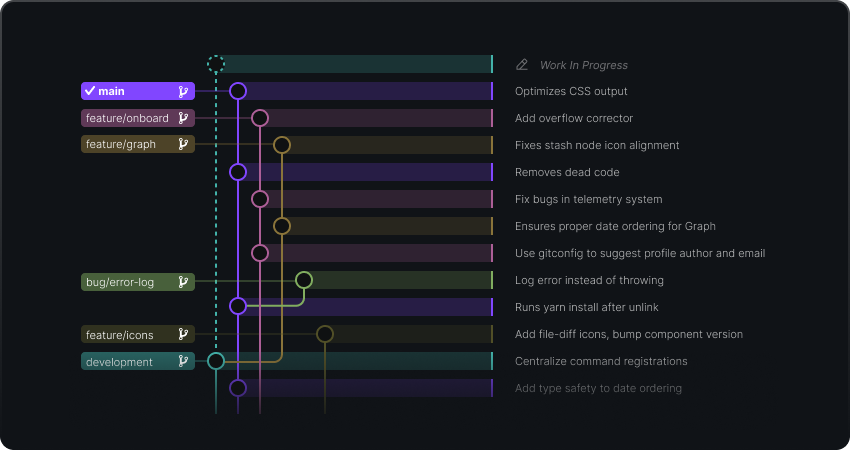
Hi, is there some explanation of what i actually see in the graph? it looks nice but i'm totally confused when looking at it. i would expect 'main' branch will be the straightest and other branches will depart and arrive at it later, but....i'm puzzled
which of these lines is the 'main' one? |

|
The purple dot that |

|
Hi, I'm trying to open my submodule but somehow the graph will just show the graph of the main repo and I'm not sure why~ Anyone faces this problem? |
|
Hi @lee1409, how are you opening up the commit graph for the submodule? I am using the |


|
Hi @jkelroy , sorry for the late reply. So I tried to mock a
So when I clicked
But when I clicked
git graph will show the log of
Is this expected? |


|
It looks like this is working as expected for me in the release version of GitLens but not in the pre-release. I wrote up an issue for that here. If you are currently using the pre-release, if you switch to the release version (Extensions > settings > Switch to Release Version), are you able to open the submodule commit graph as expected? |
|
hi @jkelroy , I tried to reinstall the stable version and it works now. Thanks. |

|
It would be nice to get the branch/tag as an inline pill if the column is hidden, like this: 
|


 and others
Uh oh!
There was an error while loading. Please reload this page.
Uh oh!
There was an error while loading. Please reload this page.
We're excited to introduce the Commit Graph, a new ✨GitLens+ feature that is currently available as a preview in our Insiders release! The Commit Graph helps you easily visualize branch structure and commit history. Not only does it help you verify your changes, but also easily see changes made by others and when. It is freely available for local and public repos, while a paid account is required for use on private repos.
New Commit Graph
The quickest way to get started is to click the Commit Graph icon from the Source Control toolbar:
We'd love to hear your feedback! 🙏
We're excited to bring this to you and ready to answer any questions and make improvements where needed.
All reactions