Building and Running
To avoid potential system-dependent behavior changes, you will want to use a cross-compiler. A cross-compiler is a compiler intended to run on one system, but compile code for a different one. In this case, your computer is the former system ("host"), and basekernel is the latter system ("target").
The following script will build a suitable cross-compiler
for Basekernel in the cross subdirectory:
./build-cross-compiler.sh
This may take a long time to run, so go get a cup of coffee. You only need to do this once before building basekernel.
Once the build is complete, add the cross compiler to your PATH:
export PATH="$PWD/cross/bin:$PATH"
And then build Basekernel itself:
cd src
make
Although less tested, it is possible to build basekernel on OSX. First install MacPorts and then use it to install a cross compiler:
port install i386-elf-gcc
port install i386-elf-binutils
And also the mkisofs tool, which substitutes for genisoimage:
port install cdrtools
export ISOGEN=mkisofs
Then build Basekernel as usual:
cd src
make
Once the build is complete, you should see a file basekernel.iso
which is a bootable CD-ROM image containing the boot program,
Basekernel itself, and a small number of sample programs.
You can browse the contents of this CD-ROM using any standard utility.
To execute the operating system, use a virtual machine technology like VMWare, VirtualBox, or QEMU, and direct it to use that image.
For example, if you are using QEMU, this command-line should do it:
qemu-system-i386 -cdrom basekernel.iso
You should see something like this:
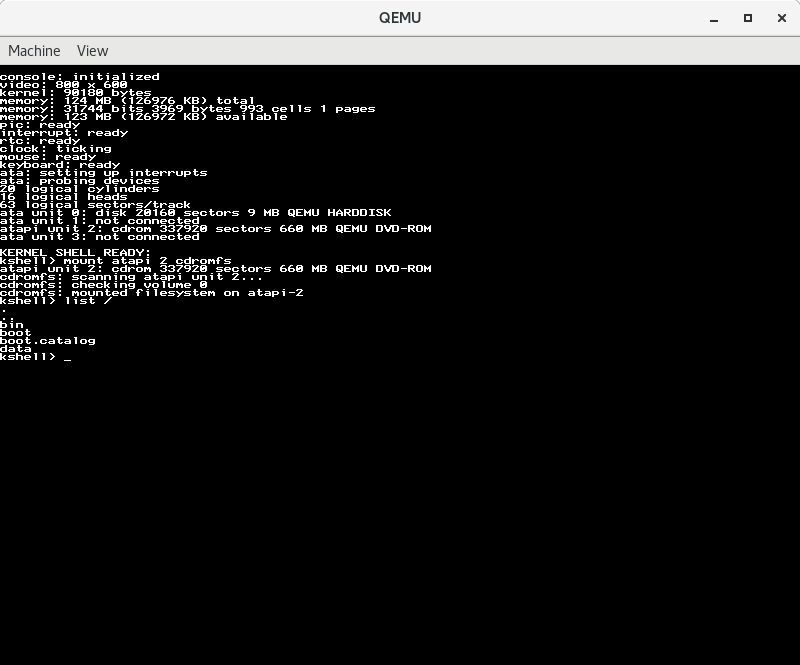
After some initial boot messages, you will see the kernel shell prompt. This allows you to take some simple actions before running the first user level program. For example, read the boot messages to see which ata unit the cdrom is mounted on. Then, use the mount command to mount the cdrom filesystem on that unit:
mount 2 cdrom
Use the list command to examine the root directory:
list
And use the run command to run a program:
run /SAVER.EXE
If you want to try it on a real machine, burn the CD-ROM image to a physical disc and reboot the machine. It may or may not work!
Basekernel compilation on linux has been tested with the following compilers:
| Compiler | Status |
|---|---|
| GCC 4.7 | ✔️ Works |
| GCC 5.4 | ✔️ Works |
| GCC 6.3 | ✔️ Works |
| GCC 7.1 | ✔️ Works |
Basekernel has been tested with the following VM hypervisors:
| VM Package | Status | Notes |
|---|---|---|
| qemu | ✔️ Works | No known issues |
| VirtualBox | Mouse does not work, struct copies fail | |
| VMware Player | ❌ Fails | No suitable video mode found at boot |