Problem Description
In Starling, I'm using Context3D.drawToBitmapData() to support drawing a display object into a BitmapData instance. When an object is bigger than the stage / the back buffer, I'm doing this in multiple steps. I'm drawing the object from several "tiles" to get all its contents, using the destPoint argument to get the positions right.
On macOS, this works just fine. However, on Windows and iOS, the output is sometimes jumbled. (I couldn't try this on Android yet). It's best shown in an image.
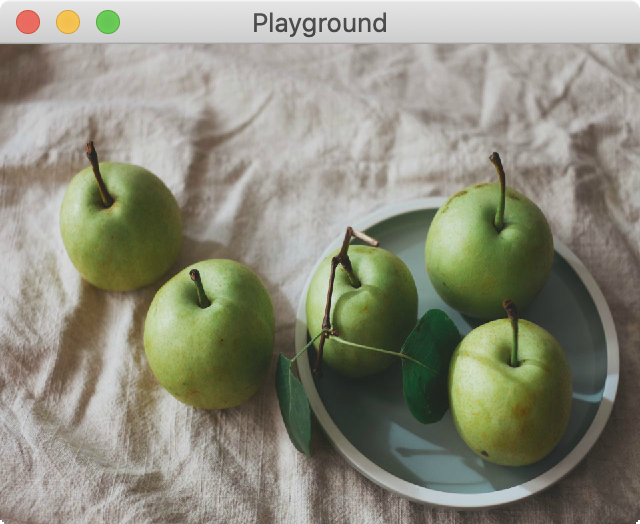
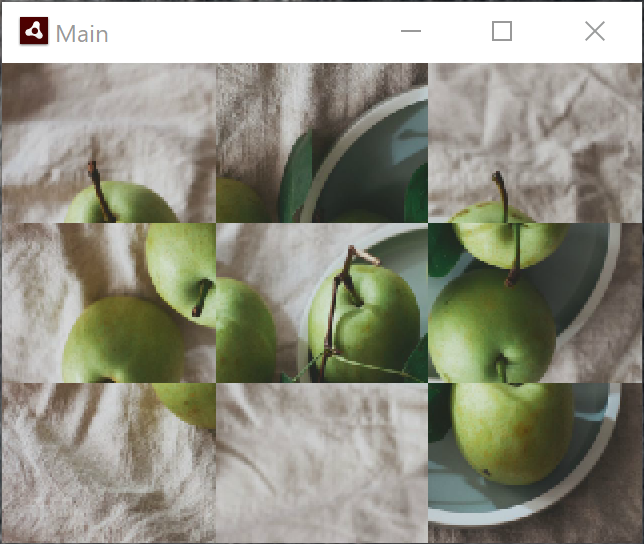
As you can see, the Windows output gets a few of the tiles right, but some are mixed up, others flipped.
- I used AIR SDK 33.1.1.190
- I tested this with Windows 10 version 1909.
- I received reports about this from several Starling users; it seems that all Windows users are affected.
- It happens both with DirectX 9 and 11.
- Interestingly, it also happens in render mode "software".
- It happens on iOS 13.6, too.
Steps to Reproduce
I created a minimal example that only uses pure Stage3D and the AGALMiniAssembler. Here's the code:
package
{
    import com.adobe.utils.AGALMiniAssembler;

    import flash.display.Bitmap;
    import flash.display.BitmapData;
    import flash.display.Sprite;
    import flash.display3D.Context3D;
    import flash.display3D.Context3DMipFilter;
    import flash.display3D.Context3DProfile;
    import flash.display3D.Context3DProgramType;
    import flash.display3D.Context3DTextureFilter;
    import flash.display3D.Context3DTextureFormat;
    import flash.display3D.Context3DVertexBufferFormat;
    import flash.display3D.Context3DWrapMode;
    import flash.display3D.IndexBuffer3D;
    import flash.display3D.Program3D;
    import flash.display3D.VertexBuffer3D;
    import flash.display3D.textures.RectangleTexture;
    import flash.display3D.textures.TextureBase;
    import flash.events.Event;
    import flash.geom.Matrix3D;
    import flash.geom.Point;
    import flash.geom.Rectangle;

    [SWF(width = "320", height = "240", backgroundColor = "#808080", frameRate = "30")]
    public class DrawToBitmapDataBug extends Sprite
    {
        [Embed(source = "apples.jpg")]
        private static const TextureBitmap:Class;

        private var _texture:TextureBase;
        private var _context3D:Context3D;
        private var _program:Program3D;
        private var _vertexBuffer:VertexBuffer3D;
        private var _indexBuffer:IndexBuffer3D;
        private var _frameIndex:int = 0;

        public function DrawToBitmapDataBug()
        {
            if (stage) onAddedToStage(null);
            else addEventListener(Event.ADDED_TO_STAGE, onAddedToStage);
        }

        private function onAddedToStage(e:Event):void
        {
            stage.stage3Ds[0].addEventListener(Event.CONTEXT3D_CREATE, initStage3D);
            stage.stage3Ds[0].requestContext3D("auto", Context3DProfile.BASELINE);

            addEventListener(Event.ENTER_FRAME, onRender);
        }

        private function initStage3D(e:Event):void
        {
            var stageWidth:int = stage.stageWidth;
            var stageHeight:int = stage.stageHeight;

            _context3D = stage.stage3Ds[0].context3D;
            _context3D.configureBackBuffer(stageWidth, stageHeight, 1, false);

            trace(_context3D.driverInfo);

            var vertices:Vector.<Number> = Vector.<Number>([
                -1.0,  1.0, 0, 0, 0, // x, y, z, u, v
                 1.0,  1.0, 0, 1, 0,
                -1.0, -1.0, 0, 0, 1,
                 1.0, -1.0, 0, 1, 1]);

            _vertexBuffer = _context3D.createVertexBuffer(4, 5);
            _vertexBuffer.uploadFromVector(vertices, 0, 4);

            var indices:Vector.<uint> = Vector.<uint>([0, 1, 2, 1, 3, 2]);

            _indexBuffer = _context3D.createIndexBuffer(6);
            _indexBuffer.uploadFromVector (indices, 0, 6);

            _texture = createBitmapTexture();

            var vertexShaderAssembler : AGALMiniAssembler = new AGALMiniAssembler();
            vertexShaderAssembler.assemble( Context3DProgramType.VERTEX,
                "m44 op, va0, vc0\n" + // pos to clipspace
                "mov v0, va1" // copy UV
            );

            var fragmentShaderAssembler : AGALMiniAssembler= new AGALMiniAssembler();
            fragmentShaderAssembler.assemble( Context3DProgramType.FRAGMENT,
                "tex ft1, v0, fs0 <2d>\n" +
                "mov oc, ft1"
            );

            _program = _context3D.createProgram();
            _program.upload( vertexShaderAssembler.agalcode, fragmentShaderAssembler.agalcode);
        }

        private function createBitmapTexture():TextureBase
        {
            var bitmap:Bitmap = new TextureBitmap();
            var texture:RectangleTexture = _context3D.createRectangleTexture(
                bitmap.bitmapData.width, bitmap.bitmapData.height,
                Context3DTextureFormat.BGRA, false);
            texture.uploadFromBitmapData(bitmap.bitmapData);
            return texture;
        }

        private function onRender(e:Event):void
        {
            if ( !_context3D )
                return;

            _frameIndex += 1;

            if (_frameIndex == 60) drawContextToBitmap();
            else renderAt();
        }

        private function renderAt(x:Number = 0, y:Number = 0, scale:Number=1.0, present:Boolean = true):void
        {
            _context3D.clear();
            _context3D.setVertexBufferAt (0, _vertexBuffer, 0, Context3DVertexBufferFormat.FLOAT_3);
            _context3D.setVertexBufferAt(1, _vertexBuffer, 3, Context3DVertexBufferFormat.FLOAT_2);
            _context3D.setTextureAt(0, _texture);
            _context3D.setProgram(_program);
            _context3D.setSamplerStateAt(0, Context3DWrapMode.CLAMP,
                Context3DTextureFilter.LINEAR, Context3DMipFilter.MIPNONE);

            var m:Matrix3D = new Matrix3D();
            m.appendScale(scale, scale, 1.0);
            m.appendTranslation(x, y, 0);

            _context3D.setProgramConstantsFromMatrix(Context3DProgramType.VERTEX, 0, m, true);
            _context3D.drawTriangles(_indexBuffer);

            if (present)
                _context3D.present();
        }

        private function drawContextToBitmap():void
        {
            trace("Drawing to bitmap ...");

            var stageWidth:int = stage.stageWidth;
            var stageHeight:int = stage.stageHeight;
            var bitmapWidth:int = stageWidth * 3;
            var bitmapHeight:int = stageHeight * 3;
            var bitmapData:BitmapData = new BitmapData(bitmapWidth, bitmapHeight);

            for (var x:int = 0; x < 3; ++x)
            {
                for (var y:int = 0; y < 3; ++y)
                {
                    var offsetX:Number = -2 * (x - 1);
                    var offsetY:Number =  2 * (y - 1);
                    renderAt(offsetX, offsetY, 3.0, false);
                    _context3D.drawToBitmapData(bitmapData,
                        new Rectangle(0, 0, stageWidth, stageHeight),
                        new Point(x * stageWidth, y * stageHeight));
                }
            }

            var bitmap:Bitmap = new Bitmap(bitmapData);
            bitmap.scaleX = bitmap.scaleY = 1.0 / 3.0;
            addChild(bitmap);
        }
    }
}
That's the texture used in the project (but you can use any other texture, too):

Run this as an AIR project on (say) macOS. It starts by rendering the texture via Stage3D. After 2 seconds, it renders to a BitmapData object and draws that on top of the stage. You don't see much of that, because it works correctly. ;-)
Now, try the same on Windows. The BitmapData object will look quite different.
What I'm doing here is draw a textured quad that's 3 times the size of the stage. Then I'm moving it around and use context3d.drawToBitmapData to assemble the full image inside a BitmapData object.
Known Workarounds
It sometimes helps to use copyPixels to get around the issue. Here's a pull request that shows such an attempt. However, forum reports say that this doesn't always help, either.

Problem Description
In Starling, I'm using Context3D.drawToBitmapData() to support drawing a display object into a BitmapData instance. When an object is bigger than the stage / the back buffer, I'm doing this in multiple steps. I'm drawing the object from several "tiles" to get all its contents, using the
destPointargument to get the positions right.On macOS, this works just fine. However, on Windows and iOS, the output is sometimes jumbled. (I couldn't try this on Android yet). It's best shown in an image.
As you can see, the Windows output gets a few of the tiles right, but some are mixed up, others flipped.
Steps to Reproduce
I created a minimal example that only uses pure Stage3D and the AGALMiniAssembler. Here's the code:
That's the texture used in the project (but you can use any other texture, too):
Run this as an AIR project on (say) macOS. It starts by rendering the texture via Stage3D. After 2 seconds, it renders to a BitmapData object and draws that on top of the stage. You don't see much of that, because it works correctly. ;-)
Now, try the same on Windows. The BitmapData object will look quite different.
What I'm doing here is draw a textured quad that's 3 times the size of the stage. Then I'm moving it around and use
context3d.drawToBitmapDatato assemble the full image inside a BitmapData object.Known Workarounds
It sometimes helps to use copyPixels to get around the issue. Here's a pull request that shows such an attempt. However, forum reports say that this doesn't always help, either.