本示例项目为云开发Agent项目示例,包括云函数部分。是文档 云开发 Agent 的一个示例项目。
本示例项目主要演示如何在本地开发环境中开发调试云开发 Agent,以及如何实现Agent 中的基础对话、联网搜索、知识库查询、文件查询等功能。
$ tree -L 3
.
├── Dockerfile                ## 编译镜像
├── README.md
├── bot-config.yaml           ## agent 配置
├── cloudbase-functions.json  ## 项目路由配置
├── package-lock.json
├── package.json
├── src
│   ├── bot.ts
│   ├── bot_config.ts
│   ├── bot_context.ts
│   ├── bot_info.ts
│   ├── chat_context.service.ts
│   ├── chat_history.service.ts
│   ├── chat_main.service.ts
│   ├── chat_recommend_questions.service.ts
│   ├── chat_tool.service.ts
│   ├── chat_wx.service.ts
│   ├── config.ts
│   ├── constant.ts
│   ├── conversation_relation.service.ts
│   ├── index.ts              ## 函数入口
│   ├── llm.ts
│   ├── mcp.ts
│   ├── tcb.ts
│   ├── utils.ts
│   └── wx_api.service.ts
└── tsconfig.json

2 directories, 25 files依赖说明
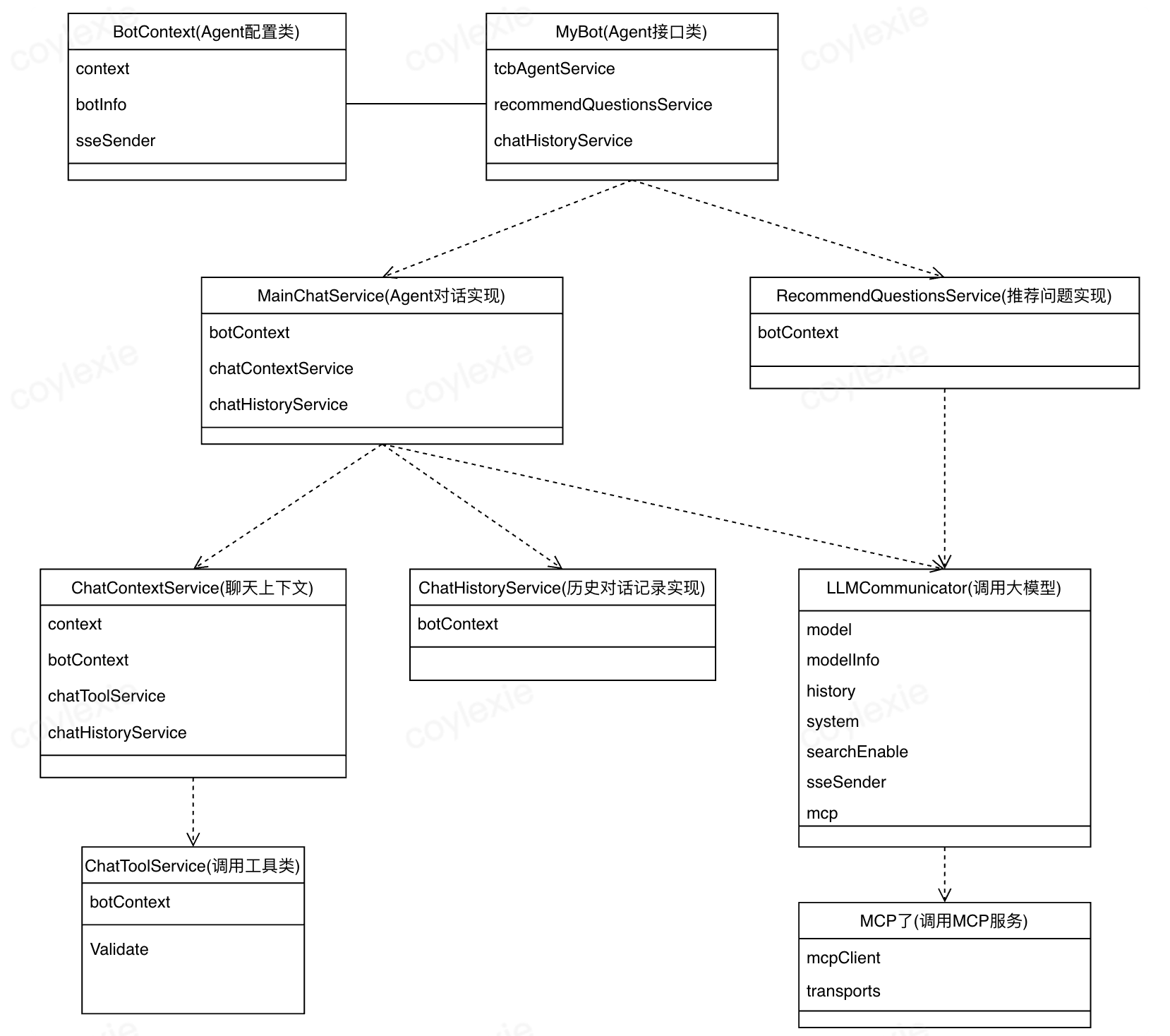
在 bot-config.yaml 文件中设置 agent 能力,其中 baseURL 字段可以参考一下内容
# 混元-exp
baseURL: https://{{envId}}.api.tcloudbasegateway.com/v1/ai/hunyuan-exp

# DeepSeek 模型
baseURL: https://{{envId}}.api.tcloudbasegateway.com/v1/ai/deepseek进入 agent 函数目录下安装依赖:
npm i编译 TypeScript 代码:
npx tsc -w启动 Agent 服务:
tcb cloudrun run -w --dotEnvFilePath=.env --enableCors=true --runMode agent -e {your-envId} --agentId {your-botId}参数说明:
your-envId:云开发环境 ID,可以在云开发控制台查看your-botId:Agent ID,可以在云开发控制台查看
服务启动后,会自动打开前端调试页面:http://127.0.0.1:3000/cloudrun-run-ui/index.html,可以直接在浏览器中进行调试。
curl 'http://127.0.0.1:3000/v1/aibot/bots/{your-botId}/send-message' \
  -H 'Accept: text/event-stream' \
  -H 'Content-Type: application/json' \
  --data-raw '{"msg":"你好","searchEnable":false,"files":[]}'
curl 'http://127.0.0.1:3000/v1/aibot/bots/{your-botId}/send-message' \
-H 'Accept: text/event-stream' \
-H 'Content-Type: application/json' \
--data-raw '{"msg":"最近天气怎么样?","searchEnable":true,"files":[]}'curl 'http://127.0.0.1:3000/v1/aibot/bots/{your-botId}/send-message' \
-H 'Accept: text/event-stream' \
-H 'Content-Type: application/json' \
--data-raw '{"msg":"最近天气怎么样?","searchEnable":true,"files":["cloud://xxxx.4321-xxxx-0000000000/path-to-file"]}'curl 'http://127.0.0.1:3000/v1/aibot/bots/{your-botId}/send-message' \
-H 'Accept: text/event-stream' \
-H 'Content-Type: application/json' \
--data-raw '{"msg":"概括下文件内容?","searchEnable":true,"files":["cloud://xxxx.4321-xxxx-0000000000/path-to-file"]}'curl 'http://127.0.0.1:3000/v1/aibot/bots/{your-botId}/send-message' \
-H 'Accept: text/event-stream' \
-H 'Content-Type: application/json' \
--data-raw '{"msg":"介绍一下云托管?","searchEnable":true,"files":["cloud://xxxx.4321-xxxx-0000000000/path-to-file"]}'curl 'http://127.0.0.1:3000/v1/aibot/bots/{your-botId}/send-message' \
-H 'Accept: text/event-stream' \
-H 'Content-Type: application/json' \
--data-raw '{"msg":"介绍一下云托管?","searchEnable":false}'curl 'http://127.0.0.1:3000/v1/aibot/bots/{your-botId}/send-message' \
-H 'Accept: text/event-stream' \
-H 'Content-Type: application/json' \
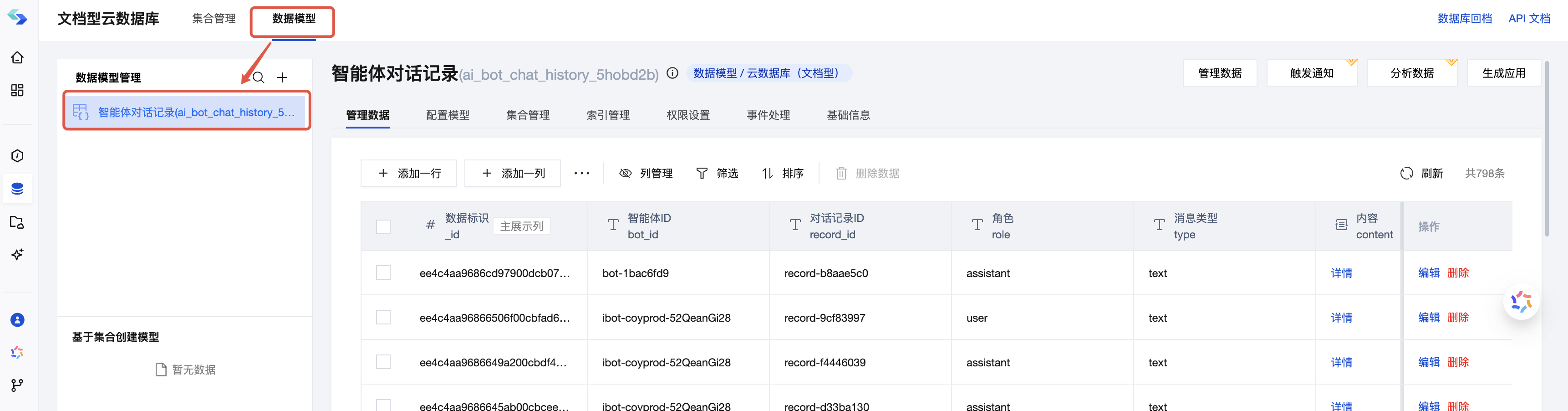
--data-raw '{"msg":"总结下最近 30 天的用户访问情况?","searchEnable":false}'Agent 对话记录统一保存在数据模型 ai_bot_chat_history_5hobd2b 中,可以通过 腾讯云CloudBase控制台 -> 数据库 -> 文档型 -> 数据模型 中查询历史对话记录
配置字段
searchEnable: true请求
curl 'http://127.0.0.1:3000/v1/aibot/bots/{your-botId}/send-message' \
--header 'Accept: text/event-stream' \
--header 'Content-Type: application/json' \
--header 'Authorization: Bearer <token>' \
--data '{
    "msg": "今日天气",
    "searchEnable": true
}'
返回数据
{
    "type": "search",
    "created": 1750038921037,
    "model": "hunyuan",
    "role": "assistant",
    "content": "",
    "search_info": {
        "search_results": [
            {
                "index": 1,
                "title": "今日广东仍有强降雨 16日至18日中东部地区高温发展增多--社会·法治--人民网",
                "url": "http://society.people.com.cn/n1/2025/0616/c1008-40501353.html"
            },
            {
                "index": 2,
                "title": "大风+暴雨双预警!多地将有强对流天气,河南还要再热两天 - 今日头条",
                "url": "https://www.toutiao.com/article/7516354773910667776/"
            }
        ]
    },
    "finish_reason": "continue"
}
{
    "type": "text",
    "created": 1750045094055,
    "role": "assistant",
    "content": "相关回答",
    "finish_reason": "continue",
}配置字段
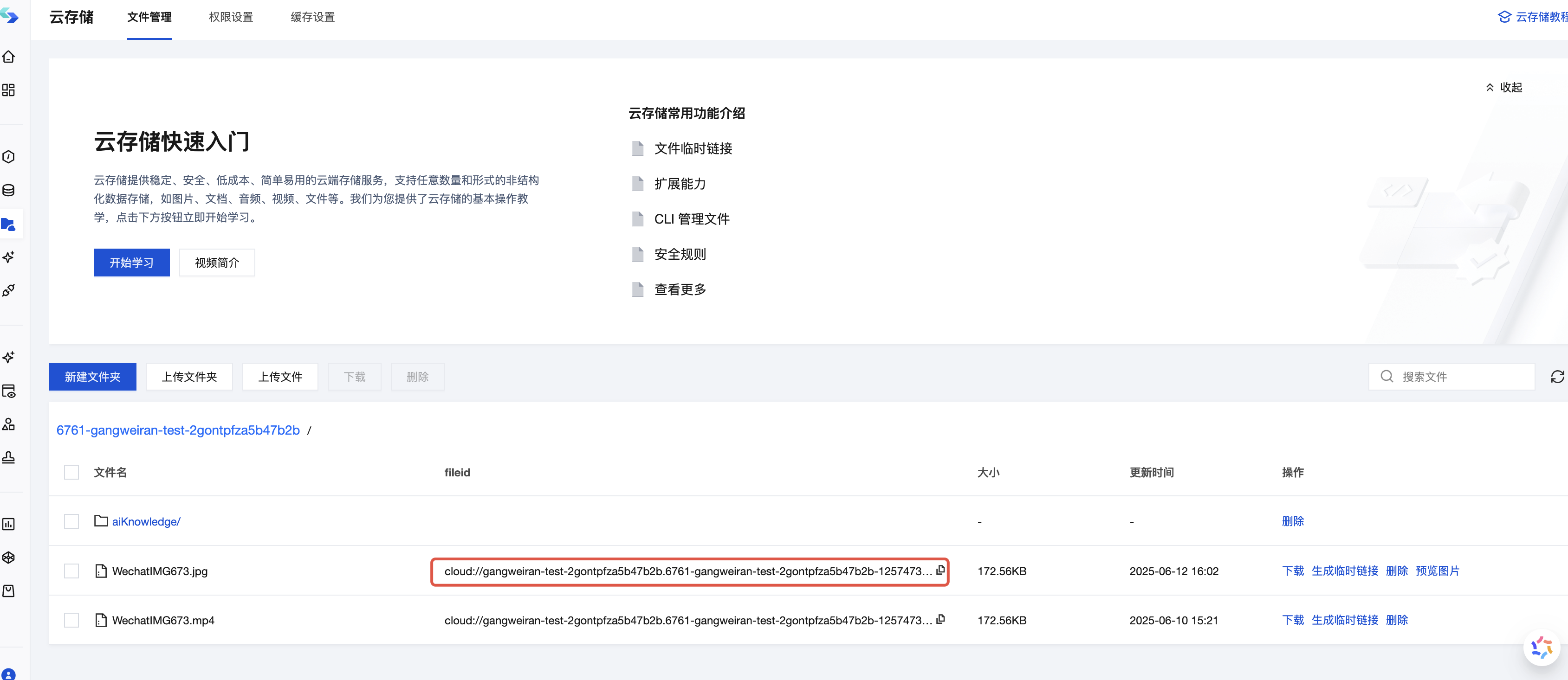
searchFileEnable: true文件url 获取方式
请求
curl 'http://127.0.0.1:3000/v1/aibot/bots/{your-botId}/send-message' \
--header 'Accept: text/event-stream' \
--header 'Content-Type: application/json' \
--header 'Authorization: Bearer <token>' \
--data '{
    "msg": "图片说了什么",
    "files":["cloud://url.xxx"]
}'
文件相关返回数据
{
    "type": "'search_file',",
    "created": 1750043592705,
    "model": "hunyuan",
    "role": "assistant",
    "content": "这张图片展示了一个卡通形象。",
    "finish_reason": "continue"
}
{
    "type": "text",
    "created": 1750045094055,
    "role": "assistant",
    "content": "相关回答",
    "finish_reason": "continue",
}配置字段
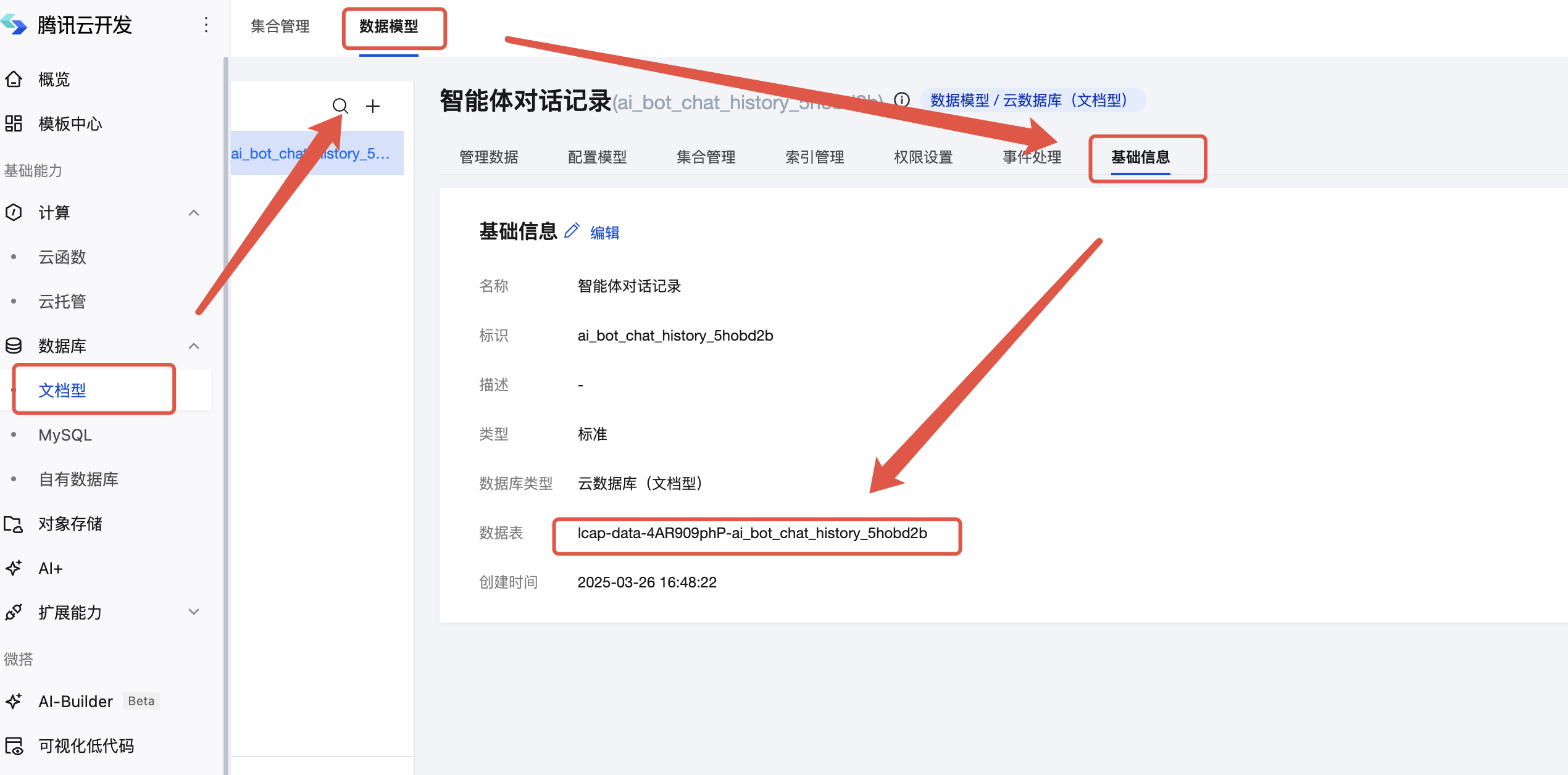
databaseModel:
  - "lcap-data-4xxxx"
数据库ID配置获取方式
请求
curl 'http://127.0.0.1:3000/v1/aibot/bots/{your-botId}/send-message' \
--header 'Accept: text/event-stream' \
--header 'Content-Type: application/json' \
--header 'Authorization: Bearer <token>' \
--data '{
    "msg": "表中有的多少条数据"
}'
返回数据
{
    "type": "db",
    "created": 1750045094055,
    "role": "assistant",
    "content": "",
    "finish_reason": "continue",
    "search_results": {
        "relateTables": 1
    }
}
{
    "type": "text",
    "created": 1750045094055,
    "role": "assistant",
    "content": "相关回答",
    "finish_reason": "continue",
}配置字段
knowledgeBase:
  - "知识库ID"
知识库ID配置获取方式
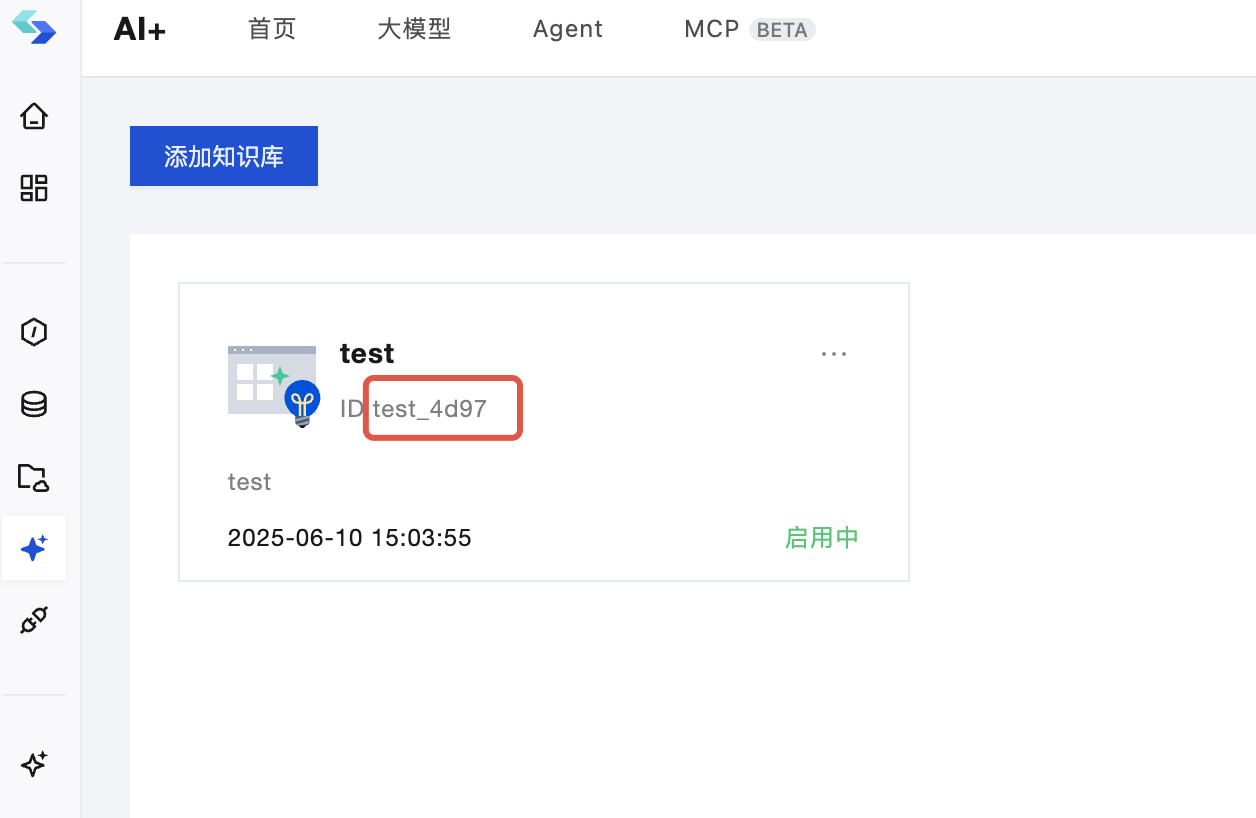
请求
curl 'http://127.0.0.1:3000/v1/aibot/bots/{your-botId}/send-message' \
--header 'Accept: text/event-stream' \
--header 'Content-Type: application/json' \
--header 'Authorization: Bearer <token>' \
--data '{
    "msg": "如何开发小程序"
}'
返回数据
{
    "type": "knowledge",
    "created": 1750043592705,
    "role": "assistant",
    "content": "",
    "finish_reason": "continue",
    "knowledge_base": [],
    "knowledge_meta": []
}
{
    "type": "text",
    "created": 1750045094055,
    "role": "assistant",
    "content": "相关回答",
    "finish_reason": "continue",
}配置字段
mcpServerList:
  - tools:
      - name: hunyuanText2Image
    url: https://gangweiran-test-2gontpfza5b47b2b.api.tcloudbasegateway.com/v1/cloudrun/yuanqi-tool-6c7hvi/messages
    name: yuanqi-tool-6c7hvi
创建MCP服务时,需要添加环境变量
SKIP_VERIFY_ACCESS: true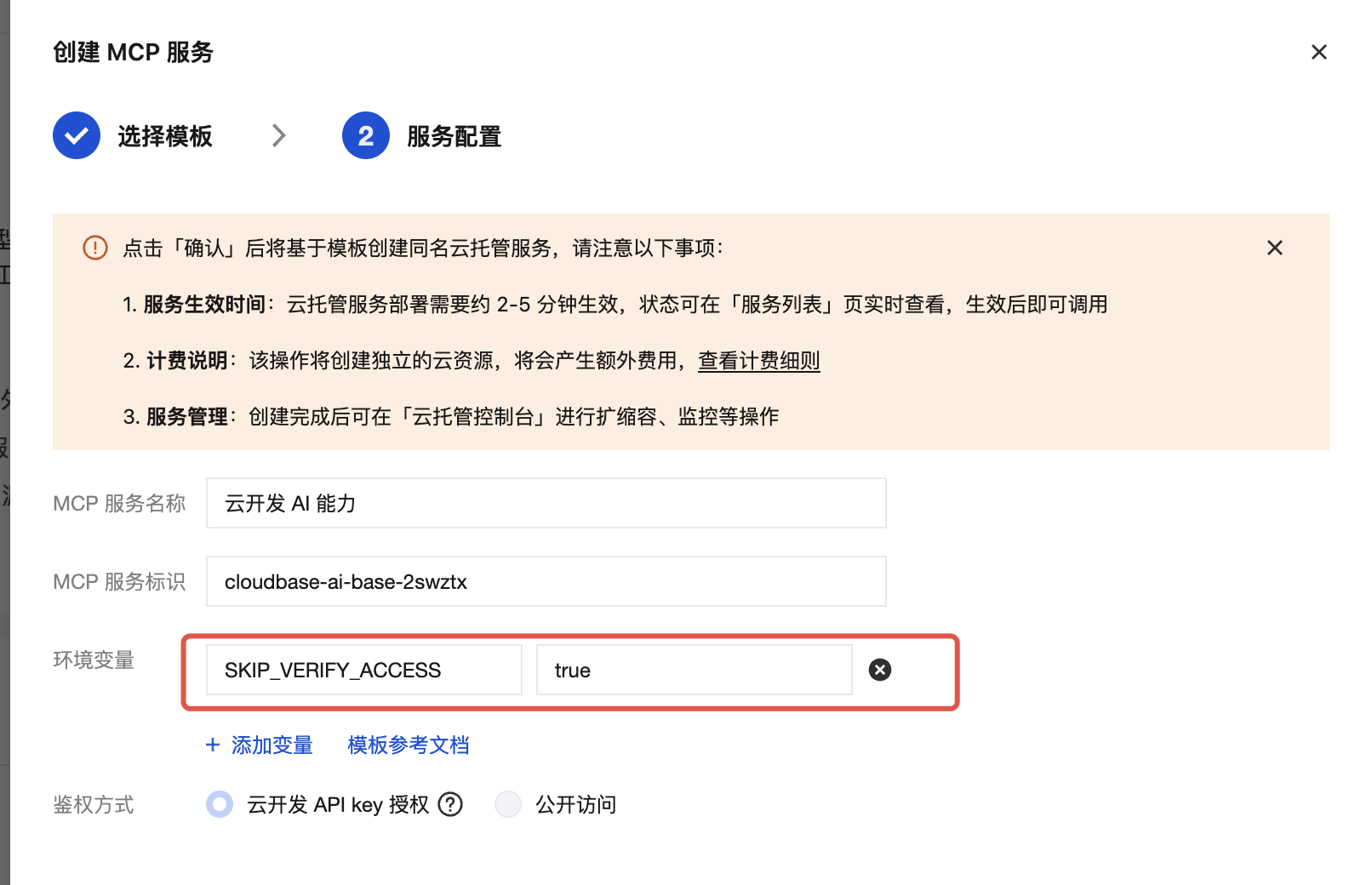
服务名配置获取方式
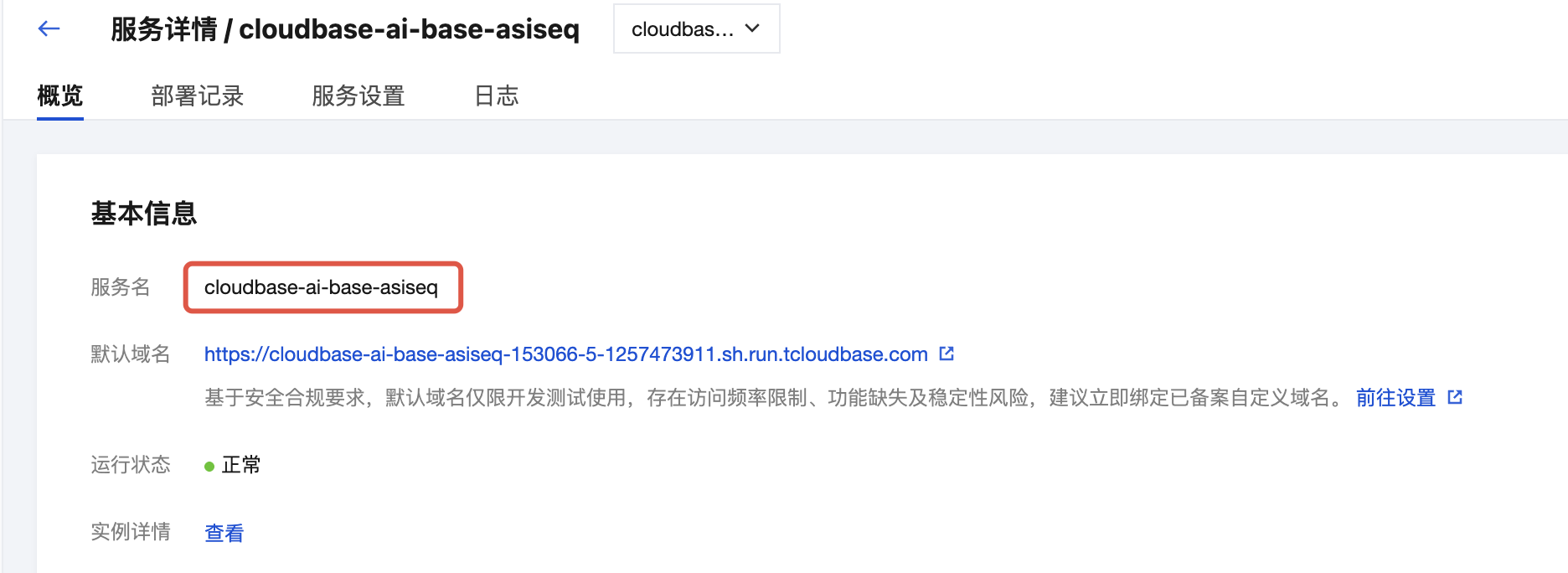
请求
curl 'http://127.0.0.1:3000/v1/aibot/bots/{your-botId}/send-message' \
--header 'Accept: text/event-stream' \
--header 'Content-Type: application/json' \
--header 'Authorization: Bearer <token>' \
--data '{
    "msg": "表中有的多少条数据"
}'
返回数据
{
    "type": "tool-call",
    "created": 1750055422647,
    "record_id": "record-xxx",
    "model": "hunyuan-lite",
    "content": "",
    "usage": {},
    "tool_call": {
        "index": 0,
        "id": "call_d17rjvk2c3m65plh0990",
        "type": "function",
        "function": {
            "name": "",
            "arguments": {}
        }
    }
}
{
    "type": "text",
    "created": 1750045094055,
    "role": "assistant",
    "content": "相关回答",
    "finish_reason": "continue",
}
配置字段
voiceSettings:
  ## 是否开启
  enable: false
  ## 语音输入引擎模型类型
  inputType: "16k_zh"
  ## 语音输出音色
  outputType: 501007
inputType 字段枚举可参考
语音输入引擎模型类型 中的 EngSerViceType 字段
outputType 字段枚举可参考
语音输出音色类型
multiConversationEnable: true ## 开启多会话模式