Fabulously Optimized changes some default options of Minecraft and the included mods to improve your gameplay.
Because the pack is using Config Manager, the options will only change if you do not have options.txt or mod-specific files in config folder already, e.g. by using a clean profile. That also means you can freely update the pack without losing your settings!
Changed mod settings can be found here.
Fabulously Optimized enables relevant mod-provided resource packs and bundles some resource packs for better experience.
- Mod Menu Helper (FO-exclusive) - explains what each mod does in a consistent and clear way on Mod Menu
- Chat Reporting Helper - explains chat reporting in a clear way by simplifying vanilla and No Chat Reports tooltips and No Chat Reports icons
- Translations for Sodium - adds unofficial translations for Sodium (video settings)
The resource packs use minimal resources, can be translated to your language and they will work with other resource packs.
| Option | Description | Vanilla | Modpack | Reason for Change |
|---|---|---|---|---|
darkMojangStudiosBackground |
Monochrome Logo: OFF | false |
true |
Black background is less intrusive than red, partial Bedrock Edition parity. |
operatorItemsTab |
Operator Items Tab: ON | false |
true |
Only appears in Creative inventory when you have the permission (/op) for it. |
resourcePacks |
List of enabled resourcepacks | [] |
(see ¹) | Enables mod-provided and modpack-exclusive resource packs by default. |
lang |
Game language | en_us |
(your language) | Enables user's system language by default, where supported, using Language Reload. |
telemetryOptInExtra |
Disables optional telemetry | false |
false |
Currently the default already, but may not always be the case, hence the enforcement. Debugify is used to disable telemetry entirely, so this is a fallback. |
¹ ["vanilla","file/SodiumTranslations.zip","file/Chat Reporting Helper.zip","file/Mod Menu Helper.zip","continuity:glass_pane_culling_fix","continuity:default"]
Most "quality & performance" video settings on the modpack are based on the vanilla preset "fast" for improved performance. User can change the preset by going to video settings, pressing Shift + P and adjusting the slider.
| Option | Description | Vanilla ("fancy") | Modpack ("fast") |
|---|---|---|---|
biomeBlendRadius |
Biome Blend: 3x3 (Fast) | 2 |
1 |
cloudRange |
Cloud Distance: 32 Chunks | 64 |
32 |
entityDistanceScaling |
Entity render distance: 75% | 1.0 |
0.75 |
entityShadows |
Entity shadows: OFF | true |
false |
mipmapLevels |
Mipmap levels: 2 | 4 |
2 |
particles |
Particles: Decreased | 0 |
1 |
prioritizeChunkUpdates |
Chunk Builder: Threaded | 1 |
0 |
renderClouds |
Clouds: Fast | "true" |
"fast" |
renderDistance |
Render Distance: 8 Chunks | 16 |
8 |
simulationDistance |
Simulation Distance: 6 Chunks | 12 |
6 |
textureFiltering |
Texture Filtering: None | 1 |
0 |
weatherRadius |
Weather Effect Radius: 5 blocks | 10 |
5 |
Exceptions - same category options that are not based on preset "fast":
| Option | Description | Vanilla ("fancy") | Preset "fast" | Modpack ("custom") | Reason for Change |
|---|---|---|---|---|---|
ao |
Smooth Lighting: ON | true |
false |
true |
Users preferred smooth lighting. |
cutoutLeaves |
See-Through Leaves: ON | true |
false |
true |
MoreCulling already provides significant improvements to leaf performance; users preferred improved visuals. |
graphicsPreset |
Vanilla graphics preset: Custom | "fancy" |
"fast" |
"custom" |
Due to the exceptions to "fast" above, game sets the preset to "custom". |
Other video settings:
| Option | Description | Vanilla | Modpack | Reason for Change |
|---|---|---|---|---|
guiScale |
GUI Scale: 3 | 0 |
3 |
3 is more usable on most screens; 0 (Auto) can get too large on Full HD and larger screens. |
Hidden options
| Option | Description | Vanilla | Modpack | Reason for Change |
|---|---|---|---|---|
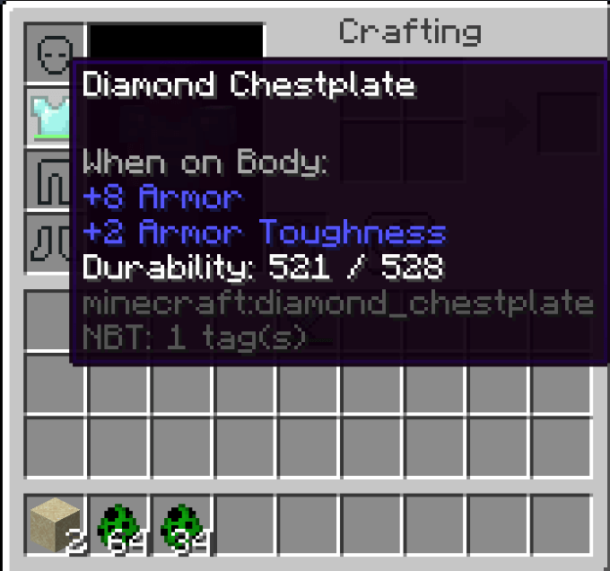
advancedItemTooltips |
Enables "Advanced" tooltip info on items | false |
true |
Shows item IDs, durability value, armor color, map scale, loaded firework type on item tooltips. |
incompatibleResourcePacks |
List of forcefully enabled outdated resource packs | [] |
(varies) | Mod-provided outdated resource packs that are known to be compatible. Values vary by version and are automatically changed by the game as needed. |
joinedFirstServer |
Hides hint toast for Social Interactions | false |
true |
It is already easily discoverable by the "Player Reporting" button on the pause screen. |
skipMultiplayerWarning |
Hides multiplayer disclaimer | false |
true |
Modpack users are already expected to know that the third party servers are not owned or monitored by Mojang Studios or Microsoft. |
tutorialStep |
Hides tutorial hint toasts | movement |
none |
Modpack users are already expected to know basic aspects of Minecraft. |
| Option | Default | Modpack | Reason for Change |
|---|---|---|---|
| Zoomify: Zoom | V | C | This key is often used for zoom |
| Zoomify: Secondary zoom | F6 | none | Not needed for most players |
| Iris: Reload Shaders | R | none | Not needed for most players |
| Iris: Shaderpack Selection Screen | O | none | Not needed for most players |
| Iris: Toggle Shaders | K | none | Not needed for most players |
| OptiGUI: Copy inspection to clipboard | F12 | none | Not needed for most players |
Vanilla F3 debug screen can display various pieces of information and is configured with F3+F6. As it is a debugging feature and the old look cannot be directly replicated anyway, FO has chosen to keep it as default for now, except for the following:
| Option | Description | Default | Modpack | Reason for Change |
|---|---|---|---|---|
| polytone:particle_hitboxes | Enables hitboxes on particles when enabling Show hitboxes (F3+B) | Always | OFF | Unexpected; users got confused |
Fabulously Optimized includes some mods that fix vanilla bugs. Similar to the mod inclusion policy, they must be meaningful to 70%+ users to get enabled (e.g. FPS drops, crashes, platform-specific annoyances...).
| Mojang bug | Description | Fixed by |
|---|---|---|
| MC-577 | Mouse buttons block all inventory controls that are not default | Debugify |
| MC-59810 | Cannot break blocks while sprinting (Ctrl+Click = right click on macOS) | Debugify |
| MC-81098 | Redstone dust updates cause lag (Singleplayer only) | Lithium |
| MC-89146 | Pistons forget update when being reloaded | Debugify |
| MC-90683 | "Received unknown passenger" - Entities with differing render distances as passengers outputs error | Debugify |
| MC-122477 | Linux/GNU: Opening chat sometimes writes 't' | Debugify |
| MC-132488 | Ticking animated textures is very inefficient | Sodium |
| MC-154966 | Hunger and experience bar invisible on horses and all other animal mounts | Better Mount Hud |
| MC-165595 | Guardian beam does not render when over a certain "Time" in level.dat | Sodium Extra |
| MC-227302 | Smooth lighting doesn't work properly on the water surface | Sodium |
| MC-228976 | Entity collision is run on render thread | Lithium |
| MC-237493 | Telemetry cannot be disabled | Debugify |
| MC-259512 | Horizontal camera rotation lags when riding | Debugify |
| MC-263865 | Fullscreen state isn't saved | Debugify |
If you'd like to enable more bugfixes for your game, see the fixed bug list for Debugify.
Telemetry Data Collection, previously known as Snooper, refers to Minecraft's and potentially mods', launchers' methods of collecting analytics about the user, usually in a limited form to preserve privacy. Minecraft's telemetry options are detailed here.
While telemetry is not always bad, as it may help developers better support their content for users' devices (e.g. to see where performance can be improved) it can be unwanted and unexpected for privacy concerns.
As of 1.20.2, Minecraft does not have an option to fully disable telemetry, so in this modpack such option is added by Debugify. The reason for disabling vanilla telemetry is that
- it collects too much data even in minimal configuration (e.g. user's Xbox ID)
- it skews Mojang's data due to being modded - Mojang may see that users using the modpack have good performance, but it does not actually reflect the original game
The modpack's stance is to disable all forms of telemetry by default, letting users to choose to opt-in to it manually when wanted. The modpack cannot disable any telemetry collected by game launcher or operating system.
Want to get a bug fixed in Fabulously Optimized? Here's what you'll need to do:
- Find the actual bug in Mojang's bug tracker
- Request it or look at its status on Debugify's bug tracker
- Once implemented (or confirmed to be) in Debugify, request an option change in FO
- Describe the bug, mention the mod that fixes it and why it is important to 70-80% of users
- If accepted, expect the fix to be enabled in the next version of FO :)
The modpack is already configured for the best performance and simplest experience for most users.
If you want to configure something, you'll most likely find it on Options... → Video Settings.... If you have a powerful computer or monitor, you may want to disable Vsync there.
For other things like dynamic lights, shaders and zoom:
- Click
Mods - Read the descriptions of the mods to see what they do
- If
🛠️or✏️is blue, you can configure the mod by clicking the config button- If you don't see the
🛠️or✏️emoji, you don't have the Mod Menu Helper resource pack enabled for some reason. ClickDone→Options...→Resource Packs...→⏵on "Mod Menu Helper.zip" →Done→ go to point 1 of this tutorial
- If you don't see the


If you need to disable a mod, see this wiki page.
If you have more questions about the mods, chat with us on Discord!